Cloud backup for manufacturing data is defined as the automated, offsite replication of production-critical systems to enable rapid, sequenced restoration after any disruption. The industry term is “cloud-based data protection,” and it covers far more than simple file storage. The role of cloud backup for manufacturing data extends to restoring interconnected IT and operational technology (OT) systems in the right order, at the right speed, to keep production running. Cyberattacks cause only 5% of manufacturing outages. The real threat is everyday operational failure, and most plants are not ready for it.
Cloud backup is the difference between a two-hour delay and a two-day shutdown. The importance of cloud backup goes well beyond ransomware defence. Operational failures, including network errors, configuration loss, and hardware faults, cause the vast majority of manufacturing downtime. The financial stakes are severe.
Average hourly downtime costs reach $100,000 for manufacturers, and three-quarters of plants report recovery times exceeding two hours, pushing total incident costs past $274,000.
That figure reframes the conversation. Backup is not an IT insurance policy. It is a production cost control measure. Every hour your MES, ERP, or SCADA system stays offline, you are losing revenue, missing shipments, and eroding customer trust.
Recovery speed is now a board-level concern. Operational disruption recovery speed ranks as a top-three strategic priority for mid-sized manufacturers in 2026. That ranking reflects a shift in how manufacturing leaders think about risk. Prevention matters, but the ability to recover fast matters more. Cloud data storage for manufacturing gives you the offsite durability you need, but only a tested recovery plan converts that storage into actual uptime.
Pro Tip: Track your actual recovery time from your last real incident, not your theoretical recovery time objective (RTO). The gap between those two numbers is your true risk exposure.
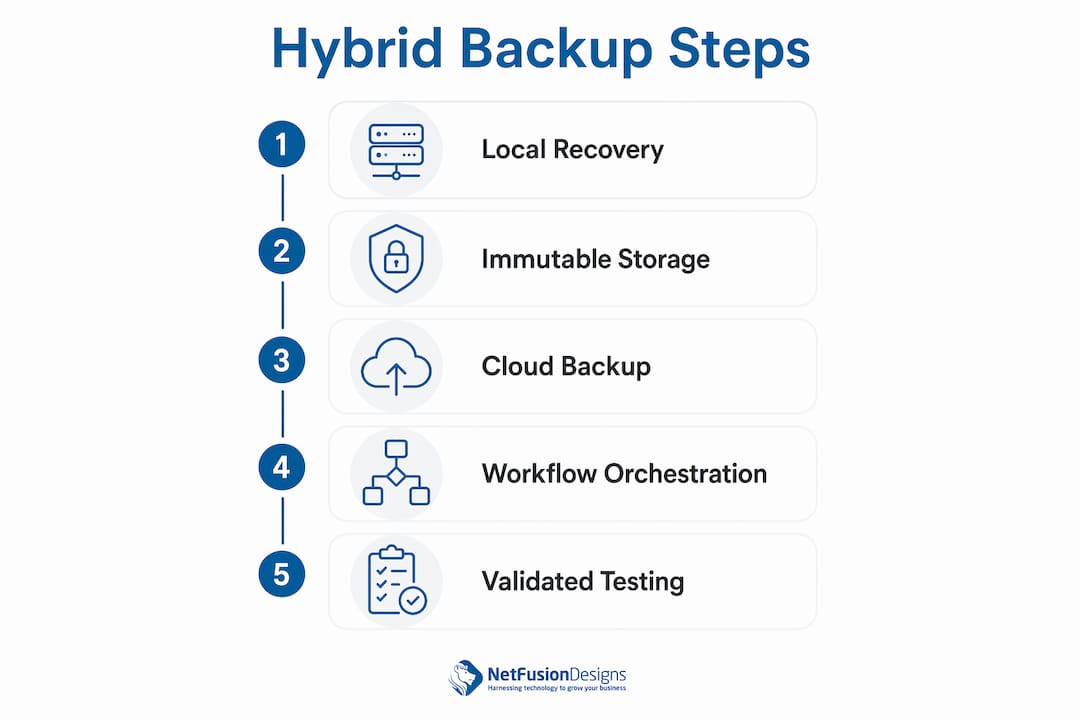
Cloud backup alone cannot meet the recovery demands of a factory floor. Cloud backup alone may fail due to OT latency and air-gapped systems. A hybrid model, combining a local recovery appliance with cloud storage, solves this directly.

The local appliance handles near-instant restoration for critical plant systems such as PLCs, HMIs, and MES servers. The cloud layer provides immutable, geographically replicated copies that survive ransomware, fire, or facility-level failure. Together, they give you speed and durability that neither approach delivers alone.
Immutable backups are a non-negotiable element of any modern architecture. Immutable storage means backup files cannot be altered or deleted, even by an attacker who gains administrative access. Regional replication adds a second layer of protection by storing copies in a separate data centre, so a single regional outage cannot eliminate your recovery options.
| Recovery layer | Primary strength | Best use case |
|---|---|---|
| Local recovery appliance | Near-instant restoration | Critical OT systems, PLCs, MES |
| Cloud immutable storage | Ransomware-proof durability | Full system images, compliance archives |
| Regional cloud replication | Geographic redundancy | Facility-level disaster recovery |
Workflow orchestration is the part most manufacturers overlook. Restoring systems out of sequence can prolong downtime instead of reducing it. Your ERP cannot function before your database server is online. Your MES cannot connect before your network infrastructure is restored. Dependency mapping documents these relationships so your recovery team follows a tested sequence, not guesswork.
Pro Tip: Build a visual dependency map of your top five production systems before your next recovery drill. You will likely find at least one sequencing assumption that is wrong.
Most manufacturers have invested in backup tools. Far fewer have invested in recovery readiness. 75% of manufacturers use hybrid backup combining cloud and on-premises storage, but only 18% reliably meet their recovery time objectives. That gap is the real problem.
The barriers are consistent across the industry:
Addressing these barriers requires more than purchasing a cloud backup solution for your factory. It requires governance, clear ownership, and a tested plan.
Effective cloud backup in manufacturing follows a structured approach. Effective manufacturing recovery requires mapping system dependencies and restoring in a tested sequence across IT and OT systems. The following practices build that capability.
Classify workloads by business impact and data change rate. Not every system needs the same backup frequency or recovery priority. Your MES and ERP are Tier 1. Your HR system is Tier 3. Assign recovery time objectives and recovery point objectives (RPOs) to each tier before you configure a single backup job.
Build predefined recovery playbooks aligned to production priorities. A playbook documents who does what, in what order, using which tools, when a specific disruption occurs. Write separate playbooks for ransomware, hardware failure, and network outage. Each scenario has a different recovery sequence.
Run realistic recovery exercises, not just backup verification checks. Validated recovery testing under realistic scenarios reveals gaps that simple backup success metrics miss. Simulate a full MES failure on a test environment. Time the recovery. Identify what broke. Fix it before a real incident forces the issue.
Apply the Minimum Viable Factory recovery concept. Minimum Viable Factory recovery focuses on restoring the essential systems needed to restart production safely, not rebuilding the full infrastructure first. Identify the minimum set of systems required to ship one order. Recover those first. Expand from there.
Establish continuous improvement cycles. Every recovery drill produces findings. Assign owners to each finding and set a deadline for resolution. Review your dependency maps and playbooks quarterly. Manufacturing environments change, and your recovery plan must change with them.
Unify IT and OT recovery governance. Appoint a single recovery owner who has authority over both IT and OT teams during an incident. This person does not need to be technical. They need to be empowered to make decisions and enforce the playbook sequence.
Manufacturing leaders must prioritise resilience through speed of coordinated recovery response, not just cyber prevention. Decision velocity, meaning how fast your team acts on predefined triggers, determines how long a disruption lasts.
Cloud backup for manufacturing data is only as valuable as the recovery plan behind it. Speed, sequence, and validated testing determine whether your backup investment actually protects production.
| Point | Details |
|---|---|
| Operational failures drive most downtime | Cyberattacks cause only 5% of outages; everyday failures are the primary threat. |
| Hybrid architecture is the standard | Combine local recovery appliances with immutable cloud storage to meet OT recovery demands. |
| Most manufacturers fail their own RTOs | Only 18% reliably meet recovery time objectives despite widespread backup investment. |
| Sequencing determines recovery speed | Restoring systems out of order prolongs downtime; dependency maps and playbooks prevent this. |
| Testing reveals real readiness | Realistic recovery drills expose gaps that backup job success metrics never show. |
Manufacturing leaders often tell me their backup is “handled.” When I ask when they last tested a full recovery, the room goes quiet. That silence is the real risk.
Backup has been categorised as an IT checkbox for too long. The data is clear: backup is an operational discipline requiring leadership understanding that goes beyond cybersecurity prevention. Operational failures, not hackers, are shutting down production lines. Your backup strategy needs to reflect that reality.
The manufacturers I have seen handle disruptions well share one trait. They treat recovery as a production process, not an IT project. They have playbooks. They have tested them. They know which systems come back first and who makes that call. That level of preparation does not happen by accident. It requires leadership commitment and a partner who understands both the IT and OT sides of a factory.
The shift from “we have backups” to “we can recover in under two hours” is not a technology purchase. It is a governance decision. If you have not made that decision yet, the real cost of downtime will eventually make it for you.
— Geeshan
Manufacturing firms across Ontario trust NetFusion Designs Inc to design, manage, and validate cloud backup architectures that meet real production demands.

NetFusion Designs Inc builds hybrid backup environments that address both IT and OT recovery requirements, including dependency mapping, immutable cloud storage, and recovery playbook development. Teams in Mississauga, Kitchener, Waterloo, and Toronto provide on-site and remote support when it matters most. Whether you need managed IT in Kitchener and Waterloo or emergency IT support after an incident, NetFusion Designs Inc brings the governance and technical depth your production environment requires. Explore how our cloud backup and disaster recovery services protect manufacturing operations across Canada.
Cloud backup for manufacturing data provides offsite, durable copies of critical production systems and enables rapid, sequenced restoration after operational failures, ransomware, or hardware faults. Its primary role is protecting production continuity, not just preserving files.
Only 18% of manufacturers reliably meet their RTOs despite widespread backup investment. The main causes are legacy infrastructure, lack of validated recovery testing, and fragmented ownership between IT and OT teams.
A hybrid cloud backup architecture combines a local recovery appliance for near-instant OT system restoration with immutable cloud storage for offsite durability and ransomware protection. This model addresses the latency and air-gap limitations that make cloud-only backup insufficient for factory environments.
Minimum Viable Factory recovery is a prioritisation framework that identifies the smallest set of systems needed to safely restart production. It focuses recovery efforts on operational impact rather than full infrastructure rebuild, reducing the time to first output after a disruption.
Manufacturers should run realistic recovery exercises at least quarterly, simulating scenarios such as MES failure, ransomware, or network outage. Backup job success metrics alone do not confirm that restored systems will actually support production operations.
%20(1).avif)
%201.avif)