On-site IT support is defined as the deployment of IT technicians physically to your business location to resolve hardware, network, and infrastructure problems that remote tools cannot fix. The role of on-site IT support explained simply is this: some IT problems require hands in the room, not hands on a keyboard across town. Standard service agreements typically promise same or next business day on-site response for critical outages. NetFusion Designs Inc delivers this model across Ontario, with local technicians in Kitchener-Waterloo, Mississauga, Toronto, and beyond. Understanding when and how to use on-site support is one of the most practical decisions a small or mid-sized business owner can make.
On-site IT support handles the physical layer of your technology. Hardware repairs, network cabling, and physical security systems all require a technician to be present. No remote session can replace a failed hard drive, re-terminate a network cable, or verify that a server room door lock is functioning correctly.
The specific tasks that require physical presence include:
Remote support tools like remote desktop software and monitoring platforms are excellent for software issues, configuration changes, and helpdesk tickets. They cannot physically seat a RAM module, trace a faulty cable run, or confirm that a firewall appliance is properly racked. On-site engagements range from two-hour emergency repairs to multi-day infrastructure projects, depending on the scope of the problem.
Pro Tip: Before your next office move or hardware refresh, ask your IT provider to conduct a physical site survey. A two-hour visit can prevent weeks of post-move connectivity problems.

Remote and on-site IT support are not competitors. They serve different but complementary roles. Remote support excels at speed and scalability, while on-site support excels at hands-on troubleshooting and physical infrastructure work. Treating them as an either/or choice is the most common mistake business owners make.
Here is how the two models differ across key dimensions:
| Dimension | Remote IT support | On-site IT support |
|---|---|---|
| Response speed | Minutes to hours | Same or next business day |
| Best use case | Software, config, helpdesk | Hardware, cabling, compliance |
| Cost per incident | Lower | Higher due to travel time |
| Scalability | High | Limited by technician availability |
| Physical access | Not possible | Full access |
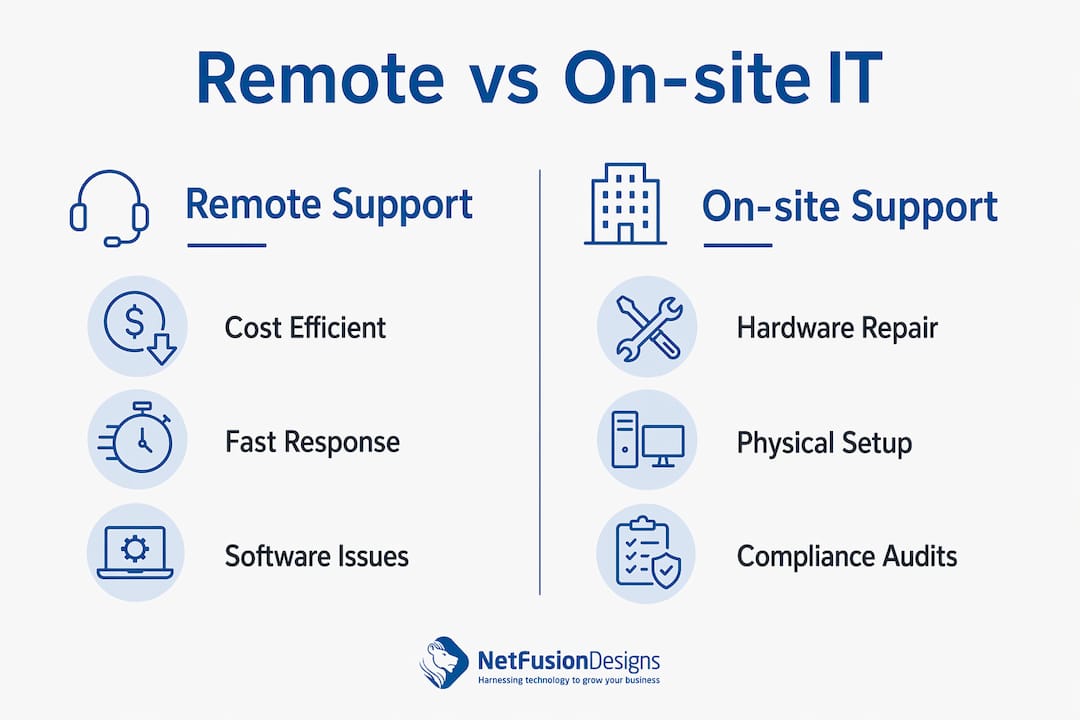
Remote-focused IT plans cost 20–40% less than on-site heavy models, primarily because travel time is eliminated and ticket handling is more efficient. That cost gap is real, but it does not mean remote support alone is sufficient.
The most effective model for most SMBs is a hybrid 80/20 split: roughly 80% of issues handled remotely, with 20% escalated to on-site visits. This ratio balances cost with the reality that physical problems do occur. A well-structured managed IT agreement builds this split into the contract from the start.
Pro Tip: Ask any IT provider you are evaluating to show you their escalation policy in writing. If they cannot define when a remote ticket becomes an on-site visit, that gap will cost you money and downtime later.
On-site IT support delivers measurable improvements to uptime, security, and compliance. These are not abstract benefits. They show up in fewer hours of lost productivity and fewer audit findings.
The core operational and security advantages include:
For businesses in regulated industries, the importance of on-site IT support goes beyond convenience. Physical audits are a compliance requirement, not an option. Providers like NetFusion Designs Inc include compliance-aware on-site visits as part of their managed IT services offering, which means your physical and digital environments are assessed together.
Getting the contract structure right prevents unexpected costs and ensures you receive the right level of support. Most SMBs overpay or underpay for on-site support because they have not mapped their physical IT environment before signing an agreement.
Follow these steps to structure your on-site support correctly:
When evaluating providers, proximity matters. Local IT providers with technicians near your business offer faster on-site response than providers operating from a distant city. A provider based two hours away cannot realistically promise a same-day response for a critical outage.
For businesses with legal or regulatory questions about their IT contracts and obligations, legal guidance on tech agreements can clarify what your service level commitments actually require.
Pro Tip: Negotiate a block of banked on-site hours into your managed IT agreement rather than paying per-visit rates. Banked hours are almost always cheaper per hour and give you predictable budgeting.
The question of outsourcing versus internal IT staff also shapes your on-site support structure. Internal staff provide constant physical presence but come with salary, benefits, and training costs. Most SMBs benefit from the predictable costs and broader expertise that a managed service provider delivers, with on-site visits dispatched as needed rather than staffed full-time.
On-site IT support is not a luxury for SMBs. It is the physical layer of a complete IT strategy, and without it, hardware failures, compliance gaps, and security risks go unresolved.
| Point | Details |
|---|---|
| Physical problems need physical presence | Hardware failures, cabling, and compliance inspections cannot be resolved remotely. |
| Hybrid 80/20 model is the standard | Roughly 80% of issues resolve remotely; 20% require an on-site technician. |
| Map your hardware before signing a contract | Accurate hardware inventories prevent poorly structured agreements and surprise costs. |
| Local technicians respond faster | Proximity directly shortens on-site response times for critical outages. |
| Clarify on-site hour allocation upfront | Most contracts bill on-site visits separately; negotiate banked hours for predictable costs. |
The most common mistake I see is business owners treating on-site IT support as a backup plan rather than a planned component of their IT strategy. They sign a remote-only managed IT agreement, assume it covers everything, and then face a surprise invoice the first time a technician needs to drive out to replace a failed switch.
The second mistake is choosing a provider based on price without checking where their technicians are actually located. A provider with no local presence cannot deliver a same-day response, regardless of what their contract says. I have seen businesses in Kitchener wait two days for a technician from a provider based in another province. That is not a support model. That is a liability.
What actually works is a clearly documented hybrid model where remote triage happens first, escalation triggers are defined in writing, and on-site hours are banked into the agreement. The businesses I have seen get the most value from their IT support are the ones who treat the on-site component as a scheduled, budgeted resource rather than an emergency-only expense. They use on-site visits proactively, for quarterly hardware audits, compliance checks, and staff training, not just when something breaks.
If you are evaluating providers, ask them to walk you through their last three on-site escalations. How fast did they respond? What did they find that remote tools missed? The answers will tell you more than any service level agreement.
— Geeshan
NetFusion Designs Inc provides on-site IT support with local technicians across Kitchener-Waterloo, Mississauga, Toronto, and other Ontario markets. Every managed IT plan includes defined escalation paths, banked on-site hours, and guaranteed response times for critical issues.

For businesses that cannot afford extended downtime, NetFusion Designs Inc offers emergency IT dispatch with rapid on-site response for hardware failures, network outages, and security incidents. Businesses in Mississauga can access local IT services tailored to their physical and operational environment. NetFusion Designs Inc is SOC 2 Type 2 attested, which means your data and physical IT environment are managed to a verified security standard.
On-site IT support is the deployment of IT technicians to your physical business location to resolve hardware, network, and infrastructure problems that cannot be fixed remotely. It covers tasks like server repairs, network cabling, and compliance inspections.
On-site support is necessary when hardware fails, network infrastructure needs physical work, or compliance regulations require physical inspections. Hardware failures, network cabling, and physical security systems all require a technician to be present.
Standard service agreements promise same or next business day on-site response for critical outages, with premium options available for faster attendance at mission-critical sites.
Remote-focused plans cost 20–40% less than on-site heavy models. The most cost-effective approach for most SMBs is a hybrid model that uses remote support for the majority of issues and reserves on-site visits for physical problems.
Most SMBs need both. Remote-first triage with defined on-site escalation triggers is the recommended approach, combining the speed of remote support with the physical capability of on-site technicians.
%20(1).avif)
%201.avif)