{
"@type": "Article",
"image": {
"url": "https://csuxjmfbwmkxiegfpljm.supabase.co/storage/v1/object/public/blog-images/organization-38409/1782644788364_Decorative-flat-vector-illustration-clouds-and-secure-data.jpeg",
"@type": "ImageObject",
"caption": "Decorative flat-vector illustration clouds and secure data"
},
"author": {
"url": "https://nfd.ca",
"name": "NetFusion Designs Inc",
"@type": "Organization"
},
"@context": "https://schema.org",
"headline": "Cloud backup for accounting firms: a 2026 guide",
"publisher": {
"url": "https://nfd.ca",
"name": "NetFusion Designs Inc",
"@type": "Organization"
},
"inLanguage": "en-US",
"description": "Discover the essential role of cloud backup for accounting firms in 2026. Learn how it enhances data security, compliance, and recovery speed.",
"datePublished": "2026-06-28T11:11:20.848Z"
}
{
"@type": "FAQPage",
"@context": "https://schema.org",
"mainEntity": [
{
"name": "What is cloud backup for accounting firms?",
"@type": "Question",
"acceptedAnswer": {
"text": "Cloud backup for accounting firms is the automated, encrypted replication of financial data to offsite servers, enabling rapid recovery after data loss, ransomware, or hardware failure. It differs from cloud storage in that it captures full application environments and maintains versioned, restorable copies.",
"@type": "Answer"
}
},
{
"name": "Is cloud backup required by law for accounting firms in Canada?",
"@type": "Question",
"acceptedAnswer": {
"text": "Canadian accounting firms handling U.S. clients or subject to FTC Safeguards Rule jurisdiction must maintain encrypted, documented backups under a formal WISP. Canadian firms operating domestically should also follow PIPEDA guidelines, which require reasonable safeguards for personal financial data.",
"@type": "Answer"
}
},
{
"name": "How often should accounting firms test their backups?",
"@type": "Question",
"acceptedAnswer": {
"text": "Accounting firms should run documented restore tests at minimum monthly, with daily automated job monitoring. Audit compliance requires logs of successful test restores as proof that the backup system functions as intended.",
"@type": "Answer"
}
},
{
"name": "What is the difference between cloud backup and cloud storage?",
"@type": "Question",
"acceptedAnswer": {
"text": "Cloud storage, such as Microsoft OneDrive or SharePoint, retains current files but does not provide versioned, application-aware recovery. Cloud backup captures full environment states at scheduled intervals and allows firms to restore to a specific point in time after an incident.",
"@type": "Answer"
}
},
{
"name": "What is an immutable backup and why do accounting firms need one?",
"@type": "Question",
"acceptedAnswer": {
"text": "An immutable backup is a copy that cannot be modified or deleted, even by an administrator. Immutable backups guard against ransomware and account compromise by preserving a clean recovery point that attackers cannot reach or destroy.",
"@type": "Answer"
}
}
]
}
Cloud backup is defined as the automated, offsite replication of data to secure remote servers, and for accounting firms it is the primary defence against data loss, ransomware, and regulatory penalties. The role of cloud backup for accounting firms goes well beyond simple file storage. It covers compliance with the FTC Safeguards Rule and IRS Written Information Security Plan (WISP) requirements, rapid recovery from incidents, and protection of sensitive client financial data. Firms using dedicated third-party backup solutions recover 45% faster than those relying on native tools. That gap in recovery speed is the difference between a minor disruption and a week of lost billing.
Accounting firms operate under two primary federal frameworks governing data backup: the FTC Safeguards Rule and IRS Publication 5708, which defines WISP requirements. Both set specific, documented obligations. Ignoring either creates legal exposure and audit risk.
The FTC Safeguards Rule mandates AES-256 encryption for data at rest and in transit, multi-factor authentication (MFA) on all backup access points, and a designated security coordinator. Firms must also maintain audit logs showing who accessed backup systems and when. These are not optional best practices. They are enforceable requirements.

The IRS WISP framework goes further. It requires firms to document their backup creation schedules, monitoring procedures, test restore results, data retention timelines, and destruction protocols. Audit compliance requires a formal WISP that includes logs of successful test restores. Without those logs, a firm cannot prove its backup works, regardless of what technology it uses.
When a firm uses a third-party backup provider, the compliance responsibility does not transfer. The firm remains accountable for verifying that the vendor meets FTC and IRS standards. This means reviewing vendor SOC 2 reports, confirming encryption standards, and documenting that verification in the WISP.
Pro Tip: Ask every backup vendor for their SOC 2 Type 2 report before signing a contract. If they cannot produce one, that is a compliance risk your firm will own.
Compliance taskRequirementEncryption standardAES-256 at rest and in transitAccess controlMFA on all backup accountsDocumentationWISP with backup policy and test restore logsVendor oversightAnnual review of third-party SOC 2 reportsAudit logsTimestamped records of all backup access and changes
Cloud backup security for firms rests on three technical pillars: encryption, immutable storage, and application-aware recovery. Each addresses a different failure mode.
AES-256 encryption protects data from interception during transfer and from unauthorised access at rest. This standard is used by financial institutions and government agencies. For accounting firms handling tax returns, payroll records, and corporate financials, anything less creates unacceptable exposure.
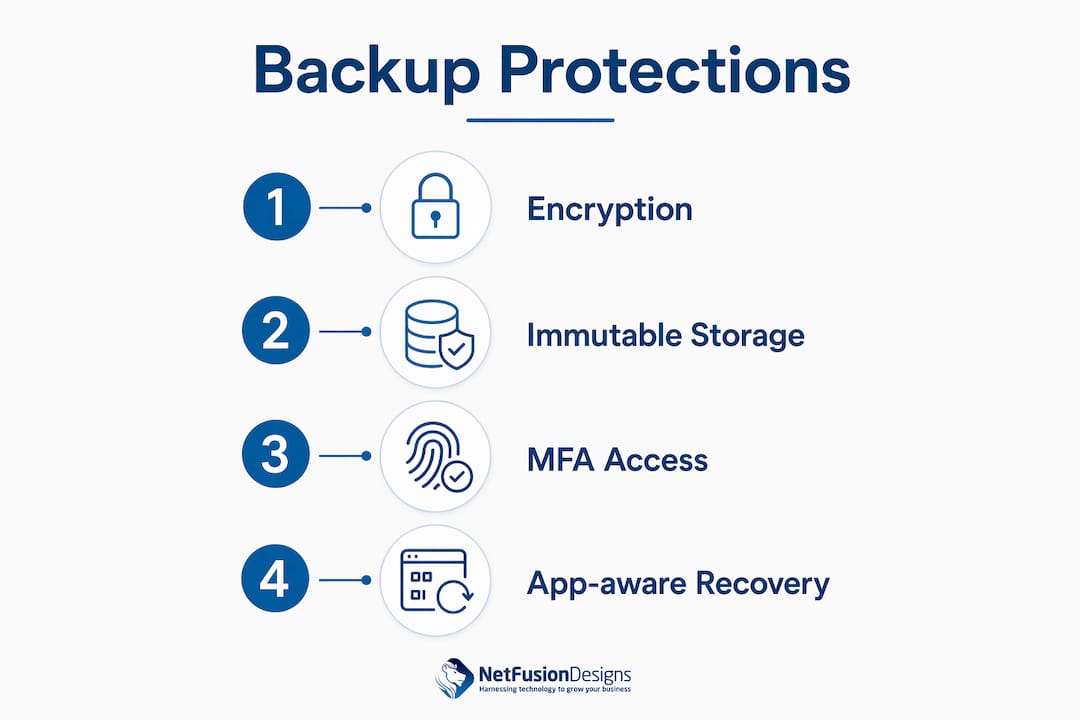
Immutable backups are copies that cannot be altered or deleted, even by an administrator. Multi-factor authentication and immutable backups are the two controls that guard cloud backups against ransomware and admin account compromise. Ransomware operators increasingly target backup systems first, knowing that destroying backups forces firms to pay. An immutable copy breaks that leverage entirely.
Application-aware recovery captures entire software environments, not just individual files. This matters because restoring a single file from accounting software like QuickBooks or Sage does not restore the database relationships, user configurations, and linked documents that make the software functional. Application-aware recovery brings back the full production environment, which is what firms actually need after an incident.
Pro Tip: Test your application-aware recovery at least quarterly. Restoring a file is not the same as restoring a working accounting environment. The difference only becomes clear under pressure.
FeatureWhat it doesWhy it matters for accounting firmsAES-256 encryptionProtects data at rest and in transitMeets FTC Safeguards Rule requirementsImmutable backupsPrevents deletion or alteration of backup copiesDefeats ransomware that targets backup systemsApplication-aware recoveryRestores full software environmentsBrings accounting platforms back to full functionMFA on backup accessBlocks unauthorised login attemptsPrevents credential-based account compromiseAutomated schedulingCreates backups without manual interventionRemoves human error from the backup process
Technology alone does not make a backup strategy work. Operational oversight, particularly backup test restores, is the weakest link in most firms’ backup strategies. The most common failure pattern is straightforward: a firm installs a backup solution, assumes it is working, and only discovers a problem when a real incident occurs.
Backup without operational test recovery oversight causes most failures. Firms realise issues only during disasters. Daily managed backup restore tests prevent surprise failures and audit issues. A managed backup service that validates restores every day catches configuration drift, storage errors, and software version conflicts before they become crises.
The audit implications are equally serious. Regulators and cyber insurance underwriters increasingly ask for documented restore test logs. A firm that cannot produce those logs faces two problems at once: a potential compliance finding and a weakened insurance claim.
Here are the operational practices that separate reliable backup programmes from ones that fail at the worst moment:
Managed backup services handle most of these tasks automatically. For firms without dedicated IT staff, that coverage is the practical difference between a backup strategy that works and one that only appears to work.
The right cloud backup strategy for accounting firms balances cost, security, and compliance without requiring a full in-house IT team. The most practical model for small to mid-sized firms combines managed backup with Disaster Recovery as a Service (DRaaS) under a single monthly subscription.
Managed backup and DRaaS solutions shift IT costs from capital expenditure to predictable monthly operating costs. This removes the need for physical backup appliances, which require upfront investment and ongoing maintenance. A monthly subscription model also includes monitoring, test restores, and compliance documentation, which are costs firms would otherwise absorb internally.
A hybrid backup strategy combining cloud backup with air-gapped immutable storage provides the strongest ransomware resilience. Air-gapped storage is physically or logically disconnected from the network, meaning ransomware cannot reach it even after compromising cloud credentials. This layered approach is now considered best practice for firms handling regulated financial data. You can learn more about cloud backup and disaster recovery models suited to professional services firms.
When evaluating backup vendors, accounting firms should work through this checklist:
Common pitfalls to avoid include relying solely on Microsoft 365’s native retention features as a backup, assuming cloud storage equals cloud backup, and skipping test restores because the backup dashboard shows green. Each of these mistakes has caused real data loss for accounting firms. A proper disaster recovery plan addresses all three.
Cloud backup protects accounting firms through encryption, immutable storage, and documented test restores, all required under the FTC Safeguards Rule and IRS WISP frameworks.
PointDetailsCompliance is mandatoryFTC Safeguards Rule and IRS WISP require documented backup policies, AES-256 encryption, and MFA.Technology needs oversightDaily restore tests and monitoring logs are what make a backup strategy provably reliable.Immutable backups stop ransomwareCopies that cannot be deleted or altered remove the leverage ransomware operators depend on.Hybrid strategies are strongestCombining cloud backup with air-gapped immutable storage provides the deepest ransomware resilience.Managed services reduce riskDRaaS subscriptions shift costs to predictable OpEx and include compliance documentation automatically.
Accounting firms tend to treat backup as an IT problem. I have seen this framing cause real harm. When backup is owned by IT, it gets reviewed during IT budget cycles. When it is owned by firm leadership, it gets reviewed against the cost of a week without billable hours, a regulatory fine, or a client relationship lost to a breach.
Backup must be viewed as a revenue protection and business continuity strategy, not mere IT insurance. That framing changes the conversation. A firm that loses access to client files during tax season is not facing an IT problem. It is facing a business continuity crisis with direct revenue consequences.
The ransomware threat has made immutable backups non-negotiable. Cloud systems remain vulnerable to account compromise, and immutable backup copies are the only reliable guarantee of recoverability when credentials are stolen. I have watched firms with strong perimeter security lose weeks of data because their backup copies were stored in the same compromised environment.
Formalising backup through a WISP and scheduling third-party validation annually is not bureaucratic overhead. It is the documentation that protects your firm in front of a regulator, an insurer, or a client asking hard questions after an incident. The firms that handle incidents well are the ones that prepared before the incident happened.
Accounting firms need backup solutions that meet FTC and IRS requirements without adding internal IT overhead. NetFusion Designs Inc is a SOC 2 Type 2-certified managed IT provider with teams across Ontario and Canada, including Mississauga, Kitchener-Waterloo, Toronto, and Markham.

NetFusion Designs Inc delivers fully managed cloud backup with 24/7 monitoring, daily restore validation, and compliance documentation built for WISP requirements. Firms get application-aware recovery, immutable backup copies, and MFA-enforced access controls without managing any of it internally. For accounting firms in the Greater Toronto Area, managed IT services in Mississauga include backup strategy, compliance reporting, and rapid incident response. For firms facing active threats, emergency ransomware recovery support is available around the clock.
Cloud backup for accounting firms is the automated, encrypted replication of financial data to offsite servers, enabling rapid recovery after data loss, ransomware, or hardware failure. It differs from cloud storage in that it captures full application environments and maintains versioned, restorable copies.
Canadian accounting firms handling U.S. clients or subject to FTC Safeguards Rule jurisdiction must maintain encrypted, documented backups under a formal WISP. Canadian firms operating domestically should also follow PIPEDA guidelines, which require reasonable safeguards for personal financial data.
Accounting firms should run documented restore tests at minimum monthly, with daily automated job monitoring. Audit compliance requires logs of successful test restores as proof that the backup system functions as intended.
Cloud storage, such as Microsoft OneDrive or SharePoint, retains current files but does not provide versioned, application-aware recovery. Cloud backup captures full environment states at scheduled intervals and allows firms to restore to a specific point in time after an incident.
An immutable backup is a copy that cannot be modified or deleted, even by an administrator. Immutable backups guard against ransomware and account compromise by preserving a clean recovery point that attackers cannot reach or destroy.
%20(1).avif)
%201.avif)