Small business IT support options include managed services, break-fix, in-house staff, co-managed models, and cloud-based helpdesks, each with distinct costs and trade-offs. Choosing the wrong model costs you more than money. It costs you uptime, security, and staff productivity. With 43% of cyberattacks targeting businesses with fewer than 250 employees, the stakes for small businesses are real. This guide breaks down every major IT support model so you can make a clear, confident decision for your business in 2026.
Five primary IT support models exist for small businesses. Each suits a different size, budget, and risk tolerance.
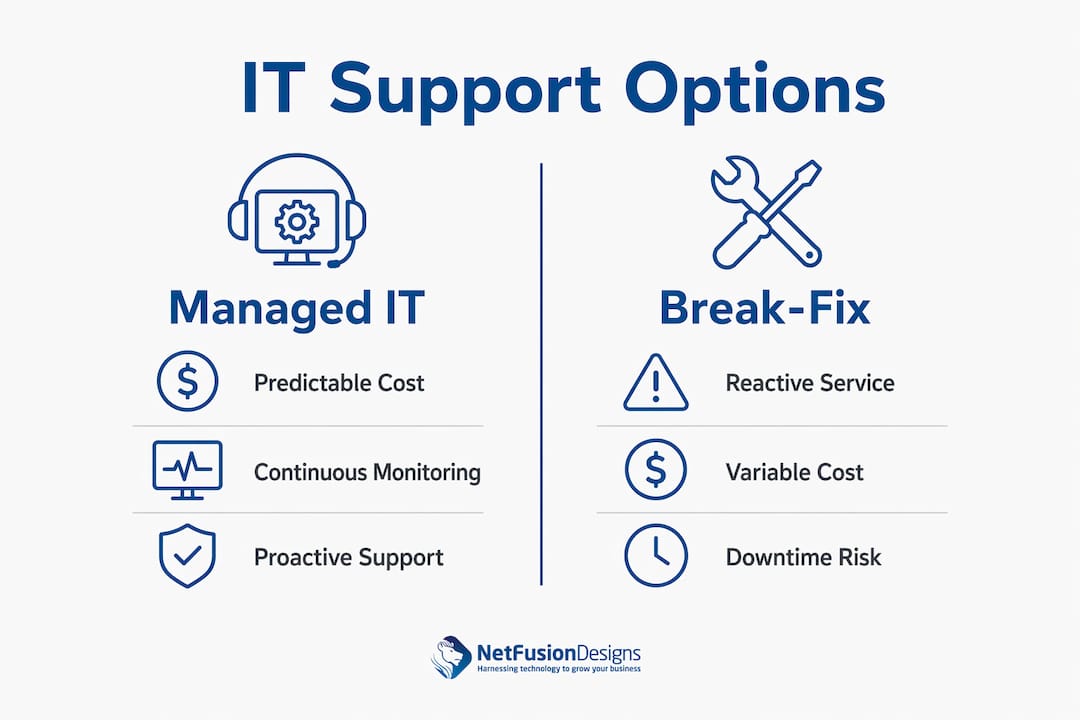
A managed service provider (MSP) takes full responsibility for your IT environment under a flat monthly fee. Services typically include 24/7 monitoring, helpdesk support, patching, backups, and security. Managed IT costs $100–$250 per user per month, which makes budgeting predictable. This model suits businesses that want proactive support without hiring internal staff.
Break-fix is the traditional “call when something breaks” model. A technician arrives or connects remotely, fixes the issue, and bills by the hour. Rates typically run $125–$250 per hour per incident. There is no monitoring, no patching schedule, and no service level agreement (SLA). This model works for very small operations with minimal technology, but it scales poorly.
Hiring a dedicated IT employee gives you on-site expertise and direct control. The trade-off is cost. Salary, benefits, training, and tools for a single IT generalist in Canada easily exceed $80,000 per year. One person also cannot cover all specialisations, including security, networking, and cloud administration simultaneously.
Co-managed IT pairs your internal IT person or team with an external MSP. Your staff handles day-to-day requests while the MSP manages security, infrastructure, and after-hours monitoring. This model suits businesses that already have some internal IT capacity but need broader coverage and expertise.
A cloud-based helpdesk delivers ticket management, remote support, and user self-service through a web platform. It is often the entry point for businesses setting up a formal IT helpdesk for the first time. Cloud-based remote support offers flexibility and rapid incident response at a lower cost than full managed services.
Pro Tip: Before comparing plans, list every piece of technology your business depends on daily. That inventory becomes your baseline for evaluating what any support model actually needs to cover.
The core difference between managed IT and break-fix is timing. Managed IT acts before problems occur. Break-fix responds after they do.
Managed services convert IT spending into stable monthly operational expenses with included SLAs, patching, and backups. Break-fix billing is unpredictable. A single server failure can generate a bill of several thousand dollars in labour alone, before accounting for data recovery or replacement hardware.
For a 50-person business, managed IT costs approximately $105,000 per year compared to $107,000–$172,000 for equivalent in-house IT coverage including salary and benefits. That gap widens when you factor in specialist knowledge an in-house generalist simply does not have.
Break-fix support’s real cost is the productivity loss while your team waits for a technician. Every hour your staff cannot work, process orders, or serve clients adds to the total incident cost. That cascading effect rarely appears on a break-fix invoice, but it shows up clearly in your monthly revenue.
Managed IT providers monitor systems continuously. Issues are often detected and resolved before users notice anything. That difference in time-to-detection directly reduces both the frequency and severity of outages.
Break-fix providers have no visibility into your environment between incidents. Patches go unapplied. Vulnerabilities accumulate. Managed IT includes continuous security monitoring, which is the primary reason proactive monitoring is considered essential for SMBs. A breach discovered weeks after the fact costs far more to remediate than one caught in hours.
Pro Tip: Ask any IT provider for their average time-to-detection on security alerts. That single metric tells you more about their real capability than any marketing claim.
The right staffing model depends on your headcount, budget, and how much internal IT control you need.
The tipping point for a full internal IT department is typically 150 or more employees. Below that threshold, most businesses cannot justify the cost of a complete internal team. Here is how to think through the decision:
Co-managed IT is particularly well-suited for businesses that have already hired one IT person but find that person stretched thin. The MSP handles security operations, after-hours monitoring, and infrastructure management. Your internal person focuses on user support and day-to-day requests. The result is better coverage at a lower total cost than hiring a second full-time employee.
Small businesses gain the most from outsourcing IT because it provides instant access to certified experts and enterprise-grade tools that would be unaffordable to build internally. A single MSP contract can include a security operations centre, Microsoft 365 administration, cloud backup, and compliance reporting. Replicating that internally requires multiple specialists.
A cloud-based helpdesk is the operational backbone of any modern IT support model. It is the system through which users log issues, track resolutions, and access self-service resources.
For small businesses setting up an IT helpdesk for the first time, a cloud platform removes the need for on-premises server infrastructure. Tickets are logged through a web portal or email. Technicians respond remotely. Resolution times drop because there is no travel involved. Remote IT support covers 24/7 monitoring, data backup, and recovery planning, making it a practical fit for businesses with remote or distributed teams.
Cloud helpdesks also integrate cleanly with managed IT services. When an MSP monitors your environment and detects an issue, the alert flows directly into the helpdesk queue. The technician resolves it, documents the fix, and closes the ticket. You have a full audit trail without any manual effort on your part.
The key advantage for small businesses is cost. Cloud helpdesk platforms eliminate the capital expense of on-premises ticketing infrastructure. You pay a monthly subscription and scale the number of agents as your business grows. That flexibility makes it a strong foundation for any IT support for small businesses strategy.
A structured evaluation process prevents costly mistakes. Work through these steps before signing any contract.
Business owners who wait too long to engage managed IT typically make the switch only after recurring tech issues have already damaged productivity. Transitioning before that point is always less disruptive and less expensive.
Managed IT services deliver the most predictable cost and the strongest security posture for small businesses with 10 or more employees, making them the default recommendation for most Canadian SMBs in 2026.
| Point | Details |
|---|---|
| Managed IT beats break-fix on cost | For a 50-person business, managed IT saves up to $67,000 per year compared to in-house IT. |
| Break-fix hides its real cost | Productivity loss during downtime makes break-fix more expensive over time than a flat monthly plan. |
| Co-managed suits 25–150 employees | Pair an internal IT person with an MSP to get full coverage without the cost of a second hire. |
| Cloud helpdesk reduces setup cost | Cloud-based ticketing removes on-premises infrastructure and scales with your team size. |
| QBRs signal a strategic partner | Providers who conduct quarterly business reviews align IT with your growth goals, not just your tickets. |
Small business owners consistently underestimate the cost of doing nothing. I have seen businesses run on break-fix support for years, convinced they are saving money, until a ransomware incident or a failed server wipes out a week of productivity and generates a five-figure recovery bill.
The misconception I encounter most often is that outsourcing IT means losing control. The opposite is true. A well-run MSP gives you more visibility into your environment than most in-house generalists can provide. You get dashboards, incident reports, and quarterly reviews. You know exactly what is happening and why.
The other mistake is treating IT support as a cost centre rather than a business function. When your IT works reliably, your staff works faster, your clients get better service, and your security posture holds up under scrutiny. Those outcomes have direct revenue implications. The benefits of proactive outsourced IT management are not theoretical. They show up in fewer lost hours and fewer emergency calls.
My honest advice: if recurring IT issues are interrupting your team more than once a month, you have already crossed the threshold where managed IT pays for itself.
— Geeshan
NetFusion Designs Inc is a SOC 2 Type 2-certified managed IT provider serving small and mid-sized businesses across Ontario and Canada. Whether you are in Mississauga, Kitchener, or Waterloo, NetFusion Designs Inc delivers predictable monthly pricing, 24/7 monitoring, and a fully staffed helpdesk backed by enterprise-grade security tools.
If your business is ready to move beyond reactive IT, explore managed IT services in Mississauga or IT support in Kitchener and Waterloo. NetFusion Designs Inc also offers a managed IT services offer designed specifically for growing Canadian SMBs. Talk to the team today and get a clear picture of what proactive IT support looks like for your business.
Cloud-based helpdesk and managed IT services typically cost less over time than break-fix support. Break-fix billing is unpredictable and does not account for productivity loss during downtime.
43% of cyberattacks target businesses with fewer than 250 employees. Managed IT provides continuous monitoring and patching that break-fix support cannot deliver.
Start with a cloud-based helpdesk platform that handles ticket logging, remote support, and user self-service. Pair it with a managed IT provider for monitoring and escalation coverage.
The practical threshold for a full internal IT department is 150 or more employees. Below that, a managed service provider or co-managed model delivers better coverage at a lower cost.
Ask for their average response time, their escalation process for major incidents, and whether they conduct quarterly business reviews to align technology with your business goals.
%20(1).avif)
%201.avif)