


IT support is the operational backbone that keeps technology reliable, resolves issues fast, and protects employee productivity from the constant threat of technical disruption. Business owners and managers who treat IT support as a cost centre rather than a productivity function are measuring the wrong thing. The role of IT support in business productivity goes far beyond fixing broken laptops. It covers proactive monitoring, automation, identity management, and service desk operations that collectively determine how much time your team spends working versus waiting. When IT functions well, it is invisible. When it fails, the losses compound quickly.
How does IT support directly impact business productivity?
IT support reduces disruptions to the core tools employees depend on every day, including email, VPN, shared drives, and business applications. Every time one of those tools fails, employees lose more than the minutes spent waiting for a fix. They lose their work context, the mental state required to continue a complex task, and that recovery time accumulates across the day.

The term “managed IT services” is the industry standard for what many businesses call IT support. It describes a model where a provider takes ongoing responsibility for monitoring, maintaining, and resolving technology issues, rather than responding only when something breaks. Understanding this distinction matters because the managed model is what actually protects productivity at scale.
Short interruptions are deceptively costly. A two-minute VPN failure does not cost two minutes. It costs the time to notice the failure, attempt a fix, contact support, wait for resolution, and then mentally re-engage with the original task. Multiply that across a team of 30 people and a single recurring issue becomes a significant weekly drain.
Why does downtime cost more than most managers realise?
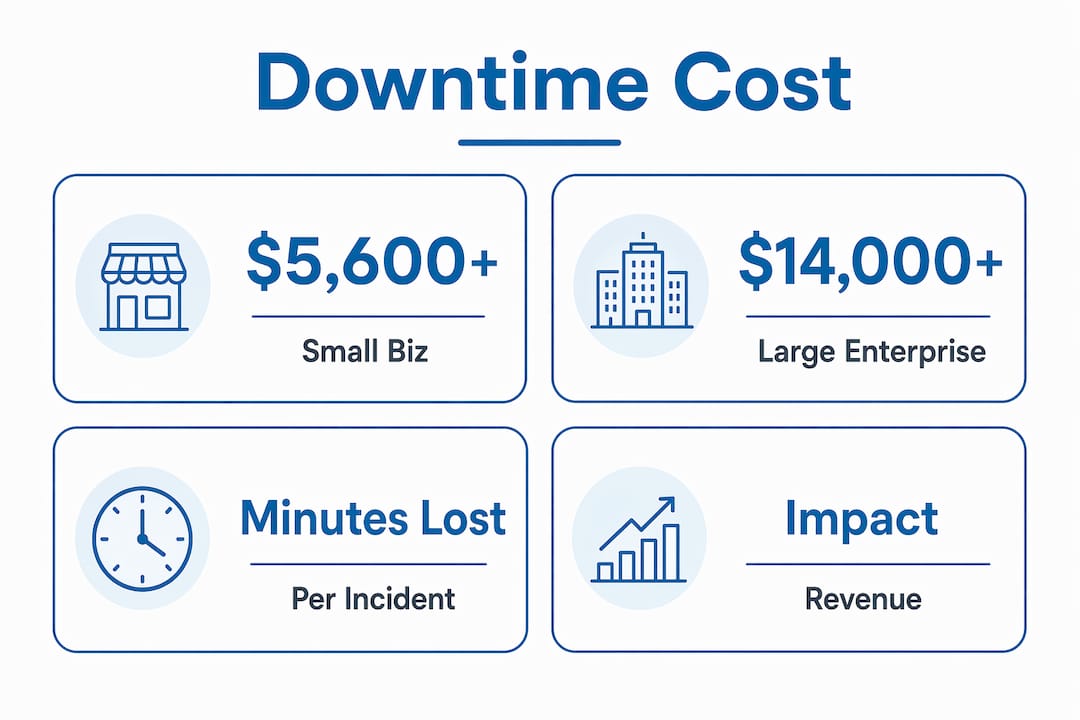
Unplanned IT downtime costs range widely, but commonly reach $5,600 to over $14,000 per minute, depending on business size and industry. Large enterprises can lose $23,750 per minute during an outage. Those figures represent direct revenue loss, idle labour, and missed transactions, not the softer costs of employee frustration or client trust erosion.
The financial picture becomes clearer when you account for how losses accumulate across a workforce. A one-hour outage affecting 25 employees at an average billing rate of $50 per hour costs $1,250 in idle labour alone, before factoring in any revenue impact. For professional services firms in Ontario, where billable time is the product, that math is immediate and painful.
Proactive IT monitoring and redundancy sharply reduce both the frequency and the impact of downtime. Prevention is always cheaper than recovery. The businesses that invest in stable IT environments avoid the compounding costs that reactive-only support cannot prevent.
Common sources of productivity loss that IT support directly addresses include:
- Slow or dropped VPN connections that block access to cloud applications
- Email outages that halt internal and client communication
- Failed software updates that cause application crashes mid-task
- Access and permission errors that lock employees out of files or systems
- Unpatched security vulnerabilities that trigger incident response and system lockdowns
Pro Tip: Track how often your team contacts IT support for the same recurring issue. Repeat tickets on the same problem are a clear signal of a systemic gap, not a one-off failure. One recurring issue affecting ten people weekly is a productivity drain worth fixing permanently.
How has the IT service desk evolved into a productivity enabler?
The IT service desk has moved well beyond ticket queues and phone trees. AI and automation in service desks now enable rapid end-to-end resolution, reducing the time employees spend waiting for support and minimising the downstream disruption to their work. Zendesk describes the modern service desk as a strategic asset that delivers fast, scalable, and accurate support across departments.
The shift from reactive to proactive support is the defining change in how IT service desks operate. Reactive support waits for a user to report a problem. Proactive support detects and resolves issues before the user notices them. That difference in timing is where most of the productivity value lives.
| Dimension | Reactive IT support | Proactive IT support |
|---|---|---|
| Trigger | User reports a problem | Monitoring detects an anomaly |
| Response time | Minutes to hours after impact | Before or at the moment of impact |
| Productivity effect | Work stops until resolved | Work continues uninterrupted |
| Cost pattern | High per-incident cost | Lower ongoing cost, fewer incidents |
| Employee experience | Frustrating, unpredictable | Reliable, confidence-building |
Effective IT support organisations measure success by time-to-return-to-work, not just time-to-close-tickets. Kyndryl’s research makes the point clearly: optimising only visible help desk metrics misses the true cost of disruptions across the workforce. A ticket closed in 15 minutes still represents 45 minutes of lost productivity if the employee spent 30 minutes trying to self-resolve before calling.
What routine IT tasks should be automated to boost efficiency?
Automation reduces errors, speeds processes, and eliminates the repeated recovery work that consumes IT team capacity. The most productive IT environments automate the tasks that are high-volume, low-complexity, and time-sensitive. That frees support analysts to focus on the complex problems that genuinely require human judgement.
The tasks that deliver the clearest productivity gains when automated include:
- Patch deployment: Automated patch cycles keep systems current without scheduling manual maintenance windows or disrupting business hours
- User onboarding and offboarding: Automated provisioning gives new employees immediate access to the tools they need on day one, without a queue
- Password resets and account unlocks: Self-service portals handle these instantly, removing a common Tier 1 bottleneck from the support queue
- Alert routing and triage: Automated systems classify and assign incoming alerts, cutting response time on critical issues
- Identity and access management: Automating access provisioning prevents the immediate work-blocker scenario where an employee cannot access a system they need to do their job
Shifting Tier 1 tasks to self-service and automation clears the support queue and lets analysts concentrate on higher-value issues. The result is faster resolution across all ticket categories, not just the simple ones. When your IT team is not spending half their day on password resets, they can address the infrastructure issues that affect everyone.
Pro Tip: When deciding which IT tasks to automate first, prioritise by frequency and business impact. A task that happens 50 times a week and blocks work immediately, such as account lockouts, delivers far more value when automated than a task that happens twice a month.
What does IT downtime actually cost your business?
The financial impact of IT downtime scales with business size, industry, and the systems affected. The table below summarises cost ranges based on industry benchmarks.
| Business size | Estimated cost per hour of downtime | Primary driver |
|---|---|---|
| Small business (under 50 staff) | $8,000 to $74,000 | Idle labour, missed sales |
| Mid-sized business (50–250 staff) | $74,000 to $300,000 | Revenue loss, client impact |
| Enterprise (250+ staff) | $300,000 to $1,000,000+ | System-wide impact, regulatory exposure |
These figures reflect the real cost of downtime across labour, revenue, and recovery. They do not include the longer-term costs of client attrition or reputational damage, which are harder to quantify but equally real.
The metric that most accurately captures productivity loss is time-to-return-to-work. Measuring how quickly employees resume meaningful work after a disruption gives managers a clearer picture of IT support’s true impact than ticket volume or resolution speed alone. A business that resolves 100 tickets per week but takes 90 minutes per incident to restore full productivity is losing far more than its help desk metrics suggest.
Key takeaways
Reliable IT support is the single most direct lever business owners control for protecting employee productivity and reducing the financial cost of technology failure.
| Point | Details |
|---|---|
| Downtime costs accumulate fast | Unplanned outages cost $5,600 to over $14,000 per minute, making prevention far cheaper than recovery. |
| Proactive support outperforms reactive | Monitoring-based IT support resolves issues before employees notice them, keeping work uninterrupted. |
| Automation targets the right tasks | Automating password resets, onboarding, and patch deployment removes the highest-volume bottlenecks from IT queues. |
| Measure time-to-return-to-work | Ticket close time alone misses the true productivity cost. Track how long it takes employees to resume full work. |
| Service desks are strategic assets | Modern IT service desks use AI and automation to deliver fast, scalable support that directly protects workforce output. |
What I have learned about IT support and productivity after years in the field
Most business owners I speak with think of IT support as insurance. They want it there when something breaks, and they want it to be cheap the rest of the time. That framing costs them more than they realise.
The businesses that get the most from their IT investment treat their support function as an active part of operations, not a standby service. They measure how quickly their team gets back to work after an issue, not just how quickly a ticket gets closed. That one shift in measurement changes everything about how IT support is prioritised and resourced.
The other pattern I see consistently is underestimating the compound effect of small delays. A slow VPN, a recurring login error, a software update that keeps failing at the worst moment. None of those feel like crises. But when they happen to 20 people, three times a week, the lost hours add up to a real number by the end of the month.
My honest advice: before you evaluate any IT support provider, ask them how they measure productivity impact, not just ticket metrics. If they cannot answer that question clearly, they are optimising for the wrong thing. The benefits of managed IT services show up most clearly in what does not happen: the outages that never occur, the issues that resolve before anyone notices, and the hours your team spends working instead of waiting.
— Geeshan
Nfd keeps your team working, not waiting
Nfd delivers managed IT services built around one goal: keeping your team productive. For businesses in Mississauga, Kitchener-Waterloo, Toronto, and across Ontario, Nfd provides proactive monitoring, a 24/7 helpdesk, automated patch management, and rapid incident response. Every service is designed to reduce the time your employees spend dealing with technology instead of doing their actual jobs.

If your business has experienced recurring outages, slow support response times, or IT issues that keep coming back, Nfd’s IT services in Mississauga and surrounding regions are built to address exactly those gaps. When technology fails fast, Nfd’s emergency IT support team responds immediately to restore operations. Contact Nfd to find out how proactive IT support can protect your productivity.
FAQ
What is the role of IT support in business productivity?
IT support maintains the reliability of the tools employees use every day, including email, VPN, and business applications, and resolves issues fast enough to prevent significant productivity loss. Its primary function is keeping technology stable so work continues uninterrupted.
How much does IT downtime cost a business?
Unplanned IT downtime costs range from $5,600 to over $14,000 per minute depending on business size and industry, with large enterprises potentially losing $23,750 per minute. Annual losses from recurring downtime can reach millions for mid-sized and large organisations.
What is the difference between reactive and proactive IT support?
Reactive IT support responds after a user reports a problem, meaning work has already stopped. Proactive IT support uses monitoring to detect and resolve issues before employees are affected, which is where most of the productivity value is generated.
Which IT tasks should be automated first?
Prioritise automating high-frequency, work-blocking tasks such as password resets, account provisioning, and patch deployment. These are the tasks that create the longest queues and the most immediate disruption to employee productivity when handled manually.
What metric best measures IT support’s productivity impact?
Time-to-return-to-work is the most accurate metric. It measures how quickly employees resume meaningful work after a disruption, capturing the full productivity cost that ticket-close-time alone does not reflect.

%20(1).webp)
%201.webp)


