Transitioning internal IT to managed services is a structured process that shifts day-to-day operational responsibilities to a specialist provider while your business retains strategic control. The industry term for this model is managed IT services, delivered under a formal service level agreement (SLA) that defines costs, responsibilities, and measurable performance standards. For small to mid-sized Canadian businesses, the managed IT service benefits are clear: lower operational costs, stronger security, and predictable monthly spending. This guide walks you through every phase of the transition, from preparation through steady-state operations, so you can move forward with confidence and minimal disruption.
Preparation is the single biggest factor in a successful transition. Businesses that skip this stage face credential recovery delays, security gaps, and knowledge-transfer failures that cost time and money.
Start by building a complete inventory of your IT environment. Document every asset, application, vendor contract, and access point your business relies on. This includes server configurations, network diagrams, software licences, and cloud subscriptions. Inventory diagrams, runbooks, and vendor agreements must be assigned owners and gaps addressed early, or they become blockers during onboarding.

Next, conduct a thorough credential and access audit. Map every critical control plane: identity administration, DNS management, backup consoles, and network equipment. A credential and access audit covering these areas prevents early operational failures after the managed service provider (MSP) takes over. Missing admin credentials are one of the most common causes of transition delays.
Security readiness is non-negotiable before cutover. Validate that multifactor authentication (MFA), encryption, endpoint protection, and patching are all active and documented. Validating MFA, encryption, and patching before stable MSP operations begin protects your business from inheriting unresolved vulnerabilities.
The table below summarises the key prerequisites and recommended tools for each area.
| Preparation area | What to document | Recommended tools |
|---|---|---|
| Asset inventory | Servers, endpoints, applications, licences | IT Glue, Lansweeper |
| Credential audit | Admin accounts, DNS, backup, network gear | Password managers, Active Directory |
| Security baseline | MFA status, patching, encryption, endpoint protection | Microsoft Defender, Qualys |
| Vendor contracts | SLAs, renewal dates, support contacts | Contract management software |
| Service scope | What MSP owns vs. what internal IT retains | RACI matrix template |
Pro Tip: Treat documentation gaps as a formal project. Assign an owner and a deadline to each missing item. Ad-hoc fixes before cutover almost always get deprioritised and then cause problems on day one.
Transitioning from internal IT to an MSP follows four defined phases: discovery and assessment, onboarding and implementation, knowledge transfer, and stabilisation with service validation. Each phase has a clear purpose and exit criteria before the next begins.
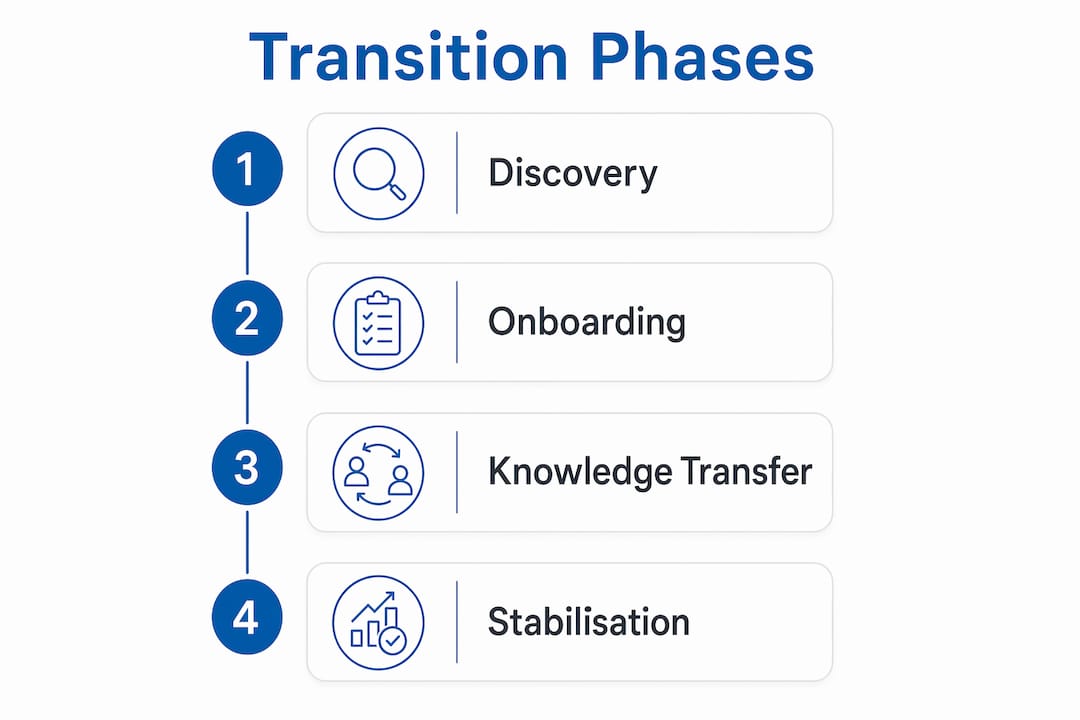
The MSP audits your environment, reviews your documentation, and captures baseline operational metrics. Capture baseline metrics like incident volumes, response times, and uptime before handoff. These numbers tie your SLA targets to real benchmarks and make it easy to detect regressions after the transition.
The MSP deploys its monitoring and management tooling across your environment. This includes remote monitoring and management (RMM) agents, helpdesk ticketing integration, and security tooling. The onboarding checklist covers asset documentation, credential recovery, security validation, tooling rollout, and communication rules. Work through each item in sequence rather than in parallel to avoid missed steps.
Your internal IT team transfers institutional knowledge to the MSP. This means documented runbooks, standard operating procedures (SOPs), escalation contacts, and known issue logs. Missing documentation delays knowledge transfer and is one of the top causes of post-transition service disruption. Treat every undocumented process as a risk item with an assigned owner and a completion date.
The MSP operates your environment while your team monitors performance against the agreed SLA. Parallel operation for 2–4 weeks with a defined cutover date reduces downtime risk. During this window, both your internal team and the MSP are active. On the cutover date, incumbent access is revoked and the MSP takes full operational control.
The numbered steps below give you a practical sequence to follow.
Pro Tip: Set your cutover date on a Tuesday or Wednesday morning. Avoid Fridays. If something goes wrong, you want your full team available to respond, not heading into a weekend.
Many businesses also consider a co-managed IT model where internal IT and the MSP share responsibilities long-term, rather than a full handoff. This suits businesses that want to retain a senior IT person internally while outsourcing helpdesk, monitoring, and security operations.
| Approach | Internal IT role | MSP role | Best for |
|---|---|---|---|
| Full MSP | Strategic decisions only | All operations | Businesses with no internal IT |
| Co-managed | Strategic + specialist projects | Helpdesk, monitoring, security | Businesses with one or two IT staff |
| Hybrid oversight | Architecture and vendor management | Day-to-day operations | Growing SMBs scaling IT capacity |
Moving to an MSP does not mean giving up control. Control over IT services depends on documentation, ownership clarity, and escalation paths, not physical proximity to your systems. Your internal team shifts from fixing tickets to governing outcomes.
Many organisations adopt hybrid models where internal teams retain strategic oversight and the MSP handles operational delivery. This is the most practical model for Canadian SMBs. Your internal IT lead approves vendor changes, reviews monthly performance reports, and manages the MSP relationship. The MSP handles monitoring, helpdesk, patching, and incident response.
Governance best practices to retain visibility and control:
Pro Tip: Ask your MSP for read-only access to their monitoring dashboard. Seeing live data builds confidence and catches issues before they appear in a monthly report.
Managed IT services delivered under SLA give you defined costs and performance standards. That predictability is one of the core managed IT service benefits that internal-only IT cannot easily replicate.
The most costly mistakes in an IT outsourcing transition are predictable and preventable. Failure modes include vague escalation, incomplete credentials, and undocumented risks, all of which cause knowledge-transfer delays and post-cutover disruptions.
The businesses that struggle most during an IT transition are not the ones with complex environments. They are the ones that assumed their documentation was complete when it was not.
Common mistakes and how to avoid them:
The benefits of outsourcing IT services are real, but they only materialise when the transition is executed with discipline. Shortcuts in preparation create problems that take months to resolve.
Transitioning internal IT to managed services succeeds when you complete thorough documentation, validate security controls, and govern the MSP relationship through defined SLAs and regular performance reviews.
| Point | Details |
|---|---|
| Prepare before you start | Document all assets, credentials, and vendor contracts before engaging an MSP. |
| Follow a phased process | Move through discovery, onboarding, knowledge transfer, and stabilisation in sequence. |
| Use parallel operations | Run both teams simultaneously for 2–4 weeks to reduce cutover risk. |
| Retain governance | Use SLAs, RACI matrices, and monthly reviews to stay in control post-transition. |
| Prevent common failures | Audit credentials, document all processes, and define escalation paths before go-live. |
After working through IT transitions with small and mid-sized businesses across Ontario, the pattern I see most often is not technical failure. It is a documentation problem disguised as a technical problem. A business assumes its IT environment is well-documented because someone on the team knows how everything works. That is not documentation. That is a single point of failure.
The businesses that transition smoothly are the ones that treat the preparation phase as the real project. The actual cutover is almost anticlimactic when the groundwork is solid. The ones that struggle spend the first 60 days post-transition in reactive mode, chasing credentials and rewriting runbooks under pressure.
The hybrid model is the right starting point for most Canadian SMBs. Full outsourcing works well when there is no internal IT function at all. But if you have even one IT-capable person internally, keep them. Redeploy them as your MSP relationship manager and internal IT strategist. That combination of internal accountability and external operational capacity is genuinely hard to beat.
One more thing: treat your MSP as a partner, not a vendor you monitor for compliance. The businesses that get the most value from managed services are the ones that bring their MSP into business planning conversations. When your MSP understands where your business is going, they can prepare your IT environment for it before you need it.
— Geeshan
Nfd (NetFusion Designs) is a SOC 2 Type 2-certified managed IT services provider serving small and mid-sized businesses across Ontario and Canada. Nfd delivers fully managed IT covering security, monitoring, helpdesk, cloud, and Microsoft 365, backed by a 24/7 network operations centre.

For businesses in the Greater Toronto Area and Waterloo Region, Nfd offers structured onboarding programmes that follow the phased transition model described in this guide. Whether you need managed IT services in Mississauga or support across the Kitchener-Waterloo corridor, Nfd’s team handles the full transition process, from credential audits and security baseline validation through to steady-state operations. Explore Nfd’s managed IT services offer to see how the onboarding process works and what your first 90 days would look like.
Transitioning internal IT to managed services means shifting day-to-day IT operations to a specialist provider under a formal SLA, while your business retains strategic governance. The MSP handles monitoring, helpdesk, patching, and security, freeing your team for higher-value work.
A typical transition takes 30–90 days, including a parallel operation window of 2–4 weeks before the final cutover date. Complex environments or incomplete documentation extend that timeline.
Control comes from documentation, defined escalation paths, and SLA accountability, not from managing systems directly. Businesses that maintain runbooks, access maps, and monthly performance reviews retain full visibility after transitioning to managed services.
A co-managed model keeps an internal IT person in a strategic or specialist role while the MSP handles operational tasks like helpdesk, monitoring, and security. This model suits SMBs that want the benefits of outsourcing IT services without eliminating their internal IT function entirely.
Incomplete credential recovery and undocumented processes are the leading causes of transition failure. Auditing every admin account, DNS record, and backup console at least two weeks before cutover eliminates most of this risk.
%20(1).avif)
%201.avif)