Pick one repetitive, high-volume workflow, run a 90-day pilot against a single success metric, and decide whether to expand it before you buy anything else. Done properly, that first pilot returns measurable hours or faster response times within weeks, not months. The rest of this guide is the playbook: which workflows to automate first, how to wire tools into your existing systems without creating a mess, and the governance rules that keep a pilot from quietly dying.
TL;DR:
- Choosing a single high-volume workflow and running a 90-day pilot with clear success metrics ensures measurable benefits within weeks, not months.
- Prioritizing tools that integrate with existing CRM and provide audit logs significantly reduces the risk of project failure and abandonment.
- Starting with process mapping and maintaining a human approval gate for customer-facing outputs prevents reputational and compliance issues.
- Costs for initial AI pilots typically range from $3,000 to $8,000 setup, plus $200 to $600 monthly, with measurable ROI usually seen within 30 to 90 days.
- Staff training tied directly to the pilot process, along with clear ownership and governance rules, is crucial for successful adoption and long-term sustainability.
AI automation for small business means using AI tools, robotic process automation (RPA), and workflow platforms to handle repetitive tasks that currently eat staff hours: drafting replies, chasing invoices, booking appointments, answering the same internal questions. It is not the same as installing enterprise software and hoping staff adopt it. Small business automation tools work because they attach to a specific, already-repeated task rather than a department-wide overhaul.
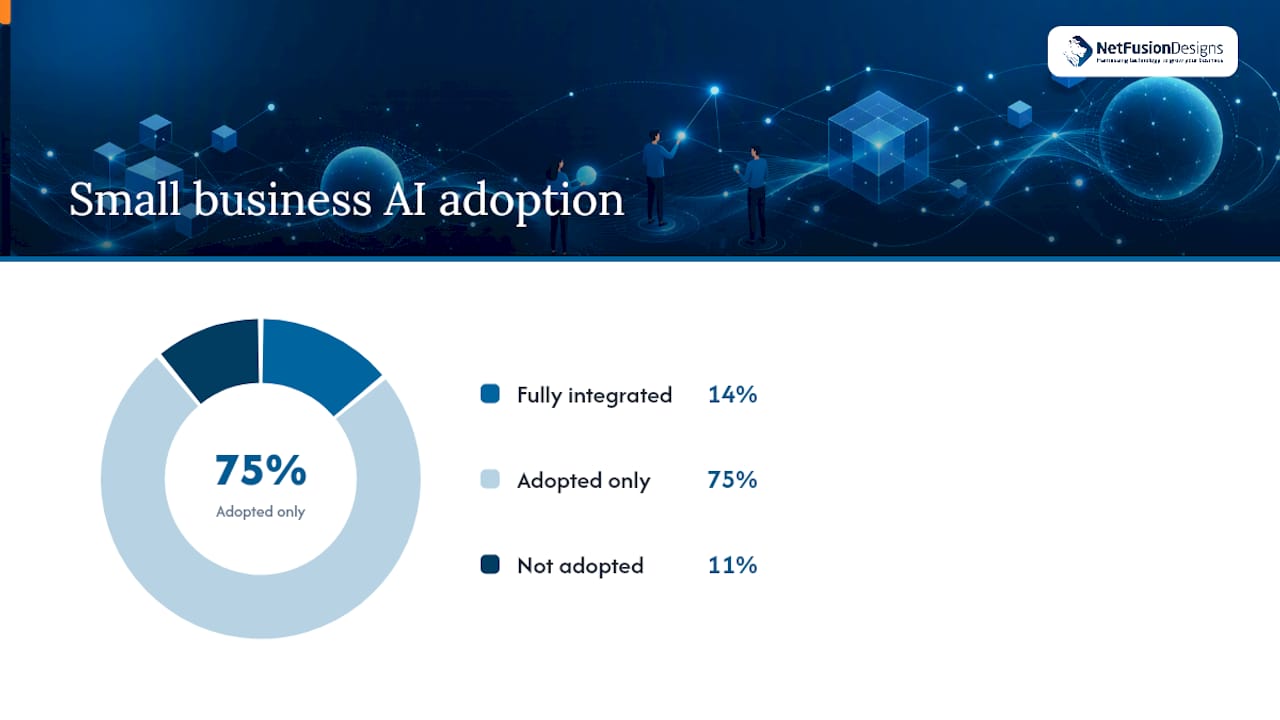
Adoption is already high. A 2026 survey found that 89% of small businesses have adopted some form of AI, yet only 14% have fully integrated it into core operations. Most firms are still running isolated pilots, which is exactly where a disciplined, metric-driven approach gives you an edge over competitors who bought a tool, poked at it for a week, and moved on.
The five candidates below cover the workflows that consistently deliver return in a first 90-day window.
Each of these fits the profile of a good first pilot: high repetition, clear inputs and outputs, and a metric your bookkeeper can already track without a new dashboard.
A short, disciplined sequence beats a sprawling six-month rollout. Field-tested implementation guides put the first working playbook at 14 to 30 days, with measurable ROI following by day 90. Here is the sequence that gets you there.
Pro Tip: Put the day-90 decision meeting on the calendar on day one, before the pilot even starts. A dated meeting is much harder to skip than a vague “we’ll check in eventually.”
Typical first-project costs run $3,000 to $8,000 in setup with $200 to $600 a month in ongoing platform fees, which gives you a rough budget to hold vendors against before you sign anything.
The single biggest predictor of a stalled pilot is a tool that does not talk to your existing systems. Implementation guides consistently flag integration with your CRM as the deciding factor between a tool that sticks and one that gets abandoned after three weeks.
Run every candidate tool through this checklist before you pay for anything:
Two categories of tools solve different problems, and small businesses often buy the wrong one first. Workflow automators like Zapier, Make, or n8n act as glue, connecting apps that were never built to talk to each other. Embedded AI features inside your existing CRM or helpdesk platform are usually the better first choice when they exist, because they skip the integration step entirely.
Cost shapes differ, too. A first pilot using a glue tool plus one AI feature typically runs in the low hundreds of dollars monthly. A custom-built, multi-workflow deployment costs several times more and belongs later in your roadmap, not in month one.
The leading causes of failure are process and governance gaps, not the underlying technology. An analysis of common breakdowns in small-business AI projects found that buying tools before mapping workflows, weak ownership, and missing approval gates account for most stalled or abandoned pilots.
Pro Tip: Set a recurring calendar reminder to audit active subscriptions every 30 days. Small businesses routinely discover three or four AI tools running that nobody remembers signing up for.
Governance is not bureaucracy for its own sake. It is what keeps one bad automated email from becoming a customer complaint you did not see coming. A written AI policy for employees gives staff a clear reference for what the AI is allowed to send without review.
Realistic benchmarks matter more than optimistic vendor promises. Implementation guides consistently show 14 to 30 days to a working first playbook, 30 to 90 days to measurable ROI on that single workflow, and 6 to 12 months for a full, multi-pillar rollout across marketing, service, and finance.
| Stage | Typical timeline | Typical cost |
|---|---|---|
| First playbook built | 14 to 30 days | $3,000 to $8,000 setup |
| Measurable ROI on pilot | 30 to 90 days | $200 to $600 per month ongoing |
| Full multi-pillar rollout | 6 to 12 months | Scales with number of workflows |
Time savings give you a usable target for your own metric. Industry surveys cited in recent reporting show many employees using AI save several hours per week, with managers often saving more than individual staff. Set your pilot’s target inside that range rather than inventing a number that sounds impressive on a slide.
A managed IT service provider with SOC 2 Type II certification runs a 24/7 Network Operations Center (NOC) to support managed IT and AI enablement services for small and mid-sized businesses. That certification means your automation pilot sits on infrastructure already held to an external security standard, not a patchwork of unmanaged subscriptions.
Some providers offer readiness assessments to map workflows before any tool purchase, and AI workforce training so staff can effectively run what gets built. The goal of experienced providers is a pilot that survives past day 90, not a demo that impresses once and then gets abandoned.
Nearly 70% of small business owners say they lack the skills to use AI effectively, even as adoption climbs. That gap, not the software itself, is usually why a promising pilot fizzles by week six.
Training works best when it is tied directly to the live pilot, not delivered as a generic AI seminar weeks before anyone touches the tool. Walk the process owner through the exact trigger-to-output flow they will manage, using their own real customer or invoice data in the training session. Abstract examples do not stick; a booking confirmation the receptionist actually sent yesterday does.
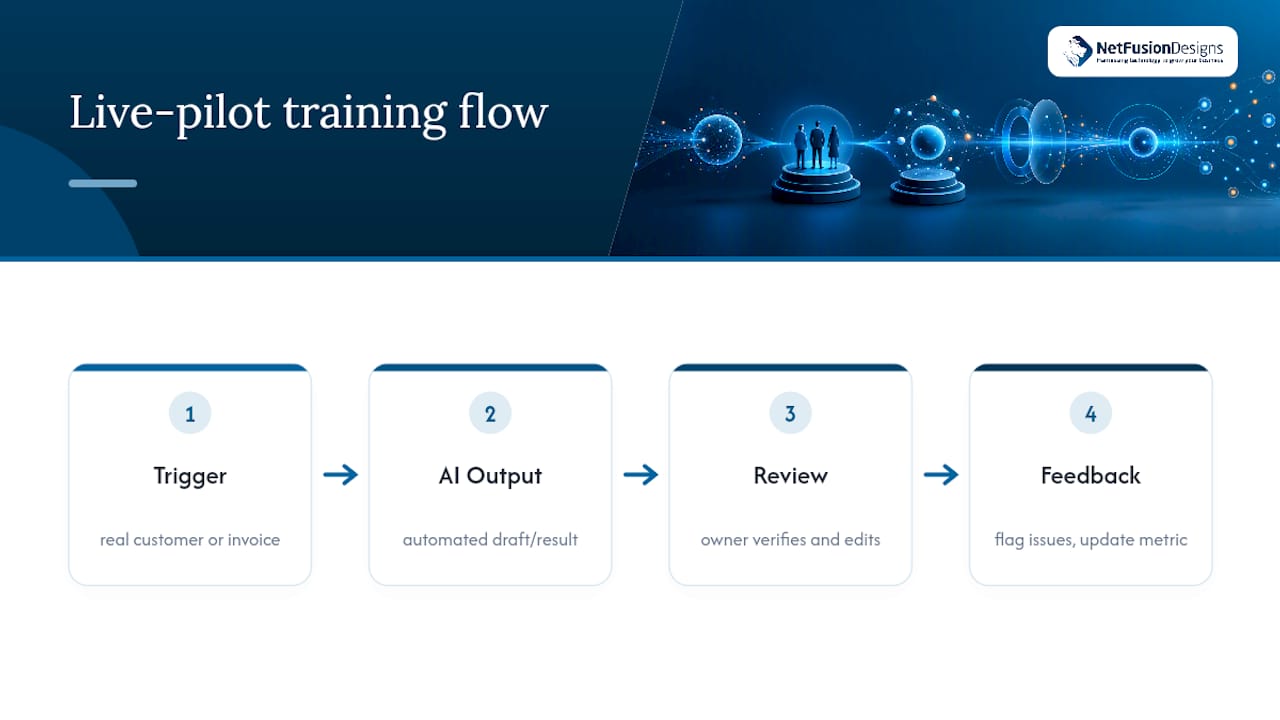
Change management for a small team looks different than for a 500-person company. You do not need a formal committee. You need the process owner to feel confident explaining, in one sentence, what the AI does and what still requires their judgment. Build that explanation into week one of the pilot, not as an afterthought once something breaks.
Resistance usually comes from a fear of being replaced, not from confusion about the tool. Address it directly: frame the automation as removing the repetitive 80% of the task so the person can spend more time on the judgment calls that actually need them. Staff who understand this distinction adopt faster and flag problems earlier, which is exactly the feedback loop your 90-day metric depends on.
Regulatory obligations for small-business AI use are still developing and vary by sector and jurisdiction, so treat any customer-facing automation as a compliance question from day one rather than an afterthought. Businesses handling health, financial, or other sensitive personal data face the strictest scrutiny, and the rules that apply to a bookkeeping automation are not the same as those governing a customer service chatbot collecting personal details.
Data privacy is the area most small businesses underestimate. Before connecting any tool to customer records, confirm whether the vendor trains its models on your data by default, and choose vendors offering an explicit opt-out or built-in redaction of personally identifiable information. This matters more for customer service and marketing tools that touch names, emails, and purchase history than for internal SOP search tools working from your own documents.
For customer-facing automations specifically, keep the human approval gate in place for at least the first 90 days and define an escalation path before launch, so a customer with a genuine problem is never stuck talking to a bot with no way to reach a person. That single safeguard does more to manage regulatory and reputational risk than any amount of fine print in a privacy policy nobody reads. Businesses using AI to analyze health, credit, or employment data should also confirm their sector-specific obligations with a qualified advisor before automating a decision that affects a customer’s rights or eligibility. A SIEM-backed security posture helps demonstrate the kind of audit trail regulators and cautious customers increasingly expect.
Every failed AI project I have reviewed had the tool right and the discipline wrong. Pick one workflow, name an owner, set a ship date. Everything else in this playbook is detail.
— Geeshan
Running the 90-day playbook well takes more than good intentions; it takes someone who has mapped workflows and wired integrations before. Experienced providers run readiness assessments to identify a single best starter workflow, handle managed deployment with correct CRM sync and audit log configuration, and deliver AI workforce training to build process owner confidence early. That combination is what turns a pilot into something you actually keep running past day 90.
If you already know which workflow you want to automate, our AI workforce training program is built to get your team using it correctly from the first week. Businesses still deciding where to start can also look at how we build AI around existing operations rather than forcing a generic tool into place. Book a readiness conversation and leave with a specific 90-day metric, not a vague roadmap.
Pick one repetitive, high-volume task, such as invoice reminders or first-line customer replies, map it in trigger-logic-output terms, and run a 90-day pilot with a single measurable success metric before expanding to a second workflow.
Look for a provider offering readiness assessments, managed deployment, and staff training together rather than just software, since training gaps are a bigger barrier to ROI than the tool itself; NetFusion Designs Inc offers all three under one engagement.
There is no single best tool; the right choice is whichever platform integrates directly with your existing CRM and offers audit logging, since integration failures, not weak AI, cause most stalled pilots.
Invoicing and payment-reminder automation shortens days sales outstanding, chatbot-drafted customer responses improve response time and retention, and AI-assisted marketing content cuts contractor spend, all of which show up directly on a small business’s bottom line.
%20(1).avif)
%201.avif)