A cyber incident response plan is your organization’s authorized playbook for detecting, declaring, and resolving security incidents. If you don’t have one, adapt a fillable template today and plan to run a tabletop exercise soon. Align the plan to NIST CSF 2.0 through NIST SP 800-61 Rev.3, and make sure senior leadership signs off on it before you file it away.
TL;DR:
- Regular testing through tabletop and full operational exercises helps identify response gaps and ensures the plan remains effective under pressure.
- Incident response plans must include clear roles, contact backups, and decision thresholds to prevent delays during an actual security event.
- Maintaining an up-to-date, approved plan with defined review triggers and senior leadership sign-off ensures ongoing organizational readiness.
- Integration of NIST’s continuous functions—Govern, Identify, Protect, Detect, Respond, Recover—simplifies planning and encourages ongoing, overlapping activities.
- Comprehensive evidence preservation procedures must be established to enable forensic investigation while avoiding slowing down recovery efforts.
An incident response plan is the document that tells your team exactly what to do when something goes wrong, before panic sets in and decisions get made on the fly. It only works if it contains real operational detail, not just good intentions.
Start with a policy statement. This is a short section where leadership formally commits to the plan, defines its scope (which systems, data, and business units it covers), and states the plan’s objectives. Without this, the document is advice. With it, the document has authority.
From there, the plan needs:
Cyber.gc’s guidance on developing an incident response plan walks through this same structure with Canadian-specific templates and examples, which is a useful starting point if you want language you can adapt directly.
None of this matters if the plan sits in a folder nobody opens. CISA’s incident response guidance is blunt about this: the plan needs formal senior leadership approval, and it needs to be treated as a living document, reviewed and updated as your systems, vendors, and threats evolve. A plan that was accurate 18 months ago and hasn’t been touched since is worse than no plan. It gives your team false confidence in outdated contact numbers and retired tools.
In 2025, NIST revised SP 800-61 and retired the old, rigid incident response lifecycle in favour of six continuous functions borrowed from CSF 2.0: Govern, Identify, Protect, Detect, Respond, and Recover. This isn’t a cosmetic rename. The old model treated response as a sequence, prepare, then detect, then contain, then recover, as if incidents politely wait their turn. The new framing treats these as overlapping, ongoing activities that inform each other constantly. You’re never “done” with Identify just because you moved on to Detect.
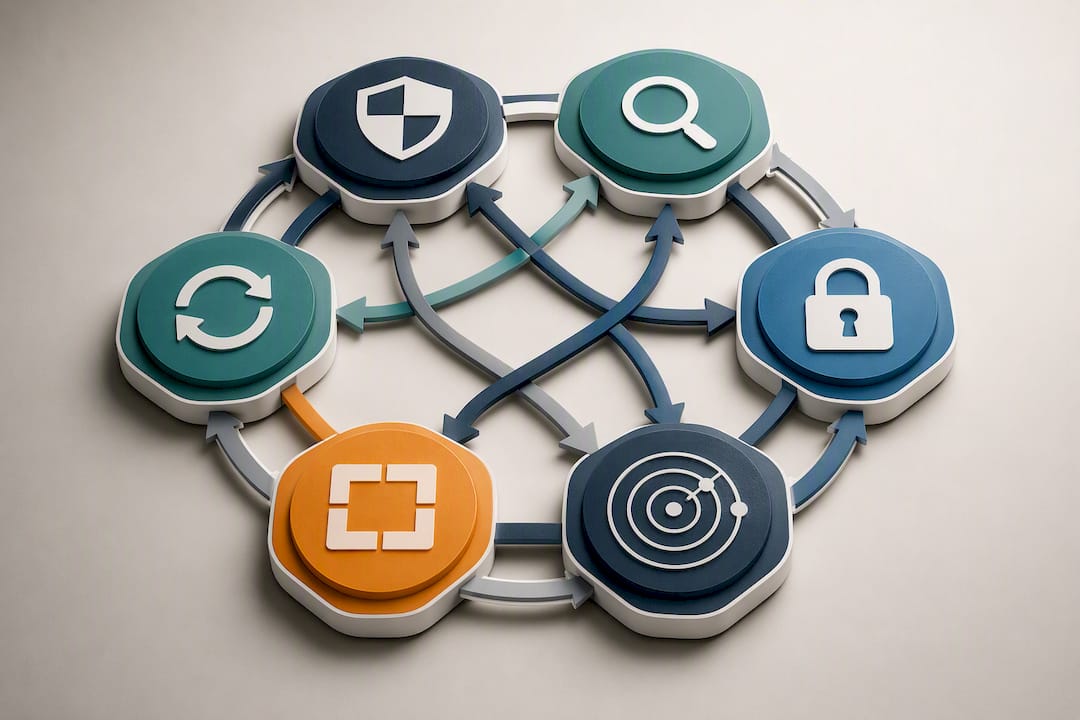
For a small or mid-sized organization, this shift actually simplifies planning, because it gives you a checklist you can revisit at any point in the year rather than a rigid runbook you only open during a crisis.
Here’s what each function should look like in your plan:
Statistic Callout: NIST’s own framing makes the point explicit: incident response works best when it’s integrated across governance, detection, response, and recovery activities rather than bolted on as a separate crisis process, according to the CSF 2.0 Community Profile in SP 800-61 Rev.3.
Every function needs a decision point built in. Who declares the incident? What’s the threshold for escalating to legal counsel? At what point do you preserve evidence versus rushing to eradicate the threat? Write these decisions into the plan now, while you’re calm, not during the incident, when you’re not.
Every incident needs an Incident Manager, and that person’s job is not technical. This trips up a lot of organizations that hand the role to their most senior engineer, who then gets pulled into fixing the problem instead of managing the response.
The Incident Manager’s real job is the clock. Incidents create a strange effect practitioners sometimes call time dilation: fifteen minutes into a live ransomware event can feel like fifteen seconds, and technical teams lose track of how long containment has actually taken. The Incident Manager tracks milestones, keeps stakeholders informed, and makes the call on escalation, while leaving the hands-on containment work to specialists.
Beyond the Incident Manager, your core team should include:
Each role needs a named backup. If your Incident Manager is on a flight when the alert fires, the plan should say exactly who steps in, with no ambiguity.
A simple RACI table clears up most of the confusion that stalls a response in its first hour:
| Activity | Incident Manager | Tech Manager | Comms Manager | Executive Sponsor |
|---|---|---|---|---|
| Declare incident | A | C | I | C |
| Contain threat | I | R/A | I | I |
| Draft customer notice | C | I | R/A | A |
| Approve ransom payment decision | C | C | I | A |
Your contact list needs to go further than names and titles. Include personal cell numbers, home email addresses, and the phone numbers for any third-party retainers, forensics firms, outside counsel, cyber insurance brokers, since your work contact directory may be part of what’s compromised.
Pro Tip: Print a physical copy of your contact list and store it somewhere other than the network it describes. A locked drawer works. A file that only lives on the server you’re trying to recover does not.
A playbook is the plan’s operational layer. It’s narrow, scenario-specific, and written so that someone under pressure at 2 a.m. can follow it without improvising.
Every playbook needs the same skeleton:
Different scenarios need different emphasis. A ransomware playbook should prioritize isolation speed and evidence preservation. Effective playbooks favour short-term isolation techniques, disconnecting a device from the network while it stays powered on, over a full reimage, because a reimage wipes the volatile memory and logs that forensic investigators need. Only skip this if retention is genuinely impossible.
A data breach playbook should prioritize scope assessment (what data, how many records, which jurisdictions) since that assessment drives your notification obligations. A phishing playbook should prioritize speed of account containment and a rapid internal alert, since a single compromised credential often spreads laterally within hours. A DDoS playbook should prioritize your provider or CDN escalation contacts and pre-negotiated mitigation triggers, since minutes of downtime often matter more than forensic depth here.
Store playbooks with version numbers and dates, and restrict edit access to the people accountable for that specific playbook. Keep a read-only copy accessible offline. ISDE’s fillable incident response template is a solid starting document if you’re building your first set from scratch, since it includes example language you can adapt line by line rather than draft cold.
An untested plan is a theory. Testing is what turns it into a capability your team can actually execute under pressure, and it’s one of the trust signals regulators and auditors look for first.
Run two types of exercises regularly:
For your first tabletop, keep the script simple: present a scenario (“an employee reports their laptop is displaying a ransom note”), then walk the room through declaration, containment, notification, and recovery decisions in real time. Note every place someone hesitates or says “I’m not sure who handles that.” Those hesitations are your action items.
Track key metrics after exercises and incidents, such as time to detect, contain, and recover, and rate of closing identified action items.
Statistic Callout: NIST SP 800-61 Rev.3 recommends tracking this type of performance data as part of continuous improvement, not just a one-time audit. A plan with no lessons identified may indicate insufficient testing.
If you want a low-friction way to establish your baseline before your first tabletop, a free cybersecurity assessment will surface the gaps worth testing against first.
Communications failures during an incident tend to do more reputational damage than the incident itself. Your plan needs to specify exactly who hears what, in what order, through what channel.
Internally, build a notification tree that doesn’t depend on systems that might be down. Executives and the board need a status update within a defined window (many organizations use one hour for a declared major incident). Staff need clear, calm guidance on what to do and, just as importantly, what not to say publicly. Use out-of-band channels, a separate messaging app, a phone tree, since your primary email and chat platforms may be part of the affected environment.
Externally, your Communications Manager and legal counsel should own drafting for:
Regulatory timelines vary by sector and jurisdiction, and this is where generic advice becomes dangerous. A healthcare provider, a financial institution, and a public company face different mandated windows and different bodies to notify. Build a simple table into your plan that maps your specific obligations to your specific regulators, and have legal counsel confirm it. Cybersecurity obligations for law firms illustrate how professional services firms carry their own notification and confidentiality duties on top of general breach law, and publicly traded companies carry additional disclosure timelines tied to board and investor reporting.
Once the immediate response winds down, reputational recovery becomes its own workstream. A step-by-step guide to managing online reputation for small and mid-sized businesses is a useful reference for the post-notification period, when customer trust needs active rebuilding rather than a single press release.
A plan without an owner decays. Assign a single accountable executive, name that person in the document, and require their signature on every version.
Every plan needs:
Fold the IRP into your broader business continuity planning rather than treating it as a standalone document. Official Canadian guidance is explicit that incident response works best when leadership commitment and business continuity integration happen together, not as separate initiatives running on separate calendars. An IRP that ignores your continuity plan risks two teams making conflicting decisions about the same downed system at the same time.
Audit the plan against ISO 27001 or your compliance framework of choice at each annual review. If your organization already maintains broader security posture documentation, tie this review into that same cycle rather than running a parallel process, which is where most plans quietly go stale.
Building your first plan from a blank page takes longer than it should. Some organizations operate as SOC 2 Type II certified providers with a 24/7 NOC, which means the checklist below reflects what actually gets used during a live incident, not just what looks complete on paper.
Before you finalize your plan, confirm you have:
Here’s a compressed ransomware decision sequence you can adapt directly into your own playbook:
Pro Tip: Assign someone whose only job during the first hour is watching the clock and logging every decision with a timestamp. Time dilation is real, and a clean timeline afterward is often what separates a defensible response from a messy one.
Your incident response plan can’t stop at your own network perimeter, because a growing share of real incidents originate with a third party. A compromised managed service provider, a breached SaaS platform, or a vendor with excessive access to your systems can all trigger an incident that your team didn’t cause and can’t directly contain.
Build a vendor-specific section into your plan that covers:
Treat cloud and Microsoft 365 vendors the same way. If your organization relies heavily on a hosted productivity platform, confirm your provider’s own incident notification commitments and back them up with your own hardened configuration and backup strategy, since you can’t outsource accountability for your own data.
The uncomfortable truth is that a vendor’s incident becomes your incident the moment it touches your data or your customers. Your notification obligations to your own customers don’t pause while you wait for a vendor’s postmortem.
Every containment decision you make in the first hour either preserves or destroys evidence you might need later, for a forensic investigation, an insurance claim, a regulatory inquiry, or a law enforcement referral. Your plan needs explicit instructions here, because “we’ll figure it out during the incident” almost always means evidence gets lost.
Build these steps into every playbook:
This is where a signed retainer with a digital forensics firm pays for itself. Negotiating scope and rates during a live breach costs you both time and leverage. Confirm your retainer’s response time commitment now, and note it directly in the contact list section of your plan.
Most organizations treat their incident response plan the way they treat a fire extinguisher: bought once, hung on the wall, and checked only when something goes wrong. That’s backwards, and it’s the single biggest gap I see between plans that look complete and plans that actually work under pressure.
NIST’s 2025 shift to continuous functions in SP 800-61 Rev.3 isn’t just a framework update. It’s a correction to how organizations have been thinking about response for years, as a phase that happens after prevention fails, rather than an ongoing discipline that runs alongside governance and detection every day. The plans that hold up during a real incident are the ones where the Incident Manager has run the tabletop enough times that the role feels familiar, not the ones with the most polished PDF.
The uncomfortable part is that this requires ongoing executive attention, not a one-time budget approval. If your leadership signs the plan once and never asks about the last tabletop result, you don’t have a capability. You have a compliance artefact. Make the review cadence a standing item on a leadership meeting agenda, not an annual scramble before an audit.
— Geeshan
Writing the plan is the easy part. Running it under real pressure, at 2 a.m., with a live threat on your network, is where most organizations discover the gaps. That’s the part NetFusion Designs Inc is built to close.

Organizations offering SOC 2 Type II certification and a 24/7 NOC can provide small and mid-sized organizations with continuous monitoring that catches an incident before it becomes a headline, plus practitioners who help author playbooks and facilitate tabletop exercises so the roles in a RACI actually get rehearsed. Instead of building detection tooling and an incident retainer from scratch, organizations can provide a team already watching your environment around the clock, ready to execute the containment steps your plan calls for.
If your organization doesn’t yet have 24/7 detection coverage backing your incident response plan, start with the 24/7 managed SOC service and book a readiness review to find out exactly where your current plan would hold up, and where it wouldn’t.
At minimum, a policy statement with leadership sign-off, a roles and contact list with backups, an incident classification scheme, scenario-specific playbooks, evidence handling procedures, and defined metrics for measuring response performance.
A Computer Security Incident Response Team (CSIRT) is the group activated specifically to manage a declared incident, while a Security Operations Centre (SOC) provides the continuous monitoring and detection that spots the incident in the first place; NetFusion Designs Inc’s 24/7 managed SOC covers the detection layer that feeds your CSIRT’s response.
Most frameworks, including Cyber.gc’s guidance, describe preparation, detection and analysis, containment, eradication, recovery, and post-incident activities as the core steps, with NIST’s updated approach now framing these as continuous functions (Govern, Identify, Protect, Detect, Respond, Recover) rather than a strict sequence.
Definitions vary across sources and there’s no single canonical version tied to incident response planning specifically, so it’s worth treating claims about a fixed number of categories with caution unless the source defines its terms clearly.
Run tabletop exercises quarterly at minimum and a full operational exercise at least annually, or immediately after any major infrastructure or business change.
%20(1).avif)
%201.avif)