For organizations with steady or growing ticket volumes, outsourcing Tier 1 and high-volume Tier 2 support delivers predictable costs, extended coverage and faster resolution. That outcome holds mainly for businesses with consistent ticket flow, a need for hours beyond 9 to 5, and an internal team stretched too thin to keep up. The trade-off only pays off when you govern it properly: written SLAs, a real pilot, and proof of security posture before you hand anyone the keys.
TL;DR:
- Outsourcing support is most cost-effective for organizations with predictable ticket volumes and the need for extended hours beyond regular business hours.
- Vendor pricing models vary: per-ticket is suitable for simple issues and fluctuating volume, while dedicated agents are better for steady, complex support needs; fixed fees provide predictability.
- Effective governance is critical to success, including clear SLAs with separate clocks, a structured onboarding plan, and regular performance reviews to prevent scope creep and SLA violations.
- Maintaining internal Tier 3 support and strategic control helps preserve institutional knowledge, especially for environments with regulatory or high-complexity requirements.
- Nearshore delivery offers a cost-effective alternative to offshore support, with better time-zone alignment and language fluency for voice support where communication quality is crucial.
The case for outsourcing rests on four measurable advantages: cost, coverage, expertise, and freed-up internal time. None of them are theoretical. Each shows up in a line item within the first billing cycle.
Cost predictability tops the list. Instead of budgeting for salaries, benefits, training, and the inevitable replacement hire when someone quits, you pay a variable contract fee tied to ticket volume or headcount. Enterprises that shift to an outsourced model routinely report IT support cost reductions of 25 to 40%, depending on scope and geography. That range matters because it is wide enough to reward smart vendor selection and punish a lazy one.
Statistic Callout: In-house help desk roles see turnover of roughly 30 to 40% annually, and every departure drags recruiting costs, training time, and a temporary dip in first-contact resolution behind it. Outsourcing converts that churn risk into a fixed monthly number.
Coverage is the second lever. A three-person internal team cannot realistically staff nights, weekends, and holidays without overtime premiums or burnout. An outsourced provider spreads that cost across many clients, so you get 24/7 coverage without paying shift differentials for your own staff.
Expertise is where the gap widens further. Small internal teams cannot sustain deep specialists in Microsoft 365, network security, and AI-assisted triage tools simultaneously. A managed provider carries that bench already, and applies enterprise-grade tooling most SMBs could never justify buying outright for a five-person desk.
The benefits break down like this:
That last point tends to get underweighted in the cost conversation. Every hour your senior engineer spends resetting a forgotten password is an hour not spent on the network migration or the security project that actually moves the business forward.
Vendors charge in one of four ways, and each one shapes vendor behaviour differently. Per-ticket pricing rewards resolving issues fast, which is good for you unless the vendor starts closing tickets prematurely to hit volume. Per-agent (dedicated) pricing rewards depth and continuity, since the same person learns your environment over time. Per-hour pricing suits short-term overflow work. Fixed managed-fee pricing bundles everything into one predictable number, which is why it dominates mature managed-services contracts.
Typical price bands look like this:
| Pricing model | Typical range | Best fit |
|---|---|---|
| Per-ticket | $6–$40 per ticket | Variable volume, simple issues |
| Per-hour | $8–$60 per hour | Short-term overflow or project work |
| Dedicated agent | a range of per-month fees for dedicated agents | Steady volume, deep context needs |
| Setup/onboarding fee | a typical one-time setup fee | Applies across most models |
These figures come from Wedoflow’s cost breakdown for buyers weighing budget against ROI. Per-ticket pricing tends to work best when volume is unpredictable and issues are simple; per-agent pricing performs better when volume is steady and the agent needs real context depth, according to the same Wedoflow analysis.
Watch for billing traps beyond the headline rate:
Channel mix changes price too. Voice support costs more than chat because it demands real-time staffing and stronger phone fluency. Nearshore delivery models commonly save 40 to 60% versus in-house for comparable coverage, with the added benefit of matching time zones, something offshore-only pricing rarely offers at the same rate.
Outsourcing fails for predictable reasons, and most of them trace back to weak governance rather than a bad vendor.
Pro Tip: Before signing anything, ask the vendor to quote a specific “time-to-scale” SLA, such as adding 50 users within a defined number of days. A provider’s answer to that question reveals whether their capacity is genuinely elastic or dependent on the same slow hiring cycle you’re trying to escape.
Outsourcing is the wrong move for very low ticket volume, heavy Tier 3 work requiring deep system access, or environments with strict on-site compliance mandates that no external contract can satisfy.
Run this sequence before signing anything, not after.
Checklist for vendor evaluation:
Questions to ask directly:
Contract terms worth insisting on include penalty clauses tied to missed SLA thresholds, a fixed reporting cadence (weekly or monthly), clearly stated minimums, and explicit billing rules for Tier 3 escalations that fall outside the base scope. Once live, require a recurring governance review, monthly at minimum, quarterly at most, to catch scope drift before it becomes a renewal-time argument. Reviewing the trade-offs between managed and in-house models before you shortlist vendors makes this checklist far easier to apply consistently.
Co-managed is the most common structure for a reason: it keeps Tier 3 and strategic architecture decisions internal while handing Tier 1 and high-volume Tier 2 to the outsourced partner. Your team retains ownership of the ticketing platform, asset inventory, and runbooks, while the outsourced desk handles the repetitive volume.
Blended (pooled) teams cost less because agents serve multiple clients, but continuity suffers slightly since you’re not guaranteed the same person twice. Dedicated teams cost more but build deeper familiarity with your environment over time.
The decision rule is straightforward:
Comparing internal versus outsourced models against your actual ticket mix, not a generic industry average, is the fastest way to land on the right structure.
Onboarding is where most outsourcing engagements succeed or quietly fail. A written 30/60/90 plan with a defined pilot scope is non-negotiable, because onboarding typically stabilizes within 60 to 90 days, and you need acceptance criteria at each checkpoint rather than a vague “let’s see how it goes.”
Statistic Callout: Tier 1 ramp generally takes 2 to 3 weeks and Tier 2 takes 4 to 6 weeks; offshore Tier 2 and Tier 3 work can take longer. Budget your pilot timeline accordingly.
Involve your IT manager, a finance stakeholder for cost tracking, and whoever owns compliance documentation. Expansion beyond the pilot should require hitting agreed thresholds on MTTR, FCR, and CSAT, not just surviving the calendar.
One Managed Intelligence Provider runs a SOC 2 Type II certified, 24/7 NOC-backed helpdesk model with teams across multiple Canadian cities. That structure maps directly onto the checklist above: security certification you can audit, extended coverage without overtime staffing, and a Canadian-based team rather than an anonymous offshore queue.
They describe themselves as a Managed Intelligence Provider rather than a traditional MSP, because the helpdesk model increasingly includes AI-assisted triage alongside human agents. That said, treat this as one auditable example of a working structure, not a substitute for running your own pilot and SLA verification with whichever provider you choose. The benefits of working with a managed provider extend well past the helpdesk line item, but the helpdesk is usually where buyers see proof first.
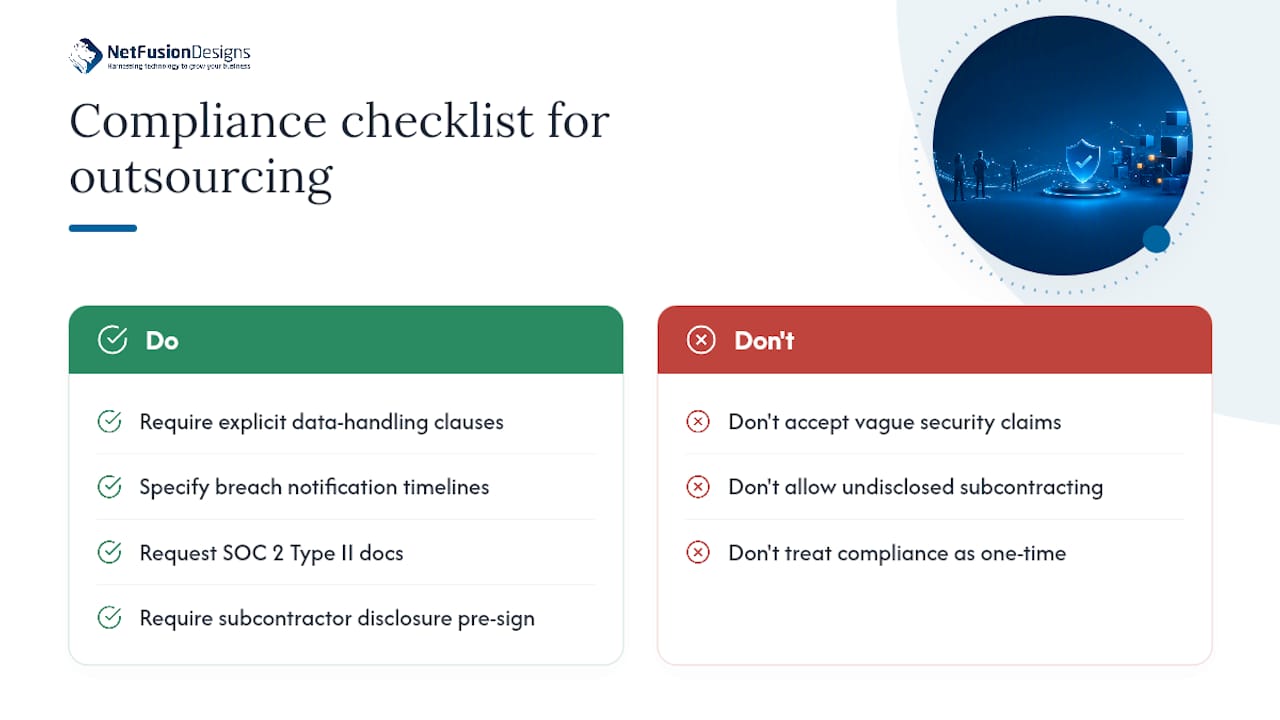
Outsourcing your helpdesk means a third party touches systems that hold personal data, financial records, or health information depending on your industry. That raises real questions before you sign anything.
Data privacy obligations apply regardless of who answers the phone. If your business handles personal information, your outsourcing contract needs explicit language on data handling, breach notification timelines, and where data physically resides. Industry-specific requirements add another layer: healthcare-adjacent businesses, financial services firms, and legal practices each carry sector rules about who can access client records and under what conditions.
Security certification is the practical proof point here. Ask any prospective vendor for SOC 2 Type II documentation, not just a claim of “enterprise-grade security” on a sales page. SOC 2 Type II specifically demonstrates that security controls were tested over a period of time, not just designed on paper.
Subcontracting compounds compliance risk quietly. If your vendor routes tickets to a third-party contractor without disclosure, your compliance obligations may extend to a party you never vetted. This is why the contract questions in the evaluation checklist matter as much as the SLA numbers. A vendor unwilling to answer subcontracting questions directly is telling you something important before you’ve even signed.
Build compliance review into your governance cadence rather than treating it as a one-time signing exercise. Regulations shift, your data footprint grows, and a vendor’s own subcontracting arrangements can change mid-contract without you noticing unless you ask.
Time zone alignment sounds like a minor detail until your users are waiting on a ticket at 2 p.m. while the support desk is asleep. Nearshore delivery models solve this more reliably than offshore-only models, since the working hours overlap with North American business days without the premium of fully domestic staffing.
Language fluency affects more than accent. Phone-based support depends on tone, idiom, and the ability to de-escalate a frustrated user in real time, not just technical accuracy. Chat-based support tolerates language gaps better because users have time to read and reread a response. If your ticket mix leans heavily toward voice, prioritize providers with demonstrated phone fluency over the cheapest hourly rate.
Company culture mismatch shows up subtly. An outsourced agent who doesn’t understand your internal shorthand, your escalation politics, or which executives get white-glove treatment will make small missteps that erode user trust faster than a slow resolution time ever would. This is exactly why runbooks and a documented escalation matrix matter as much as the SLA itself: they encode culture into process, so the agent doesn’t need to guess.
The practical fix is deliberate onboarding that goes beyond technical documentation. Include a short cultural brief covering internal terminology, key stakeholders, and tone expectations. Providers who ask for this upfront tend to integrate faster than those who only ask for network diagrams.
The pattern across successful engagements tends to follow the same shape: a defined pilot, a co-managed structure that keeps Tier 3 internal, and metrics tracked from day one rather than added later as an afterthought.
A mid-sized company running a lean two-person internal IT team, for example, typically outsources Tier 1 and high-volume Tier 2 first, using a blended team model to control cost while volume is still being measured. Tier 3 architecture work and vendor management stay internal, preserving control over the decisions that carry the most business risk. Within the first 90 days, the acceptance criteria usually centre on FCR improvement and reopen rate reduction rather than raw ticket count, since raw volume tells you nothing about whether users are actually getting resolved issues.
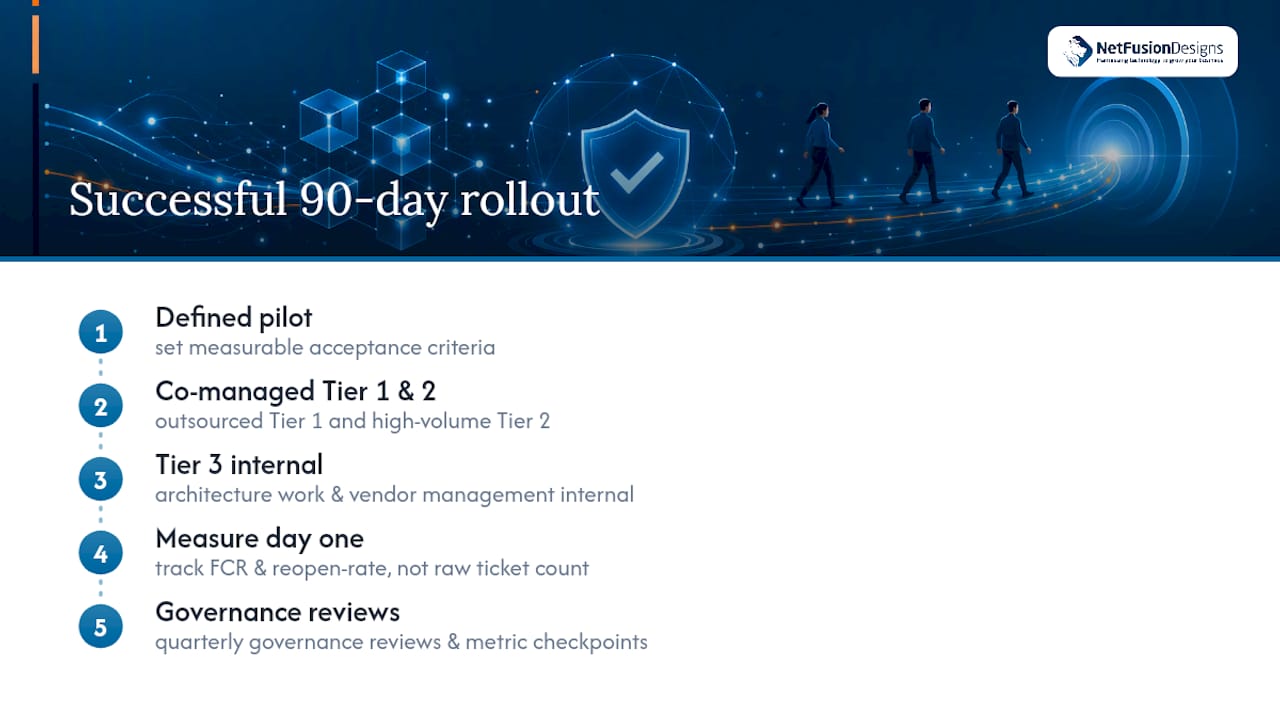
The failure pattern looks almost identical in reverse: skipping the pilot, accepting a blended SLA number instead of separate acknowledgment and resolution clocks, and discovering three months in that Tier 2 work has quietly crept into the contract without a corresponding rate adjustment. Buyers who treat outsourcing as an ongoing operating decision, with quarterly governance reviews and metric checkpoints, consistently report smoother scaling than those who treat the signed contract as the finish line.
The common thread in engagements that hold up over multiple renewal cycles isn’t the vendor’s size or brand name. It’s whether the buyer insisted on measurable acceptance criteria before expanding scope.
We tend to recommend co-managed setups over full outsourcing for most clients we talk to, mainly because keeping Tier 3 internal protects institutional knowledge while still freeing your team from the ticket grind. What we watch for isn’t just lower cost. It’s whether the SLA improvements and freed engineering hours actually show up in the numbers by day 90. If you’re heading into a vendor conversation, bring one question above all others: ask for their time-to-scale SLA in writing before you ask about price.
— Geeshan
There are several routes to solving helpdesk strain, from hiring more internal staff to piecing together an offshore contractor arrangement. One provider offers a SOC 2 Type II certified, 24/7 helpdesk backed by a Canadian NOC and a pilot-first onboarding process, so you’re never signing a contract without seeing performance data first.

Their onboarding follows SLA-first discipline: separate acknowledgment, escalation, and resolution clocks, a written pilot scope, and metrics reviewed at 30, 60, and 90 days before any expansion of scope. If you’re weighing outsourced IT support against building out an internal team, request a pilot scope and a sample SLA from us before you commit to either direction. Businesses in the Mississauga area looking for a local, auditable partner can start with our Mississauga IT services page to request a quote by ticket volume or dedicated-agent pricing, whichever fits your ticket profile better.
The core it helpdesk outsourcing benefits are cost predictability, 24/7 coverage without overtime staffing, faster resolution through dedicated tooling, and freed internal capacity for strategic projects.
IT helpdesk work remains a solid entry point into IT careers, offering broad technical exposure, though in-house roles see turnover of 30 to 40% annually, which is one reason many businesses outsource the function entirely.
Beyond helpdesk specifically, outsourcing generally converts fixed costs into variable ones, provides access to specialized skills without full-time hires, and reduces the operational burden of staffing and turnover management.
A managed helpdesk service with SOC 2 Type II certification and a 24/7 NOC provides measurable SLAs, consistent reporting, and coverage hours that would be costly to staff internally.
Pricing depends on the model: per-ticket runs $6 to $40, per-hour runs $8 to $60, and dedicated agents run $924 to $4,500 or more per month, plus a typical one-time setup fee of $1,500 to $5,000.
%20(1).avif)
%201.avif)