Microsoft 365 alone is not sufficient for real business continuity. Its native retention windows are built for short-term recovery, not disaster protection, and the Canadian Centre for Cyber Security explicitly calls for independent, encrypted copies and regular restore testing. If you have not confirmed your retention settings or tried a restore in the last 90 days, do that this week, not after an incident.
TL;DR:
- Microsoft 365 native retention windows are short-term solutions and require regular testing and verification to ensure data recovery is possible.
- Native retention does not cover audit logs or compliance records, and it offers no protection against ransomware that encrypts live data and recycle bins simultaneously.
- Microsoft 365 Backup is a separate, paid service with a default one-year recovery window, and policies must be carefully configured to match actual business needs.
- Building an effective backup plan involves defining scope, setting realistic recovery objectives, storing independent copies, encrypting data, and consistently testing restore procedures.
- Operational ownership, including monitoring, testing, and dedicated personnel, is more critical than the backup product itself for actual data recovery success.
Microsoft 365 gives you meaningful protection out of the box, but every workload has a clock running on it. Understanding those clocks is the first step toward knowing whether your business is actually covered or just assumes it is.
Exchange Online keeps deleted items for 14 days by default, and admins can extend that retention up to 30 days. A mailbox that gets soft-deleted, say, after an employee leaves and IT removes the account, sticks around for up to 30 days before it is gone for good. That sounds generous until you consider how many businesses discover a deletion problem weeks after it happened, not days.
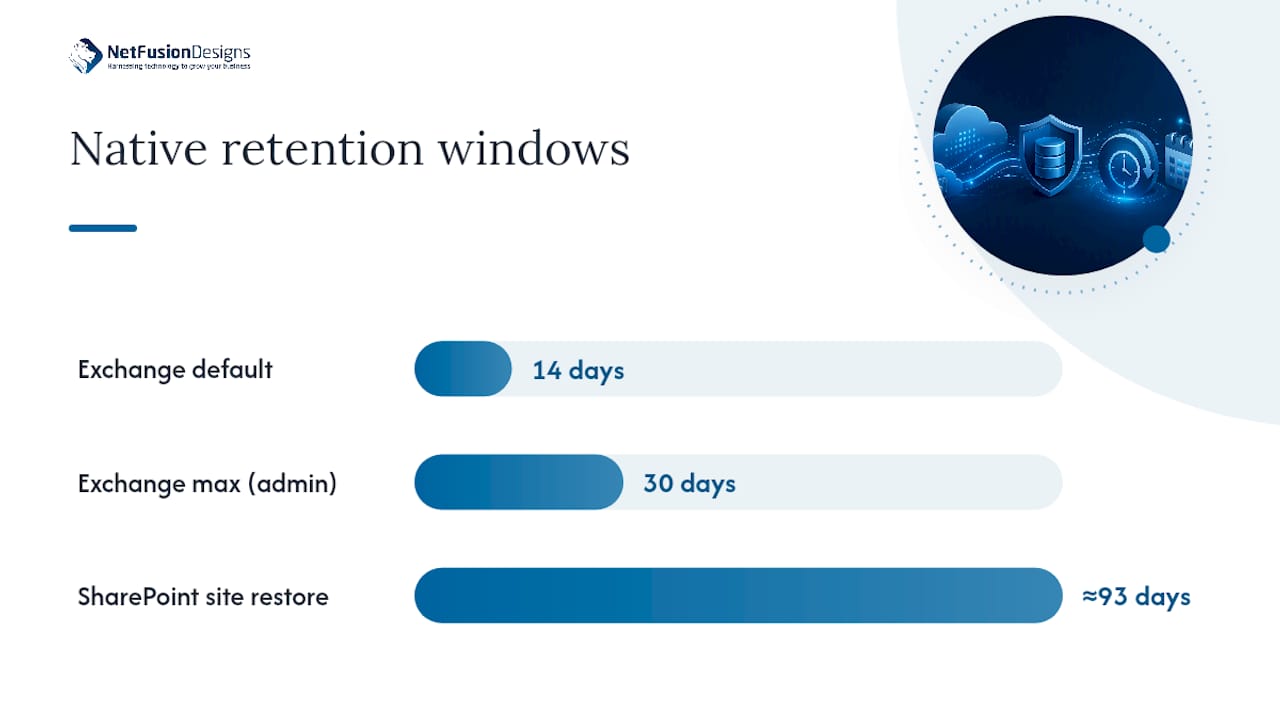
SharePoint and OneDrive work on a similar logic but with more moving parts. Deleted files pass through a first-stage and second-stage recycle bin, and an entire deleted site can be recovered for roughly 93 days before it is permanently purged. Microsoft holds an additional limited retention period of site backups specifically to support full site collection restores, but that is the outer edge, not a safety net you can rely on indefinitely.
Three practical gaps trip up SMBs more than any single retention number:
Microsoft does sell a purpose-built backup product, separate from native retention, called Microsoft 365 Backup. It covers Exchange Online mailboxes, OneDrive accounts, and SharePoint sites, and it is priced as a consumption service rather than a flat monthly fee.
Pro Tip: Before you assume Microsoft 365 Backup solves everything, check whether your compliance obligations require audit-log retention, since that workload sits outside the product’s standard coverage.
Microsoft publishes a rate of US$0.15 per GB per month, and new policies default to a recovery window of about one year unless an administrator changes it. That default matters: a business assuming “Microsoft backs it up forever” is wrong, and a business that never checks the policy setting may find its actual protection window is shorter than expected.
Setting up policies involves a few mechanical choices worth understanding before you flip the switch:
A backup plan is not a product purchase. It is a short sequence of decisions that determine whether your business can actually get back to work after data loss, and most SMBs skip at least two of the six steps below.
Pro Tip: Treat step six as non-negotiable. A backup system that has never restored anything in production is functionally unproven, no matter how well the vendor’s dashboard looks.
Confidence in a backup system comes from restoring something, not from a green checkmark on a dashboard. Run these specific tests on a recurring schedule, not just once after setup:
Offboarding deserves the same rigour. When a departing employee’s licence is removed, some retention features stop applying immediately, so your offboarding workflow needs a step that preserves or reassigns that person’s data before licence removal, not after.
| Restore test | What to verify | Who owns it |
|---|---|---|
| Single email | Metadata, folder, read status | IT admin |
| Full mailbox | Elapsed time, completeness | IT admin + manager sign-off |
| SharePoint site | Permissions, versions | IT admin + site owner |
| OneDrive file | Version history intact | End user + IT admin |
Assign one person to authorize restores, a separate person to perform them, and store backup credentials with the same access discipline you apply to your domain admin account.

A backup product is only as good as the people running it. That is the uncomfortable truth most vendor pitches skip: the failure mode that actually sinks businesses is rarely “we picked the wrong tool,” it is “nobody tested the restore” or “the backup credentials were sitting in a shared spreadsheet.”
NetFusion Designs Inc operates under SOC 2 Type II certification with a 24/7 NOC watching for failed backup jobs before they become failed recoveries, and we run tested restores as a standing operational practice, not a one-time onboarding checkbox. If your internal IT team is stretched thin across helpdesk tickets, security patching, and everything else, a managed provider closes the gap between owning a backup tool and actually being able to recover from it.
— Geeshan
Buying a backup tool and knowing you can recover from it are two different problems, and most SMBs only discover the gap between them during an actual incident. NetFusion Designs Inc’s Cloud Backup & Disaster Recovery service is built around the practices this article just walked through: independent copies outside your production tenant, encryption, restricted restore access, and scheduled restore tests with documented results.

A typical engagement starts with an assessment of your current Exchange, OneDrive, and SharePoint retention settings, followed by policy design that matches your actual recovery time and recovery point needs, and a first test restore so you see proof of recoverability before you ever need it in a real emergency. We also handle Microsoft 365 optimization alongside backup, since tenant hygiene and backup coverage are closely linked, especially during offboarding. If you want a straightforward next step, request a backup assessment through our managed IT services page and we will walk you through exactly what your current setup does and does not cover.
No. Native retention windows, like the 14 to 30 day mailbox recovery period and the 93-day SharePoint site deletion window, are designed for short-term recovery, not indefinite protection. A true backup keeps an independent copy outside your production tenant.
Start with Exchange mailboxes, OneDrive accounts, and SharePoint sites tied to daily operations, then extend to Teams data. Anything supporting a regulatory or client obligation should be prioritized regardless of how often it is used.
Run at least one documented restore test per quarter, covering a single file, a full mailbox, and a SharePoint site or folder. The Canadian Centre for Cyber Security treats regular verification as a core requirement, not an optional extra.
Microsoft prices Microsoft 365 Backup at US$0.15 per GB per month with a default one-year recovery window. It covers Exchange, OneDrive, and SharePoint, but not all audit-log data, so check compliance requirements separately.
If your internal team already struggles to monitor failed jobs or test restores consistently, a managed provider closes that gap. NetFusion Designs Inc’s current pricing for managed backup and disaster recovery is available directly on the site.
%20(1).avif)
%201.avif)