Zero Trust for an SMB means one thing in practice: never assume a login, device, or network location is safe just because it looks familiar, and verify every request before granting access. The single highest-impact first step is enabling multi-factor authentication (MFA) across every account, especially email and admin logins. Microsoft’s own security data shows MFA blocks the vast majority of automated account-compromise attempts(https://www.microsoft.com/en-us/security/business/security-101/how-effective-is-multifactor-authentication-at-deterring-cyberattacks), making it the fastest, cheapest control an SMB can deploy this week.
TL;DR:
- Enforcing MFA on all accounts, especially email and admin logins, is the most impactful first step, blocking over 99% of automated account compromises.
- SMBs can implement Zero Trust principles by reconfiguring existing tools such as Microsoft 365, firewalls, and endpoint security, avoiding costly hardware upgrades.
- Sequential phases—identity verification, device management, and network segmentation—spread implementation over roughly six months and reduce risks progressively.
- Prioritizing high-impact controls like MFA, device compliance, and network segmentation offers the best return on effort for small teams with limited security resources.
- Continuous monitoring, access reviews, and policy updates are essential to maintain effective Zero Trust practices beyond initial deployment.
Zero Trust is not a product you buy. It is a set of principles applied to the tools you already run: your email platform, your firewall, your laptops. That distinction matters for SMBs because it means you do not need a six-figure security stack to start.
The model rests on three ideas. Verify explicitly means every access request gets checked against identity, device health, and context, not just a password. Least privilege means people and applications get only the access they need for their specific task, nothing broader. Assume breach means you design your systems expecting that an attacker will eventually get inside, so you limit what they can reach once they do.
NIST SP 800-207 breaks this down into five practical pillars an SMB can map to existing infrastructure:
For a 15-person accounting firm or a 40-employee manufacturer, this usually means reconfiguring Microsoft 365, your firewall, and your endpoint tools, not replacing them.
Credential theft, phishing, and ransomware remain the three attack paths that hit small businesses hardest, and Zero Trust directly interrupts all three. A stolen password alone can no longer unlock an account when MFA sits in front of it. A phished employee cannot hand an attacker the keys to the whole network when access is segmented by identity and device health rather than by network location.
MFA blocks more than 99% of automated account-compromise attacks, according to Microsoft’s security research. That single statistic explains why every major framework, including the Canadian Centre for Cyber Security’s Zero Trust guidance, lists MFA as the starting point rather than an optional add-on.
Beyond blocking attacks outright, Zero Trust shrinks the blast radius when something does go wrong. If a laptop gets compromised, segmentation and least-privilege access limit what the attacker can touch, and centralized logging gives you an audit trail. That auditability increasingly matters for cyber insurance renewals and client compliance questionnaires, where insurers now routinely ask whether MFA and access controls are enforced organization-wide.
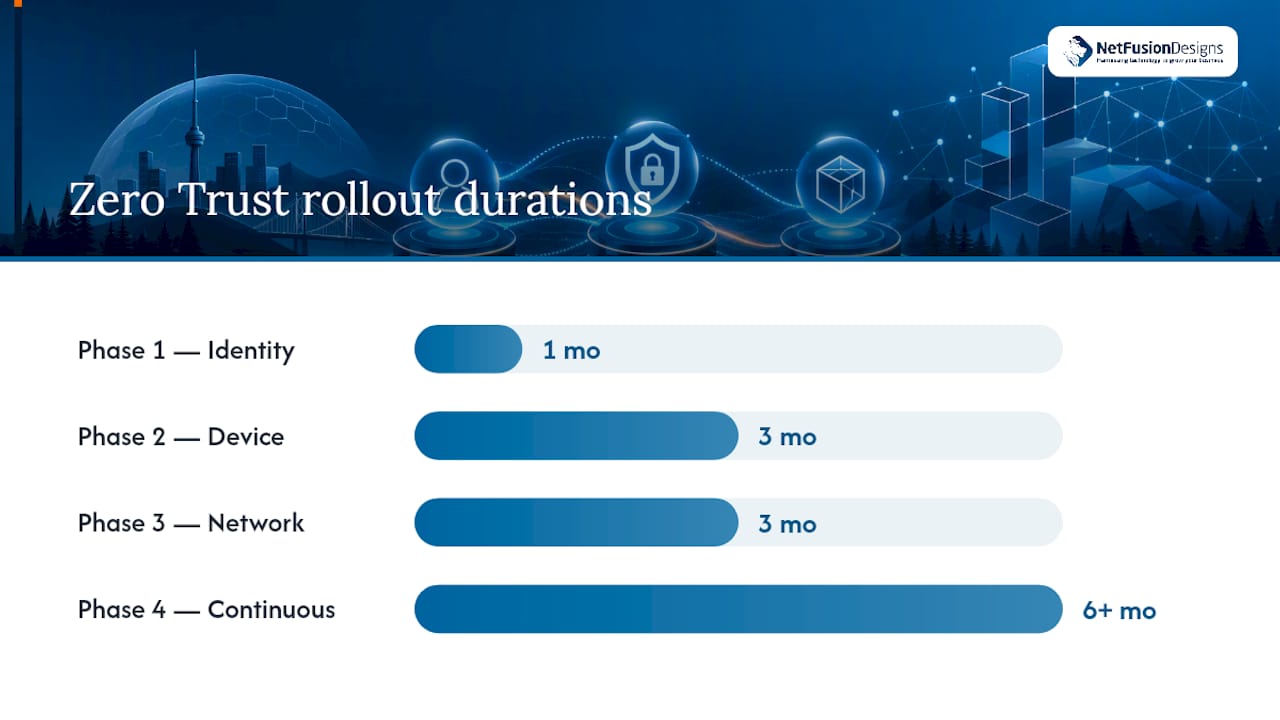
You do not need to rebuild your network overnight. The most realistic path treats Zero Trust as four sequenced phases, each building on the last, spread across roughly six months.
This sequencing matches how the Canadian Centre for Cyber Security frames the transition: start with strong authentication and identity, then layer device and network controls, then move to just-in-time and just-enough access as policies mature.
Pro Tip: Do not wait for Phase 3 to start logging. Turn on basic sign-in and admin activity logs during Phase 1. It costs almost nothing, and it gives you a baseline to compare against once you start tightening access rules later.
Cloud providers increasingly frame this same approach as achievable without ripping out infrastructure, sequencing identity, device management, and monitoring using tools most SMBs already have licences for.
The gap between “we enabled MFA” and “MFA covers every account, including service accounts,” is where most SMB security programs quietly fail. Attackers know this and specifically hunt for the forgotten API key or legacy service account that never got the same treatment as human logins.
A few implementation details separate a working Zero Trust setup from a paper one:
Pro Tip: If your team already has Microsoft 365 Business Premium, you likely own most of the identity and device tools needed for Phases 1 and 2. Check your existing licence before buying anything new.
Not every control delivers equal value for equal effort, so prioritize using a simple impact-versus-effort lens rather than trying to do everything at once.
| Control | Impact | Effort for a small IT team |
|---|---|---|
| MFA on all accounts | Very high | Low |
| SSO consolidation | High | Medium |
| MDM enrolment | High | Medium |
| EDR deployment | High | Medium |
| VLAN segmentation | Medium | Medium |
| ZTNA pilot | Medium | High |
| SIEM/MDR | Medium | High (or outsourced) |
The baseline controls published by the Canadian Centre for Cyber Security are built around exactly this logic: cheap, high-impact measures like patching, MFA, and network separation come before expensive tooling.
Budget shape matters too. In-house configuration of MFA, SSO, and MDM is mostly a time cost if you already have IT staff. A round-the-clock security operations centre (SOC) or MDR service is an ongoing operating expense, but it becomes the right call once you lack staff to monitor alerts overnight or respond to an incident at 2 a.m. If your team is stretched thin covering helpdesk tickets, that is usually the clearest signal it is time to bring in a managed provider rather than keep DIY-ing detection and response.
NetFusion Designs Inc’s engagement with the Ontario Soil and Crop Improvement Association followed this same phased logic: identity and MFA first, then device management, then a cloud migration with segmented access. The organization’s SOC 2 Type II certification and 24/7 network operations centre (NOC) meant continuous monitoring was already in place before the migration began, rather than bolted on afterward. The recurring lesson across similar deployments: teams that skip the identity cleanup step and jump straight to network segmentation end up rebuilding access policies twice.
A calendar-based plan makes it easier to report progress and get budget sign-off, since it shows concrete milestones instead of an open-ended project.
Each 30-day block produces something you can point to in a leadership update: a percentage of accounts covered, a number of devices enrolled, a completed tabletop drill.
The biggest misconception is that Zero Trust requires ripping out your existing network and buying an entirely new stack. It does not. Most SMBs already own the licences (Microsoft 365, business-class firewalls, endpoint tools) needed for the first two phases; the real cost is configuration time and expertise, not new hardware.
A second common mistake is treating Zero Trust as a project with an end date rather than an operating model. Teams celebrate hitting “100% MFA coverage” and then stop reviewing access for a year, during which new hires, contractors, and forgotten service accounts quietly erode that coverage.
A third challenge is underestimating user friction. Rolling out conditional access or device compliance checks without warning staff first generates a wave of helpdesk tickets and, worse, workarounds like personal email forwarding that reintroduce the exact risk you were trying to close.
Finally, many SMB owners assume Zero Trust is only relevant to larger enterprises with dedicated security teams. The opposite is closer to true: smaller organizations often have fewer legacy systems and simpler network topologies, which makes the identity and device phases faster to complete than in a sprawling enterprise environment.
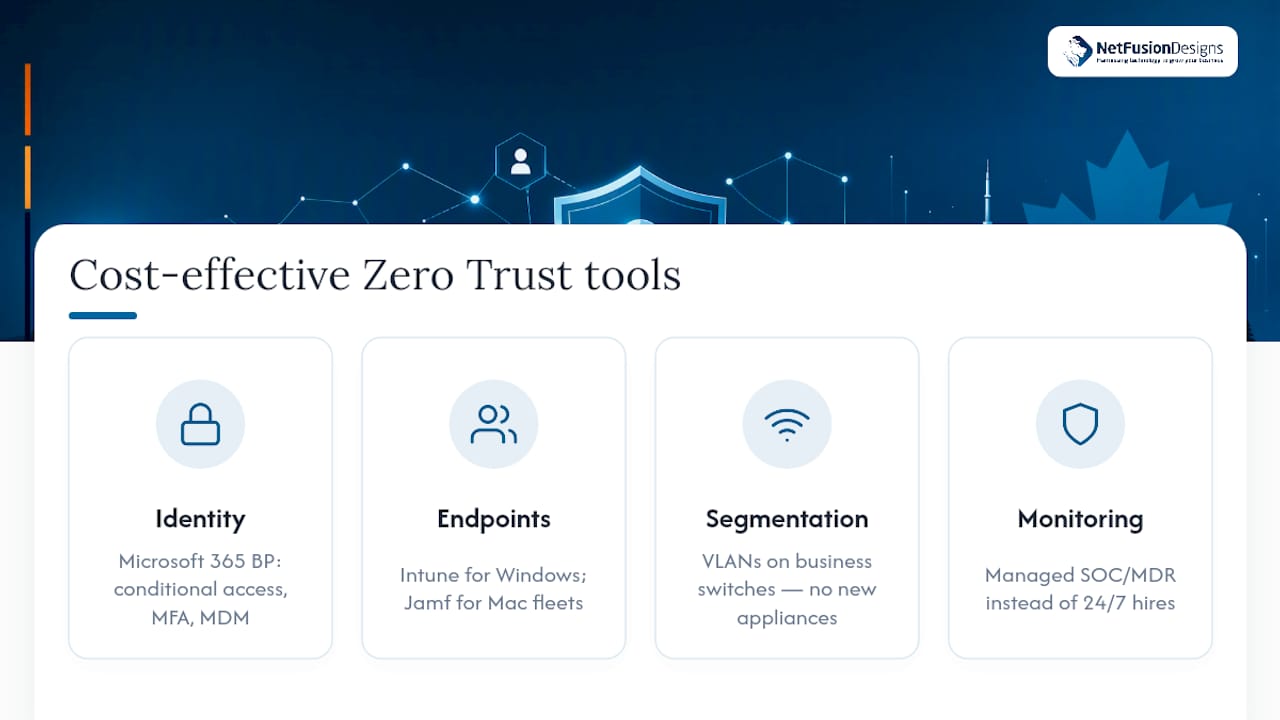
You do not need enterprise pricing to run a credible Zero Trust program for SMB growth. Microsoft’s Zero Trust guidance for small businesses maps Microsoft 365 Business Premium features directly to Zero Trust pillars, meaning many SMBs already own conditional access, MDM (Intune), and MFA capability inside a licence they are paying for regardless.
For device management specifically, Microsoft Intune covers Windows environments, while Jamf is the standard choice for Apple-heavy fleets, particularly agencies, design studios, and firms running Mac hardware. Both plug into conditional access policies so non-compliant devices get blocked automatically rather than flagged after the fact.
Network segmentation does not require new appliances in most cases. VLANs configured on business-class switches you likely already own separate finance systems, guest Wi-Fi, and general staff traffic effectively, without the capital cost of enterprise-grade segmentation hardware.
The Cloud Security Alliance’s SMB-specific guidance reinforces this incremental approach: identity verification, endpoint security, and segmentation, each built one step at a time rather than deployed as a single enterprise rollout. For teams without in-house security staff, a managed SOC and MDR service replaces the need to hire around-the-clock monitoring internally, shifting a capital problem into a predictable operating cost.
Zero Trust is not something you finish and walk away from. It needs ongoing measurement, or coverage quietly decays as staff, contractors, and devices change.
Track a small set of metrics monthly rather than trying to measure everything: MFA coverage percentage across all accounts including service accounts, the number of devices enrolled in MDM versus your total device count, and the average time between an EDR alert and its resolution. A quarterly access review, checking who still has admin rights and whether every service account still has an active owner, catches the drift that daily monitoring tools miss.
Centralized logging, even a modest setup pulling sign-in logs and endpoint alerts into one dashboard, turns monitoring from a reactive scramble into a repeatable habit. Once logging is in place, alert tuning matters more than alert volume; a flood of low-priority notifications trains staff to ignore everything, which defeats the purpose of monitoring in the first place.
Beyond the Ontario Soil and Crop Improvement Association engagement, the pattern across smaller organizations tends to repeat: identity first, device posture second, network changes last. A regional accounting firm might start by enforcing MFA and SSO across its 20 staff accounts, then move to Intune enrolment for laptops handling client tax data, then finally segment its bookkeeping software onto its own VLAN separate from general office traffic.
A manufacturing shop with a mix of office staff and shop-floor terminals often follows a similar path but adds ZTNA earlier, since VPN access to shared drives from personal devices is a common early risk in that environment. In both cases, the sequencing matters more than the specific tools chosen. Businesses that try to segment their network before locking down identity tend to rebuild their access policies once they eventually add MFA, since the two need to work together from the start.
Zero Trust reduces the damage an attacker can do. It does not make a breach impossible, and any vendor implying otherwise is overselling. What Zero Trust actually buys you is a smaller blast radius and faster containment when, not if, something slips through.
That only holds if someone owns the ongoing work. Quarterly access reviews, policy updates as staff change, and user training after every rollout are not optional extras. Skip them, and your carefully configured access policies drift back toward the flat, trust-everything network you started with.
— Geeshan
Configuring MFA, conditional access, and device compliance correctly across a growing team takes time most SMB owners do not have between running the actual business. NetFusion Designs Inc is SOC 2 Type II certified with a 24/7 NOC, which means the monitoring and incident response layer of your Zero Trust roadmap, the part that catches what slips past your access controls, is already running rather than something you have to build from scratch.

Our managed security services, including SOC and MDR, EDR, and penetration testing, map directly onto Phases 2 through 4 of the roadmap above: device posture, network monitoring, and continuous improvement. If your team has already handled MFA and SSO in-house and wants help with the harder segmentation and monitoring pieces, or if you would rather hand the whole sequence to a single provider instead of managing five vendors, a Zero Trust readiness review is the fastest way to see where your current setup stands and what phase to tackle next.
Zero Trust means no login, device, or network location is trusted automatically, every access request gets verified against identity and device health first. For an SMB, it starts with enforcing MFA on every account and gradually extends to device checks and network segmentation.
Yes. Antivirus and firewalls protect against known threats at the perimeter, but they do nothing once an attacker has valid stolen credentials, which is how most breaches start. Zero Trust closes that gap by requiring MFA and continuously checking device health, rather than trusting anyone already inside the network.
ZTNA and network access control (NAC) solve related but different problems: NAC controls which devices can join a physical network, while ZTNA controls which specific applications a verified user and device can reach, regardless of network location. Many SMBs use ZTNA to replace broad VPN access for cloud applications while keeping simpler NAC or VLAN rules for on-premises segmentation.
Enforcing MFA on every account, using conditional access so only compliant devices can log in, and segmenting finance systems onto a separate VLAN are all everyday examples. NetFusion Designs Inc’s work with the Ontario Soil and Crop Improvement Association followed this same identity-first, device-second sequencing during a cloud migration.
Cost depends heavily on what you already own; many SMBs already have MFA, conditional access, and device management bundled into an existing Microsoft 365 licence, so the main cost is configuration time. Current pricing for managed implementation and ongoing monitoring through NetFusion Designs Inc is available directly on the Managed IT Services page.
%20(1).avif)
%201.avif)