The right model for nonprofit IT support is a proactive, managed services partnership with a provider that understands restricted budgets, donor data, and grant reporting — not a break/fix vendor you call when something breaks. Your single best next step: schedule a discovery audit that documents every account, maps where donor data lives, and confirms your backup status before any remediation begins.
Why this matters right now:
Managed IT for nonprofits covers far more than a helpdesk. A well-scoped agreement typically includes:
The hidden value of managed services sits in the background: automated patching, ongoing backup verification, and strategic planning that most nonprofits have simply never had access to before.
Project work — office moves, donor-database migrations, specialised integrations — sits outside the monthly scope and is typically quoted separately. Watch for contracts that are vague about this boundary. Per-user or per-device pricing is the most common model; ask specifically what is excluded before you sign.

Generic IT providers often miss the constraints that define nonprofit operations. Providers with nonprofit experience tailor billing and project phasing to funding cycles and donor-data needs — a standard commercial MSP rarely thinks in those terms.
The practical gaps show up quickly:
A nonprofit-aware partner documents volunteer offboarding, phases projects around grant cycles, and knows which Microsoft 365 licences qualify for nonprofit pricing. That sector knowledge has real dollar value.
Nonprofit organisations handle some of the most sensitive data in any sector: donor records, financial files, beneficiary details, and sometimes health information. According to NTEN’s State of Nonprofit Cybersecurity Report, many nonprofits lack documented cyberattack response policies and do not provide regular cybersecurity training to staff.
Statistic: One provider reported a roughly 50% reduction in downtime after moving from break/fix to proactive managed services.
Your IT partner should deliver these baseline controls without negotiation:
For compliance, ask your provider for SOC 2 Type 2 evidence or an equivalent controls mapping. If your organisation handles payment data or health information, request explicit help mapping to PCI or HIPAA requirements. SLA-defined incident response times should be written into the contract, not left as a verbal promise.
Pro Tip: Request a sample identity audit report from any provider you are evaluating. A provider that cannot show you one has likely never done a formal audit.
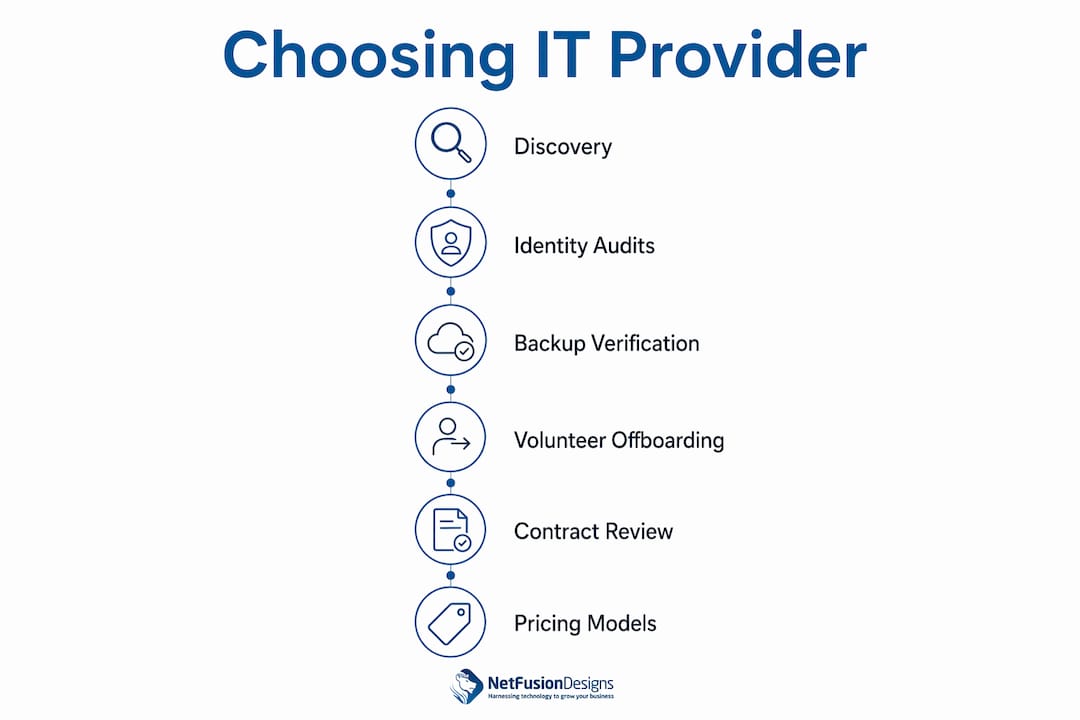
Selecting a managed IT partner is a structured process, not a price comparison. Work through this checklist in order:
Questions to ask on the first call: What does your discovery process cover? How often do you run identity audits? How do you verify backups? What is your policy for removing volunteer accounts?
Red flags: multi-year lock-in contracts with no exit clause, no documented onboarding process, SLA metrics that are vague or absent, surprise billing line items, or an inability to produce any security attestation.
Pricing model comparison: Break/fix costs are unpredictable and spike during crises. Fully managed services convert IT spend to a predictable monthly operating expense. Co-managed arrangements split responsibility between your internal staff and an MSP, which suits organisations with smaller internal IT teams needing specialist backup.
Pro Tip: For small to mid-sized organisations, an outsourced managed team often delivers broader daily coverage and specialised capabilities at a lower total cost than a single internal hire.
| Phase | Typical duration | Key activities |
|---|---|---|
| Discovery and inventory | Weeks 1–2 | Account audit, device inventory, donor-data mapping, backup status |
| Baseline remediation | Weeks 3–5 | MFA rollout, patching, backup configuration, credential cleanup |
| Migration and workstreams | Weeks 4–6 | Cloud migrations, application integrations, network changes |
| Documentation and training | Weeks 6–10 | Runbooks, staff training, volunteer account policies |
| Quarterly vCIO planning | Ongoing | Roadmapping, budget planning, compliance reviews |
Common blockers that extend timelines include legacy on-premises servers, undocumented shared credentials, and donor-database integrations that require vendor coordination. Budget for these upfront.
Primary cost drivers: number of users and devices, legacy infrastructure, donor-database integrations, compliance applications, and one-time remediation fees. Treat recurring managed services as an operating expense; use grants for one-time transformation projects and consider equipment donations selectively for non-core devices.
Small, practical AI pilots deliver measurable time savings without heavy upfront investment. The highest-value starting points for most nonprofits:
Start with data hygiene: AI tools are only as reliable as the data they process. Pilot on non-sensitive datasets first, integrate with your existing CRM or donor system, and build in audit trails so you can explain every automated decision. Protect donor personally identifiable information (PII) at every stage, and plan for human oversight on any output that affects a donor or beneficiary directly.
Pro Tip: AI workforce training for your staff is as important as the tools themselves. A well-trained team extracts far more value from automation than one handed a tool with no context.
Training is not a one-time event. Staff and volunteers need clear guidance on the tools they use, the data they handle, and what to do when something goes wrong. A managed IT partner should deliver security awareness training at least annually, run simulated phishing exercises, and provide accessible documentation for common tasks.
Volunteers present a specific challenge: they may use personal devices, rotate frequently, and have inconsistent technical skills. Define which volunteers receive IT support, what access they need, and when their accounts must be removed. Documented offboarding is not optional when volunteers have access to donor records or financial systems.
Nonprofits collect donor names, addresses, payment details, and sometimes health or demographic information. Canadian organisations are subject to PIPEDA (and provincial equivalents), while US-based nonprofits may face state privacy laws alongside HIPAA or PCI requirements depending on the data they handle.
Your IT partner should help you document a data processing policy that covers what data you collect, where it is stored, who can access it, how long you retain it, and how you respond to a breach. Donor data protection starts with knowing exactly where that data lives — which is precisely why the discovery audit is the first step, not an afterthought.
This article is general information, not legal or compliance advice. Confirm your specific obligations with a qualified privacy professional or your relevant regulatory authority.
Donor management platforms — Salesforce Nonprofit Success Pack, Raiser’s Edge NXT, Bloomerang, and similar tools — sit at the centre of most nonprofit operations. Your IT partner needs to understand how these systems connect to Microsoft 365, your accounting software, your payment processor, and your reporting tools.
Integration failures create data gaps that affect grant reporting and donor communication. Before signing with any provider, confirm they have experience with your specific donor platform and can support API-level integrations, not just basic helpdesk tickets about login problems. Custom application and integration work may be required for complex environments.
A ransomware attack or server failure during a fundraising campaign can cost a nonprofit weeks of recovery time and permanent donor trust. Disaster recovery planning means more than having a backup: it means knowing how fast you can restore operations, who makes decisions during an incident, and how you communicate with donors and funders while systems are down.
Your IT partner should test backups regularly, document a recovery time objective (RTO) and recovery point objective (RPO) for your critical systems, and run a tabletop exercise at least once a year. Financial systems security guidance recommends structured, tested recovery protocols as a baseline expectation, not an advanced capability.

NetFusion Designs Inc delivers the predictable, proactive IT foundation that nonprofits need without the overhead of building an internal team. As a SOC 2 Type 2–attested provider with a 24/7 NOC, NetFusion Designs Inc covers security, monitoring, helpdesk, Microsoft 365 administration, and vCIO planning under one monthly agreement. The AI enablement practice adds practical automation — donor acknowledgement workflows, reporting tools, and staff training — so your team spends less time on manual tasks and more time on your mission.
Organisations across Ontario and Canada work with NetFusion Designs Inc for one concrete reason: predictable costs, documented processes, and a named account manager who knows their environment. For nonprofits ready to move from reactive IT to a managed model, the starting point is a managed IT services assessment. If you need faster help, emergency IT support is available around the clock.
Managed, nonprofit-aware IT support converts unpredictable technology costs into a planned operating expense while protecting donor data, maintaining grant-reporting continuity, and reducing downtime by up to 50%.
| Point | Details |
|---|---|
| Start with a discovery audit | Document every account, map donor-data locations, and confirm backup status before any remediation. |
| Require sector experience | Providers with nonprofit experience tailor billing, project phasing, and vendor choices to funding cycles. |
| Managed services pricing | Expect $100–$250 per user per month; plans with vCIO and advanced security sit at the higher end. |
| Pilot AI on low-risk tasks | Start with donor acknowledgement or reporting automation; prioritise data hygiene and audit trails first. |
| NetFusion Designs Inc | SOC 2 Type 2–attested, 24/7 NOC, and nonprofit-focused managed IT across Ontario and Canada. |
Most nonprofit IT problems are not technical failures. They are documentation failures. Shared passwords, forgotten admin accounts, donor data stored in personal Dropbox folders, backups that have never been tested — these are the real risks, and they are invisible until something goes wrong.
The industry emphasis on discovery-first onboarding exists because remediation without inventory is guesswork. You cannot patch what you cannot see, and you cannot protect data you have not located. A provider that skips the discovery phase and goes straight to installing tools is solving the wrong problem.
There is also a budgeting argument. Nonprofits that treat IT as an operating expense — a predictable monthly line item rather than an emergency fund — make better technology decisions over time. They plan hardware replacements, phase migrations around grant cycles, and avoid the “starvation cycle” where deferred spending compounds into a crisis. The managed services model is not just a support structure; it is a financial discipline that most nonprofits genuinely need.
The following references support the claims and recommendations in this article. Readers who want to verify specific points or explore further will find these useful:
Nonprofit IT support is a managed technology partnership that covers helpdesk, security, monitoring, cloud administration, and strategic planning for mission-driven organisations. It replaces reactive break/fix spending with a predictable monthly operating cost.
Managed IT pricing for small organisations generally runs $100–$250 per user per month, with comprehensive plans that include vCIO services and advanced security sitting toward the higher end of that range.
Ask about their discovery process, identity audit cadence, backup verification procedures, volunteer account offboarding policy, and whether they can provide SOC 2 Type 2 evidence or an equivalent controls mapping.
A discovery audit uncovers shared credentials, undocumented accounts, and donor-data locations that remediation-only approaches miss. Skipping it means inheriting hidden risks that surface later at a much higher cost.
Yes. NetFusion Designs Inc is a SOC 2 Type 2–attested managed IT provider with teams across Ontario, including Kitchener-Waterloo, Toronto, Markham, and Mississauga, offering nonprofit-focused managed services, 24/7 NOC coverage, and AI enablement.
%20(1).avif)
%201.avif)