For managed and on-site IT support in Ontario, NetFusion Designs Inc is the provider to contact first. SOC 2 Type 2 attested, backed by a 24/7 Network Operations Centre (NOC), and offering vCIO strategic planning, NetFusion Designs Inc covers Microsoft 365, Microsoft Azure, and local on-site response across the GTA and the Kitchener–Waterloo corridor. If your business needs an IT partner that shows up with documented SLAs and real accountability, request a no-obligation IT assessment or reach out for emergency IT support today.
Managed IT services replace the old break-fix model with proactive monitoring, helpdesk, patching, backups, and security under a fixed monthly fee. That shift matters because you stop paying for crises and start paying for prevention.
Most providers organise their offering into three tiers:
Beyond the tier, expect your provider to handle asset management (knowing what devices exist and when they need replacing), VoIP readiness, and structured network cabling for physical offices. The role of managed services for Ontario SMBs goes well beyond helpdesk tickets — it is your outsourced IT department.

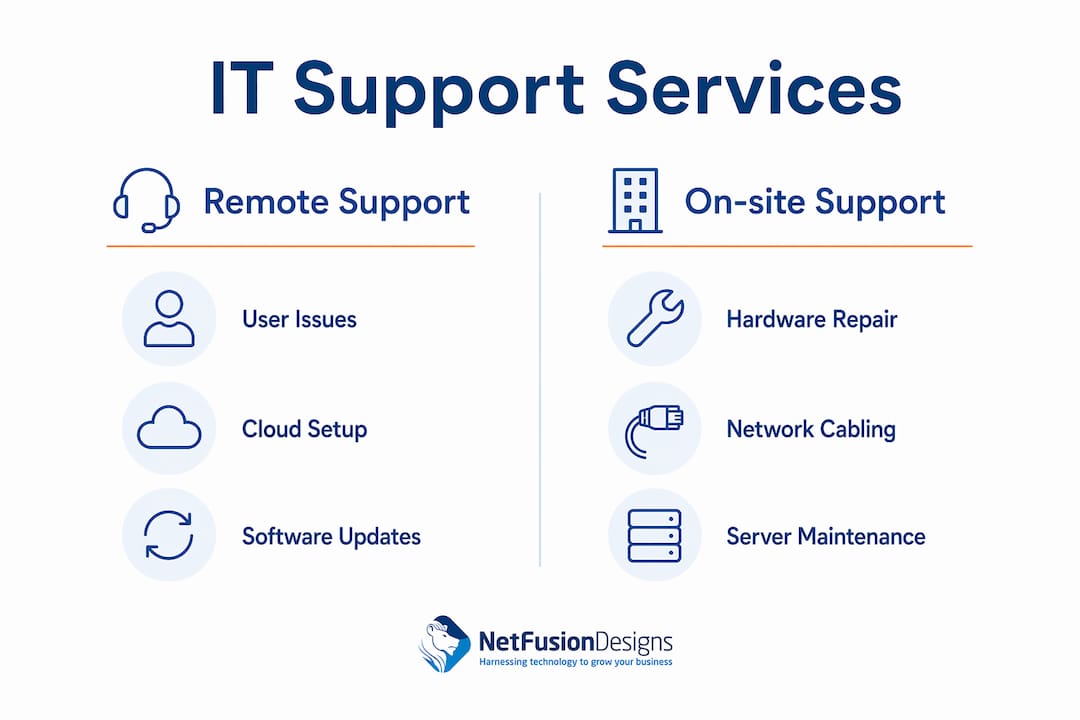
Prefer remote-first delivery for day-to-day issues, and require guaranteed on-site response when you host critical on-premise systems or physical infrastructure. Remote tools and monitoring resolve most software and cloud issues efficiently, while on-site technicians handle hardware, structured cabling, and business-critical physical infrastructure.

Remote support fits: user account issues, Microsoft 365 configuration, cloud migrations, software troubleshooting, patch deployment, and routine monitoring alerts.
On-site support is needed for: server hardware failures, structured cabling installation or repair, complex network troubleshooting, physical security appliance setup, and manufacturing or retail floor equipment.
The right mix depends on your environment. If your team shares printers, local servers, or in-office Wi-Fi, on-site visits are not optional — they are periodic necessities. If your staff works entirely on cloud-based tools and laptops, remote support handles the vast majority of incidents. Many Ontario businesses in the GTA and Kitchener–Waterloo corridor run a hybrid model: remote for daily issues, scheduled on-site for hardware and quarterly reviews.
Pro Tip: Insist on a written on-site response SLA tied to severity levels. “We’ll get there as soon as we can” is not a commitment. A P1 critical incident should carry a guaranteed on-site response window — typically two to four hours — and that window should be in your contract.
Strong coverage means EDR on every endpoint, MFA enforced across all accounts, email protection (anti-phishing, anti-spam, safe links), and regular security awareness training for staff. Microsoft 365 security is not automatic — it requires deliberate configuration of Defender policies, conditional access rules, and audit logging. Verify that your provider actively manages these settings, not just licences them.
Good backup practice means tested, regular backups with documented Recovery Time Objectives (RTO) and Recovery Point Objectives (RPO). You need an offsite or immutable copy — ideally both. A backup that has never been tested is not a backup; it is a hope. Ask your provider how often restore tests are performed and what the documented RTO is for your environment. For a deeper look at how cloud restore processes work in practice, the technical detail matters when you are evaluating proposals.
Azure management includes hybrid environment support, identity management via Azure Active Directory (now Microsoft Entra ID), and migration planning. If you are moving workloads from on-premise servers to the cloud, your provider should deliver a phased migration plan with rollback options, not a weekend cutover with fingers crossed.
VoIP readiness means your network is configured for voice quality of service (QoS). Structured cabling and hardware lifecycle management are often overlooked in proposals — confirm they are included or priced separately before signing.
Security must be foundational, not an add-on. Verify that EDR, MFA, email security, and regular security awareness training are included in your plan before comparing price.
Ontario businesses handling personal or health data must consider PIPEDA and PHIPA compliance. PIPEDA governs how personal information is collected and stored across most industries. PHIPA applies specifically to health information custodians — dental offices, clinics, physiotherapy practices, and similar businesses. If you process payment card data, PCI DSS requirements layer on top of both. Your IT provider should be able to advise on retention policies, breach reporting obligations, and audit documentation for all three frameworks.
Data breaches in Canada can be extremely costly for businesses, with expenses reaching millions of dollars. For a small business, even a fraction of that figure is existential. Security spending is not overhead — it is risk management.
Pro Tip: Ask any shortlisted provider for a recent third-party security attestation or penetration test summary. SOC 2 Type 2 attestation is the clearest signal that a provider’s security controls have been independently audited and verified — not just self-reported.
Per-user pricing is the most common model for small and medium-sized teams, and it scales cleanly as you hire. Per-device, flat-rate, and à-la-carte options exist but are less predictable for growing businesses.
Ontario pricing varies depending on service scope, with different tiers reflecting increased levels of coverage and support. Pricing typically scales with the range of included services and response guarantees. Businesses should expect to see costs influenced by on-site visit frequency, advanced security requirements, onboarding fees, and 24/7 monitoring coverage. For a small team, managed IT services are often more cost-effective than hiring a part-time IT staff member.
SLA basics to confirm in writing: response time by severity level (P1 through P4), uptime guarantees for monitored systems, escalation paths when the first responder cannot resolve the issue, and remediation obligations if targets are missed.
Price is an indicator, not the full story. Evaluate SLAs, onboarding scope, security posture, and local on-site response capability together.
Questions to ask during discovery calls:
Red flags to watch for:
When comparing proposals, look past the monthly fee. Check what is excluded (on-site visits, after-hours calls, hardware procurement), what the onboarding remediation cost might be, how often you receive performance reports, and what the minimum contract term and termination conditions are. A vCIO planning cadence aligned to your 12–24 month business goals separates a strategic partner from a helpdesk vendor.
Good onboarding starts with a full audit, immediate remediation of critical vulnerabilities, documented asset inventory, and an initial roadmap. Expect visible progress within 30–60 days.
The typical phases run as follows:
One-time remediation costs are a real budget risk. If your environment has years of deferred patching, unlicensed software, or no backups, expect a remediation invoice on top of the monthly fee. Ask for a written estimate before signing.
Pro Tip: Request that your onboarding roadmap be delivered as a written document with completion dates, not a verbal summary. It protects both parties and gives you a clear benchmark for the first quarterly review.
NetFusion Designs Inc is SOC 2 Type 2 attested, operates a 24/7 NOC, and delivers vCIO services with dedicated local coverage across Kitchener–Waterloo, Toronto, Markham, and Mississauga. That combination is not common among providers that also serve small businesses — most SOC 2 attested MSPs focus on enterprise accounts.
Specific proof points:
Pro Tip: Start with the free IT assessment. It maps your current environment, identifies the highest-risk gaps, and gives you a written roadmap — whether you engage NetFusion Designs Inc or not, that document is worth having.
Reliable small business IT support in Ontario requires a provider with written SLAs, SOC 2 security credentials, local on-site capability, and a structured onboarding process that starts with a full audit.
| Point | Details |
|---|---|
| Pricing shape | Ontario managed IT runs $75–$350 per user per month depending on tier; per-user pricing is the most common model for small teams. |
| SLA must-haves | Require written response times by severity level, uptime guarantees, and documented remediation obligations before signing. |
| Security baseline | EDR, MFA, email protection, and regular security awareness training should be included at the standard tier, not priced as add-ons. |
| Onboarding timeline | Expect a full audit, critical remediation, and baseline monitoring within the first 30–60 days; get the roadmap in writing. |
| NetFusion Designs Inc | SOC 2 Type 2 attested, 24/7 NOC, local on-site coverage in Toronto, Mississauga, and Kitchener–Waterloo — request the free IT assessment to start. |
The conversation about managed IT almost always starts with price. That is understandable — monthly fees are visible and easy to compare. What is harder to see, and far more consequential, is whether your provider is actually reducing your risk over time or just keeping the lights on.
The providers that deliver real value are the ones that show up to a quarterly vCIO session with data: which systems are aging, where your backup restore times have drifted, what your Microsoft 365 security score looks like compared to three months ago. That kind of reporting turns IT from a cost you tolerate into a function you can manage deliberately.
One thing that consistently keeps costs predictable is a documented change approval process. When every hardware purchase, software addition, or configuration change goes through a simple approval step, you eliminate the surprise invoices that come from scope creep. Pair that with a regular device rationalisation review — retiring equipment before it fails rather than after — and your annual IT spend becomes genuinely foreseeable.
The businesses that get the most from an MSP relationship treat it like any other professional services engagement: they show up prepared, they ask for the data, and they hold the provider accountable to the roadmap. The ones that struggle are the ones that sign the contract and go quiet until something breaks.
Ontario small businesses that have worked through the checklist above — SLAs, onboarding scope, security posture, local response — will find that NetFusion Designs Inc meets each criterion directly. SOC 2 Type 2 attestation covers the security attestation requirement. The 24/7 NOC covers after-hours monitoring. Local teams in Toronto, Mississauga, and Kitchener–Waterloo cover on-site response. And vCIO services cover the strategic planning gap that most helpdesk-only providers leave open.

The practical next step is the free IT assessment. It takes less than an hour, produces a written gap analysis of your current environment, and gives you a roadmap you can act on immediately. For urgent situations, the emergency IT support page connects you with rapid response. For managed services pricing and packages, the IT managed services offer page covers current options. If you are in Mississauga or the Kitchener–Waterloo corridor, regional pages for IT services Mississauga and managed IT in Kitchener and Waterloo detail local coverage and response commitments.
Ontario pricing typically runs $75–$125 per user per month at the basic tier, $125–$200 at the standard tier, and $200–$350 for comprehensive coverage including compliance and vCIO services.
Remote support resolves software, cloud, and user account issues without a technician visiting your office; on-site support is required for hardware failures, structured cabling, and physical infrastructure that cannot be accessed remotely.
PIPEDA applies to most Ontario businesses handling personal data, and PHIPA applies to health information custodians such as dental offices and clinics. Your IT provider should be able to advise on both and support breach reporting documentation.
Most businesses see critical remediation and baseline monitoring completed within 30–60 days; a full onboarding cycle including staff training and the first vCIO review typically runs 60–90 days.
SOC 2 Type 2 means an independent auditor has verified that the provider’s security controls work as claimed over a sustained period, not just on paper. NetFusion Designs Inc holds this certification, which is one of the clearest third-party signals of a provider’s security posture.
%20(1).avif)
%201.avif)