
SIP trunking is a phone service that runs calls over your internet connection instead of copper lines, replacing PRI/ISDN circuits with virtual channels you can add or remove on demand. The main draw is cost and flexibility: you pay for concurrent call capacity, not fixed line blocks. Businesses with distributed teams, multiple office numbers, or unpredictable call volume gain the most.
TL;DR:
- Small businesses should size SIP trunk channels based on peak concurrent call data, not average traffic, adding at least 20% headroom for growth.
- Network conditions like jitter, packet loss, or NAT misconfigurations are the main causes of common SIP trunk issues such as audio quality problems or registration failures.
- Proper security protocols, including TLS and SRTP, and features like caller ID authentication (STIR/SHAKEN) and E911 support are essential for safe, reliable SIP trunk usage.
- Migration requires careful planning, including parallel testing, batching number porting, and post-launch monitoring, typically taking 30 to 90 days depending on complexity.
- Managed support providers can assist with sizing, security, and troubleshooting during migration, reducing risks and ensuring call quality through ongoing network oversight.
SIP trunking is the specific technology that connects your phone system (PBX) to the public phone network over the internet, using the Session Initiation Protocol to set up, manage, and tear down calls. SIP itself only handles signalling. The actual voice travels separately, over RTP (Real-Time Transport Protocol), which is why a “SIP problem” and an “audio problem” are often two different things technically, even though they feel identical to the person on the call.
“VoIP” is the broader umbrella term for any voice service delivered over IP networks. SIP trunking is one specific, standardized way of doing VoIP at the business level, connecting an office PBX to a carrier. A SIP trunk is a virtual connection, not a physical wire, and it is replacing analogue and ISDN phone lines across many markets.
PRI (Primary Rate Interface) circuits, by contrast, are physical, fixed. A standard PRI gives you 23 channels bundled together, whether you need them or not. Want a 24th concurrent call? You buy a whole new PRI. SIP trunks skip that rigidity entirely: your ITSP (Internet Telephony Service Provider) issues you a set of SIP channels, each one capable of carrying a single concurrent call, and you can scale that count up or down as your call volume shifts. Your existing PBX, or a cloud-hosted equivalent, still handles call routing, extensions, and voicemail. The trunk is simply the pipe connecting that system to the outside world.
The cost case is the one most owners hear first, and it holds up: SIP trunking typically delivers a lower total cost of ownership than PRI/ISDN because you are buying virtual channels instead of fixed hardware blocks. That pricing model matters more than it sounds. Paying for concurrent call capacity rather than per-seat charges suits businesses where call volume is concentrated in specific hours rather than spread evenly across every employee.
Beyond price, the practical advantages tend to stack up fast:
Cloud-based SIP trunks also provide real-time analytics on usage, call quality, and channel availability, giving IT managers visibility that legacy phone lines never offered.
A SIP trunk carries two distinct kinds of traffic that travel together but serve different jobs. SIP signalling handles the setup work: dialing, ringing, call transfer, and disconnect. RTP carries the actual voice audio, compressed using a codec, most commonly G.711 (uncompressed, best quality, highest bandwidth) or G.729 (compressed, lower bandwidth, slightly reduced fidelity). Your provider negotiates which codec to use at call setup, and that choice directly affects both call quality and how much bandwidth you consume.
Four components make the connection work:
The ITSP is the carrier selling you trunk service and PSTN (public telephone network) access. The session border controller (SBC) sits at the edge of your network, acting as a security checkpoint and traffic cop for all SIP traffic entering or leaving your system. Your PBX (on premises or hosted in the cloud) handles internal call routing, extensions, and voicemail. Gateways convert signals when you still have analogue devices, like fax machines or older desk phones, that need to talk to a digital trunk.
Each SIP channel supports exactly one concurrent call. A “trunk” is simply the logical grouping of however many channels your business has provisioned. If you have 15 channels, you can run 15 simultaneous calls, no more, until the sixteenth caller hears a busy signal or gets queued, depending on how your PBX handles overflow.
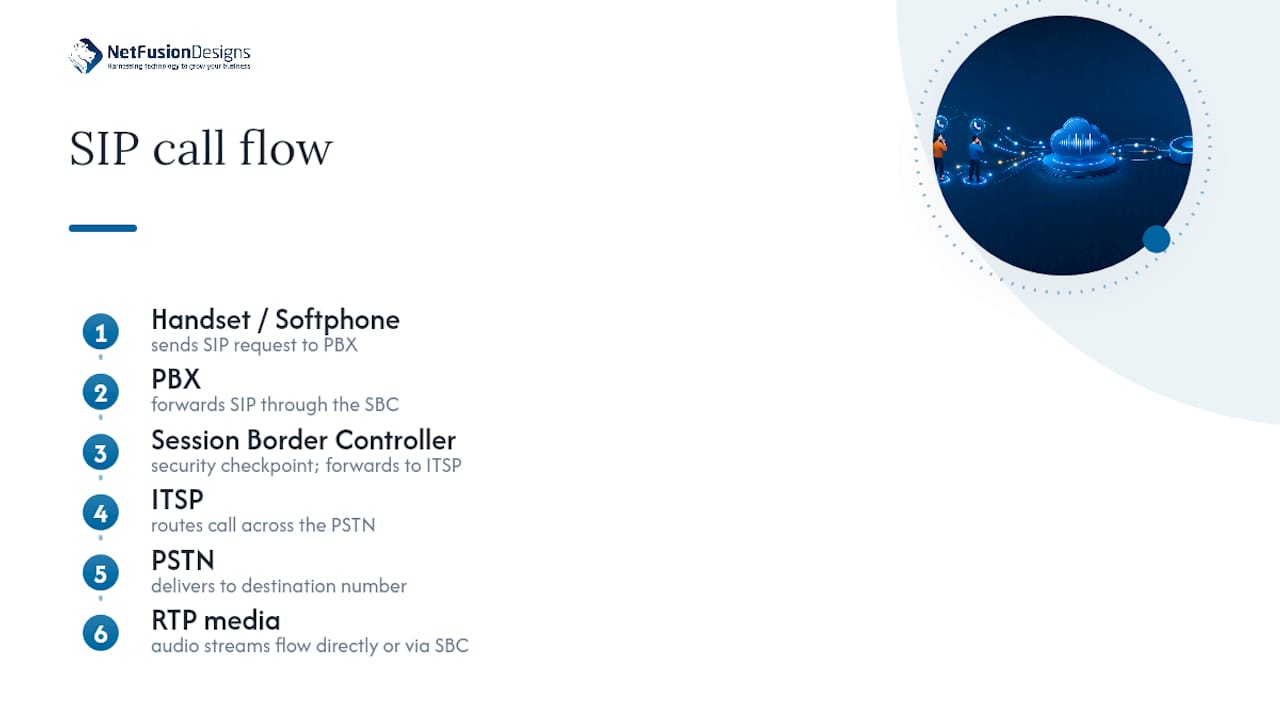
The call flow, simplified: a handset or softphone sends a SIP request to your PBX, the PBX forwards it through the SBC to your ITSP, the ITSP routes it across the PSTN to reach the destination number, and RTP media streams flow directly (or through the SBC) for the duration of the call. The whole handshake typically takes well under a second.
Bandwidth math is the part most SMBs skip, and it is the part that causes the most complaints later. Get it wrong and every call sounds choppy during your busiest hour, right when it matters most.
Each concurrent call using G.711, the most common codec, consumes roughly 85 to 100 kbps per direction. A rough sizing process looks like this:
Pro Tip: Don’t size for average traffic. A 20-person office might average 4 concurrent calls but peak at 11 during the Monday morning rush. Size for the peak, not the average, or your first bad Monday will be your last with that trunk.
As a starting rule of thumb, plan roughly one channel per three to four office employees, then adjust using your actual CDR data. Businesses running consistently near capacity should consider a second, redundant circuit or an upgrade to fibre before growth outpaces the connection.
A clean migration comes down to sequencing, not complexity. Businesses that skip steps here are the ones who end up with dropped calls during launch week.
Most single-site small business migrations take 30 to 90 days from decision to full cutover, with multi-site rollouts taking longer because of the added porting coordination. A hybrid pilot period, running SIP alongside your existing PSTN service while porting numbers in batches, remains the lowest-risk approach for most businesses, and internal migration guides for moving business phone systems to VoIP generally recommend the same staged approach.
Most SIP issues fall into a short list of repeat offenders, and nearly all of them trace back to network conditions rather than the trunk itself.
Track jitter, packet loss percentage, Mean Opinion Score (MOS), and SIP registration status continuously. Most quality complaints show up in these four metrics before a single user calls the helpdesk to complain.
Voice traffic travelling over the public internet needs the same scrutiny you’d apply to any other sensitive data stream, because in practice, that’s exactly what it is.
Signalling should run over TLS (Transport Layer Security), and media should run over SRTP (Secure Real-Time Transport Protocol), rather than their unencrypted equivalents. Both protect calls from interception and tampering in transit. A properly configured session border controller enforces these protections at the network edge and should be considered non-negotiable, not optional, for any business handling client calls or sensitive information.
Ask providers directly about fraud monitoring and STIR/SHAKEN support. STIR/SHAKEN is a caller ID authentication framework that helps reduce number spoofing, a growing vector for toll fraud and social-engineering attacks aimed at office staff.
One item gets missed constantly during migrations: confirm Enhanced 911 (E9-1-1) support and how the provider handles caller location data, especially for multi-site businesses where a single trunk serves several physical addresses. Emergency call routing needs to know exactly which office is calling, every time, without exception. Build these security checks directly into your provider SLA before signing, not as an afterthought once service is live.
Most modern PBX systems support SIP natively, but older digital or analogue PBX hardware may need an ATA (analogue telephone adapter) or a gateway device to bridge the gap. Check your PBX manufacturer’s documentation for SIP trunk compatibility before assuming it will connect out of the box.
Cloud PBX and UCaaS platforms typically integrate directly, and many support Microsoft Teams interoperability through direct routing, letting Teams handle calling without abandoning your existing trunk provider. The integration payoff shows up quickly: click-to-dial from a CRM record, automatic call logging tied to customer profiles, and centralized management across every office from one console. For businesses supporting remote staff, that centralization matters even more, since employees can use the same extension and number whether they’re in the office or working from home.
Number porting, moving your existing phone numbers from your old carrier to your new SIP provider, is the single step most likely to cause anxiety during a migration, and for good reason: getting it wrong means missed customer calls.
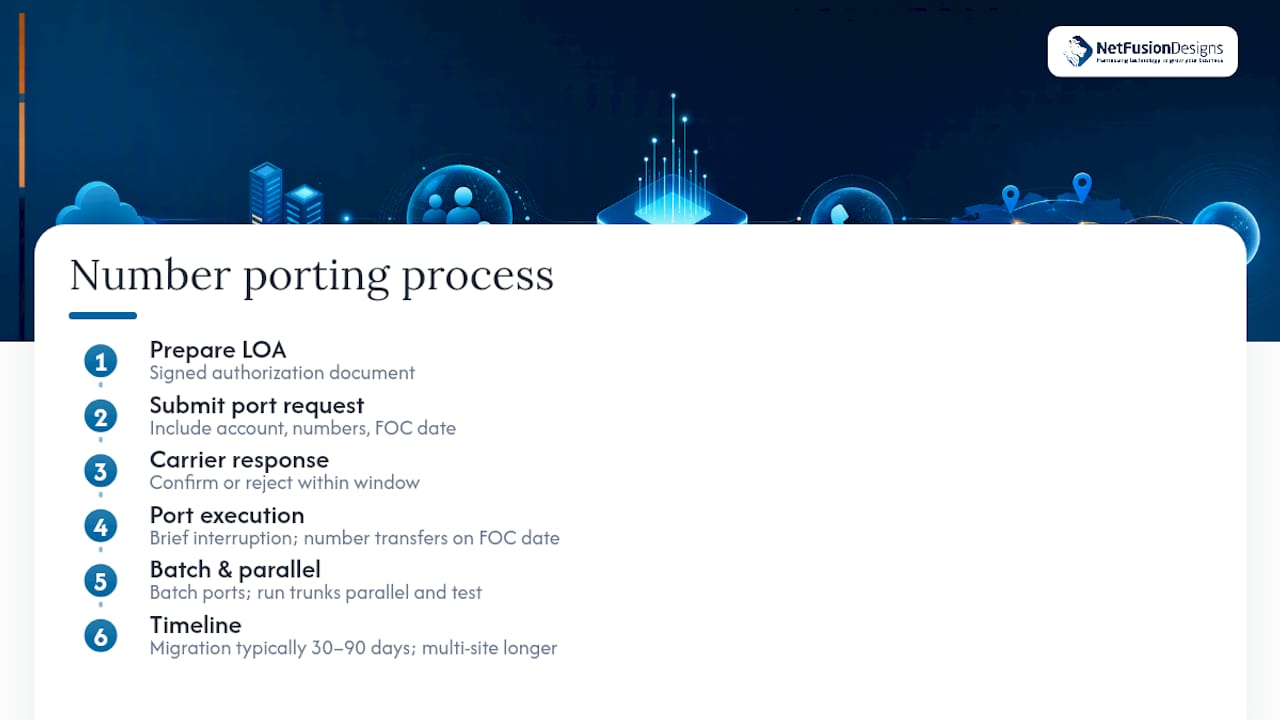
The process starts with a Letter of Authorization (LOA), a signed document authorizing your new provider to request the port from your current carrier. Your new SIP provider submits this LOA along with your account details, the numbers being ported, and a requested port date, sometimes called a Firm Order Commitment (FOC) date.
Your losing carrier then has a window to confirm or reject the request. Rejections typically happen due to mismatched account information, like a business name or address that doesn’t exactly match the carrier’s records, so double-check every field before submission. Once confirmed, the port itself usually happens on the scheduled date with a brief service interruption, often just minutes, as the number transitions between networks.
Batch porting, moving numbers in smaller groups rather than all at once, remains the safer approach for multi-line businesses. If something goes wrong with one batch, the rest of your numbers stay unaffected and functional. Run your new trunk in parallel with the old service throughout this window, testing both inbound and outbound calls on each ported number before fully decommissioning the legacy line. Full multi-site porting projects often extend the overall 30 to 90 days migration window further out, depending on how many numbers and carriers are involved.
SIP trunk providers generally differentiate along a few consistent lines: pricing structure, channel flexibility, geographic DID coverage, and the depth of security tooling included by default.
Metered providers charge per minute or per call, which suits businesses with low, unpredictable call volume where a flat monthly fee would overpay for capacity that sits idle most of the day. Flat-rate providers charge a fixed price per channel regardless of usage, which suits call centres or sales teams with consistently high, steady volume where the math favours predictability over per-minute savings.
Channel flexibility varies too. Some providers require you to commit to a minimum channel block for a contract term, while others let you scale channel counts month to month without penalty, a meaningful difference if your call volume is seasonal or still growing.
Geographic DID coverage matters most for businesses that need a local presence in multiple cities or countries without opening physical offices there. Not every provider issues numbers in every market, so confirm coverage for your specific target regions before committing.
Security tooling is the differentiator that’s easiest to overlook and most costly to discover missing later. Confirm whether TLS/SRTP encryption, STIR/SHAKEN support, and fraud monitoring come standard or cost extra, since providers vary considerably here despite marketing language that often sounds identical across the board.
The pitch for DIY SIP trunking always sounds cleaner than the reality. Buying channels and pointing your PBX at a new ITSP takes an afternoon. Getting QoS, security, and failover actually right, the parts that determine whether call quality holds up during your busiest week of the quarter, takes ongoing network expertise most small businesses don’t have sitting idle on staff.
That gap is where managed support earns its cost. A provider that handles the assessment, runs a pilot alongside your existing lines, manages the batch porting, and then keeps monitoring the trunk after launch catches the failures that DIY setups usually discover the hard way: a firewall rule blocking RTP, a router without QoS tagging, an SBC certificate nobody renewed. Businesses without dedicated network staff, or those handling client-sensitive calls, tend to see the clearest return on paying for that oversight rather than absorbing the risk themselves.
— Geeshan
A managed IT services provider can assist with SIP trunk sizing, security, and porting, supported by a security-certified team and a 24/7 network operations centre monitoring your trunk after launch, not just during setup week.

A typical engagement starts with an assessment of your current call volume and network readiness, followed by a pilot period running SIP alongside your existing lines, staged number porting in batches, and ongoing monitoring once you’re live. That structure mirrors the migration checklist above, except NetFusion Designs Inc’s team handles the QoS configuration, SBC security, and 72-hour post-launch monitoring for you. Our networks and telephony services cover exactly this kind of migration for businesses across Ontario and Canada, whether you’re consolidating multiple offices onto one trunk or replacing an aging PRI circuit before it becomes a bigger problem.
If you’re weighing a SIP trunking move and want a second set of eyes on your bandwidth math or provider shortlist, get in touch through our managed IT services page and we’ll walk through what your specific call volume actually requires.
SIP trunking connects your phone system to the public telephone network over the internet, using the Session Initiation Protocol for call setup and RTP for the actual voice audio. Your provider issues virtual channels, and each channel supports one concurrent call.
The most frequent issues are choppy audio from jitter or packet loss, one-way audio from firewall or NAT misconfiguration, and SIP registration failures from incorrect credentials or blocked ports. Most trace back to network configuration rather than the trunk service itself.
Start with a rough rule of one channel per three to four office employees, then refine using your call detail records to identify your true peak concurrent call count, plus about 20% headroom for growth.
Most modern PBX systems support SIP natively, though older analogue or digital PBX hardware may need an adapter or gateway to bridge the connection. Cloud PBX and UCaaS platforms generally integrate directly, including Microsoft Teams through direct routing.
Pricing depends on your channel count, current infrastructure, and migration scope, and current rates are available directly through NetFusion Designs Inc’s managed IT services page.
%20(1).avif)
%201.avif)





