A bring your own device policy governs how employees may use personal phones, laptops, and tablets for work, including which apps they can install and what data they can touch. Before any rollout, run a Privacy Impact Assessment and a Threat Risk Assessment, then secure sign-off from senior management. Skip that step and you’re building on sand. The sections ahead cover the policy elements, technical controls, and rollout steps that make a BYOD programme defensible.
TL;DR:
- Using app-level controls like MAM or UEM rather than full-device MDM reduces privacy risks for employee-owned devices while maintaining security.
- Conducting a Privacy Impact Assessment and Threat Risk Assessment before rollout is critical to define technical limits and legal compliance boundaries.
- Pilot programs with clear success metrics should precede full deployment to identify operational and privacy gaps early on.
- Explicitly stating ownership of support costs and escalation paths in the policy prevents conflicts during device failures or policy violations.
- Continuous monitoring, review, and designated roles ensure the BYOD program remains sustainable, compliant, and adaptable over time.
A BYOD policy is only as strong as its weakest clause. According to guidance from the Canadian Centre for Cyber Security, an effective policy must designate who is authorized to participate and spell out roles for both the organization and the end user. That means naming which job categories qualify, which devices meet the bar, and what happens when someone leaves the programme.
The document also needs to forbid rooted or jailbroken devices outright. Once a device’s operating system has been altered to bypass manufacturer restrictions, none of your other controls can be trusted to work as designed. From there, the policy should build out acceptable use, device management authority, incident handling, patching expectations, encryption requirements, authentication rules, and data governance, all as named sections rather than vague references.
A workable policy addresses:
None of this needs to read like a legal brief. Clear, plain language works better than dense clauses that nobody reads past the first paragraph. Employees should be able to answer, in under a minute, what they can and can’t do with their own phone once it touches company data.
One detail decision-makers often overlook is ownership of support costs. If a personal laptop fails during a client deadline, whose problem is it? Spell that out before it becomes a Friday afternoon argument. The policy should also state, in one sentence, who owns the final decision on eligibility exceptions, usually a named IT or security lead rather than a manager acting alone.
Three acronyms dominate BYOD conversations, and mixing them up leads to bad purchasing decisions. Mobile Device Management (MDM) controls the entire device: settings, apps, even remote wipe of everything on it. Mobile Application Management (MAM) works at the app level, wrapping corporate apps in a container while leaving the rest of the phone alone. Unified Endpoint Management (UEM) folds both approaches, plus desktops and IoT devices, into a single console.
For personally owned devices, MAM or a UEM platform configured for app-level control is usually the safer starting point. Full-device MDM on a device an employee bought with their own money invites both legal and privacy problems, since the organization ends up with visibility (and wipe authority) over personal photos, messages, and apps it has no business touching.
MDM also isn’t a fix-all. Government guidance on MDM solutions notes that MDM capability varies widely across products, and an MDM tool cannot add security features a device’s operating system never had in the first place. Selecting an MDM platform has to be done in the context of the actual mobile platforms in use and the organization’s risk profile, not a vendor’s marketing sheet. Do not mandate full device management on employee-owned hardware unless you are prepared to accept the privacy and legal consequences that come with it; app-level controls are the better default where they get the job done.
Encryption and access controls fill the gaps MDM and MAM leave open:
Combining MDM, MAM, or UEM with strong written policy and ongoing monitoring is the approach recommended in guidance on mobile device deployments, though the same guidance flags that support obligations and legal exposure both need weighing carefully because the hardware belongs to the employee, not the company. Business decision-makers evaluating enterprise-grade tooling for this layer can find a broader rundown in NetFusion Designs’ overview of enterprise security tools.
Pro Tip: Pilot your MAM container with a small group before writing the final policy language: real usage almost always surfaces an app or workflow the draft policy never accounted for.
The single biggest compliance mistake in BYOD rollouts is treating it as a technology project when it’s actually a privacy project with technology attached. The Office of the Privacy Commissioner of Canada states that organisations must conduct a Privacy Impact Assessment and a Threat Risk Assessment before implementing a BYOD programme, specifically to identify risks tied to the collection, use, disclosure, storage, and retention of personal information.
Those two assessments aren’t paperwork exercises. They set the actual boundaries of what your technical controls are allowed to do. If the PIA flags that full-device wiping would expose personal photos or messages, that finding becomes the reason the policy mandates containerisation instead of full MDM. If the TRA identifies unpatched operating systems as the highest-likelihood attack path, that becomes the justification for a minimum OS version requirement.
A practical compliance sequence looks like this:
Consent matters here too. A full wipe of a personal device should never happen without the employee’s explicit agreement, since it risks erasing personal photos and accounts along with corporate data. Build that consent step into the offboarding checklist itself, not into a clause nobody reads until the day someone resigns.
A policy on paper means nothing until it survives contact with real employees and real devices. The rollout sequence matters as much as the policy language itself.
Pro Tip: Keep the pilot group small enough that IT can personally walk every participant through onboarding: a rocky pilot experience spreads faster by word of mouth than a well-written policy document ever will.
Enforcement works best when it’s paired with clarity rather than punishment. Most employees who break BYOD rules do so because the rule was never explained, not because they set out to cause a breach.
A BYOD program drifts without clear ownership. It needs a small group of named roles, each with a specific job, reviewed on a set schedule rather than left to run on autopilot.
Change control matters just as much as the initial rollout. Every time a new app gets added to the approved list, or a minimum OS version changes, that update needs the same sign-off chain as the original policy, not a quiet email from IT. Review the policy on a fixed cadence, ideally twice a year, checking metrics like enrollment numbers, incident counts, support ticket volume, and exception requests against the previous review.
Budgeting deserves a line item of its own. BYOD support costs money even when the devices are free, since helpdesk time, MAM licensing, and periodic security audits all add up. An exception process, with a named approver and a documented reason, keeps ad hoc departures from quietly becoming the new normal.
Every organisation’s policy needs its own specifics, but the same skeleton works across industries. The clauses below are meant to be copied into an internal draft and adjusted for your data sensitivity and business type.
Scope clause: “This policy applies to all employees, contractors, and interns who use a personally owned smartphone, tablet, or laptop to access company email, files, or business applications.”
Acceptable use clause: “Approved devices may be used to access email, calendar, and applications listed in the Approved App Registry. Devices may not be used to store client financial records or protected health information outside the approved container.”
Device eligibility clause: “Devices must run a manufacturer-supported operating system version, apply security patches within 14 days of release, and must not be rooted or jailbroken. Non-compliant devices will be denied enrollment.”
Monitoring limits clause: “The organisation will monitor only the corporate application container. Personal photos, messages, and non-work accounts will not be accessed, copied, or reviewed under any circumstance.”
Selective wipe clause: “Upon termination of employment or loss of the device, the organisation will remove the corporate container and all associated data. Personal data outside the container will remain untouched unless the employee has separately consented to a full wipe.”
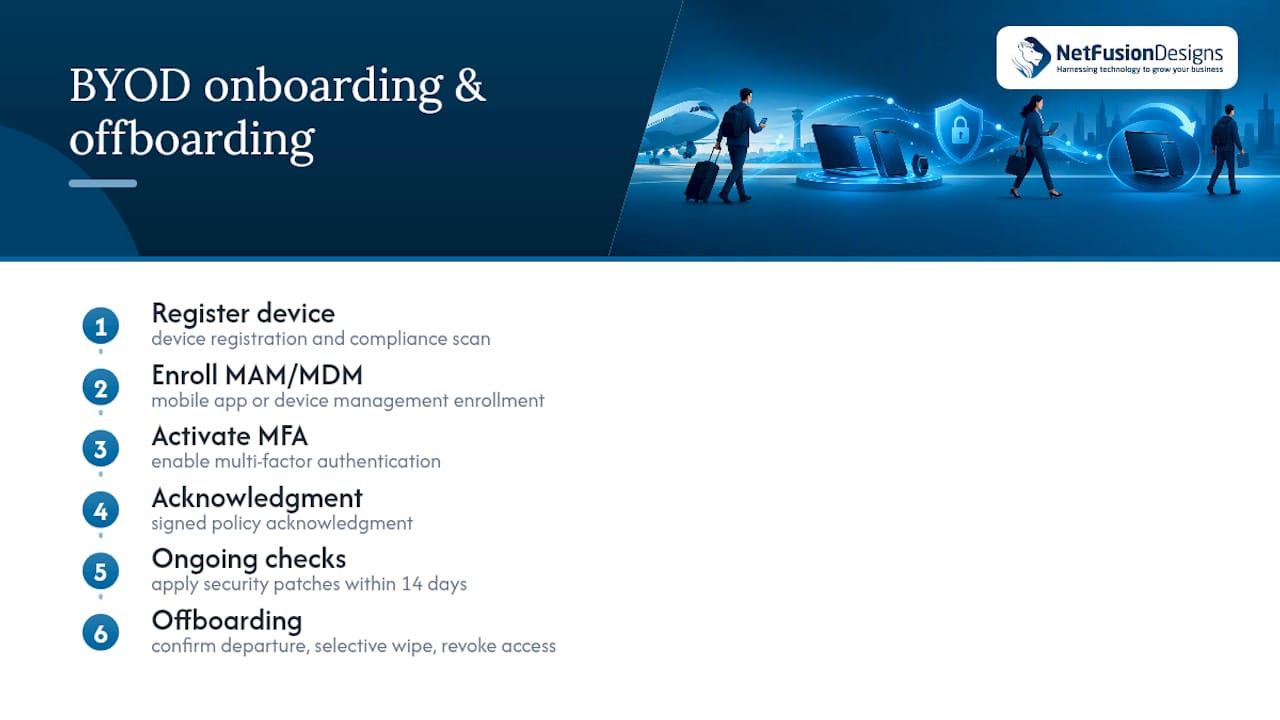
For onboarding, a short checklist covers device registration, a security compliance scan, MAM or MDM enrollment, MFA activation, and a signed acknowledgment of the policy. For offboarding, the checklist runs in reverse: confirm departure date, trigger selective wipe, revoke access to connected systems, and document completion with a timestamp.
Tier the clauses by data sensitivity rather than writing one policy for the entire organisation. A sales team accessing only calendars and email needs a lighter monitoring clause than a finance team touching client banking details. Keep the tiers named in the policy itself (Tier 1, Tier 2, and so on) so managers can quickly identify which rules apply to which role.
Most of the work in a BYOD rollout isn’t writing the policy, it’s building and maintaining the technical layer underneath it. A managed IT partner typically runs the pilot, assists with the PIA and TRA, designs the MAM or MDM configuration, sets up selective wipe procedures, and handles incident response when a device is lost or compromised.
NetFusion Designs is a managed IT and security provider with teams across Ontario and Canada, backed by a network operations centre for ongoing monitoring. That kind of continuous coverage matters for BYOD specifically, since lost devices and phishing attempts don’t wait for business hours.
Deciding whether to keep BYOD management in-house or bring in outside help usually comes down to team size and existing security operations. A team with a dedicated security analyst and spare helpdesk capacity can often manage MAM configuration internally. A smaller IT team juggling helpdesk tickets, Microsoft 365 administration, and everything else on top of a BYOD rollout usually gets there faster with outside support handling the assessment and deployment work in parallel.
The most common mistake isn’t a missing encryption setting. It’s skipping the Privacy Impact Assessment because it feels like paperwork standing between the policy draft and launch day. Skip it, and you inherit blind spots that surface during an incident, when it’s far more expensive to fix.
The second mistake is leaning on MDM as if it solves everything on its own. It doesn’t, and it can create legal exposure on a device the company doesn’t own. The third is vague offboarding: teams write detailed onboarding steps and leave departures as an afterthought, which is exactly when data walks out the door.
Start with a pilot of ten to fifteen people, not the whole company. Write the policy in plain sentences an employee can read in five minutes. None of that requires new technology, just leadership willing to sign off before the rollout, not after something breaks.
— Geeshan
Writing the policy is the easy part. Running the Privacy Impact Assessment, configuring MAM or MDM correctly for your device mix, and keeping monitoring around the clock is where most internal IT teams run out of hours in the week.

NetFusion Designs supports BYOD programmes end to end, from PIA and TRA assistance through pilot design, MAM and MDM deployment, and ongoing security operations once the programme is live. Our SOC 2 Type II certified team and 24/7 monitoring mean device incidents get caught and handled without waiting for the next business day. If your organisation is planning a BYOD rollout or needs a second look at an existing one, our managed IT services page outlines how we structure that support and how to book a first conversation.
BYOD carries real risk, mainly around lost devices, outdated operating systems, and unclear boundaries between personal and corporate data. Those risks are manageable when an organisation runs a Privacy Impact Assessment and Threat Risk Assessment beforehand and applies containerisation rather than full-device control, as recommended in guidance from the Privacy Commissioner of Canada.
BYOD can work well for organisations that pair it with a documented policy, technical controls like MAM or MDM, and clear onboarding and offboarding steps. It tends to fail when leadership skips the privacy assessment stage or treats the policy as an afterthought rather than a planned rollout.
The main disadvantages are inconsistent device security, legal and privacy exposure if the organisation over-monitors personal devices, and higher support costs than expected. Full-device MDM on personally owned hardware can also create friction, since MDM guidance warns it cannot add security features a device never had and can expose the organisation to unnecessary legal risk.
A BYOD policy should cover scope and eligibility, acceptable use, device requirements including a ban on rooted or jailbroken devices, authentication rules, approved apps and data classes, and a selective wipe process for offboarding. Government guidance also recommends defining incident management, patching, encryption, and data governance as their own named sections.
%20(1).avif)
%201.avif)