The safest starting point for most helpdesks is a P1 target of 15 minutes to assignment and 2 hours to restoration, P2 at 1 business hour to assignment and 4 business hours to resolution, P3 at 2 business hours and 1 business day, and P4 at 4 business hours and 3 business days. Track assignment and resolution as two separate clocks, never one blended number, and pair whatever compliance percentage you land on with operational KPIs so the score can’t hide a struggling queue. The examples and templates below show how to adapt those numbers to your own environment.
TL;DR:
- Setting separate assignment and resolution targets for each priority level ensures SLAs are measurable and trustworthy over time.
- Templates should be tailored to organization size, with simple ones for small teams and detailed, multi-tier ones for large enterprises.
- Escalation thresholds must be clearly defined, with notification triggers at specific elapsed times to prevent noise and ensure accountability.
- Regularly tracking operational KPIs like reopen rates and backlog age alongside compliance reveals underlying helpdesk health beyond the numbers.
- Outsourcing managed services with certified teams can help organizations deliver 24/7 SLA coverage without building internal staffing capacity.
An SLA written for a five-person office looks nothing like one written for a hospital network, and pretending otherwise is why so many templates get abandoned within a year. Here are three working examples, each built around a different operating reality.
Example A: small business, business-hours only. A 25-person accounting firm with one internal IT contact and a managed provider on retainer doesn’t need four-tier urgency. It needs clarity and a compliance target it can actually hit.
| Priority | Assignment target | Resolution target | Compliance goal |
|---|---|---|---|
| P1 (outage) | 15 minutes | 4 business hours | 80% |
| P2 (major impairment) | 2 business hours | 1 business day | 80% |
| P3 (minor issue) | 4 business hours | 2 business days | 80% |
| P4 (request) | 1 business day | 5 business days | 75% |
Escalation here is simple: P1 tickets open unresolved past target trigger a phone call to the account manager, nothing more elaborate.
Example B: 24/7 critical service. A healthcare clinic or e-commerce operation running around the clock needs the business-hours/off-hours split that University of Minnesota Duluth uses for its own incident response, where P1 response sits at 15 minutes during business hours and 1 hour off-hours, with resolution windows of 4 hours and 8 hours respectively.
| Priority | Assignment (business hrs) | Assignment (off hrs) | Resolution (business hrs) | Resolution (off hrs) |
|---|---|---|---|---|
| P1 | 15 min | 1 hour | 4 hours | 8 hours |
| P2 | 1 hour | 2 hours | 8 hours | 4 hours |
| P3 | 4 hours | Next business day | 2 business days | 3 business days |
Example C: enterprise, multi-tier. Larger organizations layer in silent resolution service level expectations (SLEs) that track trends without triggering alerts, alongside alerting assignment SLEs that escalate the moment a clock runs long. Boston University’s priority matrix sets P1 assignment at 15 minutes with a 2 hour resolution target, P2 at 1 business hour assignment and 4 business hours resolution, P3 at 2 business hours and 1 business day, and P4 at 4 business hours and 3 business days, exactly the baseline this article opens with.
Notice what all three examples share: assignment and resolution are always two different numbers. That distinction is what separates a working SLA from a document nobody trusts by month three.
A helpdesk SLA policy is a written agreement covering the services offered, the hours those services run, the performance targets attached to each priority level, and who is responsible for what when things go sideways. The Service Desk Institute’s SLA template lists the core sections every functioning agreement needs, and skipping any of them is usually where disputes start.
Getting these five sections right before you touch a single target number is what makes the rest of the document defensible.
Impact and urgency, combined, should determine priority, never how senior the person calling happens to be. Impact asks how many people or systems are affected; urgency asks how fast the situation is deteriorating. A CEO’s slow laptop is not a P1 just because of who’s typing.
Some organizations add a P5 tier for background or planned work, a practice Samuel Merritt University’s IT service level agreement documents explicitly. P5 covers scheduled maintenance, provisioning requests, and other work with no fixed deadline pressure, keeping it out of the same reporting bucket as active incidents.
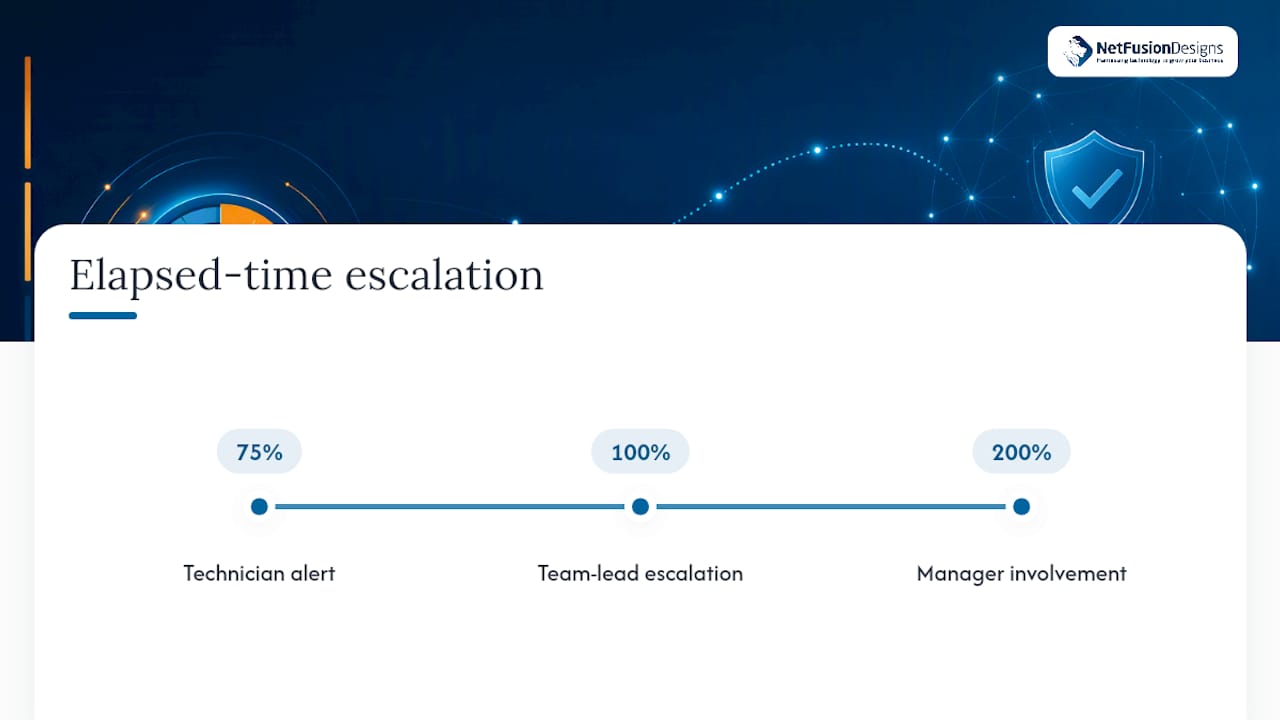
Notification thresholds matter as much as the targets themselves. A common structure alerts the assigned technician at 75% of elapsed time, escalates to a team lead at 100%, and pulls in a manager at 200%, a pattern consistent with how UMD’s DIT service desk structures assignment and resolution service level expectations.
Pro Tip: Keep assignment SLEs alerting and resolution SLEs silent in day-to-day reporting. Alerting on every resolution clock creates noise; reviewing resolution trends monthly catches the same problems without the pager fatigue.
Pro Tip: Build your change control clause before you need it. An SLA with no formal amendment process tends to drift silently, until someone finally asks why nobody’s held to the numbers on paper anymore.
SLA compliance percentage tells you whether targets were hit. It does not tell you whether your helpdesk is actually getting better or quietly falling apart underneath a decent-looking number.
Boston University’s incident management guidance recommends pairing a compliance target, often written around 80%, with these operational KPIs precisely because a steady 80% can mask a rising backlog or a climbing reopen rate. Run monthly dashboards for the operations team and reserve the quarterly cycle for stakeholder reviews where targets themselves get revisited. If compliance stays flat while backlog age or reopens climb, that’s the signal to dig into staffing or ticket categorization before the SLA number eventually catches up and drops too.
Template complexity should scale with team size, not with how impressive the document looks on a shelf.
The Service Desk Institute’s SLA template is a solid mid-market starting point, but its own documentation is explicit that every sample value is guidance, not a standard to copy blindly. Adjust every number against your own ticket data before you sign anything.
NetFusion Designs Inc operates as a SOC 2 Type II–certified 24/7 helpdesk with teams across Ontario and Canada, including Kitchener-Waterloo and beyond, backed by a staffed NOC. Outsourcing SLA delivery makes sense when internal staff can’t sustain round-the-clock coverage, or when compliance obligations demand independently audited processes rather than an informal arrangement.
An SLA doesn’t prevent outages. It measures whether your team communicates and escalates fast enough when one hits, and that distinction changes how you should read every compliance report you’re handed. Automation and clearly named escalation owners cut breach risk more than any target number on the page ever will.
— Geeshan
Drafting a strong SLA is one problem. Staffing it around the clock, month after month, is a different one entirely. NetFusion Designs Inc runs managed IT services built around exactly the assignment, resolution, and escalation structure this article walks through, backed by a SOC 2 Type II–certified team and a 24/7 NOC across Ontario and Canada.

That means the priority tiers, off-hours coverage, and monthly reporting cadence outlined above aren’t necessarily something your team has to staff and monitor alone; some helpdesks operate this way day to day. If your current SLA is more aspiration than measured reality, request a free IT health check to see where your response times and compliance targets actually stand against a working benchmark, no long commitment required to get the answer.
An IT helpdesk SLA is a written agreement defining the services offered, the hours they’re available, the response and resolution targets for each priority level, and who’s responsible when something breaks. It typically separates assignment (a technician taking ownership) from final resolution, since blending the two hides where delays actually happen.
Response time targets vary by priority and by whether the ticket lands during business hours or off-hours. A common structure sets P1 response at 15 minutes during business hours, per Boston University’s priority matrix, stretching to 1 hour off-hours in models like UMD Duluth’s.
A good SLA separates assignment from resolution, sets different targets per priority tier, and pairs its compliance percentage with KPIs like reopen rate and backlog age. The three examples earlier in this guide, small business, 24/7 critical, and enterprise, show how that structure scales with team size.
P1 means an organization-wide outage requiring an immediate response, typically within 15 minutes and resolved within 2 to 4 hours depending on the model used. P2 through P4 step down in both impact and urgency, with P4 covering low-priority requests that can wait several business days, and some organizations add a P5 for background or planned work.
%20(1).avif)
%201.avif)