The fastest way to cut email risk is to layer five controls: SPF, DKIM and DMARC for domain authentication, phishing-resistant MFA on every mailbox, a secure email gateway with URL and attachment scanning, enforced TLS in transit, and a regular phishing simulation programme. Deploy them in that order, because each layer closes a gap the next one cannot cover alone.
TL;DR:
- Deploy DMARC gradually from monitoring to enforcement, ensuring all legitimate senders are correctly authenticated before switching to reject policies.
- Use phishing-resistant MFA, such as FIDO2 security keys, on all accounts with mailbox access instead of SMS or push codes to prevent credential theft.
- Regularly tune secure email gateway detection thresholds, enable URL sandboxing, and restrict risky attachments to catch malicious payloads effectively.
- Maintain continuous monitoring of logs, conduct frequent phishing simulations, and enforce verification for sensitive actions like payments or credential resets.
- Protect backups with encryption and strict access controls, test restorations regularly, and store copies offline or on immutable storage to prevent ransomware damage.
Most breaches trace back to a handful of preventable gaps. This checklist gives you a sequence, not just a list, so you can audit your environment and prioritise the highest-impact work first.
Each item builds on the one before it. Authentication stops spoofing, MFA stops credential reuse, the gateway stops malicious payloads, and monitoring catches whatever slips through.
Pro Tip: Run this checklist as a gap audit against your current tenant configuration before you touch a single policy setting, so you know exactly which controls are missing rather than guessing.
Technical controls fail more often from rushed configuration than from weak design. The Canadian Centre for Cyber Security’s email security guidance lays out a practical sequence that avoids the most common breakage points.
Pro Tip: Keep DMARC aggregate reports flowing to a dedicated mailbox or parser for at least four weeks before advancing the policy, since one missed sender can silently block legitimate invoices or payroll notices.
Technical controls stop most attacks, but a convincing message still reaches an inbox occasionally. The Canadian Centre for Cyber Security recommends pairing regular simulations with a verification habit that catches what training alone misses.
A phishing simulation programme works best when it measures reporting behaviour, not just click rates, since the goal is faster detection, not perfect avoidance.
Controls degrade without upkeep. Ongoing operational discipline is what keeps the technical layer effective months after deployment.
The Canadian Centre for Cyber Security treats backups, monitoring and incident response as core parts of email security, not afterthoughts bolted on once authentication is in place.
A short internal workshop can execute most of this plan in weeks: pick a pilot group for FIDO2 keys, run a one-week DMARC monitoring window, tune gateway thresholds against real traffic, and set a phishing simulation calendar for the quarter. Managed SOC and EDR services tie directly into this work, since they give the monitoring and rapid response layer that catches what slips past the gateway. NetFusion Designs runs its own phishing simulation programme and offers a free cybersecurity assessment that maps these gaps in eight questions.
Backups are often the last line of defence against ransomware, but an unencrypted or openly accessible backup archive is just as exposed as the live mailbox. Encrypt mailbox backups at rest using strong, current algorithms, and manage the encryption keys separately from the backup storage itself so a single compromised credential cannot unlock both.
Restrict who can access backup systems using role-based permissions, and log every restore request. A backup administrator role should be distinct from a general IT administrator role, since the ability to restore historical mail is itself a sensitive privilege that attackers target to recover deleted evidence or exfiltrate archived data.
Store backups on immutable or write-once storage where possible, so a compromised account cannot delete or encrypt historical copies. Test restores on a defined schedule, not only after an incident: a backup that has never been restored is unverified, and unverified backups have a habit of failing exactly when needed. Keep at least one backup copy isolated from the production network, since ransomware that reaches connected backup systems can encrypt them alongside live data.
Retention policies matter too. Align backup retention with legal and regulatory holds where they apply, and document how long mailbox data is kept and why, since indefinite retention increases the amount of sensitive data exposed in any future compromise.
Most email compromises escalate because an attacker who gets into one mailbox inherits far more access than that mailbox needs. Role-based access control limits the blast radius by tying permissions to job function rather than granting broad administrative rights by default.
Start by auditing who holds Global Administrator or Exchange Administrator rights in your tenant. These roles should be held by as few people as practical, and any account with elevated privileges should require phishing-resistant MFA without exception. Use just-in-time or time-boxed elevation for administrative tasks instead of leaving privileged roles active permanently.
Segment mailbox delegation carefully. Shared mailboxes and delegate access are common in finance and executive teams, but each delegation should be reviewed periodically and revoked when someone changes roles or leaves. Apply the principle of least privilege to service accounts and third-party application integrations too, since an over-permissioned API connection can expose an entire tenant’s mail data through a single compromised app registration.
Conditional access policies add another layer: restrict sign-ins by location, device compliance status and risk score, and block legacy authentication protocols that bypass modern MFA entirely. Combined, these measures mean that even if an attacker compromises one set of credentials, the account’s practical reach stays limited.
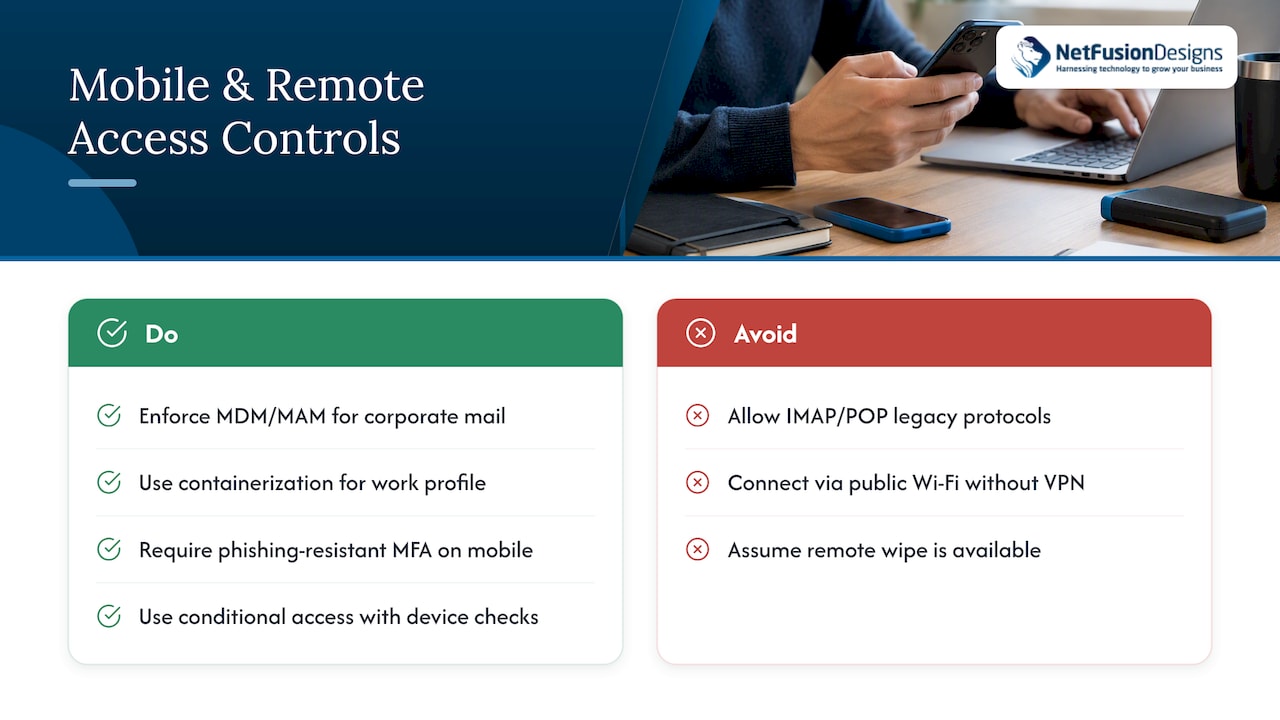
Mobile devices and remote access extend the mailbox perimeter well beyond the office network, and that extension needs its own controls. Enforce mobile device management or mobile application management so corporate mail can only be accessed through managed, compliant devices, with encryption and screen lock requirements applied automatically.
Separate corporate and personal data on mobile devices using containerization where your mobile device management platform supports it, so a lost or stolen phone does not expose the entire device, only the managed work profile. Require the same phishing-resistant MFA standard for mobile sign-ins as for desktop access, since attackers frequently target mobile logins where security teams assume lower risk.
For remote access, conditional access policies should evaluate device health and network context before granting a session, and legacy protocols like IMAP and POP that bypass modern authentication should be disabled tenant-wide. Public Wi-Fi and unmanaged networks increase exposure to interception, so remote workers should connect through a corporate VPN or a zero-trust access solution rather than connecting directly.
Remote wipe capability is worth confirming as policy, not assumption: when a device is reported lost or an employee departs, IT should be able to remove corporate mail data within minutes. Enterprise-grade security tooling that manages TLS, device compliance and endpoint detection together closes most of the gap that remote work otherwise opens.
Static rules catch known attack patterns, but anomaly detection catches the ones nobody has written a rule for yet. Behavioural baselines, such as typical sign-in locations, sending volumes and mailbox rule changes, let security tools flag deviations that indicate compromise even before a malicious email is reported.
Watch specifically for a handful of high-value signals: sudden creation of inbox forwarding rules, impossible-travel sign-ins, a spike in outbound mail volume from a single account, and newly created mailbox rules that hide or delete replies. Each of these is a common technique used to conceal an ongoing compromise from the account owner.
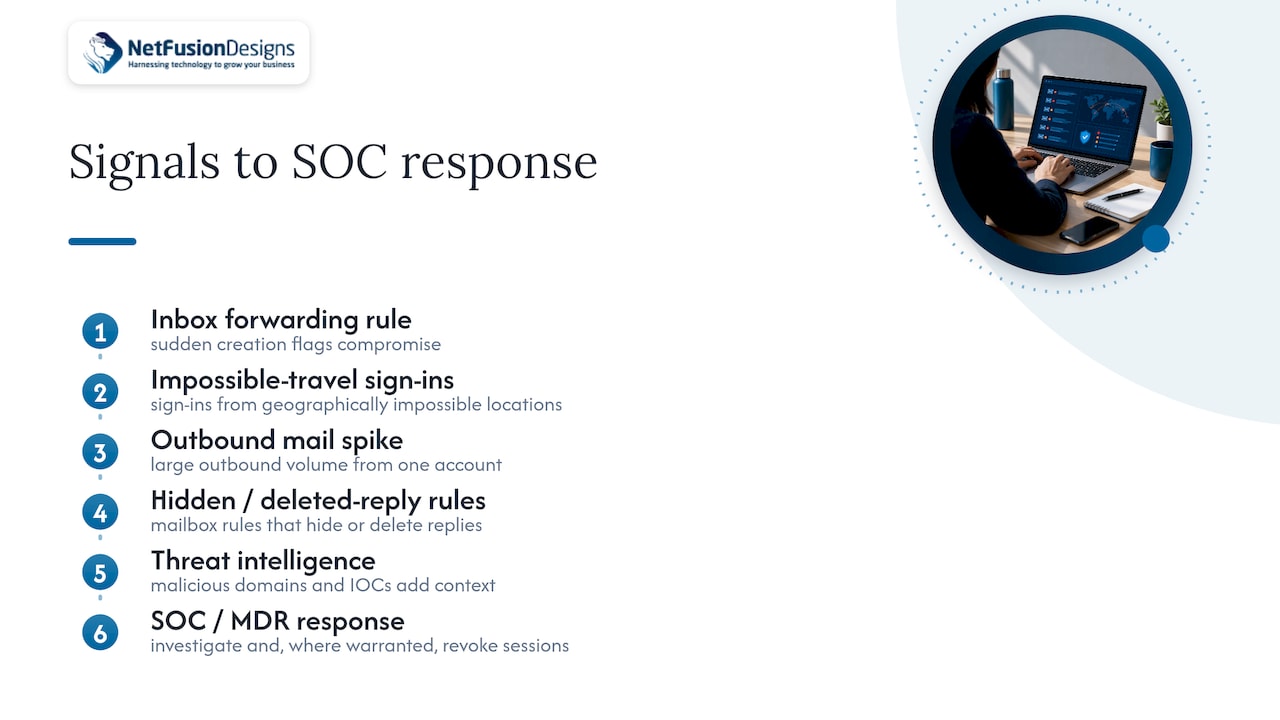
Threat intelligence feeds add external context to these internal signals. Integrating known-malicious sender domains, indicators of compromise from recent campaigns and updated phishing infrastructure lists into your gateway and SIEM means detection does not rely solely on what has already happened inside your own tenant. The Canadian Centre for Cyber Security’s national threat assessment notes that phishing actors increasingly use AI to craft convincing messages, which makes behavioural and intelligence-based detection more valuable, as message content alone becomes a less reliable signal.
Feeding these anomalies into a SOC or managed detection and response workflow closes the loop: a flagged anomaly should trigger investigation and, where warranted, automatic session revocation, not just a log entry that nobody reviews until later.
Security that nobody can use gets bypassed. Deploy phishing-resistant MFA and DMARC first since they carry the highest return for the least user friction. If your team is stretched thin, spend next on detection and response, because faster containment matters more than blocking every possible entry point.
— Geeshan
Building and maintaining these layers takes ongoing attention most internal IT teams are stretched to provide. NetFusion Designs runs managed cybersecurity, a 24/7 SOC, phishing simulation programmes and MFA rollout support as part of its Managed IT Services, alongside penetration testing to validate the controls once they are in place.

If you want a clear picture of where your own email environment stands, start with a free cybersecurity assessment and use the results to prioritise your next steps.
For implementation detail beyond this checklist, consult the Canadian Centre for Cyber Security’s email security guidance and NIST’s trustworthy email guidance.
Definitions vary across organisations, but a common version covers being clear, concise, courteous, correct and complete in every message. None of these directly address security, so they should be treated as a communication standard that sits alongside, not in place of, the technical controls in this article.
This is not a recognized security or etiquette standard, and no authoritative source defines a fixed time rule for email. If you have encountered this framing, it likely refers informally to pausing briefly before sending or clicking a link, which lines up with the verification habit recommended by the Canadian Centre for Cyber Security.
There is no single official list of key golden rules, though most guides converge on themes like using clear subject lines, proofreading before sending, avoiding all caps, replying promptly and using “reply all” sparingly. For security purposes, the more relevant habit is verifying unexpected requests through a separate channel before acting on them.
Neither provider name reflects a documented security comparison in current guidance, and consumer webmail platforms are outside the scope of organisational email security controls. For business email, the security outcome depends far more on whether your organization has deployed SPF, DKIM, DMARC, phishing-resistant MFA and a secure gateway than on which consumer platform an account happens to use.
Your DMARC policy is ready to move from p=none to p=quarantine or p=reject once aggregate reports show that every legitimate sending source, including third-party services and forwarders, passes authentication consistently. Rushing enforcement before this review is the most common cause of blocked legitimate mail during rollout.
%20(1).avif)
%201.avif)