The most effective phishing simulation programmes are learning-first, not gotcha exercises. That means calibrated cadence to avoid fatigue, realistic and ethical lures paired with immediate feedback, transparent communication before and after each test, and measurement that goes beyond a single click-rate number to difficulty-rated results and reporting speed.
TL;DR:
- Effective phishing simulations should use role-specific scenarios and difficulty levels once basic email training is established, not before.
- The program must integrate technical controls like DMARC, DKIM, SPF, and phishing-resistant MFA before increasing employee detection efforts.
- Frequency of simulations should start small, shift to monthly, then become risk-based, and finally taper off once reporting performance stabilizes.
- Transparency, supportive feedback, and privacy safeguards are essential to maintain trust and prevent simulations from feeling punitive or exploitative.
- Results should be measured using difficulty-rated bands, not just click rates, with additional metrics like reporting speed and repeat offender tracking.
A phishing simulation programme is a system with several moving parts, not a single test you run once a quarter. Before you design a campaign, four elements need to be in place.
Start with channel coverage. Email remains the primary vector, but a mature programme in 2026 also tests SMS (smishing), voice calls (vishing), and QR codes when those channels are already part of how your organization communicates. Adding a vector before employees have seen basic email training tends to confuse the lesson rather than sharpen it.
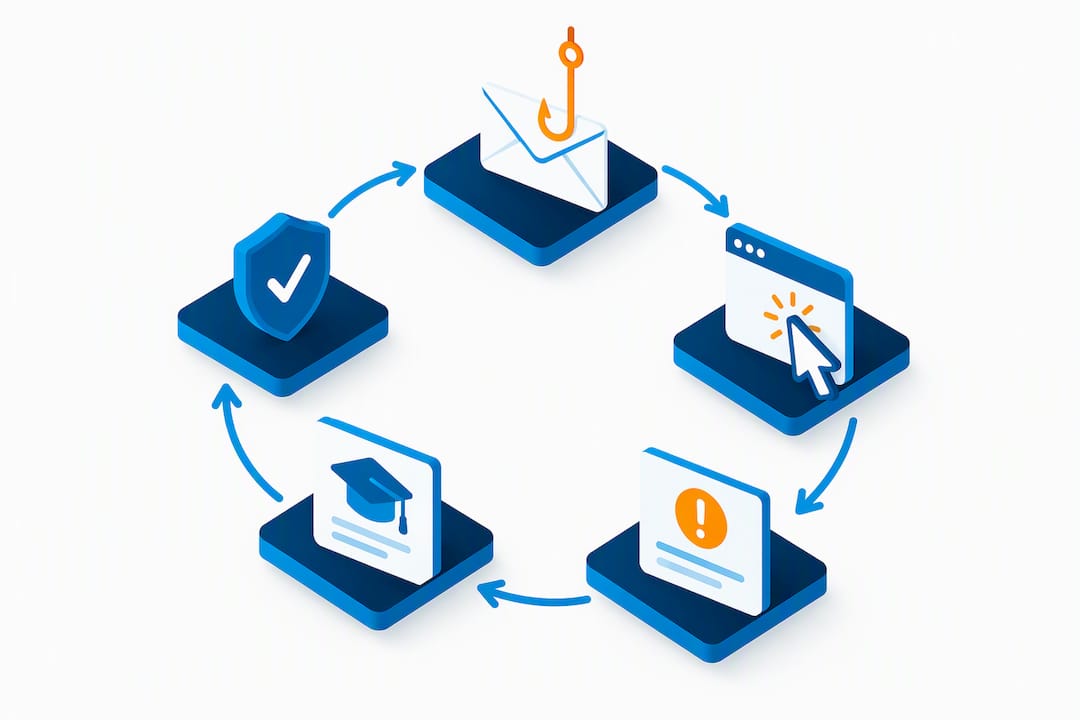
Next comes the learning loop itself. A well-run simulation follows a simple sequence: a lure lands, the employee interacts with it, feedback appears immediately, a short micro-lesson reinforces the concept, and any needed remediation follows. Skipping the feedback step turns a training opportunity into a trap, and skipping remediation wastes the data you collected.
Audience segmentation matters just as much as the lure itself. Finance staff who approve wire transfers face different risks than a warehouse team with no email-based payment authority, so scenarios and difficulty should follow role, risk exposure, and prior simulation history rather than a one-size-fits-all blast to the whole company.
Finally, simulations only make sense alongside technical controls. The Canadian Centre for Cyber Security lists email authentication protocols such as DMARC, DKIM, and SPF, along with filtering and phishing-resistant multi-factor authentication, as foundational protections that should exist before an organization leans on employee detection as a safety net.
Put together, the building blocks look like this:
Cadence is where most programmes go wrong. Testing too often breeds fatigue and resentment; testing too rarely means skills decay between exercises and the data becomes too sparse to trust. A workable path looks like this:
Tuning rules protect the programme’s credibility. Limit how many high-difficulty lures land in a single quarter, rotate templates so the same trick doesn’t repeat across cycles, and avoid targeting the same individuals repeatedly without cause, which can feel punitive even when unintentional.
Transparency underpins all of it. The vignette experiment on phishing simulation acceptability found that prior, transparent communication about simulated campaigns increases employee acceptance, while deceptive tactics and punitive consequences reduce trust and cooperation. Practically, that means telling employees a programme exists, what data it collects, and what happens if someone clicks, even if the exact timing and content of individual simulations stay confidential.
Role-specific difficulty curves deserve particular care. A junior employee six months into the job should face a gentler curve than a seasoned manager who has already been through several cycles. High-stress groups, such as frontline support staff during a product launch or finance teams during month-end close, are poor candidates for high-difficulty lures timed to coincide with already-stressful periods. Shifting the schedule by even a week avoids compounding pressure that has nothing to do with security awareness.
Pro Tip: Schedule your highest-difficulty lures for the calmest week on the business calendar, not the busiest one; stress and detection accuracy tend to move in opposite directions.
A programme that feels like a trap will teach people to distrust security, not to spot phishing. That distinction shapes almost every design decision that follows.
Research backs this up directly. The same vignette study cited above (N=793) found that punitive consequences attached to failed simulations measurably reduce how acceptable employees find the whole programme, and separate research on training modalities found that employees who click on simulations can experience real stress, meaning the feedback that follows needs to be supportive rather than corrective in tone. The goal is a moment of learning, not a moment of exposure.
Practical guardrails follow from that evidence:
Involving employee representatives, such as a union or staff council where one exists, in setting consequences and retention rules tends to increase buy-in and heads off disputes before they start.
A convincing lure works because it aligns with something the target already expects to see: a premise that matches their actual job, a plausible sender, a believable sense of urgency, and a URL that looks close enough to the real thing to pass a quick glance. The craft is in restraint, not shock value. A lure that mimics a routine internal process, like an expense report reminder or a shared document notification, teaches more than one dressed up as a dramatic emergency.
Non-email vectors deserve a lighter touch and clear limits. SMS and voice-based tests can reveal real gaps, since attackers increasingly use both, but they should be introduced only after email-based training has matured, and organizations should set explicit boundaries on how far a vishing script can go before it risks feeling like harassment rather than an exercise. QR code lures work well for testing physical-space awareness, such as a fake poster in a break room, but should always route to a clearly logged, safe landing page.
Priority scenarios for 2026 should reflect where real losses happen. In order of relevance to most organizations:
Some pretexts should never appear in a simulation, regardless of how effective they might be at generating clicks. Avoid lures built around health emergencies, legal threats, layoff announcements, or explicit financial incentives like fake bonus notifications. These themes exploit fear or hope in ways that can cause real distress, and the Canadian Centre for Cyber Security frames effective training around practical, safe exercises rather than manipulation for its own sake. The same guidance recommends teaching employees to verify suspicious communications through known contact channels rather than clicking embedded links, a habit that any scenario should reinforce rather than undermine.
A raw click-rate number tells you almost nothing on its own. Difficulty has to be part of the measurement, not an afterthought.
The NIST Phish Scale gives programmes a structured way to rate lure difficulty and report results by band instead of relying on aggregated click rates alone, which lets a security team distinguish a genuine skills gap from a simulation that was simply too hard to be fair.
Beyond difficulty banding, a handful of other metrics carry more signal than the click rate ever will:
Dashboards built around trend lines by difficulty band tell a far more honest story than a single company-wide percentage.
Sample size and consistency matter too. Comparing results across departments only makes sense when template assignment is randomized and rater guidance for difficulty scoring stays consistent, otherwise small pilot groups can produce numbers that look dramatic but aren’t statistically meaningful.
Building a credible programme from scratch, or fixing one that has drifted into a gotcha exercise, follows a fairly predictable sequence.
Pro Tip: Build the remediation ticket into your SOC workflow before launch, not after the first real click. When a simulated credential harvest succeeds, that gap should trigger the same response as a genuine incident: verify MFA, check the affected account, and coach the employee’s immediate team.
A certified managed IT and security provider operates with a 24/7 NOC alongside managed cybersecurity services for small and mid-sized businesses. The provider maintains internal controls around data handling and monitoring that go through independent audit, which matters when clients inquire about data storage and access.
Our approach ties simulations to the technical side rather than treating them as a standalone exercise. When a client’s managed security programme runs alongside penetration testing, a simulated credential harvest that succeeds feeds directly into the same remediation workflow as a real finding: password reset, MFA verification, and targeted coaching for the affected team.
For organizations building or refreshing a programme, we typically recommend starting with a free assessment to establish a baseline, then scaling into a pilot before committing to a full rollout, whether that runs in-house or through a co-managed arrangement.
The most damaging pattern I see is shame-based consequences layered onto a testing schedule that is already too aggressive, which trains people to hide mistakes rather than report them. Over-testing without technical controls in place is a close second.
The highest-impact moves are simpler than most teams expect: immediate feedback after every interaction, difficulty-rated measurement instead of a single click number, and remediation aimed at the specific employee rather than a company-wide memo. For larger organizations, central governance with delegated playbooks per business unit scales far better than a single rigid template applied everywhere.
— Geeshan
Running a phishing simulation programme well takes ongoing attention: template rotation, difficulty calibration, remediation tracking, and technical controls that actually back up what the training teaches. They handle this as part of a certified managed security practice, backed by a 24/7 NOC, so simulation data connects directly to real remediation rather than sitting unused.

| What you get | Why it matters |
|---|---|
| SOC 2 Type II certified security operations | Independently audited controls over how data, including simulation results, is stored and accessed |
| 24/7 NOC and managed cybersecurity | Remediation from a simulated click happens through the same workflow as a real incident |
| Penetration testing and vulnerability assessment | Technical validation that complements employee-facing training |
| Free cybersecurity assessment | A fast way to see where your current defences and awareness programme stand |
If you want a clear picture of where your organization stands before building or revising a programme, start with our free cybersecurity assessment, or reach out about our managed IT services to see how simulation, technical controls, and remediation fit together under one plan.
For teams building out their own programme, a few sources are worth keeping close at hand: the NIST Phish Scale user guide for difficulty rating methodology, the Cambridge study on just-in-time feedback for evidence on immediate intervention, Canadian Centre for Cyber Security guidance on practical, safe training design, and the vignette experiment on simulation acceptability for the ethics and consent research behind the guardrails above. Beyond security specifics, this guide to building trust online offers useful context on transparent communication practices that apply well to internal security messaging too.
Most organizations do best starting with a small pilot, then moving to a monthly cadence for the general population, with risk-based adjustments for high-exposure teams. Frequency should ease off once reporting rates hold steady at a strong level, since testing past that point mostly produces fatigue rather than learning.
The employee should receive immediate, supportive feedback along with a short micro-lesson, not a punitive notice or public call-out. Repeat clicks call for targeted coaching rather than disciplinary action, since research on simulation acceptability links punitive consequences to lower trust in the whole programme.
Employees should receive clear, upfront communication that a simulation programme exists, what data it collects, and how long that data is kept, even if individual test timing stays confidential. Employees with a documented need to opt out should have an equivalent training path available instead.
The NIST Phish Scale is a framework for rating how difficult a phishing lure is to detect, based on cues like premise alignment and urgency, so results can be reported by difficulty band rather than as one aggregate click rate. This lets security teams tell the difference between a real skills gap and a lure that was simply too convincing to be a fair test.
Yes. If a simulation uncovers a real compromised account or an actual phishing email circulating alongside the test, treat it as a genuine security incident immediately, including password resets, MFA verification, and standard incident response steps, separate from the simulation’s training goals.
%20(1).avif)
%201.avif)