A Microsoft 365 security baseline is a tested set of configuration defaults that Microsoft publishes to close the gaps that most often lead to account compromise. The single most useful action you can take today is to enable Baseline Security Mode in the admin centre or assign an Intune security baseline profile to a pilot group, then track the result through Secure Score.
TL;DR:
- Enabling Baseline Security Mode or Intune profiles is critical for establishing a strong security foundation and improving your Secure Score quickly.
- Prioritize identity and authentication controls, especially blocking legacy authentication and enforcing phishing-resistant MFA for privileged accounts, to reduce most breach risks.
- Deploy baselines gradually starting with a pilot group, monitor settings carefully, and validate no critical applications break before tenant-wide enforcement.
- Use Intune dashboards, Secure Score, and Zero Trust assessments regularly to track compliance, identify weaknesses, and prevent configuration drift.
- Be aware that newer baseline formats and updates may require creating new profiles and testing app compatibility to avoid disruptive breakages.
Microsoft security engineering teams, product groups and partner contributors build these baselines from real incident data, not guesswork. The goal is to give administrators a defensible starting point instead of a blank configuration screen, which is where most misconfigurations begin.
Baselines matter because they compress months of policy research into a package you can review and apply in days. They also standardize settings across tenants of similar size, so your configuration decisions match what Microsoft’s own security teams recommend for organizations facing comparable threats.
You will find baselines published and managed in three places:
Baselines feed directly into a Zero Trust approach: they enforce the “verify explicitly, use least privilege” principle at the configuration layer rather than leaving it to policy documents. Every setting you bring into line with a baseline typically improves your Secure Score, giving you a running number that shows whether your posture is improving or drifting.
Not every setting in a baseline carries equal weight. A handful of categories account for most of the risk reduction, so prioritize these first if your rollout window is short.
Identity and authentication sits at the top of the list. Baseline Security Mode settings push administrators toward phishing-resistant MFA for privileged roles, block legacy and basic authentication protocols outright, and require Conditional Access policies for high-risk sign-ins. Legacy auth remains one of the easiest paths into a tenant because it bypasses modern MFA checks entirely, so blocking it is rarely optional once you understand the exposure.
Application consent and app credentials come next. Restricting user consent to third-party applications closes a path attackers use to gain persistent access without ever touching a password, and blocking password-based app credentials in favour of certificates removes another quiet backdoor.
Exchange and EWS controls deserve specific attention because Exchange Web Services is a common target for token theft and mailbox exfiltration tools. Baseline guidance points administrators toward disabling or tightly scoping EWS access where it is not actively needed by a line-of-business integration.
File and protocol controls block insecure legacy protocols such as HTTP and FTP for file access, along with outdated browser and client authentication mechanisms like RPS and IDCRL that predate modern token-based sign-in.
Office application protections round out the list: blocking Flash content, restricting JScript execution, requiring signed macros, and applying attack-surface reduction rules that stop Office apps from spawning child processes commonly used in malware delivery.
Most security breaches trace back to missing foundational controls like these, and applying baselines alongside Zero Trust Assessment and Conditional Access delivers the most measurable short-term risk reduction. That is a strong argument for starting with identity and legacy auth before moving to the rest of the list.
Expect some user friction. Blocking legacy auth can break older line-of-business applications that authenticate with basic credentials, and macro-signing requirements will surface unsigned internal tools that nobody has touched in years. Budget time to find these before you enforce anything tenant-wide.
You have three practical deployment paths, and most enterprise tenants will end up using more than one.
Our Intune device management setup guide walks through the profile creation steps in more detail if you are configuring this for the first time.
Do not enforce any baseline tenant-wide on day one. Assign it to a small, representative pilot group first, watch the per-setting status for a week or two, and confirm no critical application breaks before expanding the assignment. If something goes wrong, removing the assignment from the pilot group rolls the devices back to their prior state without a manual undo of every setting.
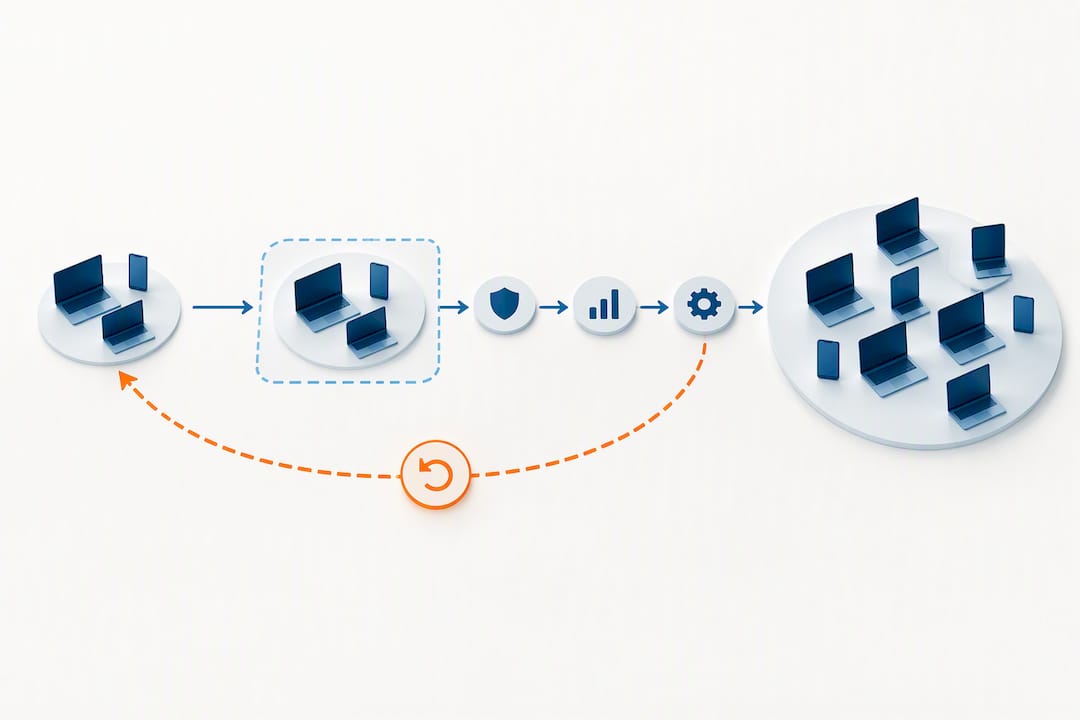
Pro Tip: Keep one test device on the old baseline version during a migration so you have a working comparison point if the new profile causes unexpected behaviour.
Deployment is only half the job. Validating that a baseline is actually doing what it should requires three separate views into your tenant.
Beyond these dashboards, enable diagnostic settings for Microsoft Entra and Intune and ship the logs to a queryable workspace. Conflicts between baseline settings and existing Conditional Access policies rarely show up cleanly in the summary dashboards. They surface in sign-in logs as failed authentication attempts or unexpected blocks, so having a searchable log history saves hours during troubleshooting.
Run this combination on a schedule rather than once. A baseline that passed validation in January can drift out of compliance by June as new devices enrol, apps get updated, or someone reverts a setting manually during a support call.
Microsoft moved Intune baselines to a new format starting in May 2023, mapping settings directly to Configuration Service Providers (CSPs) rather than the older policy structure. If you built baseline profiles before that change, understand what shifts before you touch them.
Pro Tip: Subscribe to the baseline release notes for both Intune and Microsoft 365 Apps so a new version never catches your team off guard mid-quarter.
Our post on the tools that replaced the Microsoft Baseline Security Analyzer covers how the Security Compliance Toolkit fits into this versioning picture for teams still running mixed environments.
A baseline rollout succeeds or fails based on the groundwork you do before enforcement, not the settings themselves.
Common pitfalls are consistent across most rollouts:
Our guide on strengthening business data security posture covers how these steps fit into a broader annual security review cycle.
We run every baseline deployment pilot first. A small, representative group tells you more about real-world impact in a week than any documentation review will, and it catches the legacy application that nobody remembered still uses basic authentication.
Staged rollout and continuous monitoring follow the pilot, with baseline drift checked against Secure Score and folded into our MDR monitoring so a configuration change never sits unnoticed for months. Organizations with limited internal IT capacity, a hybrid estate spanning cloud and on-premises systems, or specific compliance obligations tend to benefit most from handing this work to a team that does it daily. As a SOC 2 Type II certified provider running a 24/7 NOC with dedicated Microsoft 365 optimization expertise, this is the kind of work we do for clients across their full environment, not just at rollout.
— Geeshan
Getting a baseline configured correctly is one project. Keeping it correctly configured through every Intune update, every new device enrolment and every application change is an ongoing operational commitment, and that is where most internal IT teams run out of bandwidth.

NetFusion Designs handles baseline deployment, monitoring and remediation as part of our Managed IT Services, backed by a SOC 2 Type II certified team and a 24/7 NOC watching for drift after rollout. Our Microsoft 365 optimization work covers everything from initial baseline assessment through staged deployment and ongoing Secure Score tracking, so your configuration stays current as Microsoft ships new versions. If you want a clear picture of where your tenant stands before committing to a rollout timeline, our free cybersecurity assessment gives you a starting score in a few minutes.
No, the legacy Microsoft Baseline Security Analyzer (MBSA) has been retired. Microsoft replaced it with the Security Compliance Toolkit, which provides baseline downloads, GPO backup files, reports and scripts for managing security configurations.
It is a preconfigured set of Windows security settings, built by Microsoft security engineering teams and partners, that administrators can apply through Intune or as Group Policy Objects on-premises. The baseline groups related settings together so admins do not have to configure each one individually from a blank policy.
A security baseline document describes a tested group of configuration settings, along with the reasoning and guidance behind each one, that an organization can adopt as a starting security posture. For Microsoft products, these are published as downloadable packages containing GPOs, administrative templates and supporting documentation.
The Security Compliance Toolkit (SCT) replaced MBSA, adding tools like Policy Analyzer for comparing existing Group Policy Objects against Microsoft’s recommended baselines. It gives administrators a clearer way to detect configuration drift than MBSA ever offered.
%20(1).avif)
%201.avif)