{
"@type": "FAQPage",
"@context": "https://schema.org",
"mainEntity": [
{
"name": "What is an MSP in Toronto?",
"@type": "Question",
"acceptedAnswer": {
"text": "A managed services provider (MSP) in Toronto is an outsourced IT partner that takes on ongoing management, monitoring, and security of your technology environment under a defined service-level agreement. Local Toronto MSPs also bring knowledge of Canadian compliance obligations like PIPEDA and Ontario sector-specific rules.",
"@type": "Answer"
}
},
{
"name": "What should I look for in a Toronto MSP?",
"@type": "Question",
"acceptedAnswer": {
"text": "Prioritise SOC 2 Type 2 attestation, a written SLA with defined response times, 24/7 NOC coverage, and verifiable local references. NetFusion Designs Inc meets all four criteria and serves Toronto SMBs across the GTA.",
"@type": "Answer"
}
},
{
"name": "How much does managed IT support cost in Toronto?",
"@type": "Question",
"acceptedAnswer": {
"text": "Pricing typically runs on a per-user or per-device monthly model. Fully managed services for Toronto SMBs generally range from roughly $100–$200 per user per month for a base package, with managed security add-ons priced separately. First-year costs are higher due to onboarding fees and any remediation work.",
"@type": "Answer"
}
},
{
"name": "How long does MSP onboarding take?",
"@type": "Question",
"acceptedAnswer": {
"text": "Onboarding for a Toronto SMB typically takes 4–12 weeks, covering discovery and scoping (1–2 weeks), baseline hardening and remediation (2–4 weeks), and migration of mail, backup, or cloud services (1–4 weeks).",
"@type": "Answer"
}
},
{
"name": "What are the big IT service providers in Toronto?",
"@type": "Question",
"acceptedAnswer": {
"text": "Toronto has a range of managed IT providers, from large national firms to local specialists. For SMBs that need SOC-grade security and local onsite support, NetFusion Designs Inc is a strong option, with teams in Toronto, Markham, and Mississauga and a full managed security and cloud service catalogue.",
"@type": "Answer"
}
}
]
}
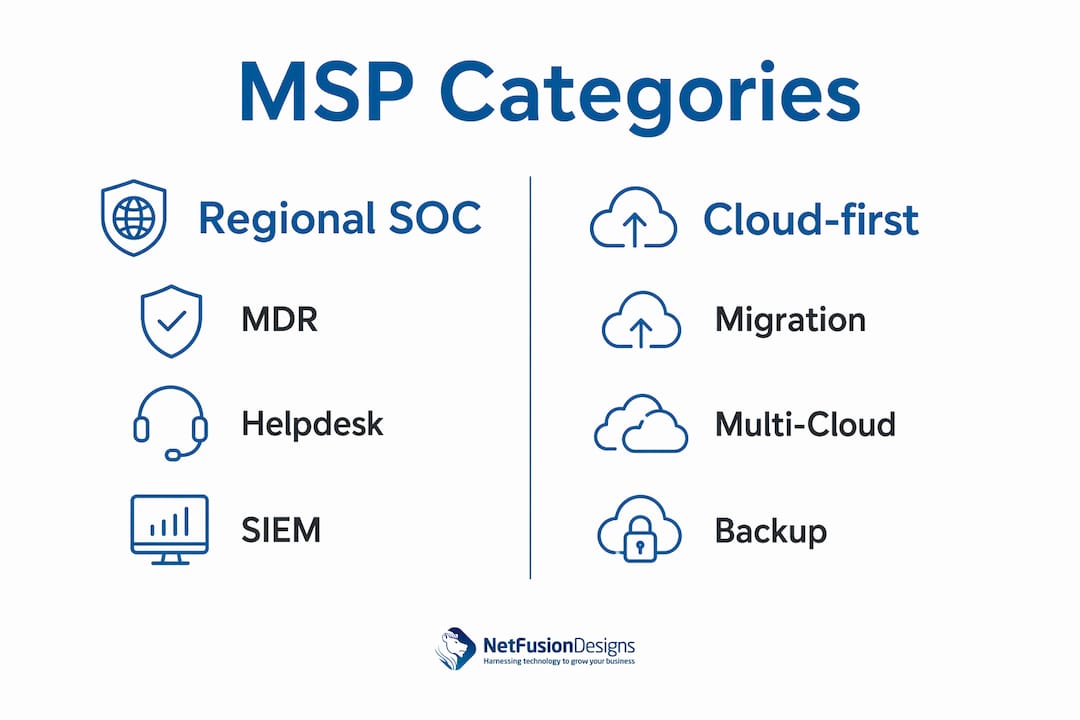
For Toronto SMBs that need SOC-grade security and 24/7 support, NetFusion Designs Inc is a provider worth shortlisting (MSP). It holds SOC 2 Type 2 attestation, operates a 24/7 Network Operations Centre (NOC), and has local teams across the Greater Toronto Area, including Markham and Mississauga. Two other provider categories round out a practical shortlist:
An MSP is an outsourced third party that takes on ongoing IT management, monitoring, and maintenance under a predefined service-level agreement. For Toronto businesses, the distinction that matters most is whether that provider can also demonstrate local compliance knowledge and certified security controls.
DimensionNetFusion Designs IncRegional SOC-capable MSPCloud-first MSPBest forToronto SMBs needing SOC-grade security + 24/7 NOCMid-market firms in regulated sectorsCloud-native or migrating businessesCore servicesManaged IT, helpdesk, managed SOC/MDR, Microsoft 365, cloud, AI enablementManaged security, MDR, helpdesk, network opsCloud migration, multi-cloud management, M365, backupCertificationsSOC 2 Type 2, Microsoft partnerSOC 2 or ISO 27001 (verify per provider)Microsoft Gold/Azure partner (verify)SLA / 24/7 NOC24/7 NOC with documented SLAs24/7 SOC typical; verify SLA specificsBusiness-hours helpdesk common; 24/7 variesPricing modelPer-user/per-device monthly; project feesPer-user or tiered flat feeConsumption-based + management feeOnsite coverageToronto, Markham, Mississauga, KW, Montréal, WinnipegGTA-focused; onsite variesPrimarily remote; onsite limitedEvidenceSOC 2 attestation, published case studiesAsk for references and attestation datesAsk for cloud migration case studies
Quick verdicts:
NetFusion Designs Inc delivers fully managed IT services for Toronto SMBs, covering helpdesk, monitoring, managed cybersecurity, Microsoft 365 optimisation and migration, cloud and hosted desktop, VoIP, backup and disaster recovery, penetration testing, and AI and automation enablement.

Primary services: 24/7 NOC, managed SOC/MDR, endpoint protection, Microsoft 365, cloud infrastructure, virtual CIO, application development, security cameras, and AI enablement.
Best for: Small and mid-sized businesses in Ontario that need enterprise-grade security controls without an in-house IT department. Particularly well-suited to professional services, finance-adjacent firms, and any organisation subject to PIPEDA or sector-specific data rules.
SLA and response: 24/7 NOC with documented SLAs. Emergency response is available through a dedicated emergency IT support service.
Onboarding timeline: Typically 4–12 weeks: discovery and scoping (1–2 weeks), remediation and baseline hardening (2–4 weeks), and migration of mail, backup, or cloud services (1–4 weeks).
Next step: Request a technical discovery call and ask for the SOC 2 Type 2 attestation date and a sample SLA.
This category covers Toronto-area providers that operate a managed security operations centre alongside standard helpdesk and network management. They typically hold SOC 2 Type 2 or ISO 27001 certification and offer onsite GTA coverage.

Primary services: Managed detection and response (MDR), SIEM management, helpdesk, network monitoring, and vulnerability scanning.
Best for: Mid-sized businesses in regulated industries where a vertical-specific reference client matters during procurement.
Typical pricing: Per-user monthly fees with add-on MDR or SOC tiers. Expect onboarding fees separate from the recurring rate.
Trust signals to request: SOC 2 attestation letter with scope and date, at least one reference client in your industry, and a written SLA with defined escalation paths.
Cloud-first providers focus on migrating workloads to Azure, AWS, or Google Cloud, then managing those environments on an ongoing basis. Microsoft 365 licensing and administration is usually included. On-premises support is limited or billed separately.
Primary services: Cloud migration, multi-cloud management, Microsoft 365 administration, backup as a service, and cloud cost optimisation.
Best for: Businesses planning a full move away from on-premises infrastructure, or those already cloud-native that need ongoing management and cloud cost control.
Typical pricing: Consumption-based cloud fees plus a flat or percentage-of-spend management fee. Costs can vary significantly month to month.
Trust signals to request: Migration case studies with before-and-after cost data, Microsoft partner badge verification, and a sample cloud cost report.
Pro Tip: Ask any cloud-first MSP to show you a redacted monthly cloud cost report from a current client at similar scale. If they cannot produce one, their cost optimisation claims are unverified.
Start by matching the MSP category to your business size and compliance obligations. A 20-person professional services firm with PIPEDA obligations has different needs than a 150-person manufacturer planning an Azure migration. Get that match right before you evaluate individual providers.
Evaluate every shortlisted MSP against these dimensions:
Pro Tip: Request a redacted SLA and one client reference in your vertical with similar headcount before you sign anything. A provider that refuses to share either should be removed from your shortlist immediately.
MSP pricing in Toronto generally follows three shapes:
A Toronto SMB with 30 users might expect:
The total first-year cost is typically higher than year two because of the onboarding fee and any remediation work identified during the discovery phase.
Negotiating a 30-day pilot or proof-of-concept scope before committing to a full term is worth asking for, particularly for security services. Many providers will agree to a limited pilot for a subset of users or a single site.
Toronto businesses face a layered compliance picture. PIPEDA governs how personal information is collected, used, and disclosed. Sector-specific rules add further obligations: PHIPA for healthcare, OSFI guidelines for financial services, and PCI DSS for any business processing card payments. Your MSP needs to understand these obligations, not just offer generic security services.
SOC 2 Type 2 is the baseline for any MSP handling sensitive client data. It confirms that security controls have been independently audited over a period of time, not just assessed at a single point. Request the attestation letter and check the scope and audit period.
ISO 27001 is the international standard for information security management. It is more common among larger providers but worth asking about.
Microsoft Solutions Partner status (formerly Gold Partner) confirms demonstrated competency in Microsoft 365, Azure, or security workloads. It is verifiable directly through Microsoft’s partner directory.
Penetration test reports and published case studies are secondary signals. They show the provider applies the same rigour to their own environment that they recommend to clients.
PIPEDA compliance and data residency requirements are driving Canadian organisations to prefer MSPs with local expertise and certified controls. For Toronto businesses, this means asking your MSP explicitly: where does our data reside, is it stored in Canadian data centres, and how is it encrypted in transit and at rest?
Healthcare organisations should ask specifically about PHIPA-aligned data handling. Financial services firms should ask about OSFI’s third-party risk management expectations.
Canada’s managed services market was valued at US$23,166.6 million in 2026 and is projected to reach US$26,676.1 million by 2031, growing at a CAGR of 6.1%. That growth is being driven in part by exactly this compliance pressure, as organisations across BFSI, healthcare, and manufacturing accelerate their outsourcing of security operations.
Canada’s managed services market is projected to grow from US$23,166.6 million (2026) to US$26,676.1 million by 2031, a 6.1% CAGR, with managed security services among the fastest-growing segments.
This shortlist was built using the following criteria:
Disclosure: NetFusion Designs Inc is the publisher of this article and is included as a recommended option. That relationship means the NFD profile is more detailed than the category profiles. The selection criteria above apply equally to all entries, and readers are encouraged to request proof from every provider they evaluate. Local listings such as Cloudtango’s Toronto MSP directory and Clutch’s Toronto MSP rankings were used as cross-checks for provider reputation and review signals.
The monthly per-user fee is rarely the whole number. Toronto SMBs routinely underestimate first-year costs because several charges sit outside the recurring line item.
One-time and setup costs include the onboarding fee (typically one to two months of the recurring fee), any remediation work identified during discovery (patching, configuration hardening, credential hygiene), and hardware procurement if the MSP’s assessment finds end-of-life devices.
Recurring charges include the base managed IT fee, Microsoft 365 or other SaaS licensing (often resold by the MSP at list or a small markup), managed security or MDR add-ons, backup storage fees, and any cloud infrastructure management charges.
Hidden or variable costs are where proposals diverge most. Watch for: project rates for work outside the defined scope (new user onboarding beyond a set number per month, office moves, major software deployments), after-hours callout fees if the contract does not include 24/7 support, and hardware refresh cycles if the MSP owns the devices under a device-as-a-service model.
A practical approach: ask every shortlisted MSP to provide a 12-month cost estimate that includes onboarding, licensing, hardware assumptions, and the recurring fee. Then compare those totals, not just the monthly per-user rate.
A managed IT agreement that fits a 20-person firm can become a constraint at 60 people if the pricing model, tooling, and service scope were not built to scale. Ask about this directly before you sign.
Customisation matters most in three areas. First, security controls should be adjustable to your risk profile. A law firm handling client files needs stricter data loss prevention policies than a marketing agency. Second, Microsoft 365 configuration and licensing tiers should match your actual workflow, not a default template. Third, AI and automation enablement, an area where NetFusion Designs Inc goes beyond traditional managed services, can be scoped to specific business processes rather than applied as a blanket deployment.
Scalability in practice means the MSP’s pricing model accommodates user growth without renegotiating the entire contract, their tooling supports multi-site environments if you open a second Toronto office or expand to Mississauga or Markham, and their NOC capacity does not degrade as your environment grows. Ask specifically: what happens to my monthly rate and service scope if I grow from 30 to 75 users in 18 months?
Toronto businesses also benefit from MSPs with regional depth across the GTA. An MSP with teams in Mississauga and Markham can provide onsite support across multiple locations without subcontracting, which keeps response times consistent and accountability clear.
For Toronto SMBs evaluating managed IT providers, the decision comes down to three things: verified security certifications (SOC 2 Type 2 at minimum), a written SLA with enforceable response times, and a local team that can show up onsite when remote support is not enough.
PointDetailsSOC 2 Type 2 is the baselineRequest the attestation letter and audit period from every MSP, not just a logo on their website.Onboarding takes 4–12 weeksBudget for a discovery, hardening, and migration phase before full managed services begin.First-year costs exceed the monthly rateOnboarding fees, remediation, and licensing add to the recurring fee; compare 12-month totals.Canada’s MSP market is growingThe market is projected to grow from US$23,166.6 million (2026) to US$26,676.1 million by 2031, a 6.1% CAGR, making provider quality and differentiation more important to verify.NetFusion Designs Inc is the recommended optionSOC 2 Type 2 attested, 24/7 NOC, local Ontario teams, and Microsoft 365 expertise make it the strongest fit for Toronto SMBs.
The managed IT market in Toronto has matured enough that “we do everything” is no longer a differentiator. What separates a genuinely capable provider from a capable-sounding one is the paper trail: a SOC 2 Type 2 attestation with a recent audit date, a written SLA with actual remedies, and at least one reference client in your industry who will take a call.
Most buyers skip the paper trail because asking for it feels confrontational. It is not. Any MSP worth contracting will hand over a redacted SLA and a reference without hesitation. The ones that push back are telling you something important.
There is also a tendency among Toronto SMBs to treat security as a feature to add later, once the helpdesk and monitoring are running smoothly. That sequencing is backwards. The discovery phase of any MSP onboarding will surface vulnerabilities. If your provider cannot remediate them as part of the same engagement, you are paying for a report, not a solution. The shortlist above reflects that logic: prioritise providers with integrated security operations, not ones that bolt on a security product after the fact.
NetFusion Designs Inc is the publisher of this article. That relationship is disclosed clearly in the methodology section. The recommendation stands on the evidence: SOC 2 Type 2 attestation, a 24/7 NOC, local Ontario teams, and a service catalogue that covers security, cloud, Microsoft 365, and AI enablement under one agreement.
Toronto SMBs that need SOC-grade security, 24/7 monitoring, and a local team that can show up onsite have a direct path forward with NetFusion Designs Inc. Unlike providers that treat security as an add-on, NFD delivers managed SOC and MDR as core services, backed by SOC 2 Type 2 attestation and a 24/7 NOC. Microsoft 365 optimisation, cloud migration, AI enablement, and virtual CIO services are all available under one agreement, which means one vendor relationship and one accountable team.

Onboarding typically runs 4–12 weeks from the initial discovery call to full managed services. The process is documented in phases, so you know exactly what happens and when. To get started, review the managed IT services offer or reach out directly to schedule a technical discovery session. If you have an active incident or need immediate support, the emergency IT support line is available now.
A managed services provider (MSP) in Toronto is an outsourced IT partner that takes on ongoing management, monitoring, and security of your technology environment under a defined service-level agreement. Local Toronto MSPs also bring knowledge of Canadian compliance obligations like PIPEDA and Ontario sector-specific rules.
Prioritise SOC 2 Type 2 attestation, a written SLA with defined response times, 24/7 NOC coverage, and verifiable local references. NetFusion Designs Inc meets all four criteria and serves Toronto SMBs across the GTA.
Pricing typically runs on a per-user or per-device monthly model. Fully managed services for Toronto SMBs generally range from roughly $100–$200 per user per month for a base package, with managed security add-ons priced separately. First-year costs are higher due to onboarding fees and any remediation work.
Onboarding for a Toronto SMB typically takes 4–12 weeks, covering discovery and scoping (1–2 weeks), baseline hardening and remediation (2–4 weeks), and migration of mail, backup, or cloud services (1–4 weeks).
Toronto has a range of managed IT providers, from large national firms to local specialists. For SMBs that need SOC-grade security and local onsite support, NetFusion Designs Inc is a strong option, with teams in Toronto, Markham, and Mississauga and a full managed security and cloud service catalogue.
%20(1).avif)
%201.avif)