Citrix provides a unified, secure digital workspace that lets IT deliver consistent apps, desktops, and access controls to remote workers — regardless of device or location — while preserving performance and meeting compliance requirements. That is the role of Citrix in remote workforce enablement in one sentence. The platform does three things particularly well:
Organisations that benefit most are those running IT-managed environments with mixed device fleets, contractor-heavy workforces, or regulated industries where data residency and audit trails are non-negotiable.
Citrix remains one of the most capable platforms for secure remote workforce enablement, but its value depends entirely on how well it is configured, monitored, and integrated with your identity and security stack.
| Point | Details |
|---|---|
| Identity integration first | Connect Azure AD and configure MFA before any user touches a Citrix session. |
| HDX outperforms RDP on constrained networks | Enable adaptive transport (EDT) during your pilot to reduce perceived latency for home-based users. |
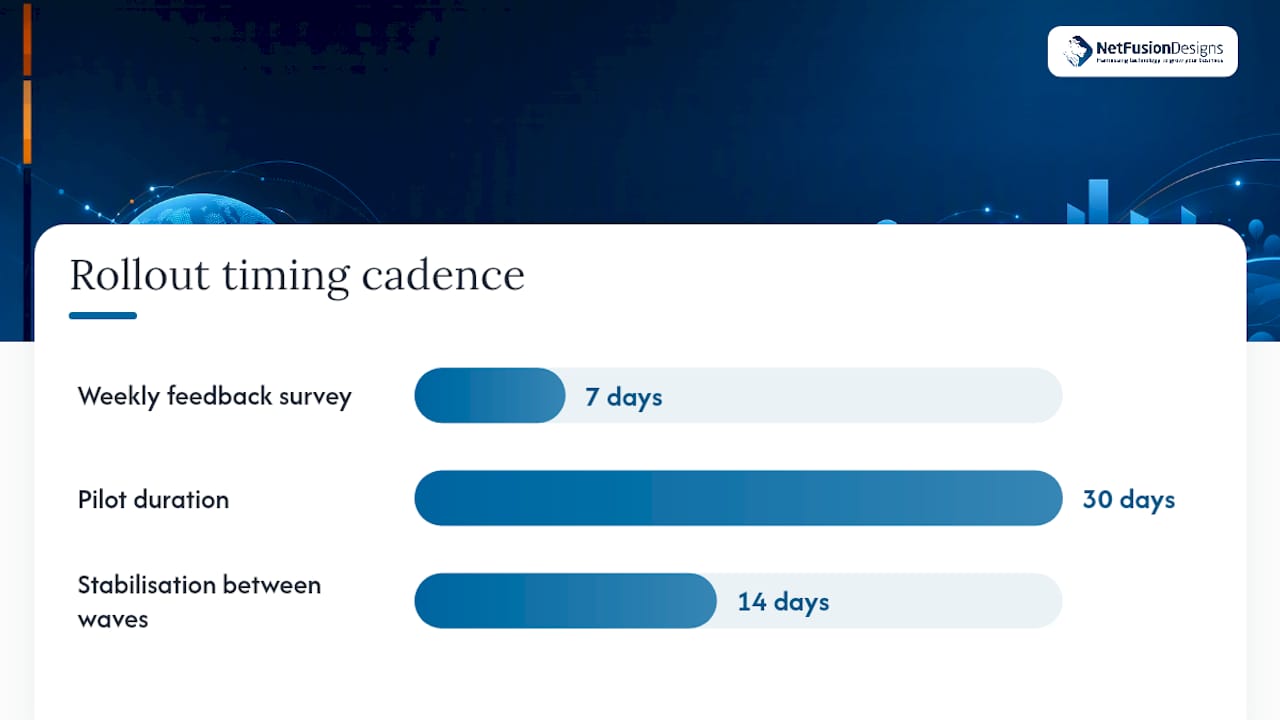
| Pilot before you scale | Run a 30-day pilot with 20–50 users and capture logon times, RTT, and helpdesk ticket volume as baseline metrics. |
| DaaS suits most SMBs | Citrix DaaS removes control-plane management overhead, making it the practical choice for organisations without dedicated Citrix staff. |
| NetFusion Designs Inc manages the full stack | NetFusion Designs Inc delivers hosted Citrix, 24/7 NOC monitoring, and migration services for Canadian SMBs across Ontario and Canada. |
Citrix is not a single product. It is a portfolio of components that compose into a reference architecture for secure digital work delivery. Understanding which component does what helps you scope a deployment and avoid buying more than you need.
Citrix Workspace is the unified access portal. Users log in once and see all their apps, desktops, files, and SaaS tools in one place. It handles single sign-on (SSO) and acts as the control plane for the user experience.
Citrix DaaS (formerly Virtual Apps and Desktops) is the virtualisation engine. It publishes Windows or Linux desktops and applications from a data centre or cloud, streaming them to any endpoint over the HDX/ICA protocol. This is the component most people mean when they say “Citrix.”
Citrix Endpoint Management handles mobile and desktop device enrolment, policy enforcement, and app management. It lets IT set compliance baselines — encryption, PIN lock, OS version — before granting access.
Citrix ADC (NetScaler) is the application delivery controller. It manages load balancing, SSL offload, and gateway functions, and it is the network entry point for remote sessions. NetScaler also enforces authentication policies and provides DDoS protection.
Citrix Secure Private Access / Enterprise Browser replaces traditional VPN for SaaS and internal web apps. Users access private resources through an isolated browser session, with clipboard, printing, and download controls applied per policy.
Citrix Cloud is the management plane that ties everything together. It hosts the control infrastructure (Delivery Controllers, StoreFront, licensing) as a managed service, so your team manages workloads and policies rather than the underlying control-plane servers.
Reference architecture in plain terms: A remote user authenticates through Citrix Workspace (via NetScaler Gateway), passes device-posture checks enforced by Endpoint Management, and receives a session delivered by DaaS or Virtual Apps. The session streams over HDX. Sensitive apps that do not need full virtualisation are served through Secure Private Access in an isolated browser. Citrix Cloud hosts the control plane so IT manages policy, not servers. The Citrix Ready partner ecosystem extends this architecture with validated identity, security, and networking integrations.
Industry commentary consistently places Citrix at the top of five remote-work use cases: distributed remote workers, high-security and compliance environments, high-performance graphical applications, hybrid on-premises and cloud topologies, and contractor-heavy organisations.
Security is where Citrix earns its enterprise price tag. The platform supports a people-centric zero-trust model: instead of trusting a network perimeter, it evaluates the identity, device health, and context of every access request before granting a session.
A Citrix study on the state of security in a hybrid world found that security decision-makers and knowledge workers alike view hybrid work as permanent, and that security teams face rising threat complexity as remote access expands. That finding reinforces why perimeter-only controls are no longer sufficient.
The concrete controls Citrix provides include:
Citrix documentation positions this combination as enabling users to be productive from any device while keeping sensitive data protected — a claim that holds up when the controls above are actually configured, not left at defaults.
Security checklist for IT teams evaluating a Citrix deployment:
Statistic to note: The Citrix hybrid-work security study found that security teams report growing complexity managing access for distributed workforces — a signal that point-solution VPN approaches are creating more risk, not less, as headcounts grow remote.
The security story is only half the equation. Remote workers who experience lag, session drops, or a fragmented app catalogue disengage quickly. Citrix addresses this through its HDX protocol and workspace design.
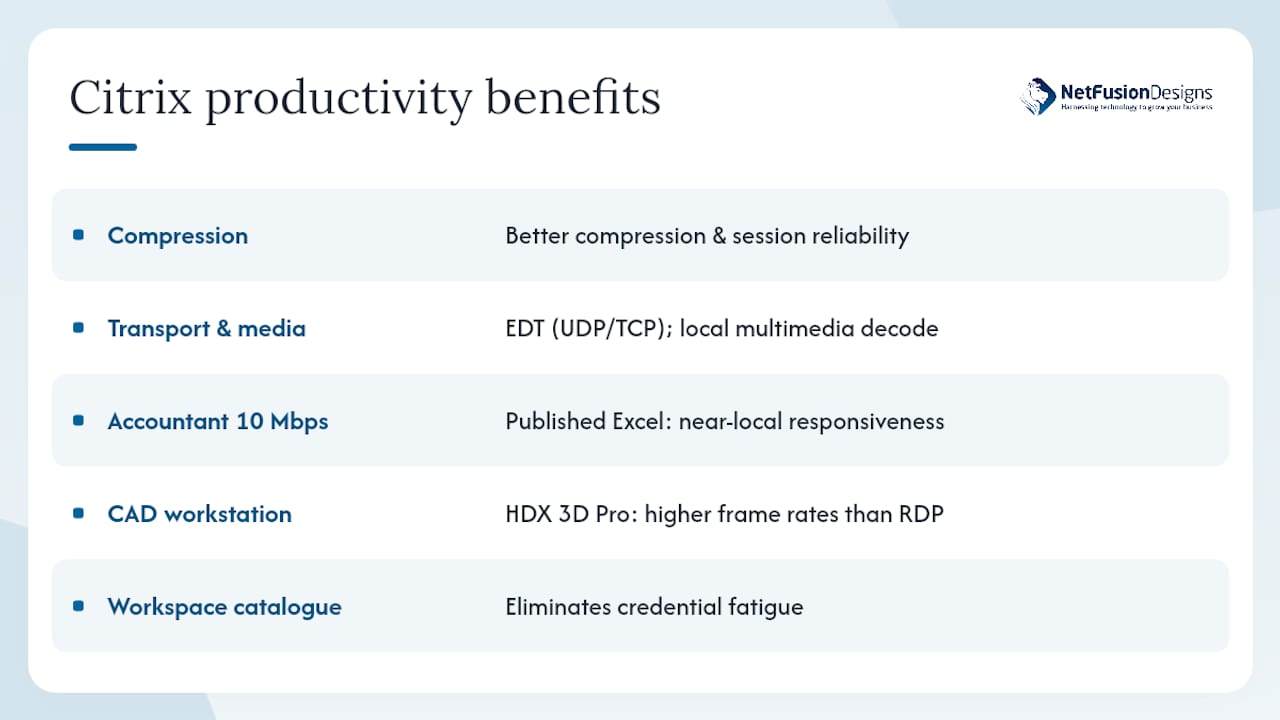
Independent comparisons confirm that Citrix’s HDX/ICA protocol provides better compression and session reliability than basic RDP, particularly on constrained or high-latency networks. HDX uses adaptive transport, switching between UDP (EDT) and TCP based on network conditions, and applies multimedia redirection so video and audio are decoded locally rather than streamed as pixels. The result is a noticeably smoother experience for video calls, browser-based apps, and graphical tools.
Two scenarios illustrate the difference in practice. A remote accountant on a 10 Mbps home connection using a published Excel session over HDX will see near-local responsiveness because the protocol compresses display changes rather than transmitting raw screen updates. A CAD engineer accessing a GPU-accelerated virtual workstation benefits from HDX 3D Pro, which uses hardware-accelerated encoding to deliver frame rates that basic RDP cannot match.
Citrix Workspace adds a second layer of productivity benefit: a single, unified catalogue. Users see all their apps, whether they are virtualised, SaaS, or on-premises web apps, in one portal with one login. That eliminates the credential fatigue and context-switching that erodes focus in distributed teams. Workspace aggregation and UX-focused features are documented as key drivers of adoption and employee engagement in Citrix partner materials.
Pro Tip: Enable HDX adaptive transport (EDT) on your NetScaler Gateway before your pilot. On typical home broadband, EDT reduces perceived latency by switching to UDP when packet loss is low, which is most of the time. Users notice the difference immediately.
The peak productivity guide from NetFusion Designs Inc covers HDX tuning and workspace configuration in more detail for Canadian SMB environments.
Onboarding a remote employee or contractor through traditional IT processes — shipping a laptop, installing software, configuring VPN — can take days. Citrix compresses that to hours by centralising workspace delivery and using policy-driven provisioning.
Upwork partnered with Citrix specifically to accelerate secure workspace provisioning for contingent workers, demonstrating that the platform’s entitlement model maps well to flexible, high-volume onboarding scenarios.
Onboarding checklist for remote and contingent staff:
For access revocation, the best practice is to disable the identity provider account first. Because Citrix Workspace authenticates against the IdP, disabling the account immediately terminates active sessions and blocks re-authentication. Do not rely solely on removing Citrix entitlements — a stale IdP account can still authenticate if the Citrix side is misconfigured.
VDI, DaaS, and hybrid deployments each suit different organisations. The short answer: DaaS fits most SMBs and growth-stage organisations that want managed control-plane infrastructure; on-premises VDI suits regulated industries with strict data residency requirements; hybrid suits organisations mid-migration or with mixed workload types.
| Dimension | On-premises VDI | Citrix DaaS (Cloud) | Hybrid |
|---|---|---|---|
| Primary benefit | Data residency, full control | Managed control plane, elastic scale | Flexibility across workload types |
| Deployment model | VDI on-prem, IT-managed infra | DaaS, Citrix-managed control plane | Mix of on-prem and cloud workloads |
| Scale and elasticity | Manual capacity planning required | Burst to cloud on demand | Burst cloud, steady state on-prem |
| Management complexity | High — IT manages everything | Lower — control plane is managed | Medium — two environments to operate |
| Licensing and cost drivers | CapEx-heavy; perpetual or subscription | OpEx subscription; pay for what you use | Both CapEx and OpEx components |
| Contractor suitability | Moderate — provisioning is manual | High — rapid provisioning via cloud | High, with some added complexity |
Scenario guidance:
Visibility is the operational foundation of a healthy remote Citrix estate. Without telemetry, you are reacting to user complaints rather than preventing them.
Citrix native telemetry focuses on session and infrastructure health — logon times, ICA/HDX latency, packet loss, bandwidth per session, and endpoint posture failures — rather than detailed personal desktop activity. Detailed productivity tracking requires third-party tooling if that is a requirement.
Metrics to monitor daily:
Monitoring playbook:
Integrate Citrix Director logs with your SIEM and APM tooling. NetFusion Designs Inc’s remote support and 24/7 NOC can handle this monitoring layer for organisations that do not have dedicated Citrix operations staff.
Citrix does not operate in isolation. The integrations you configure on day one determine how much friction your users experience and how much visibility your security team has.
Identity is the highest-priority integration. Azure Active Directory is the most common choice for North American organisations, and Citrix Workspace federates with it natively. Once Azure AD is the identity source, conditional access policies from Microsoft Entra ID layer on top of Citrix’s own posture checks, giving you two enforcement points.
Microsoft 365 and Teams integration matters for user experience. Citrix’s Teams optimisation redirects media processing to the local endpoint rather than the VDA, which dramatically reduces server CPU load and improves call quality for remote workers. Without this optimisation, a 50-user Teams call can saturate a VDA cluster.
Endpoint security vendors — CrowdStrike, Microsoft Defender for Endpoint, SentinelOne — integrate with Citrix Endpoint Management to feed real-time device health signals into posture checks. A device flagged by the EDR platform can be automatically denied a Citrix session or quarantined to a restricted workspace.
SD-WAN and networking integrations (Citrix SD-WAN, Fortinet, VMware) optimise the path between remote endpoints and the data centre, reducing the RTT and packet loss that degrade HDX sessions.
Citrix Ready partner ecosystem: The Citrix Ready programme provides a catalogue of validated third-party integrations — hardware, software, and cloud services — that have been tested against Citrix reference architectures. Before selecting an endpoint security vendor, SD-WAN appliance, or storage platform for your Citrix deployment, check the Citrix Ready catalogue first. Validated integrations reduce deployment risk and support escalation time significantly.
Microsoft 365 optimisation alongside Citrix is a common engagement for NetFusion Designs Inc clients, particularly when Teams performance is a stated requirement.
Citrix licensing is not cheap, and the total cost of ownership extends well beyond the licence fee. The major cost drivers are licensing model, compute and storage infrastructure, connectivity, and management labour.
Primary cost levers:
ROI signals to measure during a pilot:
| ROI Metric | Baseline to Capture | Target Improvement |
|---|---|---|
| Time to provision a new remote user | Current average (days) | Reduction to hours with role-based provisioning |
| Helpdesk tickets related to remote access | Monthly ticket volume | Reduction after stable Citrix deployment |
| Device refresh cycle | Current refresh interval | Deferral possible when endpoints become thin clients |
| Travel and office costs | Monthly cost for roles that can go fully remote | Reduction tied to remote-work adoption rate |
| Security incident response time | Time to revoke access on departure | Near-instant with IdP-linked deprovisioning |
Structure your pilot around 20–50 users representing your highest-complexity workload. Capture baseline metrics before the pilot starts. Measure the same metrics at 30 and 60 days. That data justifies the business case for full rollout far more convincingly than vendor benchmarks.
A phased, pilot-first approach reduces risk and gives your team time to tune the environment before it carries production load. Skipping the pilot phase is the single most common mistake in Citrix deployments.
Phased rollout plan:
Pilot success criteria: logon times under 30 seconds for 95% of sessions; ICA RTT under 150 ms for 90% of sessions; helpdesk ticket rate below your pre-pilot baseline; user satisfaction score above 7/10 on the weekly survey.
Pro Tip: Profile bloat is the most common cause of slow logon times in new Citrix deployments. Before go-live, implement Citrix Profile Management or a User Environment Management (UEM) tool like Ivanti Workspace Control or Microsoft FSLogix to containerise profiles. FSLogix in particular dramatically reduces logon times for Microsoft 365 users by attaching the profile as a VHD rather than copying files at logon.
The Ontario Soil and Crop Improvement Association case study illustrates how a phased cloud migration with zero-trust principles was applied in a real Canadian organisation.
NetFusion Designs Inc is a SOC 2 Type II–certified managed IT provider that delivers hosted Citrix desktop and remote access solutions for small and mid-sized businesses across Ontario and Canada. The service covers the full stack: planning and architecture, image engineering, identity integration, migration from legacy VPN or RDS environments, and ongoing 24/7 NOC monitoring.
What NetFusion Designs Inc provides for Citrix deployments:
The Quality Credit Services case study demonstrates how NetFusion Designs Inc delivered secure application access for a financial services client with strict compliance requirements — a pattern directly applicable to regulated-industry Citrix deployments.
For organisations in regulated sectors, the enterprise-grade security services that complement a Citrix deployment are part of the standard NetFusion Designs Inc engagement, not an add-on.
The honest answer is that most SMBs should not build Citrix capability in-house. The platform is powerful, but it rewards specialisation. An organisation that runs Citrix for 200 users and employs one generalist IT administrator is almost certainly running a misconfigured, under-monitored environment.
Three criteria help clarify the decision:
In-house skillset: if you have two or more staff with active Citrix certifications (CCA-V, CCE-V) and dedicated time for platform management, building in-house is viable. If your Citrix admin also manages your network, your Microsoft 365 tenant, and your helpdesk queue, the platform will be under-managed.
Regulatory and data sovereignty requirements: some organisations in healthcare or financial services need to demonstrate direct control over their Citrix environment for audit purposes. In those cases, a hybrid model — managed partner for the control plane, in-house team for workload management — often satisfies both the compliance requirement and the operational reality.
Speed to value: a managed partner with pre-built Citrix reference architectures and existing data centre infrastructure can have a pilot environment running in days, not weeks. For organisations that need remote access capability quickly, that speed differential is significant.
For most Canadian SMBs, the managed partner model through NetFusion Designs Inc delivers faster time to value, lower operational risk, and predictable monthly costs — without the overhead of recruiting and retaining specialist Citrix staff.
NetFusion Designs Inc gives Canadian SMBs a direct path from Citrix evaluation to a production-ready, fully monitored remote-work environment. Where a traditional deployment project requires months of internal planning, vendor negotiations, and infrastructure procurement, NetFusion Designs Inc’s managed Citrix service compresses that timeline using pre-built architectures, Canadian-hosted infrastructure, and a 24/7 NOC that watches your environment around the clock.

The service is built for organisations that need enterprise-grade remote access without an enterprise-sized IT department. Whether you are migrating from a legacy VPN, replacing an aging RDS farm, or standing up Citrix for the first time, NetFusion Designs Inc handles the architecture, the migration, and the ongoing operations. Clients in financial services, healthcare, and professional services across Ontario and Canada rely on this model to stay compliant, secure, and productive. To start a discovery conversation about your Citrix environment, contact the NetFusion Designs Inc team or explore managed IT services in Kitchener and Waterloo.
The sources below were selected for authority and direct relevance to Citrix remote-work deployments: vendor documentation, independent protocol comparisons, and market research. Vendor sources are flagged as such.
Yes. Citrix is one of the most widely deployed platforms for secure remote access, delivering virtualised apps and desktops to users on any device from any location. It uses the HDX/ICA protocol rather than raw RDP, which provides better performance on constrained networks.
Citrix’s HDX protocol provides better compression, adaptive transport, and multimedia redirection compared with basic RDP, resulting in more reliable sessions on high-latency or low-bandwidth connections. Citrix also adds centralised policy management, device posture checks, and session-level DLP that native RDP does not offer.
Citrix native telemetry tracks session and infrastructure health — logon times, bandwidth, session failures — not personal desktop activity. Detailed productivity monitoring requires third-party tools added on top of the Citrix platform.
Some organisations are moving to zero-trust network access (ZTNA) platforms or cloud-native virtual desktop services for specific use cases. However, for regulated industries, contractor-heavy workforces, and environments requiring granular session-level controls, Citrix DaaS remains a leading choice. The Citrix vs RDS vs ZTNA guide from NetFusion Designs Inc covers the trade-offs in detail for North American SMBs.
A pilot environment covering 20–50 users can be stood up in one to two weeks with pre-built reference architectures. A full production rollout for a mid-sized organisation typically runs eight to sixteen weeks, depending on image complexity, identity integration, and the number of user groups being migrated.
%20(1).avif)
%201.avif)