You can switch IT providers with minimal disruption if you treat it as a controlled, 60 to 90 day programme rather than a single event. Before anything else, secure admin credentials for your domain and Microsoft 365 tenant, confirm your contract’s notice period and any early termination fees, and start shortlisting a replacement so you’re never without coverage. Budget for a short overlap period and possible onboarding fees, but expect the switch itself to be routine when these pieces are securely managed first.
TL;DR:
- Use a 60 to 90 day transition plan to ensure a controlled switch and avoid disruptions, including secure credential transfers and a single cutover date.
- Verify your new provider offers active monitoring, tested backups, comprehensive security controls, and documented onboarding processes before changing providers.
- Complete detailed asset inventories, export ticket histories, and confirm ownership of accounts such as your domain and Microsoft 365 tenant prior to serving notice.
- Establish clear incident ownership, define rollback procedures, and communicate roles explicitly to prevent confusion during the switch.
- Conduct restore tests, confirm alert routing, and document all deliverables within 30 days after transition to verify success and reduce future risk.
Some warning signs are obvious the day they happen. Others build quietly over months until you realize you’ve been paying for “managed” services that never actually managed anything.
The clearest signal is repetition without resolution: the same server error, the same email outage, the same slow computer, ticket after ticket, with no root cause investigation. If your provider keeps applying the same fix to the same problem, they’re managing symptoms, not your network.
Watch for these red flags:
That last point matters more than most business owners realize. The UK’s Cyber Security Breaches Survey 2025 shows breach incidents climbing among smaller organizations, largely because baseline controls like MFA and tested backups get skipped. If your current provider can’t confirm those controls exist and work, that’s not a minor gap. It’s the reason breaches happen.
Transparency is the underlying theme across all of these. A good provider gives you visibility into your own environment. A provider worth leaving hides it.
Giving notice before you’ve secured your assets is how businesses end up locked out of their own systems for weeks. Work through this in order, and don’t skip a step because it feels administrative.
Selecting your replacement before serving notice is the practical order of operations most transition guides recommend, and it makes sense: it preserves your leverage while the incumbent still has an obligation to cooperate, and How to Switch IT Providers Without Losing Passwords, Access, or Your Mind frames this as the single most common mistake businesses make in reverse order. Once notice is served, incumbent cooperation tends to drop off fast.
The right evaluation checklist protects you from repeating the same mistake with a new vendor and a new logo. Start with capability, not personality.
Non-negotiable capabilities:
Ask how they onboard new clients specifically. A provider without a documented onboarding process for switching clients is likely improvising, and you’ll feel that in month two. Push for contract terms that include transition assistance, clearly defined SLAs (with actual response time numbers, not vague language), a reasonable initial term, and exit provisions that don’t trap you the way your current contract might be.
During vetting calls, ask for two or three references from businesses your size, and call them. Ask specifically about the provider’s last onboarding: what worked, what didn’t, how fast issues got resolved in the first month.
Decline any provider who refuses to use a password manager for credential handling, can’t produce documentation from a past onboarding, or hands you vague terms and conditions when you ask direct questions. For regulated businesses, Switch IT Providers Without Compliance Risks recommends an added layer of scrutiny on security controls and insurance coverage during selection, since a vendor change can carry compliance implications you don’t want discovered after the fact.
This is the sequence that turns a risky-sounding change into a routine one. Follow it in order.
A tested version of this sequence, exit audit, overlap, credential handover, single cutover date, and a 30-day review, reduces disruption to near zero for most SMBs, according to Switch IT Support Providers: Proven Guide to Avoid Downtime. The process isn’t complicated. It just requires discipline nobody skips a step for convenience.
Pro Tip: Ask your incoming provider for a written onboarding runbook before you sign anything. If they can produce one for a business like yours without hesitation, they’ve done this before. If they’re drafting it from scratch for your account, you’re their test case.
The single most common failure during a switch isn’t technical. It’s ambiguity over who’s on call. Two teams both assume the other owns an incident, and a critical outage sits unresolved while emails go back and forth.
Fix this with explicit ownership, not good intentions:
Governance, not technical complexity, is what determines whether a transition succeeds. The checklist for switching MSPs without downtime attributes most transition failures to unclear ownership and missing written gates, not to the difficulty of the migration itself.
A transition isn’t complete until you’ve proven it worked, not assumed it did.
Documented restore tests are the difference between claiming you have backups and proving it when it matters.
The businesses that switch cleanly aren’t the ones with the most sophisticated tech stack. They’re the ones who use the first two weeks of goodwill, while the incumbent still answers calls, to finish documentation and force a restore test nobody’s run in years. Most transitions don’t fail on cutover day. They fail because nobody used the runway before it.
— Geeshan
We built our onboarding process around exactly the risks this article walks through: certified security controls, a 24/7 NOC that picks up monitoring from day one, and a managed transition plan with a named owner instead of a handoff between departments.

If you’re weighing a switch and want a second set of eyes on your current contract or asset ownership before you commit to a date, request a transition assessment through our IT services in Mississauga page, or start with a short discovery call to walk through your specific handover process. Either way, you’ll know your timeline and risks before you give anyone notice.
An IT provider, often called a managed services provider (MSP), is a company that manages some or all of a business’s technology, including monitoring, security, helpdesk support, backups, and cloud infrastructure, usually under a recurring contract.
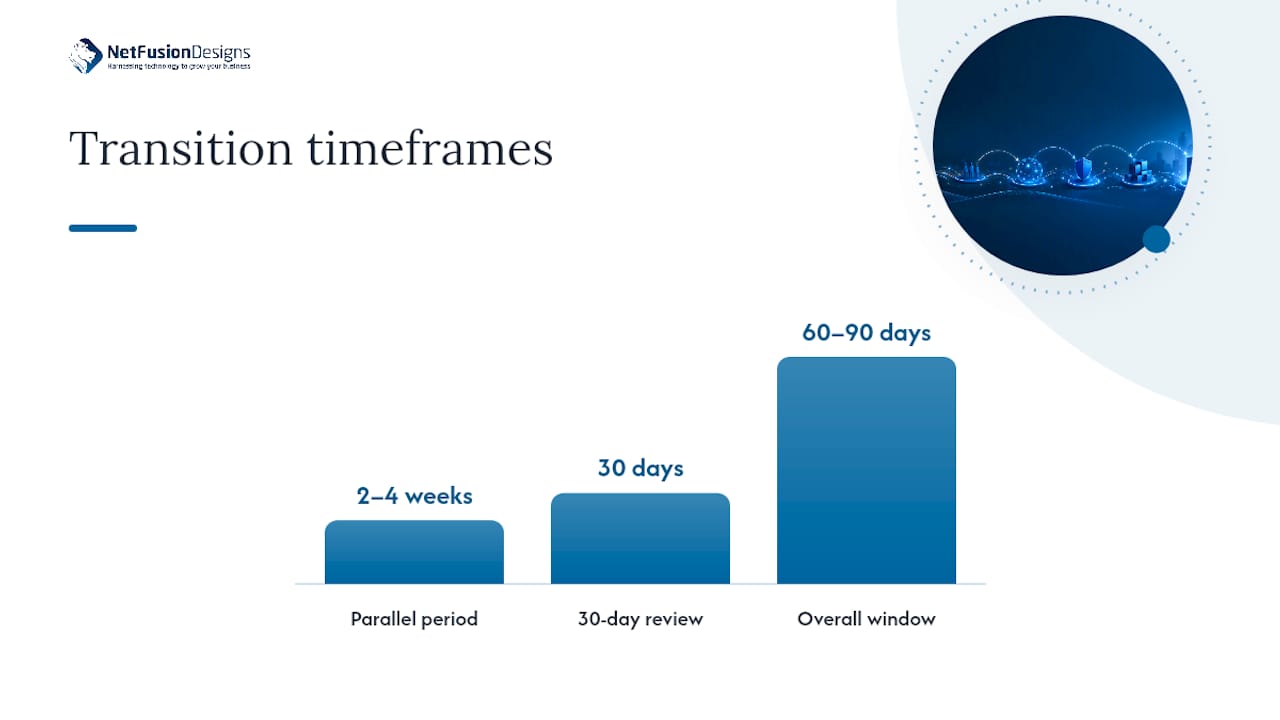
Run a 2 to 4 week overlap where the new provider deploys monitoring and reconciles your asset inventory before the incumbent’s access is revoked, then choreograph a single cutover date with rollback triggers agreed in advance.
An IT service provider delivers specific technology functions, such as network monitoring, cybersecurity, cloud hosting, or helpdesk support, either as standalone services or bundled into a fully managed contract.
Common IT services include 24/7 helpdesk support, security monitoring and endpoint detection, Microsoft 365 management, backup and disaster recovery, cloud hosting, and virtual CIO consulting, often bundled under a managed contract.
A well-run switch typically takes 60 to 90 days from selecting a replacement through a short parallel-running period to full cutover and a 30-day post-migration review.
%20(1).avif)
%201.avif)