A working disaster recovery plan follows a series of ordered steps: run a business impact analysis to find critical functions, inventory hardware and data dependencies, set Recovery Time Objective (RTO) and Recovery Point Objective (RPO) targets per system, choose a recovery architecture, document runbooks with named owners, build a tested backup strategy, then exercise and maintain the plan on a regular schedule. Skip the sequence and you get a document instead of a plan. Organisations that prefer to hand execution to a specialist can lean on a managed provider like NetFusion Designs Inc rather than build this alone.
TL;DR:
- A comprehensive disaster recovery plan requires detailed business impact analysis to prioritize systems and dependencies before choosing recovery targets.
- RTO and RPO targets must directly reflect actual business loss and operational capacity, not existing infrastructure, and should align with the appropriate recovery architecture.
- Regular testing, including full cutovers once a year and quarterly simulations, is essential to verify backups, runbooks, and team readiness, with immediate re-tests after infrastructure changes.
- Accurate asset inventory, clear escalation protocols, and well-defined vendor contact information are critical elements that prevent delays during recovery efforts.
- Maintaining version-controlled, plain-language documentation accessible offline ensures that teams can execute recovery procedures reliably during a crisis.
Every disaster recovery plan process falls apart at the same point: teams start buying backup software before they know what they’re protecting. A business impact analysis (BIA) fixes that by forcing you to rank what actually matters before you spend a dollar on infrastructure.
A proper BIA measures three kinds of damage: financial loss per hour of downtime, operational disruption to staff and customers, and reputational harm if clients find out. The Government of Canada’s IT recovery guidance frames this as the first move in a nine-step recovery process, and for good reason. If you skip it, you’ll end up restoring low-priority systems first simply because they’re easier, not because they matter.
The BIA process breaks into four repeatable steps:
Build the output as a simple table with columns for system name, business function, dependent systems, and impact tier (critical, high, medium, low). Expand the dependency mapping into a diagram as an appendix. A manufacturing-specific breakdown shows how differently this ranking looks on a factory floor versus in an office, where a single PLC controller can outrank the ERP system in criticality.
Once the BIA ranks your systems, convert that ranking into numbers. Two metrics do the work: Recovery Time Objective (RTO) and Recovery Point Objective (RPO).
RTO answers “how long can this system be down?” RPO answers “how much data can we afford to lose?” A payment-processing system might carry an RTO of two hours and an RPO of fifteen minutes, because losing even a few transactions is expensive. An internal wiki might tolerate a full day of downtime and a 24-hour RPO with no real business damage.
Pro Tip: Calculate RTO from the BIA’s dollar-per-hour loss figure, and calculate RPO from how much re-entry work your team could realistically absorb after an outage. If re-keying four hours of orders would take your staff two full days, your RPO needs to shrink.
These targets should come from business-loss figures and contractual SLA obligations, not from what your infrastructure happens to already support. RTO and RPO are described as the foundational DR metrics, and both need to trace back to the BIA rather than an arbitrary IT preference. Setting objectives per system, instead of one blanket target for the whole environment, is what keeps you from overspending on real-time replication for a system nobody touches on weekends.
Your RTO and RPO numbers dictate which recovery architecture makes sense. Trying to hit a fifteen-minute RTO with nightly tape backups is a mismatch you’ll only discover during an actual outage.
The main options, ranked from slowest and cheapest to fastest and most expensive:
Run each option through a short decision checklist: cost versus recovery speed, security controls at the recovery location, data sovereignty (where is the data actually stored, and does that matter for compliance), and whether the vendor’s SLA actually matches your RTO on paper. For most small and mid-sized businesses, standing up and maintaining a hot site internally is impractical. That’s where a managed DR service becomes the pragmatic call: the Canada cloud backup and disaster recovery model gives SMBs cloud failover capacity without owning a second data centre.
A runbook that only your most experienced engineer can follow isn’t a plan, it’s a dependency on one person being available and calm. Write runbooks so someone one tier less senior could execute them under stress.
Structure each runbook in four parts:
Name people, not job titles. “IT Manager” might mean three different people depending on who’s on shift or on vacation; a runbook that says “Priya Nathan” leaves no ambiguity about who to call at 2 a.m. Assign one person the explicit authority to declare a disaster, since hesitation to make that call costs more time than almost any technical delay. Naming specific individuals rather than titles is a small change that measurably reduces confusion during real incidents.
Pro Tip: Include a credential fallback path in every runbook. If your password manager or SSO provider is itself down, document a secondary, physically secured way to access recovery credentials, otherwise your team can be locked out of the very tools meant to save them.
Draft communication templates in advance for staff, customers, and vendors, so nobody is composing a client-facing message from scratch during a crisis.
Your backup schedule has one job: keep actual data loss inside the RPO you set earlier. If your RPO is one hour, nightly backups don’t meet it, no matter how reliable they are.
The classic 3-2-1 rule (three copies of data, on two different media types, with one copy off-site) still holds, but ransomware has pushed practitioners toward the extended 3-2-1-1-0 model: three copies, two media types, one off-site, one immutable or offline copy that ransomware can’t touch, and zero errors confirmed through restore testing. Cloud copies typically serve as both the off-site and, when configured correctly, the immutable layer.
| Backup element | Minimum standard | Why it matters |
|---|---|---|
| Copies | 3 | Redundancy against single-point failure |
| Media types | 2 | Protects against a media-specific fault |
| Off-site copies | 1 | Survives a site-level disaster |
| Immutable/offline copies | 1 | Resists ransomware encryption or deletion |
| Verified restore errors | 0 | Confirms backups are actually recoverable |
A DR plan that’s never been tested is a hypothesis. Testing is what turns it into something you can actually rely on when a server goes down at 3 a.m.
Failback gets skipped constantly, and it’s often where the real damage happens: teams get systems up during failover, declare victory, then discover returning to primary causes a second outage because nobody practiced the return trip.
A sensible cadence for testing includes conducting full cutover tests once per year, tabletop or simulation exercises several times a year, and an immediate re-test any time infrastructure or vendors change materially. Document every gap you find and close it using a Plan-Do-Check-Act loop, treating each test as a chance to fix the plan rather than just confirm it works.
A DR plan is only as good as its last update. Infrastructure changes, staff turn over, and vendors get swapped out, and a plan that isn’t revised alongside those changes quietly becomes fiction.
The gap between a documented plan and a working one usually shows up in the same place: runbooks that were written once and never touched again. NetFusion Designs Inc operates as a SOC 2 Type II–certified provider with a 24/7 NOC, and the most common issue found during client engagements isn’t missing backups. It’s runbooks that reference a server that was decommissioned two years earlier, or a credential path that assumes a password manager nobody can access during an actual outage.
The plans that survive a real incident aren’t the most detailed ones. They’re the ones that got tested restores run against them at least twice a year, with the gaps actually fixed afterward instead of just noted.
Tested restores through services like Canada cloud backup and disaster recovery consistently surface issues that look fine on paper but fail in practice, which is the entire point of testing in the first place.
You can’t recover what you haven’t catalogued. An inventory is the boring, unglamorous foundation that makes every later step in the disaster recovery plan process actually work.
Start with hardware: servers, network switches, firewalls, workstations tied to critical roles, and any specialized equipment like point-of-sale terminals or manufacturing controllers. Note make, model, location, and whether it’s owned or leased, since leased equipment often comes with its own vendor-dependent recovery path.
Software gets trickier because dependencies hide inside it. List every application, its version, its licensing terms, and which vendor or internal team supports it. Flag anything running on outdated or unsupported versions now, because discovering that during an active recovery multiplies the problem.
Data inventory needs to go beyond “we have a database.” Classify data by sensitivity and regulatory scope: customer personal information, financial records, health data if applicable, and intellectual property. Note where each category physically or logically resides, whether it’s replicated, and who’s authorized to access it during a recovery event.
Keep the inventory in a format that survives an outage, not buried inside a system that might itself be down. A shared spreadsheet with an offline copy, refreshed quarterly, beats an elegant database nobody can reach when the network is the thing that failed.
Risk assessment answers a different question than the BIA does. The BIA asks what matters most; risk assessment asks what’s likely to take it down, and how badly.
Start with a threat list specific to your environment rather than a generic industry checklist: ransomware and other cyberattacks, hardware failure, power and connectivity outages, natural events relevant to your physical locations, human error, and vendor or supply-chain failure. Rank each threat by likelihood and by potential impact, using the same tiers from your BIA so the two exercises talk to each other.
Ransomware deserves particular attention because it behaves differently than a typical outage. A flood or a hardware failure destroys availability; ransomware often targets your backups directly, which is why immutable, offline copies matter more now than they did a decade ago. Assess whether your current backup architecture would survive an attacker who has already compromised administrative credentials, not just an attacker who hasn’t gotten that far yet.
Don’t treat this as a one-time exercise. New vendors, new cloud services, and new remote-work arrangements each introduce risks that didn’t exist when you last ran the assessment. Revisit the threat list alongside your regular plan review triggers, and involve people outside IT. Finance teams often spot fraud-adjacent risks that a technical team misses entirely, and operations staff know which physical vulnerabilities never made it into a spreadsheet.
The moment between “something looks wrong” and “we’ve declared a disaster” is where plans either hold together or collapse into confusion. Clear escalation protocols close that gap.
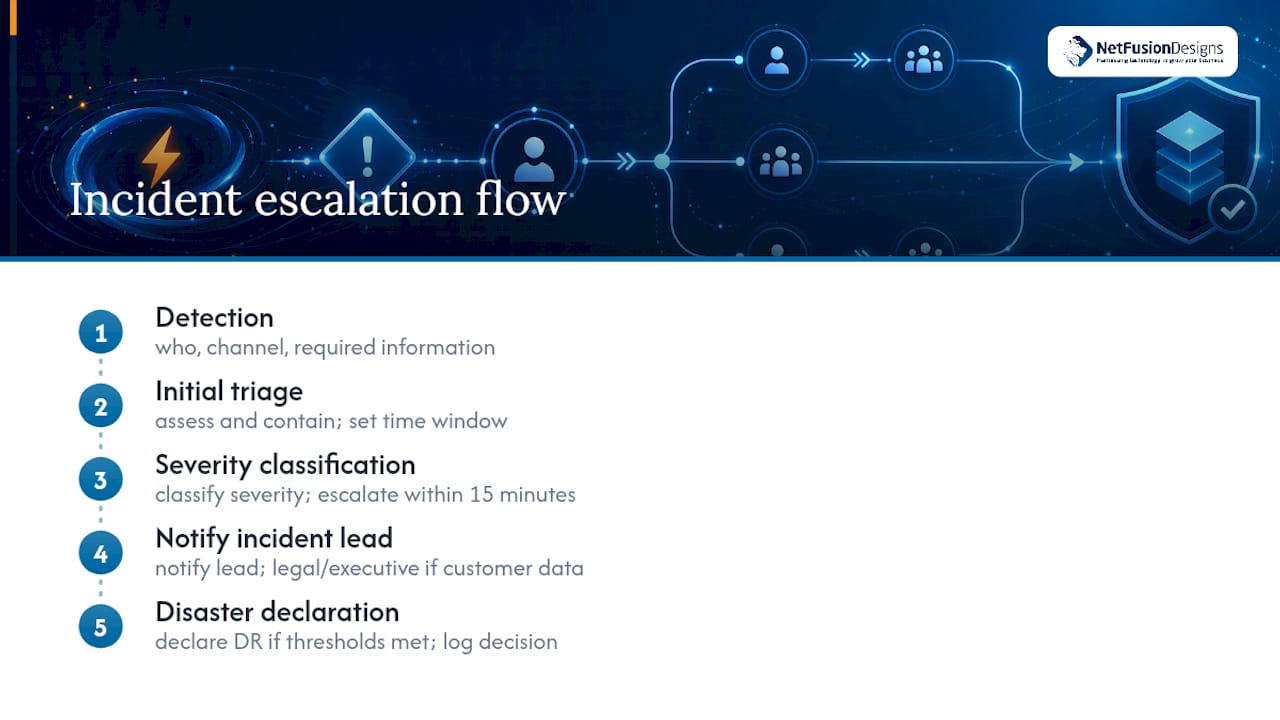
Define detection and reporting first: who can raise an alert, through what channel, and what information they need to include. Then define escalation tiers. A minor service degradation might stay within the IT team; a confirmed ransomware event should escalate immediately to the person with declared authority to invoke the DR plan, alongside legal and executive stakeholders if customer data is involved.
Write the escalation path as a simple flow: detection, initial triage, severity classification, notification of the incident lead, and formal disaster declaration if thresholds are met. Each step needs a maximum time window attached to it, because vague urgency (“escalate quickly”) gets ignored under pressure in ways that “escalate within 15 minutes” doesn’t.
Separate incident response from disaster recovery execution, even though they overlap. Incident response contains and investigates; disaster recovery restores. Confusing the two often means teams delay recovery while still chasing root cause, which extends downtime unnecessarily. A well-run process runs both in parallel, with the incident lead coordinating rather than blocking recovery work.
Document every escalation decision in real time, even briefly. Post-incident reviews depend on an accurate timeline, and memory reconstructed after the fact is consistently less reliable than notes taken during the event itself.
Almost no organisation recovers alone anymore. Cloud providers, internet service providers, backup vendors, and software-as-a-service platforms are all part of your recovery chain, whether or not you’ve formally accounted for them.
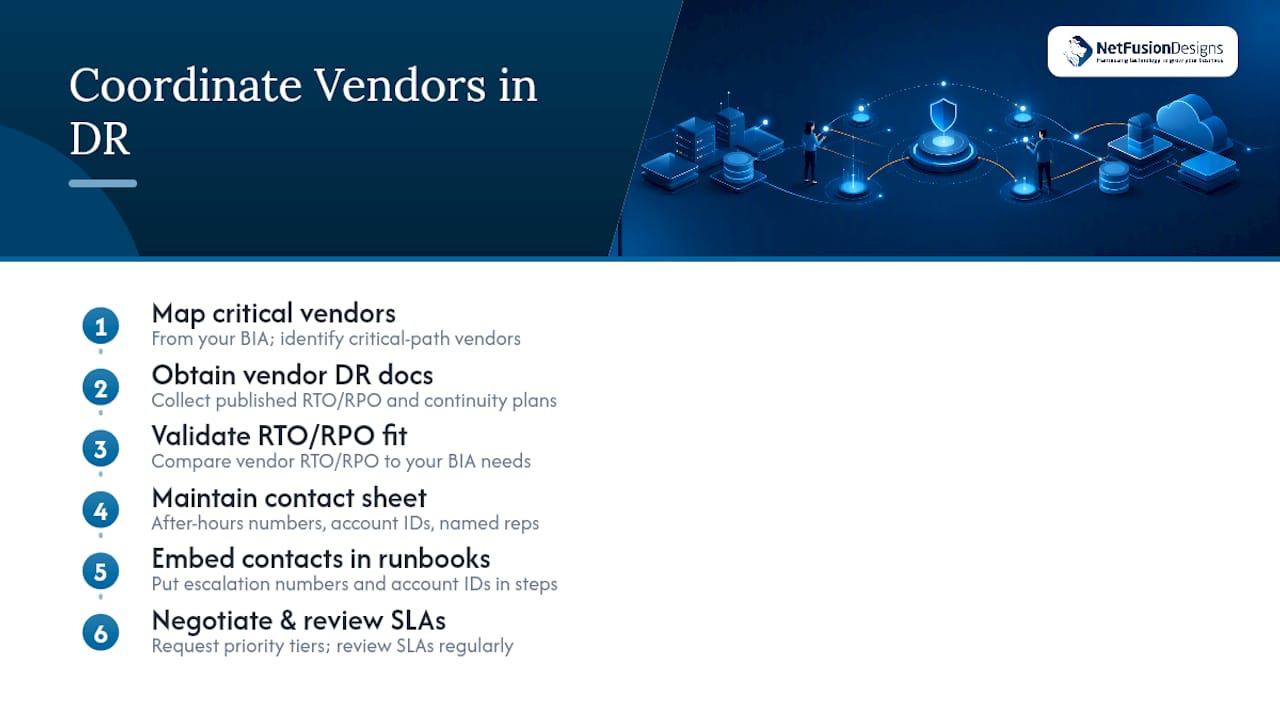
Start by mapping which vendors sit on your critical path from the BIA. If your accounting platform is cloud-hosted, that vendor’s own recovery time becomes part of your RTO, whether you like it or not. Request or locate each critical vendor’s own disaster recovery and business continuity documentation, and check whether their published RTO and RPO actually meet what your BIA requires. A vendor with a four-hour RTO can’t support a system you’ve rated as needing two-hour recovery, no matter what your internal plan says.
Keep an updated contact sheet for every critical vendor, including after-hours emergency lines, account numbers, and named account representatives where you have them. Generic support-ticket queues are frequently useless during a widespread outage when every customer of that vendor is filing the same ticket at once.
Build vendor coordination into your communication templates and your runbooks directly. A runbook step that says “contact hosting provider” is incomplete; it needs the actual escalation number and the account identifier ready to quote. Where contracts allow, negotiate priority support tiers for vendors tied to your most critical systems, since standard-tier support response times rarely align with a two-hour RTO.
Review vendor SLAs alongside your regular DR plan maintenance cycle. Vendors change ownership, support tiers, and infrastructure without always notifying customers clearly, and a vendor that met your requirements last year may not this year.
A disaster recovery plan that exists as a single unversioned document on someone’s laptop is one hard-drive failure away from not existing at all. Documentation standards aren’t bureaucracy here; they’re what makes the plan usable by someone other than the person who wrote it.
Every document within the plan, from the BIA output to individual runbooks, needs a consistent template: version number, last-reviewed date, owner name, and a change log describing what was updated and why. Store the master copy in a system with proper access controls, but keep at least one offline, read-only copy accessible to response team members that doesn’t depend on the very systems the plan is meant to recover.
Version control matters because outdated runbooks are actively dangerous during a real event. A runbook referencing a decommissioned server or an expired vendor contract wastes precious time during the exact moment speed matters most. Treat every infrastructure change, staffing change, or vendor swap as a trigger to review and, if needed, republish the relevant section rather than waiting for an annual refresh.
Write documentation in plain, direct language, not internal jargon that only the original author understands. Someone stepping in during a crisis, possibly a contractor or a less senior team member covering for someone unavailable, needs to follow the steps without needing a translator for your team’s shorthand. Consistent formatting across every runbook, using the same section headers and structure throughout, reduces the cognitive load on whoever’s executing under pressure.
Regulatory obligations don’t just apply to how you store data day-to-day; they extend directly into how you’re required to recover it. Depending on your industry and the data you handle, your disaster recovery plan may need to meet specific retention, notification, and recovery-time requirements set by regulators or by contract.
Financial services, healthcare, and any organisation handling payment card data typically face the strictest requirements, often mandating specific data retention periods, encryption standards, and breach notification timelines that your recovery plan must be built to satisfy. If a regulator requires notification within a fixed number of hours of a confirmed breach, your incident response escalation timeline needs to make that deadline achievable, not just aspirational.
Data residency requirements matter too. If regulations or contracts require certain data to remain within a specific jurisdiction, your recovery architecture, including any cloud failover site, has to respect that constraint even under pressure to restore quickly. Choosing a recovery location purely for speed, without checking residency obligations, can turn a successful technical recovery into a compliance failure.
Build compliance checks directly into your testing and review cycles rather than treating them as a separate audit exercise. When you run a tabletop exercise, include the question of whether your notification timelines and data-handling steps would actually satisfy your regulatory obligations, not just whether systems came back online. Compliance requirements also tend to change more often than infrastructure does, which makes them a natural addition to your list of plan review triggers alongside vendor and staffing changes.
Most disaster recovery guidance, including the frameworks referenced throughout this piece, gets the sequence right: identify what matters, set objectives, build the architecture, document it, test it, maintain it. Where the industry consistently falls short is treating documentation as the finish line instead of the starting point for a repeated practice.
The conventional advice tells you to “write a DR plan,” as if the document itself is the deliverable. It isn’t. The plan is a hypothesis until a tested restore or a cutover exercise proves it. Organisations that skip testing tend to have the most polished-looking plans on paper and the worst actual recovery times, because polish substitutes for practice.
If you’re prioritizing anything first, prioritize the BIA and the first tested restore, in that order, ahead of buying any new tooling. A cheap backup solution with a verified, practiced restore beats an expensive replication setup nobody has ever actually failed over. Named ownership, not job titles, is the second thing worth fixing immediately, because ambiguity about who can declare a disaster costs more real time than almost any technical gap. Everything else, the architecture, the fancier failover options, matters less than most vendors want you to believe.
— Geeshan
Writing the plan is the first half of the work. Keeping it tested, current, and ready to execute at 3 a.m. is the half most internal IT teams struggle to sustain alongside their day-to-day workload.

NetFusion Designs Inc runs disaster recovery as an operational discipline, not a document you file away. Our Canada cloud backup and disaster recovery service handles off-site, immutable backups with scheduled restore verification, so the gaps this article describes get caught in a test window instead of during a real outage. Our 24/7 NOC and SOC 2 Type II certification back every recovery engagement, and our emergency IT support line means you’re never waiting on a generic vendor queue when systems actually go down. If your current plan hasn’t had a tested restore in the last six months, that’s the gap worth closing first. Book an assessment with NetFusion Designs Inc and get a straight answer on whether your recovery objectives actually match your infrastructure.
Most frameworks compress the process into five stages: identify critical functions through a business impact analysis, set recovery objectives (RTO and RPO), choose a recovery strategy, document runbooks with named owners, and test the plan regularly. Backup strategy and ongoing maintenance run alongside all five as continuous requirements rather than a separate sixth step.
A complete disaster recovery plan process runs through business impact analysis, asset inventory, recovery objective setting, architecture selection, runbook documentation, backup strategy implementation, testing, and ongoing maintenance. The Government of Canada’s IT recovery guidance frames this as a nine-part sequence covering stakeholder identification through training.
The essential elements of a disaster recovery plan include a ranked list of critical business functions, defined RTO and RPO targets per system, a chosen recovery architecture, documented runbooks with named human owners, a tested backup strategy, and a fixed testing and review cadence. Missing any one of these turns the plan into a document rather than something you can actually execute.
The disaster recovery plan process is a repeatable cycle: assess business impact, set measurable recovery targets, build and document the recovery architecture and procedures, test them under realistic conditions, and revise the plan whenever infrastructure, vendors, or staffing change. Organisations that prefer to outsource this cycle often work with a managed provider like NetFusion Designs Inc to keep testing consistent rather than sporadic.
A reasonable cadence includes a full cutover test annually, tabletop or simulation exercises quarterly, and an immediate re-test any time infrastructure or vendors change materially. Skipping the failback portion of testing is one of the most common gaps, since teams often confirm failover works without confirming the return to primary systems is equally reliable.
%20(1).avif)
%201.avif)