SharePoint works as a legal document management system for many firms, provided it is configured, not just switched on. The recommended starting point is a matter site template built on document sets or a site-per-matter model, layered with mandatory metadata, strict permission groups, and Microsoft Purview retention labels. High email volume, heavy cross-matter search, or dense compliance obligations are the signals that tell you when SharePoint alone stops being enough. The sections below walk through the organisation models, the compliance checklist, and the point where a legal DMS layer becomes worth the cost.
TL;DR:
- SharePoint works best for law firms when properly configured with matter site templates, metadata, and strict permission controls tailored to firm size and volume.
- Large firms with over 200 open matters or strict ethical walls should consider site-per-matter or hub-and-spoke models instead of basic folder or document set structures.
- Integrating SharePoint with automated email capture, retention labels, and permission hygiene is essential for managing privilege, compliance, and email overload effectively.
- Native SharePoint’s core features suffice for small to mid-size firms, but heavier compliance needs or cross-matter search limitations often justify adding a dedicated legal document management layer.
- Proper rollout requires a pilot phase, clear governance, role-based training, and ongoing support, avoiding over-engineering and neglecting email capture from the start.
The biggest decision in any legal document management SharePoint project isn’t which add-on to buy. It’s how you structure matters before a single file gets uploaded. Get this wrong and you’ll spend two years fighting folder sprawl; get it right and permissions, search, and archiving take care of themselves.
There are five common patterns firms use, and each trades off differently on permission control, archival flexibility, and how lawyers actually behave day to day.
Solo and small firms usually do fine with document sets in a single library, since matter counts stay low enough that a shared permission model isn’t a real risk. Firms running more than roughly 200 open matters at once, or anyone with formal ethical wall requirements, should lean toward site-per-matter or hub-and-spoke, because permission isolation stops being optional once conflicts checks get serious.
If your firm already pays for Microsoft 365, the case for using SharePoint for law firm document management comes down to marginal cost. You’re not buying a new platform. You’re activating one you already own, then spending your budget on configuration and training instead of licensing.
That changes the calculation entirely compared to a standalone legal DMS, where licence fees stack on top of your existing Microsoft 365 subscription rather than sitting inside it.
Pro Tip: Before you build anything elaborate, try running one active matter through a bare-bones SharePoint site for thirty days. If the team can find documents and file email without complaining, you’ve learned more than any planning document could tell you.
Native SharePoint covers versioning, permissions, search, and retention out of the box, but it typically needs add-ons or automation for integrated email filing and deeper legal workflows. For a two-lawyer practice, a simple site with a handful of libraries beats an elaborate hub-and-spoke build every time. Complexity should scale with matter volume, not with what looks impressive in a planning deck.
Privilege gets waived through carelessness, not malice, and most of that carelessness is a permission setting nobody configured. Here’s the checklist to work through before you let a single matter go live.
Firms wanting a second opinion on the broader control set often start with a cybersecurity checklist built specifically for legal practices, since privilege protection and general cyber hygiene overlap more than most partners assume.
Email is where most legal document management systems quietly fail, and SharePoint is no exception unless you build capture into the workflow from day one. Lawyers won’t file email manually with any consistency. Design around that reality instead of fighting it.
Provisioning automation pairs naturally with this. A practice-management system trigger or an intake form can fire a Power Automate flow that creates the matter site, applies the standard metadata fields, and sets permissions the moment a new matter opens, before a single document exists. The same automation layer can push deadline notifications, assign document review tasks, and auto-apply retention labels once a matter closes.
Governance is what separates a firm running SharePoint smoothly at 500 matters from one drowning in inconsistent folder names and orphaned sites. Small firms can keep the setup boring and functional; mid-size firms need real structure.
Client-facing sharing is where firms either get privilege protection right or accidentally hand a client access to another client’s file. Build the pattern deliberately.
Not every firm needs to leave SharePoint, and not every firm should stay on it unmodified forever. The honest answer sits on a short checklist.
A legal DMS layer, added on top of your existing Microsoft 365 tenant rather than replacing it, typically adds automated email capture, structured matter profiling, and legal-grade search without moving your data out of your own environment.
Pro Tip: Run the checklist against your actual numbers, not your five-year growth plan. Firms that provision for the DMS layer they’ll “eventually need” often spend two years managing complexity they never used.
NetFusion Designs Inc is SOC 2 Type II certified and runs Microsoft 365 optimisation engagements for firms that need SharePoint configured correctly the first time, not rebuilt eighteen months in. Our work with legal and professional services clients follows a consistent pattern: discovery to map current matter volume and compliance requirements, a single pilot matter to prove the template before scaling, template provisioning with metadata and permissions baked in, then automation and a formal handover to the firm’s IT owner.
That sequencing matters because successful implementations tend to start with one pilot matter and a lightweight governance board, which catches over-engineering before it becomes expensive. Firms choose a managed partner for this specifically to reduce the operational risk of getting permissions, retention, or provisioning wrong on a live matter.
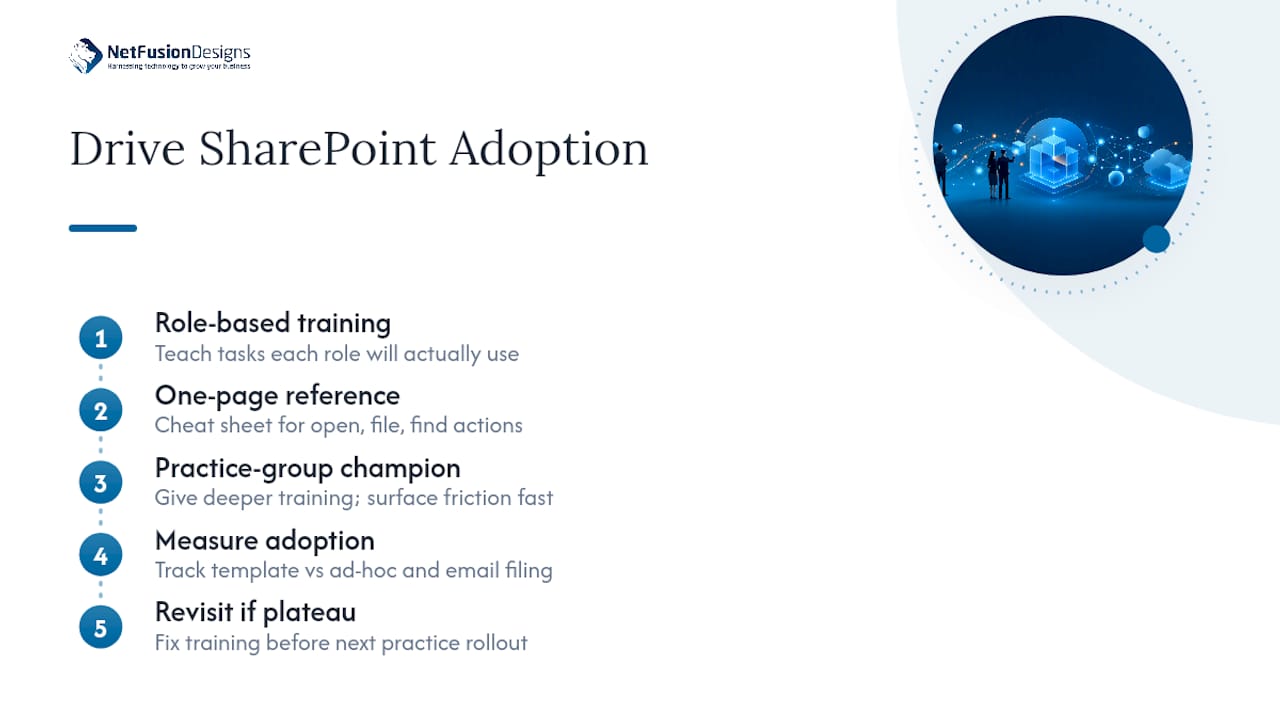
Every SharePoint rollout that stalls has the same root cause: lawyers were handed a new system and told to figure it out. Adoption requires deliberate change management, not a one-off training session buried in a Friday afternoon email.
Start with role-based training rather than one generic session. Associates need to know how to file email and search within a matter; assistants need to know metadata entry and document set creation; partners mostly need to trust that permissions are locked down correctly. Training each group on what they’ll actually touch, rather than the full feature set, keeps sessions short and relevant.
Build a short reference guide, not a manual. A one-page cheat sheet showing how to open a matter site, file an email, and find a document beats a fifty-page training deck that nobody opens twice.
Identify a champion in each practice group early, ideally someone who’s naturally curious about tools, and give them slightly deeper training than everyone else. Peer questions get answered faster than IT tickets, and champions surface friction points before they become firm-wide complaints.
Measure adoption with something concrete: how many matters are being filed through the template versus created ad hoc, and how much email is landing in matter libraries versus staying in inboxes. If those numbers plateau early, the training didn’t stick, and it’s worth revisiting before rolling out to the next practice group.
Working with co-counsel or opposing counsel on a shared matter creates a specific risk: you need enough access for real collaboration without exposing anything beyond what the engagement requires.
Create a dedicated, permission-isolated site for the joint matter rather than adding external parties to your firm’s internal matter site. This keeps co-counsel access contained to exactly what the collaboration needs and nothing from your broader tenant.
Require authenticated guest access, never anonymous links, for any external party touching shared documents. Set an explicit expiry on every guest account tied to the engagement, and review that access the moment the matter closes or a co-counsel relationship ends.
Use Purview sensitivity labels on documents shared externally so protection travels with the file even after it leaves your controlled environment, which matters if co-counsel forwards something internally on their own systems.
Keep an audit trail of every external access event. If a dispute later arises over who saw a document and when, that log is often the only concrete record available. Firms already running conditional access and MFA internally should extend the same standard to guest accounts. A weaker bar for external users defeats the purpose of hardening the internal side.
The pattern across firms that get this right has less to do with budget and more to do with sequencing. Firms that succeed almost always start small: one practice group, one matter template, a defined pilot period, and a short list of adoption metrics agreed on before launch.
A mid-size firm moving off a legacy file server typically pilots with a single practice group, litigation or corporate, for 60 to 90 days before expanding. During that window, the template gets refined based on real friction: metadata fields that turned out to be unnecessary, permission groups that were too broad, search views that didn’t match how lawyers actually looked for documents. That feedback loop, run on one group instead of the whole firm at once, is what prevents a firmwide rollout from baking in the same mistakes at scale.

Firms that skip the pilot and roll out to every practice group simultaneously report the opposite experience: inconsistent metadata from day one, permission requests flooding IT, and a template that’s technically “live” everywhere but trusted nowhere. The difference isn’t the technology. It’s whether governance and training were sequenced before scale, or bolted on after.
Licensing is rarely the expensive part. Most firms already hold Microsoft 365 plans that include SharePoint, so the marginal licence cost of activating it for legal document management is close to zero if you’re already paying for Business Premium or an E3/E5 tier.
The real cost sits in three places. First, configuration and governance work: building matter templates, setting up metadata schemas, and configuring Purview labels and DLP policies takes professional time, whether that’s internal IT or a managed partner. Second, automation: Power Automate flows for provisioning and email capture are included in most Microsoft 365 tiers at a basic level, but complex workflows or high-volume automation can require premium Power Automate licensing. Third, any legal DMS layer added on top, if the firm’s matter volume or compliance burden justifies one, comes with its own licence fee stacked on the Microsoft 365 base.
Ongoing costs include ongoing governance time (someone has to run the quarterly review), training refreshers as staff turn over, and support if something breaks. Firms that budget only for initial setup and skip the ongoing governance line tend to see the same drift problems reappear within a year or two.
If I had ninety days to get a firm live on SharePoint, I’d spend the first two weeks on scope and one pilot matter, the next month on the governance checklist and training, and the rest on measuring adoption before expanding further. The three mistakes I see most: over-engineering the template before anyone has used it, provisioning matters manually and letting naming drift within a month, and treating email capture as a phase two problem when it’s the reason lawyers abandon the system in phase one. Get legal and IT sponsors aligned before you touch a single permission setting. Everything else is easier from there.
— Geeshan
Configuring SharePoint for a legal team properly, matter templates, Purview labels, provisioning automation, permission hygiene, takes real hours from someone who’s done it before. NetFusion Designs Inc runs exactly this kind of engagement for law and professional services firms: discovery to map your matter volume and compliance needs, a pilot matter to prove the template, then rollout with SLA-backed support behind it.

That means you get a working matter site structure and governance model without pulling your own IT staff off other priorities for two months, and without guessing at Purview configuration on a live privileged matter. Our Microsoft 365 optimisation service covers exactly this: SharePoint provisioning, security hardening, automation, and ongoing managed support once the rollout is live. If your firm is weighing whether to configure SharePoint properly or add a legal DMS layer on top, book a discovery call and we’ll map the right architecture for your matter volume before you spend a dollar on licensing you don’t need.
Yes. Many firms run SharePoint as their primary document management system, particularly when it’s configured with matter templates, metadata, and governance rather than left as a default file share.
Firms typically use either native SharePoint configured for legal workflows, or SharePoint paired with a dedicated legal DMS layer that adds email capture and matter-centric search on top of the Microsoft 365 tenant.
Few firms are replacing SharePoint outright. Most add a legal DMS layer on top of their existing Microsoft 365 tenant rather than migrating away, since that preserves tenant control while adding matter profiling and legal-grade search.
Native SharePoint often needs add-ons or automation for integrated email filing, and cross-matter search can degrade without disciplined metadata, which is why some firms layer additional tools on top once matter volume grows.
Yes. NetFusion Designs Inc runs discovery, pilot matter, provisioning, and automation engagements specifically for legal and professional services clients through its Microsoft 365 optimisation service.
%20(1).avif)
%201.avif)