NetFusion Designs logo
Heart icon
Support
Email
info@nfd.ca
Phone
289 212-3930(Canada)
IT Services
Icon dropdown arrow

Infrastructure Implementation

Project PlanningHardware Voice over IP (VoIP)Application DevelopmentCloud DesktopSecurity Cameras

Managed IT Services

IT Support24/7 HelpDeskCyber Security & AntivirusData Backups & Disaster
Recovery
Co-Managed ITComplianceEmergency Ransomware
Recovery
Penetration & Vulnerability
Assessment

Optimization of Processes

Microsoft 365 OptimizationVirtual CIO ServicesPenetration TestingInventory Lifecycle
Management
Transforming SMEs with AI
Industries
Icon dropdown arrow
Dental Managed IT Services
Construction
Hotels & Hospitality
Franchises
Financial & Insurance Services
Government
Health Care & PharmaceuticalLegal & Professional Services
Local Small & Medium Businesses
Manufacturing
Non-profit
Real Estate
Retail
Transportation & Logistics
Enterprise & Consulting
Publicly Traded Companies
Our Story
Icon dropdown arrow
About UsTestimonials
Partners
Sponsorship
BlogContact Us
Open menuClose menu
Icon chevron up
Browse Blog:
Business
Insight
Advice
Insight

When to build custom software: a decision guide for leaders

Build when the software touches the core of your competitive advantage. Buy, or buy and extend, when it doesn’t. That’s the whole rule, and most build/buy failures happen because a team skips this test and starts with “what can we build” instead of “does this need to be ours.”

The decision rule beneath that verdict is simple: weigh control against cost against urgency, in that order, for whatever system is on the table. A payroll tool rarely needs custom control. A pricing engine that encodes how you actually win deals usually does. Here’s what tends to tip the scale toward building rather than buying:

  • The workflow is genuinely unique to how you make money, not just how you prefer to work
  • No vendor’s data model fits your business without painful workarounds
  • Integration density is high enough that “buy” quietly becomes “build the glue code anyway”
  • You have five or more years of runway to amortize the investment and in-house capacity to support it

Key Takeaways

The strongest build/buy decisions come from comparing five-year total cost of ownership and control needs before writing a line of code or signing a licence.

Point Details
Build for differentiation only Reserve custom development for capabilities that directly drive competitive advantage, not internal convenience.
Compare five-year TCO, not year one Include maintenance, staffing, and vendor price increases before comparing build and buy costs.
Budget 15 to 20% annually for upkeep Ongoing maintenance typically runs 15 to 20 percent of the initial build cost per year.
Default to buy-and-extend when unsure A hybrid approach fits most real-world decisions better than a pure build or pure buy.
Bring in a partner for capacity gaps NetFusion Designs Inc supports discovery, SOC 2-aligned security, and application development for teams without full in-house bench strength.

Table of Contents

  • When to build custom software vs. buy: a five-question checklist
  • How do you estimate build vs. buy costs?
  • What signals mean you should build custom software?
  • When is buying or extending existing software the smarter move?
  • What are the hidden risks of building custom software?
  • How do you run a safe build-or-buy decision process?
  • How a development partner reduces build risk
  • The conventional advice on this gets one thing badly wrong
  • Where to get help deciding, and building it right
  • Sources
  • FAQ

When to build custom software vs. buy: a five-question checklist

Run this in a single meeting, before anyone touches a requirements document. It won’t give you a perfect answer, but it will surface disagreement early, which is cheaper than surfacing it in month four of a build.

  1. Is this capability a source of competitive differentiation, or is it a commodity everyone needs the same way? Payroll, expense tracking, and basic CRM are commodities. A proprietary matching algorithm or a unique claims workflow usually isn’t.
  2. How fast do you need this live? If the answer is “next quarter,” building is a hard sell regardless of the other four answers.
  3. What does the five-year total cost of ownership look like, not just the first invoice? A framework worth borrowing here scores this explicitly, because year-one price tags mislead almost everyone.
  4. Do you have the engineering bench to own this after launch, not just to ship it? Building without a maintenance plan is how software becomes an orphan.
  5. How many systems does this need to talk to? High integration density often favours a thin custom layer over either a pure build or a rigid off-the-shelf tool.

Score each question honestly, even the uncomfortable ones about internal capacity. A decision framework built around exactly this trade-off treats reversibility as a sixth, implicit factor: when requirements are still fuzzy, the correct answer is often “wait,” not “build” or “buy.”

Pro Tip: If two or more of the five answers point toward “unclear,” don’t decide yet. Run a two-week no-code or low-code pilot to pressure-test the actual requirement before committing engineering headcount to it.

How do you estimate build vs. buy costs?

Sticker price is the least useful number in this decision. The real comparison is total cost of ownership over roughly five years, and most teams undercount it on both sides.
How do you estimate build vs. buy costs? — overview diagram

For a build, include: initial development, ongoing maintenance and patching, hosting and infrastructure, internal support time, integration work with existing systems, and the opportunity cost of engineers not working on something else. For a buy, include: licensing or subscription fees, implementation and configuration, vendor price increases over time, integration and middleware costs, and the staff time spent working around whatever the vendor doesn’t do natively.

A workable estimation method, using ratios instead of guessed dollar figures:

  1. Estimate year-one cost for each path (build: dev time plus infrastructure; buy: licence plus implementation).
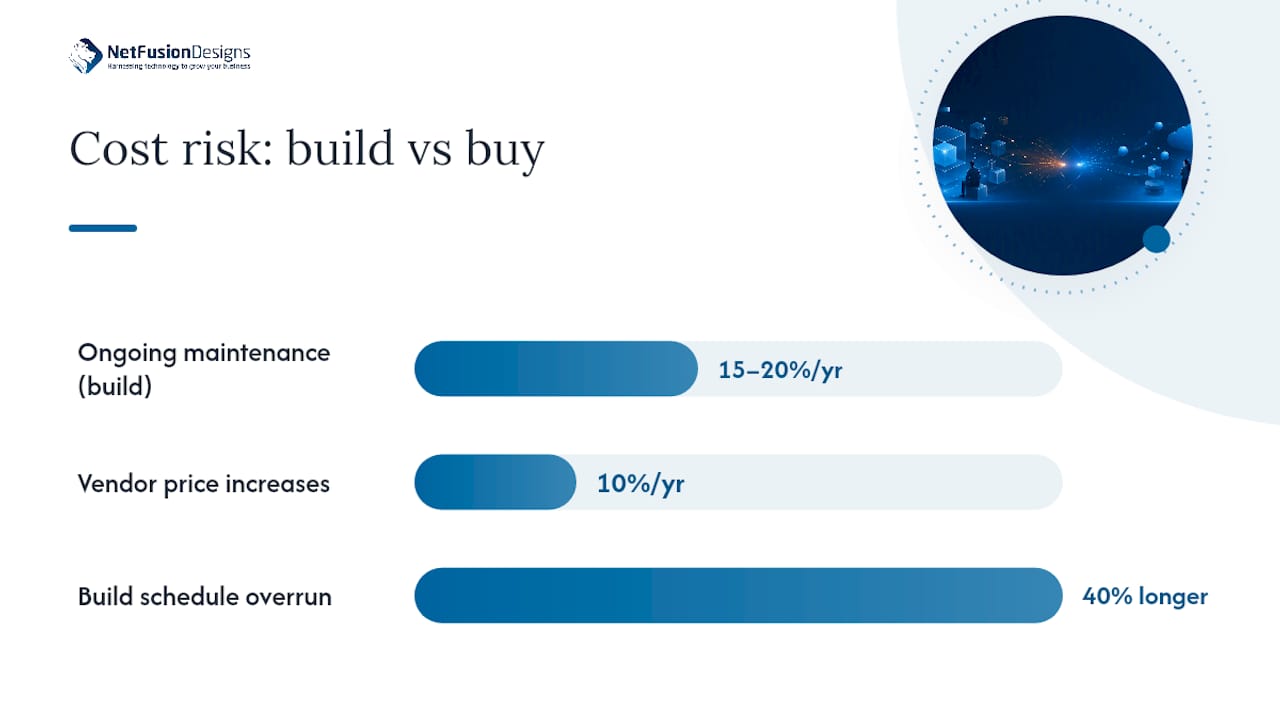
  2. Add an annual maintenance line. Buyer guidance commonly recommends budgeting 15 to 20 percent of the initial build cost per year for ongoing upkeep, a figure many first-time buyers omit entirely.
  3. Multiply both paths out five years and compare the totals, not just year one.
  4. Stress-test with a sensitivity check: what happens if the vendor raises prices 10% annually, or your build takes 40% longer than planned?
  • Build costs tend to front-load; buy costs tend to compound quietly through renewals.
  • AI-assisted development can shrink the prototyping window, but it doesn’t touch the ongoing maintenance and security cost that follows launch.

Pro Tip: Run the five-year comparison on a single page, side by side. If leadership can’t agree on the numbers in that view, the disagreement is about assumptions, not math, and that’s worth surfacing before you sign anything.

What signals mean you should build custom software?

Building is justified when the software is the product, not the plumbing. Watch for these signals, and be honest about which ones actually apply versus which ones just feel flattering to your team.

  • The capability is what customers pay you for, not a supporting function around it
  • Your data model doesn’t map cleanly onto any packaged product, the way many organizations discover once they try to force a general-purpose ERP system into a non-standard structure
  • Regulatory or contractual constraints require data handling no vendor offers off the shelf
  • Integration density is high enough that “configuring” a vendor tool starts to look like building anyway, just with worse tools
  • The five-year TCO comparison favours build once vendor price increases are factored in

A specialty insurer with a claims-adjudication logic nobody else uses is a build case. A company that just wants better dashboards on top of standard sales data usually isn’t, even if the current dashboards are ugly.

Pro Tip: Most successful builds are hybrids: a custom core wrapped around commodity infrastructure. Build the differentiator, buy or extend the layers underneath it, and resist the urge to build things like authentication or file storage that a platform already handles well.

When is buying or extending existing software the smarter move?

Buying wins when the capability is commodity, time to value matters more than perfect fit, or your engineering bench is thin. Building HR software from scratch when a proven platform already handles it well rarely produces a return worth the risk.

Watch for these buy signals:

  • The function is well understood and widely solved (accounting, ticketing, basic CRM)
  • You need something live in weeks, not quarters
  • Internal engineering capacity is limited or already committed elsewhere
  • Vendor track record and support quality are strong and verifiable

Between pure buy and pure build sits a spectrum worth knowing by name:

  1. Buy and extend: adopt a platform that covers most needs, then customize the remaining gap. Analysis of enterprise software decisions suggests this middle path fits most real-world cases, since pure build and pure buy are both minority outcomes.
  2. Low-code or no-code: fast, cheap to pilot, but limited ceiling for complex logic.
  3. iPaaS or integration platforms: useful when the real problem is connecting several existing tools, not replacing any of them.
  4. White-label: a rebranded, pre-built solution when speed to market outweighs ownership.

Vendor lock-in is the real risk here. Mitigate it with a data export clause and a documented exit plan written into the contract before you sign, not after you need it.

What are the hidden risks of building custom software?

Build decisions rarely fail because the code doesn’t work. They fail because of what happens after launch, and most of it is predictable.

  • Scope creep: requirements grow mid-build because discovery was rushed.
  • Technical debt: shortcuts taken to hit a deadline become permanent liabilities.
  • Maintenance burden: the system needs a permanent owner, not just a launch team.
  • Talent churn: the one engineer who understands the system leaves.
  • Security and compliance gaps: custom code inherits none of a vendor’s built-in controls automatically.
  • Integration entropy: every new connected system adds fragility to the last one.

A structured risk analysis of custom projects groups these under process, people, and product, and the mitigation maps cleanly: pay for real discovery upfront, write staffing continuity into the plan, and hold the build to recognized security standards like SOC 2 from day one rather than retrofitting compliance later.

Pro Tip: Assign one accountable owner and one measurable stop condition before writing a line of code. “We’ll know it’s failing if X” is worth more than any status report you’ll get in month three.

How do you run a safe build-or-buy decision process?

Treat this as a six to ten week gate, not a single meeting. Rushing it is exactly how sunk-cost projects get started.

  1. Discovery (2 to 3 weeks): fixed-cost scoping to define the real requirement, not the wish list.
  2. Prototype or MVP: a narrow slice built or configured to test the core assumption.
  3. Buy and extend evaluation: score two or three vendor options against the same criteria as the build case.
  4. Procurement checklist: data ownership, exit clauses, support SLAs, and total cost over five years.
  5. Pilot acceptance criteria: define success numerically before the pilot starts, not after.
  6. Go/no-go with stop conditions: a documented condition under which the project pauses or reverses.

Before approval, business, security, and engineering stakeholders should each answer: does this justify five years of ownership? Does it meet our compliance baseline? Can we staff it after launch? A 12-point scoring rubric built around exactly these questions turns a subjective debate into something closer to a scorecard, which is worth borrowing whether you use all twelve points or just five.

How a development partner reduces build risk

Not every organization has the bench to run this whole process internally, and pretending otherwise is how projects stall at the discovery stage. A partner earns its place when it brings structured discovery, security practices aligned to standards like SOC 2, flexible pricing that mixes fixed discovery with time-and-materials build, and a plan for maintenance that doesn’t evaporate the day the project ships.

Consider a partner when:

  • Internal capacity is committed elsewhere and the timeline can’t wait for hiring
  • Compliance requirements need documented security practices from day one
  • You want co-managed ownership rather than a full handoff to an outside team

NetFusion Designs Inc runs application development with this discipline built in, alongside enterprise consulting support for the governance and procurement side of the decision.

The conventional advice on this gets one thing badly wrong

Most build/buy content treats this as a binary, and that framing alone causes bad decisions. The real answer, most of the time, is buy-and-extend, and the industry’s own data backs that up: pure build and pure buy are both minority outcomes once you look at how enterprises actually behave. Teams that frame the decision as “build or buy” end up defending whichever side they picked first, instead of asking the better question, which is how much of this needs to be ours.

The other overrated variable is speed. AI-assisted development has genuinely compressed prototyping time, and that’s real. But it hasn’t touched the five years of maintenance, security patching, and staffing that follow a launch, and too many 2026-era pitches quietly imply otherwise. If you take one thing from this framework, take this: the build decision isn’t about how fast you can ship version one. It’s about whether you can credibly own version one for the next five years. Most organizations can’t answer that question honestly in the room where the decision gets made, which is exactly why it needs to be asked out loud, on paper, before anyone commits budget.

Where to get help deciding, and building it right

If you’ve worked through the checklist above and landed on “build” or “buy-and-extend,” the next problem is execution, not theory. NetFusion Designs Inc runs the discovery-to-delivery process this article describes: fixed-cost discovery to pin down real requirements, SOC 2 Type II-aligned security practices baked in from day one, and ongoing maintenance handled by the same team that built the system, so it never becomes an orphaned project six months after launch.

NetFusion Designs Inc

That last part is what most build failures actually come down to: nobody owns the system once the launch excitement fades. NetFusion Designs Inc’s application development team stays accountable for the system after go-live, with managed IT support available to keep it running alongside everything else in your environment. If your team is leaning toward AI-assisted features as part of the build, AI enablement built around your business is worth a look before you scope that piece separately.

Book a discovery conversation to score your specific project against the five-question checklist above, with a real engineering team in the room instead of a slide deck.

Sources

  • Build vs Buy Software: Build, Buy, or Wait
  • Build vs Buy Software: Pros and Cons, Costs, and How to Decide (2026)

FAQ

What are the main advantages of custom software over off-the-shelf?

Custom software fits your exact workflow and data model instead of forcing your business to adapt to someone else’s assumptions, and it gives you full control over integrations, security posture, and future changes.

How much does it cost to build custom software?

Cost depends entirely on scope, but a realistic estimate includes upfront development plus an ongoing maintenance budget of roughly 15 to 20 percent of the initial build cost per year, not just the launch invoice.

How do you actually build custom software the right way?

Start with a fixed-cost discovery phase to nail down real requirements, build or configure a narrow prototype to test the core assumption, then move to full development only after a go/no-go review with defined acceptance criteria. Partners like NetFusion Designs Inc structure this exact sequence to reduce sunk-cost risk before full build spend begins.

Is it too late to move into software development or IT leadership at 25?

No. Age has little bearing on the skills that matter here, decision judgment, technical literacy, and the ability to run a structured evaluation process, all of which are built through experience and study rather than tied to when someone starts.

When should a business choose buy-and-extend instead of building or buying outright?

Choose buy-and-extend when a vendor platform covers most of your needs but a smaller piece of your workflow is genuinely unique. This hybrid path fits most enterprise decisions better than either pure option.

Recommended

  • Enterprise & Consulting
  • IT Managed Services Offer | NetFusion Designs
  • Managed IT vs In-House IT: Which Should You Hire?

Continue Reading

How to migrate to VoIP business phone systems without downtime
Yes, you can port your phone number in Canada: here's how
Proactive IT monitoring: your 30/60/90-day setup guide
Why Canadian data sovereignty matters for hosting
NetFusion Designs logo
NetFusion Designs is a globally recognized IT service provider and services clients across North America.

We hold a SOC 2 Type 2 report, and maintain internal processes and procedures that keep our clients’ data secure and confidential.
NetFusion Designs IT support team
IT Services Near Me
BurlingtonOakvilleHamiltonMississaugaMiltonBramptonEtobicokeBrantfordGuelphKitchenerWaterlooCambridgeSt CatharinesTorontoMarkhamCaledonNewmarket
Services
Project PlanningHardwareTelephony & VoIPApplication DevelopmentCloud DesktopSecurity CamerasHelpdesk & SupportCyber Security & Anti-VirusData Backups & Disaster RecoveryMicrosoft 365 OptimizationVirtual CIO ServicesPenetration TestingPricingSchedule a MeetingRemote Support
Pricing
Pages
Free Security ScanAbout UsOur Migration ApproachWork CultureOur Core ValuesCode of ConductTestimonialsContactBlogSchedule a MeetingRemote Support
TORONTO
Bank capital office building law
401 Bay St, 16th Floor, Toronto Ontario
Email
info@nfd.ca
Phone
647-476-5259 (Canada)
MARKHAM
Bank capital office building law
141 Main Street N, Markham, ON L3P 1Y2
Email
info@nfd.ca
Phone
647-476-5259 (Canada)
TRI-CITY AREA
(Kitchener / Waterloo / Cambridge)
Bank capital office building law
22 Frederick St, Suite 700, Kitchener Ontario
Email
info@nfd.ca
Phone
647-476-5259 (Canada)
PEEL REGION
Bank capital office building law
6700 Century Ave, 3rd floor, Mississauga, ON L5N 1V8
Email
info@nfd.ca
Phone
647-476-5259 (Canada)
DURHAM REGION
Bank capital office building law
1315 Pickering Parkway, Pickering, ON L1V 7G5
Email
info@nfd.ca
MONTREAL
Bank capital office building law
8815 Av du Parc #402, Montréal, QC H2N 1Y7
Email
info@nfd.ca
Phone
647-476-5259 (Canada)
Special Offers
Pie chart piechart stats analytics
IT-Optimization Session
Icon chevron right
Money safe safebox
800% ROI Consultancy Offer (Video)
Icon chevron right
Radio station signal antena tower
Coming Soon!
Icon chevron right
Terms and ConditionsPrivacy PolicyCookie Policy
© 2026 NetFusion Designs Inc.
LinkedInFacebookAlignable logo