{
"@graph": [
{
"@type": "Article",
"image": {
"url": "https://csuxjmfbwmkxiegfpljm.supabase.co/storage/v1/object/public/blog-images/organization-38409/1785375599522_Modern-IT-support-operations-room-with-blue-and-orange-accents.jpeg",
"@type": "ImageObject",
"caption": "Modern IT support operations room with blue and orange accents"
},
"author": {
"url": "https://nfd.ca",
"name": "NetFusion Designs Inc",
"@type": "Organization"
},
"headline": "IT support GTA: the SMB guide to managed IT in 2026",
"publisher": {
"url": "https://nfd.ca",
"name": "NetFusion Designs Inc",
"@type": "Organization"
},
"inLanguage": "en-CA",
"description": "Discover reliable IT support GTA with NetFusion Designs Inc. Enjoy 24/7 coverage, SOC 2 attestation, and strong resolution rates.",
"datePublished": "2026-07-30T01:49:32.879Z"
},
{
"@type": "BreadcrumbList",
"itemListElement": [
{
"item": "https://nfd.ca",
"name": "NetFusion Designs Inc",
"@type": "ListItem",
"position": 1
},
{
"item": "https://nfd.ca/company-blog/it-support-gta",
"name": "IT support GTA: the SMB guide to managed IT in 2026",
"@type": "ListItem",
"position": 2
}
]
}
],
"@context": "https://schema.org"
}
{
"@type": "FAQPage",
"@context": "https://schema.org",
"mainEntity": [
{
"name": "What is managed IT services and how does it differ from break-fix support?",
"@type": "Question",
"acceptedAnswer": {
"text": "Managed IT services means a provider proactively monitors, patches, and secures your environment under a recurring contract with documented SLAs. Break-fix support is reactive: you pay only when something breaks, with no ongoing monitoring or security controls.",
"@type": "Answer"
}
},
{
"name": "What SLA response times should a GTA SMB expect?",
"@type": "Question",
"acceptedAnswer": {
"text": "For critical outages, a credible provider should commit to remote response within 15–30 minutes and on-site dispatch within 2–4 hours for inner GTA locations. Normal-priority tickets typically carry a 4–8 hour remote response window.",
"@type": "Answer"
}
},
{
"name": "How do I verify a provider's SOC 2 Type 2 attestation?",
"@type": "Question",
"acceptedAnswer": {
"text": "Ask for the attestation letter from the independent CPA firm that conducted the audit, including the audit period covered. A SOC 2 Type 2 report covers 6–12 months of operational controls, not a single-point assessment.",
"@type": "Answer"
}
},
{
"name": "What does IT support typically cost per user in the GTA?",
"@type": "Question",
"acceptedAnswer": {
"text": "Basic managed IT runs $75–$150 per user per month. Services that include advanced cybersecurity and cloud management typically reach $200–$300 per user per month, based on published SMB pricing benchmarks.",
"@type": "Answer"
}
},
{
"name": "Does NetFusion Designs Inc serve businesses outside Toronto?",
"@type": "Question",
"acceptedAnswer": {
"text": "Yes. NetFusion Designs Inc covers the full GTA including Mississauga, Markham, and the surrounding region, with additional teams in Kitchener-Waterloo, serving clients across Ontario and Canada.",
"@type": "Answer"
}
}
]
}
For GTA small and mid-sized businesses that need dependable, security-first IT support, NetFusion Designs Inc is a provider worth shortlisting. SOC 2 Type 2 attested, backed by a 24/7 Network Operations Centre (NOC), and with teams across Toronto, Markham, Mississauga, and Kitchener-Waterloo, NetFusion Designs Inc covers the full GTA with measurable SLAs and strong first-contact resolution (FCR) rates.
Here is why that recommendation holds up:
Ready to see what your IT environment actually needs? Request a free IT assessment or contact the team directly to get started.
Managed IT services (the industry term for what most people call “IT support”) covers far more than a helpdesk phone number. Before you compare proposals, know what a complete package looks like.
Modern managed IT services now routinely include security, monitoring, and proactive controls rather than reactive troubleshooting alone. Providers that still sell break-fix as their primary model are operating a generation behind.
Service categoryWhat to confirm with any providerHelpdeskHours of coverage, channels (phone, chat, email), FCR targetsEndpoint managementPatching cadence, EDR tool used, device coverage scopeSecuritySOC 2 Type 2 attestation, EDR/MDR vendor, vulnerability scan frequencyBackup and DRBackup frequency, tested RTO, offsite or cloud replicationCloud and M365Migration methodology, licence management, security baselinevCIO / strategyReporting cadence, roadmap deliverables, budget planning


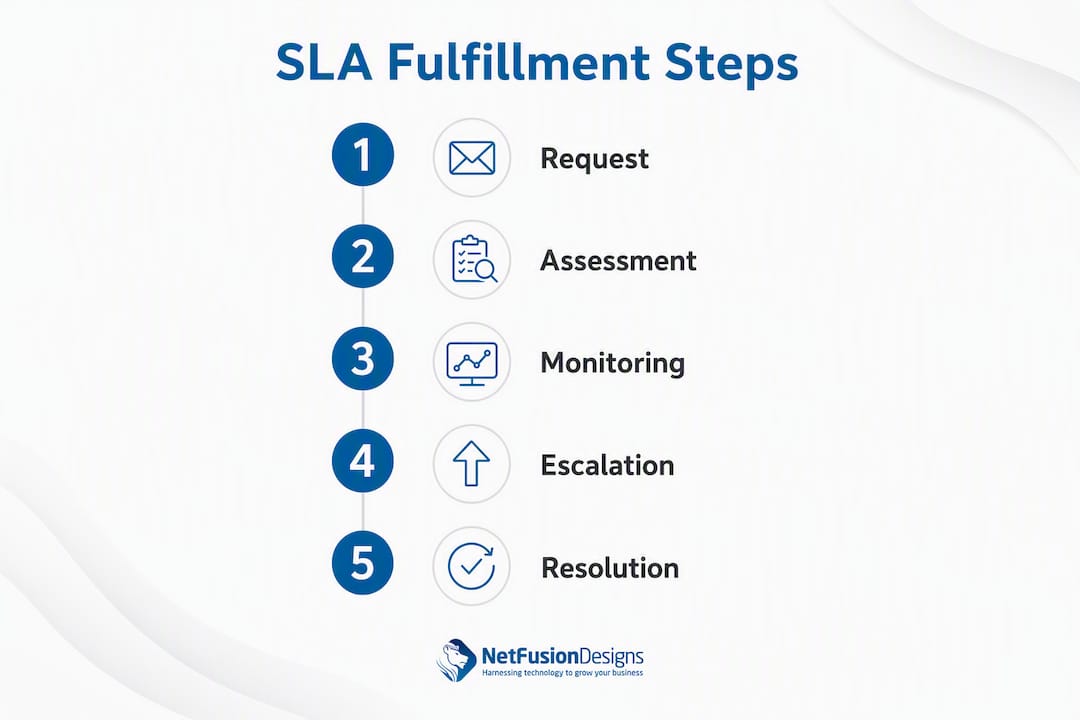
A provider’s “24/7” claim is only as good as the structure behind it. Here is what to verify.
Most managed IT contracts define three priority tiers:
Outer GTA locations (Brampton, Oakville, Ajax, Pickering) typically carry a travel buffer of 30–60 minutes on top of dispatch windows. Confirm this in writing before signing.
First response time tells you how fast someone picks up. First contact resolution (FCR) tells you how often the issue is actually fixed on that first interaction. FCR is the metric that directly affects your team’s productivity.
Top-performing helpdesks report Tier‑1 first contact resolution (FCR) rates of 82–88%, while the industry average for IT service desks is around 74%. A provider who cannot tell you their FCR by channel (phone, chat, email) is not measuring what matters.
Pro Tip: Ask any shortlisted provider for channel-specific FCR data. Chat-based support consistently delivers faster resolution; Freshservice benchmarking shows chat-raised tickets resolve faster and report first interaction resolution rates above 90% in many cases — if a provider only offers email ticketing, that gap will show up in your team’s downtime.
A 24/7 NOC does not just watch dashboards. It acts as the escalation layer between your helpdesk and a full security incident response. When monitoring detects an anomaly, the NOC triages, escalates to the SOC if needed, and dispatches a technician, all within the SLA window. Without that integrated structure, “24/7 monitoring” is often just an automated alert going to a shared inbox that nobody reads until morning.
A well-run onboarding reduces your risk exposure quickly and gets you to steady-state managed services without a prolonged disruption period.
What should appear on your onboarding statement of work:
The evaluation process is where most SMBs make avoidable mistakes. Marketing claims are easy to produce; operational proof is not.
A practical vendor selection framework ties every evaluation criterion back to documented processes and measurable outcomes, not marketing language.
Pricing varies by model and scope. Understanding the structure helps you read a quote accurately.
When reviewing a quote, separate the fixed monthly components from the variable ones. Negotiate a trial period of 60–90 days and ask for SLA credits written into the contract for missed response or resolution targets.
Security is not an add-on. A provider without verifiable security controls is a liability, not an asset.
PIPEDA governs how organisations collect, use, and disclose personal information in Canada. When your MSP handles client data on your behalf, they are acting as a service provider under PIPEDA. Your contract should specify:
Integrating cybersecurity managed services into your IT contract from day one is far less expensive than responding to a breach after the fact.
Testimonials and case studies are easy to fabricate. Here is how to vet them properly.
AI-integrated helpdesks show dramatically faster median resolution times compared with human-only operations. Ask whether the provider uses AI-assisted triage and knowledge bases; Fixify’s 2026 benchmark found human-only helpdesk tickets have a median resolution time of 71 hours, while helpdesks using integrated AI automation and knowledge bases see median resolution times of about 4.4 hours.
A SOC 2 Type 2 report covers a defined audit period (typically 6–12 months) and is issued by an independent CPA firm. It is not a self-assessment. Ask for the attestation letter showing the audit period and the issuing firm’s name. A provider who cannot produce this document does not hold the certification.
Choosing the right managed IT provider in the GTA comes down to verifiable security credentials, documented SLAs, and a structured onboarding plan — not marketing claims.
PointDetailsVerify FCR, not just response timeTop helpdesks achieve Tier‑1 FCR rates of 82–88%; the industry average for IT service desks is around 74%. Ask for channel-specific data before signing.SOC 2 Type 2 is non-negotiableRequest the attestation letter with audit period and issuing CPA firm — a logo on a website is not proof.Onboarding should take 90 daysExpect three phases: discovery, remediation, and steady state, each with documented deliverables.Hidden fees inflate real costConfirm whether licensing, onboarding, and emergency on-site charges are included in the monthly rate.NetFusion Designs Inc is a provider worth shortlistingSOC 2 Type 2 attested, 24/7 NOC, GTA-wide coverage, and AI-enabled helpdesk for faster resolution.
The break-fix model has a fundamental flaw: it only pays attention to your IT environment when something has already gone wrong. By the time a technician is dispatched, your team has already lost hours of productivity, and in a security incident, the damage may already be done.
The shift to proactive managed services changes that equation. Continuous monitoring catches anomalies before they become outages. Patch management closes vulnerabilities before attackers exploit them. Tested backups mean a ransomware event is a recoverable inconvenience rather than a business-ending crisis. When you add AI-assisted triage and a structured knowledge base, resolution times drop sharply. The difference between a helpdesk that resolves issues on first contact and one that requires three follow-up tickets is not a minor convenience gap — it is hours of lost productivity per employee per month, compounded across your entire team.
The Managed Intelligence Provider (MIP) model that NetFusion Designs Inc operates under ties helpdesk, NOC, SOC, and AI automation together into a single, accountable service layer. That integration is what makes the SLA metrics meaningful. A helpdesk without a NOC behind it cannot deliver a 2 a.m. critical response. A NOC without a SOC cannot contain a security incident. The pieces only work when they are connected and staffed.
GTA SMBs that treat IT as a cost to minimise tend to discover the real cost of that decision during an outage or a breach. The businesses that treat IT as a managed risk function — with a provider accountable to documented SLAs and security controls — spend less over time and lose far fewer productive hours.
Fewer outages, faster resolution, and a security posture you can actually document — that is what GTA SMBs get when they move from reactive IT to a fully managed model with NetFusion Designs Inc.

NetFusion Designs Inc is a SOC 2 Type 2–attested Managed Intelligence Provider serving businesses across Toronto, Mississauga, Markham, and Kitchener-Waterloo, with coverage extending across the broader GTA and Ontario. The full service stack includes 24/7 helpdesk, managed cybersecurity and SOC operations, Microsoft 365 optimisation, cloud migration, VoIP, backup and disaster recovery, and AI and automation enablement.
For businesses that need IT services in Mississauga or anywhere across the GTA, the starting point is a free IT assessment: a no-obligation review of your current environment, gaps, and priorities. If you have an active issue right now, the emergency IT support line is available around the clock. Contact NetFusion Designs Inc today to request your assessment and get a clear picture of where your IT environment stands.
Managed IT services means a provider proactively monitors, patches, and secures your environment under a recurring contract with documented SLAs. Break-fix support is reactive: you pay only when something breaks, with no ongoing monitoring or security controls.
For critical outages, a credible provider should commit to remote response within 15–30 minutes and on-site dispatch within 2–4 hours for inner GTA locations. Normal-priority tickets typically carry a 4–8 hour remote response window.
Ask for the attestation letter from the independent CPA firm that conducted the audit, including the audit period covered. A SOC 2 Type 2 report covers 6–12 months of operational controls, not a single-point assessment.
Basic managed IT runs $75–$150 per user per month. Services that include advanced cybersecurity and cloud management typically reach $200–$300 per user per month, based on published SMB pricing benchmarks.
Yes. NetFusion Designs Inc covers the full GTA including Mississauga, Markham, and the surrounding region, with additional teams in Kitchener-Waterloo, serving clients across Ontario and Canada.
%20(1).avif)
%201.avif)