Evaluate three plan families first: Business (Basic, Standard, Premium) for organisations under 300 seats, Enterprise (E3/E5) for larger or compliance-heavy environments, and Frontline (F1/F3) for shift-based staff. The July 1, 2026 pricing and packaging update makes this the right moment to run a renewal-tied licence audit and map every role to a persona before you sign anything new.
TL;DR:
- Running a license audit 60 to 90 days before renewal helps identify unused licenses and avoid paying for capabilities that staff do not utilize.
- Persona mapping is crucial to assign the correct plan tier to each role, preventing over-licensing and unnecessary costs across departments.
- The July 2026 price update increased list prices for Business Basic to $7, Business Standard to $14, and kept Premium at $22, but actual costs vary by country and partner margins.
- Licensing most shift workers on Frontline F1/F3 plans can significantly reduce costs, especially if offline access is not needed.
- Reclaiming inactive or underused licenses before renewal can save 8 to 15 percent of licensing costs in a typical tenant.
Every Microsoft 365 licensing decision starts with matching a role to a plan family, not the other way around. Buying the wrong tier for a receptionist or under-licensing a compliance officer both cost money, just in different directions.
Here’s how the families break down:
Microsoft’s own subscription suite inclusion tables spell out exactly which online services live in each SKU, and they’re worth bookmarking before any renewal conversation.
Microsoft’s pricing and packaging update took effect on July 1, 2026, with the packaging side of the rollout starting in June and specific feature changes completing by August 1. This wasn’t a quiet SKU tweak. It touched list prices across the Business and Enterprise tiers and it changed how certain capabilities are bundled.
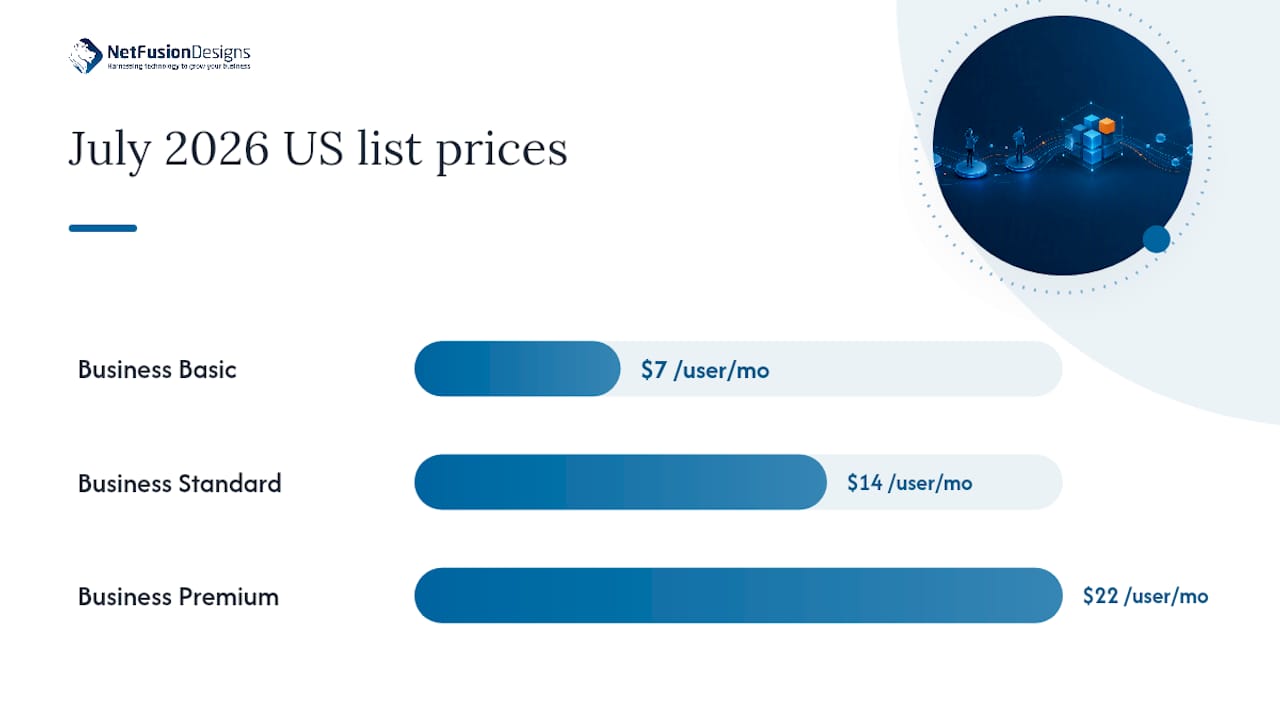
Key numbers to model now: under the July 2026 US list prices, Business Basic moved to $7.00 USD per user per month, Business Standard rose to $14.00 USD, and Business Premium held steady at $22.00 USD. E3 and E5 list prices shifted too, and pricing varies by country and by partner margin, so treat these US figures as directional, not your invoice.
Three practical points matter more than the headline numbers:
Start renewal modelling 60 to 90 days earlier than you normally would this cycle. The gap between old and new packaging is exactly where budgets get blindsided.
Persona mapping beats blanket department policy every time. A finance director and a finance clerk do not need the same SKU just because they sit in the same cost centre, and licensing them identically is how tenants end up paying for capabilities nobody uses.
Run the audit in four passes:
Build lifecycle governance around three moments: onboarding (assign by persona, not by default template), role change (re-evaluate the SKU, don’t just add access), and offboarding (automated reclamation tied to HR triggers cuts leakage and admin overhead far more than manual quarterly reviews).
Five overspending patterns commonly appear in many Microsoft 365 audits: inactive licences, duplicate capabilities across overlapping add-ons, users parked on the wrong tier, ungoverned add-on purchases nobody tracks centrally, and simply no ongoing visibility into any of it. In practical audits, 8 to 15% of assigned Microsoft 365 licences sit idle at any given time, which on a 500-seat tenant paying Business Premium rates is real monthly waste sitting untouched.
Pro Tip: Run your reclaim audit the month before renewal negotiations, not after. Unused licence data is your strongest leverage point with any vendor or partner.
Copilot licensing in 2026 isn’t a single line item, it’s a layering decision. Some SKUs now include basic Copilot chat functionality at no extra charge, while full Microsoft 365 Copilot remains a paid add-on priced at enterprise rates, and Microsoft also offers bundled Business Copilot options aimed at smaller tenants.
That layering changes your actual per-seat cost more than the base SKU choice does. A worked model should include:
Model both paths before committing: buying Copilot as part of a bundled Business SKU can cost less than layering enterprise Copilot add-ons onto a handful of selective power users. Run the comparison for your actual headcount split, then bring both numbers to your renewal conversation.
Yes, and most organisations should. Business and Enterprise licences can coexist in the same tenant, letting you put Business Premium on your office staff and E3 or E5 on roles that need deeper compliance or security tooling.
The catch is the 300-seat cap on Business licences. Once your organisation crosses that threshold, or once you need unlimited mailbox archiving, advanced eDiscovery, or Windows Enterprise rights that Business tiers don’t offer, it’s time to plan a phased move to Enterprise.
Watch for two drift patterns:
Set a quarterly review to catch both before they compound.
Start your audit 90 to 120 days before renewal, not 30. That window gives finance and IT enough runway to model multiple scenarios against real usage data instead of guessing under deadline pressure.
Before any vendor or partner conversation, bring:
Reviewing Message Center notices matters here too. Rollout timing on packaging changes can affect which features are actually live in your tenant at the moment your renewal is signed, and that’s a detail worth confirming rather than assuming.
Our managed engagements run the same core sequence every time:
NetFusion Designs Inc is SOC 2 Type II certified, runs a 24/7 NOC, and delivers managed Microsoft 365 optimisation as a core service across Ontario and Canada.
Most licensing waste isn’t a vendor problem, it’s a visibility problem. It happened because nobody owned the audit cadence, and the July 2026 packaging changes are exactly the kind of shift that punishes tenants who aren’t already tracking usage.
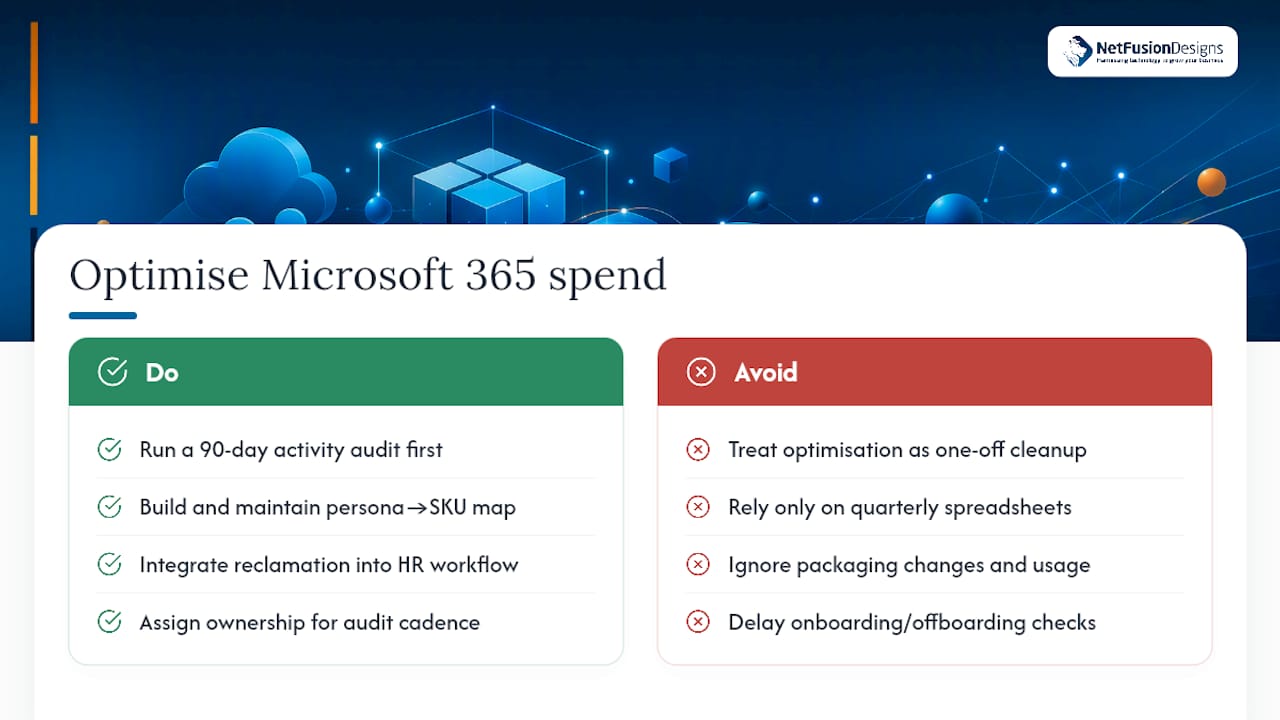
Where conventional advice falls short is treating licence optimisation as a one-time cleanup project. It isn’t. Roles change, staff turn over, and Microsoft keeps repackaging its suites roughly once a year. A persona map built in January is stale by June if nothing enforces it at onboarding and offboarding. The organisations that actually save money are the ones that build reclamation into their HR workflow, not the ones that run a heroic quarterly spreadsheet exercise.
If you take one thing from this guide, prioritise the 90-day activity audit before you touch pricing tiers at all. Getting the persona-to-SKU map right makes every downstream decision, Copilot bundling, Enterprise upgrades, add-on consolidation, dramatically simpler. Start there, not with the price list.
— Geeshan
For official pricing and packaging detail, consult Microsoft’s own pricing and packaging update announcement and subscription suite inclusion tables. For governance and optimisation frameworks, the CloudNuro licence optimisation guide is a solid independent reference.
Microsoft 365 licences fall into four main families: Business (Basic, Standard, Premium) for organisations up to 300 seats, Enterprise (E3, E5) for larger or compliance-driven organisations, Frontline (F1, F3) for shift-based staff, and standalone Apps for Business for users who only need the desktop Office suite.
No. Microsoft 365 is sold as a recurring subscription, monthly or annual, not a one-time lifetime purchase. Microsoft’s separate Office Home & Student products are sold as one-time purchases, but they are a different product line from Microsoft 365 subscriptions.
There’s no fixed number. You purchase one licence per user, and the total depends entirely on your headcount and the mix of plan tiers you assign, with Business plans capped at 300 seats per tenant.
E1 offers cloud-based Office apps and core services without desktop app installs. E3 adds desktop apps, unlimited archiving, and advanced compliance tools. E5 builds on E3 with advanced security, Power BI Pro, and advanced eDiscovery.
%20(1).avif)
%201.avif)