A 24/7 Network Operations Centre (NOC) keeps your infrastructure available around the clock by continuously monitoring systems, detecting and triaging incidents the moment they surface, and co-ordinating rapid remediation or vendor escalation before users ever notice a problem. For IT managers, that translates directly into lower Mean Time to Detect (MTTD), faster Mean Time to Resolve (MTTR), and the kind of SLA compliance that holds up under audit.
The three primary roles of a 24/7 NOC are:
NetFusion Designs Inc operates a 24/7 NOC backed by SOC 2 Type II certification, giving clients a measurable, auditable baseline for availability and incident response.
A 24/7 NOC reduces MTTD and MTTR, maintains SLA compliance, and prevents cascading failures by combining continuous monitoring, runbook-driven triage, and integrated escalation across NOC, SOC, and helpdesk functions.
| Point | Details |
|---|---|
| Continuous monitoring is the foundation | A NOC watches infrastructure 24/7 and generates qualified alerts before users notice a problem. |
| Measure outcomes, not availability hours | Track MTTD, MTTR, false-positive rate, and automation remediation rate to assess real NOC performance. |
| In-house 24/7 coverage requires a team of several engineers | Staffing, tooling, and runbook development make in-house NOC costly; outsourced models deploy in weeks. |
| Request SLA docs and incident samples | Ask any provider for written MTTA/MTTR targets by severity and 90-day incident reporting samples before signing. |
| NetFusion Designs Inc offers SOC 2–certified 24/7 NOC | NetFusion Designs Inc delivers integrated NOC and SOC operations with contractual SLA targets for Canadian businesses. |
A 24/7 NOC is a physical or virtual operations centre staffed continuously to monitor, manage, and respond to events across an organisation’s IT infrastructure. IBM describes the NOC as the nerve centre for detecting incidents, co-ordinating responses, and ensuring maximum network availability across servers, networks, applications, and security systems.
The scope a NOC typically owns includes:
What a NOC generally does not own: user-level service desk tickets, deep threat-hunting, or forensic security investigations. Those belong to adjacent functions.
The three functions are often confused, and that confusion creates expectation gaps and mispricing. The distinction is straightforward:
Handoffs between them follow defined triggers. A NOC alert that reveals suspicious lateral movement gets escalated to the managed SOC. A user complaint about slow application performance gets triaged by the NOC first; if it is a device-level issue, it routes to the helpdesk. Separate scoping for each function leads to clearer contracts and fewer disputes about who owns what.
A NOC without clear scope boundaries will absorb work it was never staffed or priced to handle. Define the lanes before you sign the contract — not after the first major incident.
ITIL’s service operation framework and Site Reliability Engineering (SRE) concepts both reinforce this separation. ITIL’s incident management and event management processes map directly onto NOC workflows. SRE’s error budget and SLO concepts give NOC teams a quantitative language for communicating availability targets to engineering and business stakeholders alike.
Splunk identifies continuous monitoring, incident response and triage, performance analysis, patch and backup monitoring, and vendor co-ordination as the NOC’s primary functions, with a clear emphasis on proactive work to prevent user-visible outages rather than reactive firefighting.
In practice, a NOC team handles the following daily:
Each of these is detectable and resolvable before it becomes a user-reported outage, provided the monitoring thresholds and runbooks are correctly configured.
Pro Tip: Set alert thresholds at two levels: a warning threshold that triggers a NOC review and a critical threshold that triggers immediate escalation. Combining this with event correlation rules, which group related alerts into a single incident ticket, can cut raw alert volume by a significant majority without masking real problems.
Effective 24/7 NOC operations rest on three pillars: the right people in the right tiers, documented processes that survive staff turnover, and integrated tooling. KERN-IT frames this as a triptych of competent teams, structured processes, and performant software — and argues that weakness in any one pillar undermines the other two.
Nebraska’s state NOC job specifications describe four tiers with distinct responsibilities:
Shift models vary by organisation size and geography:
For a managed NOC, a reasonable minimum is two qualified engineers on shift at any time for environments with 200 or more monitored devices, with an on-call L3 reachable within 15 minutes.
A well-run NOC integrates tooling across several categories, as outlined in ITBD’s NOC vs. Helpdesk guide:
The end-to-end workflow from detection to closure follows a consistent pattern regardless of the incident type. Here is a standard five-step flow:
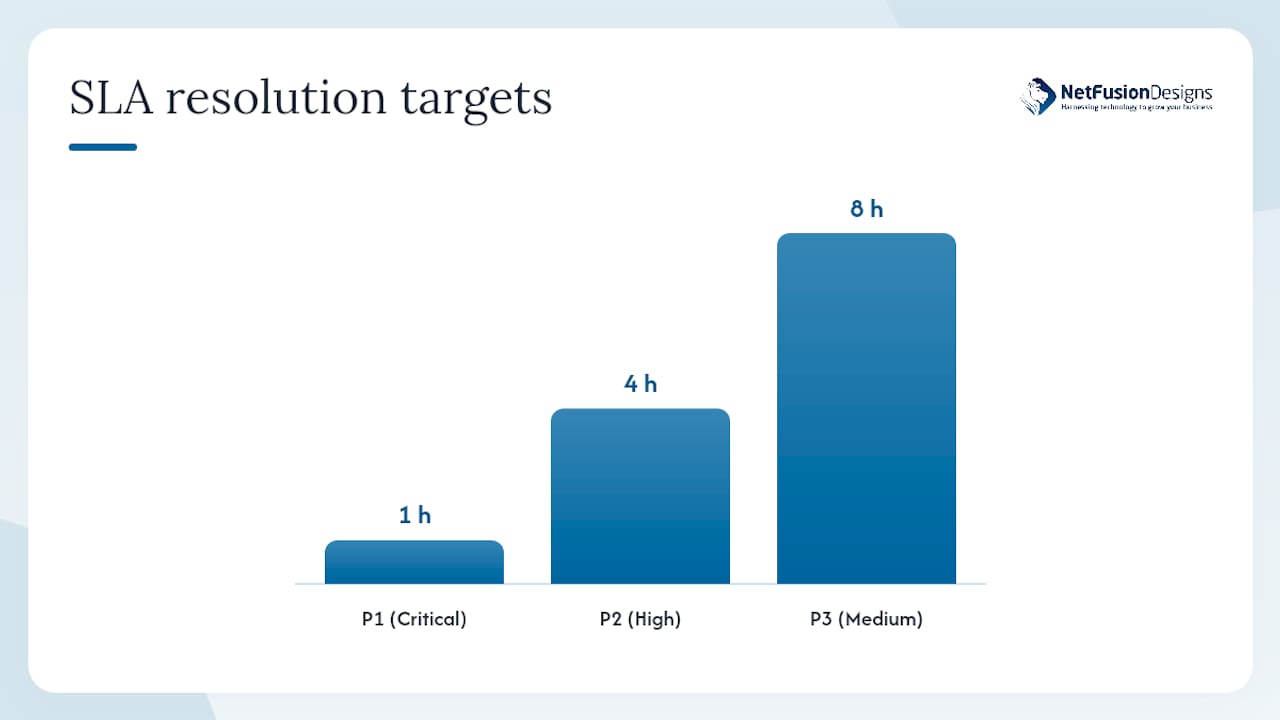
| Severity | Definition | MTTA target | MTTR target |
|---|---|---|---|
| P1 — Critical | Service down, revenue or safety impact | 5 minutes | 1 hour |
| P2 — High | Degraded service, significant user impact | 15 minutes | 4 hours |
| P3 — Medium | Partial degradation, workaround available | 30 minutes | 8 hours |
| P4 — Low | Informational, no immediate impact | 2 hours | Next business day |
These targets are starting points. Your actual SLA should reflect your business’s risk tolerance and the criticality of each monitored system.
Pro Tip: Automate remediation playbooks for your top 10 most frequent alert types. When a playbook handles a P3 alert end-to-end without human intervention, your engineers stay focused on genuine P1 and P2 incidents. Automation-assisted remediation is one of the fastest ways to reduce MTTR without adding headcount.
The business case for 24/7 NOC services comes down to three measurable outcomes: faster detection, faster resolution, and fewer cascading failures.
Nine Archs notes that true 24/7 IT support is outcome-focused, measured by MTTA and MTTR, and requires staffed response teams, SLAs, and performance reporting, not just phone availability. That distinction matters when you are evaluating providers: a vendor who offers “24/7 coverage” but cannot show you incident reporting samples and off-hours staffing counts is not offering a NOC.
Downtime cost context: Industry research consistently places unplanned downtime costs for mid-sized businesses in the range of thousands of dollars per hour, with the exact figure varying by sector and system criticality. The ROI case for 24/7 NOC coverage is strongest when you calculate your own hourly downtime cost and compare it against the annual cost of coverage.
Indirect benefits are worth naming too. Your internal IT staff spend less time on reactive firefighting and more on strategic projects. Vendor accountability improves because the NOC owns the escalation record. And your audit posture strengthens because every incident, change, and maintenance activity is logged and reportable.
For organisations in always-on sectors like finance, manufacturing, or healthcare, IBM notes that NOCs provide ongoing monitoring and can deliver substantial gains in uptime when automation is applied to common remediation tasks. You can read more about how NOC operations support business continuity planning in detail.
The decision between building an in-house NOC and outsourcing to a managed provider comes down to five axes: cost, control, time to implement, tooling maturity, and compliance posture.
ConnectWise explains that outsourced NOC services paired with BCDR and automation can shorten recovery times and reduce the overhead of maintaining a fully in-house 24/7 team. That is the core tradeoff: an outsourced NOC trades some control for speed of deployment and lower fixed cost.
| Dimension | Small internal NOC | Mature in-house NOC | Outsourced managed NOC | Hybrid model |
|---|---|---|---|---|
| Upfront cost | Low (repurposed staff) | High (hiring, tooling, facilities) | Low to medium (contract) | Medium |
| Ongoing cost | Medium (overtime, burnout risk) | High (salaries, benefits, training) | Predictable (per-device or flat fee) | Medium to high |
| Time to 24/7 coverage | Months to years | 24 months | Weeks | 3–6 months |
| Customisation | High | Very high | Medium (provider-defined runbooks) | High |
| Compliance / SOC 2 | Depends on internal programme | Achievable with investment | Provider-certified (verify) | Shared responsibility |
| Staffing risk | High (key-person dependency) | Medium (team depth) | Low (provider absorbs) | Medium |
When evaluating an outsourced or hybrid NOC provider, ask for:
Standing up 24/7 in-house coverage typically requires a team of full-time engineers to cover all shifts with redundancy, plus tooling licences, runbook development time, and a training programme. For most small and mid-sized businesses, that investment is difficult to justify against the cost of a managed NOC contract.
Measuring NOC performance requires a short set of well-defined metrics reviewed at the right cadence. Nine Archs recommends demanding incident reporting samples and SLA-backed targets from any provider, because measuring outcomes is more useful to procurement than counting hours of availability.
| KPI | What it measures | Target guidance |
|---|---|---|
| MTTD (Mean Time to Detect) | Time from incident start to alert generation | Under 5 minutes for P1 |
| MTTR (Mean Time to Resolve) | Time from alert to confirmed resolution | Under 1 hour for P1; under 4 hours for P2 |
| Uptime / SLA compliance | Percentage of time monitored systems are available | high availability for critical systems |
| Incident volume (by severity) | Total incidents per period, segmented by priority | Trending down over time indicates proactive improvement |
| False-positive rate | Percentage of alerts that require no action | Below 10% is a reasonable target |
| Automation remediation rate | Percentage of incidents resolved by playbook without human action | Above 30% indicates a maturing automation programme |
| First-touch resolution rate | Percentage of incidents resolved at L1 without escalation | high for a well-runbooked environment |
| Change failure rate | Percentage of changes that cause incidents or rollbacks | Below 5% per ITIL guidance |
For executive audiences, translate MTTD and MTTR into business language: hours of potential downtime avoided, SLA credits not triggered, and incidents resolved before user impact. Technical teams want the raw numbers; executives want the business outcome.
Running a 24/7 NOC well is harder than standing one up. These are the most common operational challenges and the mitigations that actually work.
Validate mitigations with before-and-after KPI comparisons. A 30-day baseline of false-positive rate and MTTR before implementing correlation rules, then a 30-day post-implementation measurement, gives you concrete evidence of improvement to share with stakeholders.
For practical prevention tactics and downtime prevention best practices, your operations team can apply these mitigations alongside NOC process improvements.
Integration is where most NOC programmes stumble. The technology is rarely the problem; the gaps in process and communication are.
Follow this checklist to integrate a 24/7 NOC into your existing IT operations:
Pro Tip: Run a quarterly “game day” where your NOC and engineering teams simulate a major incident (a core switch failure, a ransomware alert, a cloud provider outage) from detection through to resolution. These rehearsals surface gaps in runbooks and escalation paths that no amount of documentation review will catch.
Pro Tip: Automate your top five most frequent remediation steps first, not the most complex ones. Quick wins in automation build team confidence, reduce MTTR on high-volume alerts, and free L1 analysts to focus on genuine anomalies.
NetFusion Designs Inc operates a 24/7 NOC as part of its fully managed IT services platform, backed by SOC 2 Type II certification. That certification means an independent auditor has verified that the controls governing availability, confidentiality, and incident response meet a defined standard, not just that NetFusion Designs Inc claims to follow best practices.
The NOC and managed SOC functions are integrated, so a network anomaly that crosses a security threshold triggers a co-ordinated response between availability-focused NOC analysts and security-focused SOC engineers. That integration eliminates the handoff delay that costs time in environments where the two functions operate in separate silos.
Sample SLA language used by NetFusion Designs Inc for managed clients:
These numbers are meaningful because they are contractual and measurable. When you evaluate any provider, ask them to show you these figures in their actual SLA document, not a marketing page.
The most persuasive reporting format for executives is a monthly one-page summary showing: total incidents by severity, SLA compliance percentage, incidents resolved before user impact, and one capacity or risk observation with a recommended action. That format consistently earns budget approval for continued NOC investment.
Lessons from NetFusion Designs Inc’s operational experience:
Most articles about 24/7 NOC operations spend the bulk of their word count defining what a NOC is. By the time they get to the part that actually matters, the reader has either left or is too fatigued to act on the advice.
The real gap in most NOC programmes is not technology. Organisations that struggle with 24/7 coverage almost always have one of two problems: runbooks that were written once and never touched again, or escalation paths that exist on paper but have never been tested under pressure. No monitoring platform fixes either of those.
There is also a persistent myth that outsourcing a NOC means giving up control. In practice, a well-scoped managed NOC contract gives you more visibility than an under-resourced in-house team, because the provider is contractually obligated to report on MTTD, MTTR, and SLA compliance every month. Your internal team rarely has the bandwidth to produce that level of reporting consistently.
The advice I see underweighted in most guides: invest in your escalation matrix before you invest in your monitoring stack. A world-class monitoring platform that generates alerts nobody knows how to act on is worse than a simpler tool with a tested runbook for every alert type. Get the human process right first, then automate on top of it.
And if you are evaluating providers, the single most revealing question you can ask is: “Can I see a sample incident report from the last 90 days?” A provider who hesitates on that request is telling you something important about their operational maturity.
For small and mid-sized businesses in Ontario and across Canada, the cost and complexity of building an in-house 24/7 NOC is rarely justified. NetFusion Designs Inc offers a fully managed alternative: enterprise-grade NOC operations, SOC 2 Type II certified, with integrated helpdesk, managed SOC, and Microsoft 365 monitoring under one contract.

The difference is in the accountability structure. Every client gets contractual MTTA and MTTR targets by severity, monthly SLA reports formatted for both technical leads and executives, and a NOC that co-ordinates directly with the managed SOC when an availability event has security implications. There is no finger-pointing between siloed teams.
If you need coverage now, NetFusion Designs Inc’s emergency IT support is available immediately. For ongoing managed IT services across Ontario, including Kitchener-Waterloo, Toronto, Mississauga, and beyond, contact NetFusion Designs Inc to request a sample SLA document and a 90-day incident report. That is the fastest way to see whether the operational maturity matches what you need.
A 24/7 NOC reduces MTTD and MTTR, maintains SLA compliance, and prevents cascading failures by combining continuous monitoring, runbook-driven triage, and integrated escalation across NOC, SOC, and helpdesk functions.
These are the primary references used to build this guide. They are worth bookmarking for technical teams and procurement reviewers evaluating NOC coverage.
A NOC monitors infrastructure availability and performance around the clock, detects and triages incidents, executes remote remediation steps, and co-ordinates vendor escalation. Its primary goal is to resolve issues before they cause user-visible outages.
Core responsibilities include continuous monitoring, alert triage, incident qualification, remote remediation (service restarts, failovers), patch and backup monitoring, certificate and capacity tracking, and vendor co-ordination. Splunk’s NOC overview lists these as the foundation of proactive availability management.
A NOC operator (L1 analyst) monitors dashboards, acknowledges and qualifies alerts, executes runbook steps for known conditions, and escalates unresolved or novel incidents to L2 or L3 engineers with full context attached. Nebraska’s NOC job specifications describe this role as the first line of continuous monitoring and Tier 1 off-hours support.
A NOC focuses on infrastructure availability and performance; a SOC focuses on security threats and active attacks; a helpdesk handles user-facing tickets. The three functions have defined handoff triggers and should be scoped separately in any managed services contract.
Track MTTD, MTTR, uptime/SLA compliance, false-positive rate, and automation remediation rate. Nine Archs recommends requesting SLA documentation and incident reporting samples from any provider to verify that performance targets are contractual and measurable, not just marketing claims.
%20(1).avif)
%201.avif)