NetFusion Designs logo
Heart icon
Support
Email
info@nfd.ca
Phone
647-476-5259(Canada)
IT Services
Icon dropdown arrow

Infrastructure Implementation

Project PlanningHardware Voice over IP (VoIP)Application DevelopmentCloud DesktopSecurity Cameras

Managed IT Services

IT Support24/7 HelpDeskCyber Security & AntivirusData Backups & Disaster
Recovery
Co-Managed ITComplianceEmergency Ransomware
Recovery
Penetration & Vulnerability
Assessment

Optimization of Processes

Microsoft 365 OptimizationVirtual CIO ServicesPenetration TestingInventory Lifecycle
Management
Transforming SMEs with AI
Industries
Icon dropdown arrow
Dental Managed IT Services
Construction
Hotels & Hospitality
Franchises
Financial & Insurance Services
Government
Health Care & PharmaceuticalLegal & Professional Services
Local Small & Medium Businesses
Manufacturing
Non-profit
Real Estate
Retail
Transportation & Logistics
Enterprise & Consulting
Publicly Traded Companies
Our Story
Icon dropdown arrow
About UsTestimonials
Partners
Sponsorship
BlogContact Us
Open menuClose menu
Icon chevron up
Browse Blog:
Business
Insight
Advice
Insight

VoIP QoS: Keep Delay Below 150 ms With Teams Settings

VoIP QoS: Keep Delay Below 150 ms With Teams Settings

Keep one-way delay under 150 ms and never past 400 ms, hold jitter under 30 ms and packet loss under 5%, and keep round-trip time under 500 ms, per industry guidance. None of it holds unless you apply one rule: mark voice consistently and give it priority queuing at every hop, end to end.


TL;DR:

  • For Teams, mark audio ports 50000–50019 as EF, DSCP 46, and video ports 50020–50039 as DSCP 34; keep signaling separate.
  • Route real time media directly to the provider rather than through a VPN, which can add latency, jitter, and fragmentation; verify markings at every hop.
  • Record a baseline, then compare ingress and egress captures with queue counters; Teams telemetry is limited for PSTN and individual calls.

NetFusion Designs Inc
Keep Teams Calls Clear and Reliable
NetFusion Designs provides managed IT services, including security, monitoring, helpdesk, cloud, and Microsoft 365 for businesses across Ontario and Canada.
Explore managed IT services

Table of Contents

  • What does QoS mean for VoIP traffic?
  • Which numeric targets should you plan and monitor against?
  • How much bandwidth does each call need?
  • What DSCP, CoS and queue settings should you use?
  • What is the step-by-step checklist for end-to-end QoS?
  • How do you troubleshoot and verify QoS problems?
  • Our view: measure before you tune
  • How we can help with VoIP QoS
  • FAQ
  • Sources

What does QoS mean for VoIP traffic?

QoS does not create bandwidth. As Cisco’s voice-quality guidance explains, it manages and prioritises the traffic you already have. In practice, you do four jobs on routers and switches:

  • Classify voice using ACLs, UDP port ranges or IP and UDP header fields.
  • Mark each packet with a DSCP value at layer 3, and a CoS value at layer 2 where switches need it.
  • Queue marked voice in a priority class so it never waits behind bulk transfers.
  • Police that priority class so one misbehaving flow cannot starve everything else.

The telephony service class needs low jitter and low loss, not high throughput. That is why a fast link still drops calls: a micro-burst from a file sync fills a queue for a few milliseconds, and voice packets arriving in that window are lost. Priority queuing lets voice skip that line.

Which numeric targets should you plan and monitor against?

Use these figures as acceptance criteria and as alert thresholds in your monitoring.

ITU-T G.114 sets 150 ms as the one-way delay target for high-quality voice, and treats anything above 400 ms as unacceptable for general network planning. Delays between the two figures are workable only with good echo control.

The same industry benchmarks that give the jitter, loss and round-trip numbers above also map to what callers hear:

  • Jitter over the limit shows up as choppy or robotic audio, because packets miss the jitter buffer window.
  • Packet loss appears as clipped words and brief dropouts.
  • High round-trip time makes people talk over each other, because replies arrive late.

Timing is the root problem. VoIP is sensitive to packet order and arrival time, and ITU-T guidance is why strict classification at the edge matters so much.
How much bandwidth does each call need?

How much bandwidth does each call need? — overview diagram

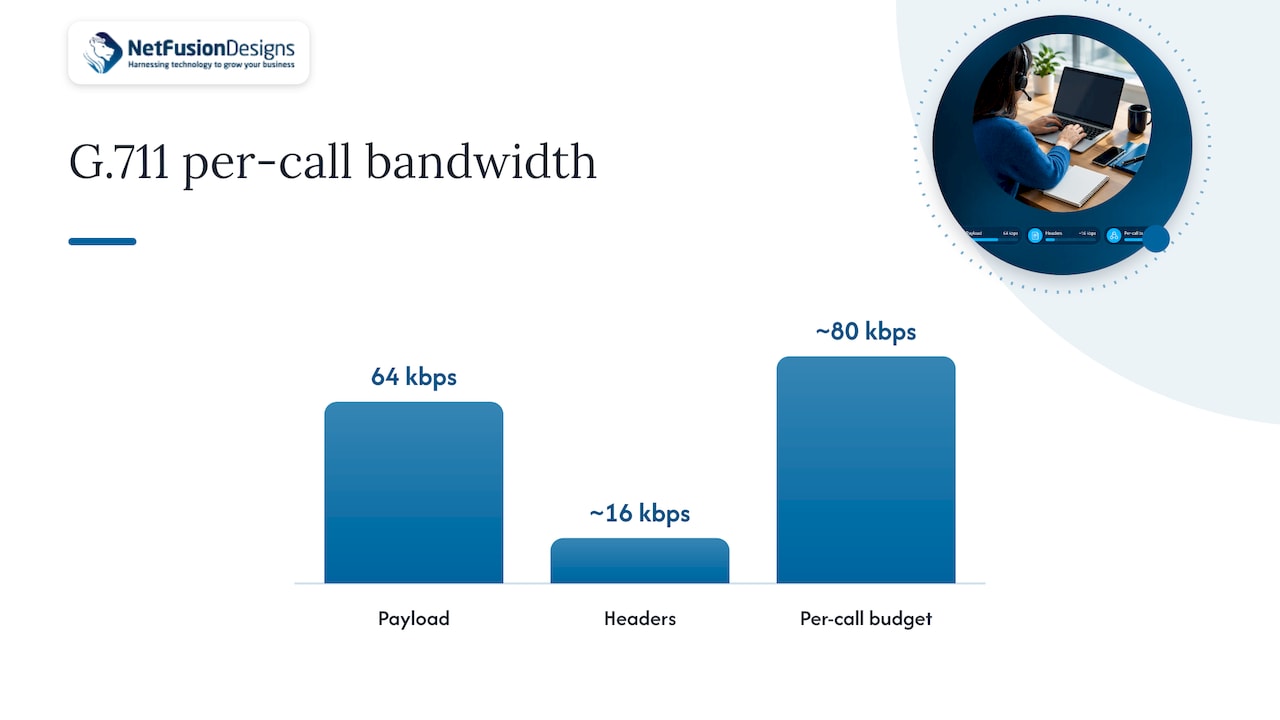
Plan per-call bandwidth from the codec, then add headers. As an illustration, G.711 carries about 64 kbps of payload plus roughly 16 kbps of IP, UDP and RTP headers, so budget about 80 kbps per call each way. Treat that as a planning figure, not a measurement of your network.

Several settings move that number:

  • Codec choice: compressed codecs cut payload size, but check their delay and quality effects first.
  • Packetisation interval: longer intervals send fewer packets and lower header overhead, at the cost of added delay.
  • VAD (voice activity detection): silence suppression reduces average use, but never plan the link around its savings.
  • cRTP (header compression): it shrinks headers on slow WAN links, though it adds processing load on the device.

On constrained links, use call admission control (CAC). Rejecting the call that would oversubscribe the priority queue is far better than degrading every call already in progress.

What DSCP, CoS and queue settings should you use?

RFC 4594 recommends the EF (Expedited Forwarding) per-hop behaviour for the telephony service class, with marking and policing at ingress so voice stays inside its negotiated bounds. Mark voice media as EF (DSCP 46) and give signalling a different value, so signalling does not crowd the priority queue.

Microsoft Teams gives a concrete example:

  • Audio: client source ports 50000–50019, DSCP 46 (EF).
  • Video: source ports 50020–50039, DSCP 34 (AF41).
  • Approach: mark at the endpoint, then reinforce with port-based tagging at routers.

Do both where you can. Endpoint marking is precise but easy for a device or policy to lose, while port-based ACL tagging on the router catches whatever arrives unmarked. On the WAN egress, put voice in a Low Latency Queue (LLQ) with a policer, so the priority class cannot grow without limit.

Pro Tip: Cisco’s DSCP policy documentation shows how to map DSCP to CoS in class maps and policy maps, so copy that structure rather than inventing your own.

What is the step-by-step checklist for end-to-end QoS?

QoS fails at the one hop that ignores it, and applying it only at the endpoints or only in the core is not enough. Work through the path in this order:

  1. Mark or trust DSCP at the network edge, using Windows or Intune policies for Teams clients (the Windows client guidance includes New-NetQosPolicy examples for audio on ports 50000–50019).
  2. Map DSCP to CoS on access and distribution switches so layer 2 and layer 3 agree.
  3. Apply LLQ and shaping on WAN egress, then police the priority class.
  4. Check every hop that can clear markings, such as firewalls, SD-WAN devices and ISP handoffs.
  5. Route real-time media directly to the provider. VPNs can add latency, jitter and fragmentation, so avoid hair-pinning voice through a tunnel.
  6. Validate with packet captures and policy-map counters to confirm the markings survive and the priority queue is being used.

Pro Tip: Capture on both sides of each device that might rewrite DSCP. A mismatch between ingress and egress points straight at the culprit.

How do you troubleshoot and verify QoS problems?

Combine active and passive methods. Place test calls and synthetic RTP streams across the same paths users take, and watch real traffic with NetFlow and packet captures. Then match symptoms to causes:

  • Jitter: find the congestion first. Enlarging the jitter buffer helps briefly but adds delay.
  • Packet loss: look at queue drops and policer counters on the priority class.
  • Markings missing: capture at the egress point and compare against the ingress.
  • Teams telemetry gaps: real-time telemetry has limits for PSTN and one-to-one calls, so rely on egress captures there.

Record a baseline before any change. Without it, you cannot show that a fix worked.

Our view: measure before you tune

We run these audits using the operating discipline we apply to our work. Our order is always the same: measure first, fix classification and edge configuration next, then tune queues and bandwidth. Call-quality complaints can trace back to markings lost at a device, as well as to a lack of capacity. Buying bandwidth before checking that is a costly guess.

— Geeshan

How we can help with VoIP QoS

NetFusion Designs Inc

If voice quality is slipping and you would rather not chase it hop by hop, we can audit your network end to end, then implement and manage the fix. That covers classification, marking, queue design and ongoing monitoring against the targets above, as part of our Managed IT Services. If you need a one-time review or extra hands, our IT support services cover ad-hoc and co-managed work. You can also read how our cloud VoIP service is delivered, or see our guide to migrating to VoIP. Ask us for a network readiness assessment and we will schedule it.

FAQ

How many Mbps does VoIP need?

G.711 carries about 64 kbps of payload plus roughly 16 kbps of headers, so budget about 80 kbps per call each way. Multiply by your peak concurrent calls, then add headroom for other traffic.

What is a QoS requirement for VoIP calls?

Voice needs one-way delay under 150 ms, low jitter and low loss. Mark it EF and give it priority queuing at every hop.

What is the main disadvantage of VoIP?

VoIP depends on your network. Congestion, packet loss or misconfigured QoS can degrade VoIP calls, which is why classification and queuing matter.

What equipment do you need for VoIP?

You need endpoints (IP phones or softphone clients), switches and routers that honour DSCP, and a provider connection. Check that each device keeps markings intact.

Sources

  • Itu
  • M365
  • Implement Quality of Service in Microsoft Teams - Microsoft Teams | Microsoft Learn
  • Cisco
  • RFC 4594 - Configuration Guidelines for DiffServ Service Classes

Continue Reading

New Office IT Checklist: Opening an Office in Mississauga
Disaster Recovery Testing: Prove RTO, Fix Gaps for Canadian IT Teams
Employee Phishing Training: Monthly Drills Need SOC Follow Through
Employee Offboarding IT Checklist for Small Businesses
NetFusion Designs logo
NetFusion Designs is a globally recognized IT service provider and services clients across North America.

We hold a SOC 2 Type 2 report, and maintain internal processes and procedures that keep our clients’ data secure and confidential.
NetFusion Designs IT support team

IT Services Near Me

BurlingtonOakvilleHamiltonMississaugaMiltonBramptonEtobicokeBrantfordGuelphKitchenerWaterlooCambridgeSt CatharinesTorontoMarkhamCaledonNewmarketNorth YorkPickering & DurhamLondonMontreal

Services

Project PlanningHardwareTelephony & VoIPApplication DevelopmentCloud DesktopSecurity CamerasHelpdesk & SupportCyber Security & Anti-VirusData Backups & Disaster RecoveryMicrosoft 365 OptimizationVirtual CIO ServicesPenetration TestingPricingSchedule a MeetingRemote Support
Pricing

Pages

Free Security ScanAbout UsOur Migration ApproachWork CultureOur Core ValuesCode of ConductTestimonialsContactBlogSchedule a MeetingRemote Support

TORONTO

Bank capital office building law
401 Bay St, 16th Floor, Toronto Ontario
Email
info@nfd.ca
Phone
647-476-5259 (Canada)

MARKHAM

Bank capital office building law
141 Main Street N, Markham, ON L3P 1Y2
Email
info@nfd.ca
Phone
647-476-5259 (Canada)

TRI-CITY AREA
(Kitchener / Waterloo / Cambridge)

Bank capital office building law
22 Frederick St, Suite 700, Kitchener Ontario
Email
info@nfd.ca
Phone
647-476-5259 (Canada)

PEEL REGION

Bank capital office building law
6700 Century Ave, 3rd floor, Mississauga, ON L5N 1V8
Email
info@nfd.ca
Phone
647-476-5259 (Canada)

DURHAM REGION

Bank capital office building law
1315 Pickering Parkway, Pickering, ON L1V 7G5
Email
info@nfd.ca

MONTREAL

Bank capital office building law
8815 Av du Parc #402, Montréal, QC H2N 1Y7
Email
info@nfd.ca
Phone
647-476-5259 (Canada)

Special Offers

Radio station signal antena tower
Pricing: $100–185 per user
Icon chevron right
Terms and ConditionsPrivacy PolicyCookie Policy
© 2026 NetFusion Designs Inc.
LinkedInFacebookAlignable logo