NetFusion Designs logo
Heart icon
Support
Email
info@nfd.ca
Phone
647-476-5259(Canada)
IT Services
Icon dropdown arrow

Infrastructure Implementation

Project PlanningHardware Voice over IP (VoIP)Application DevelopmentCloud DesktopSecurity Cameras

Managed IT Services

IT Support24/7 HelpDeskCyber Security & AntivirusData Backups & Disaster
Recovery
Co-Managed ITComplianceEmergency Ransomware
Recovery
Penetration & Vulnerability
Assessment

Optimization of Processes

Microsoft 365 OptimizationVirtual CIO ServicesPenetration TestingInventory Lifecycle
Management
Transforming SMEs with AI
Industries
Icon dropdown arrow
Dental Managed IT Services
Construction
Hotels & Hospitality
Franchises
Financial & Insurance Services
Government
Health Care & PharmaceuticalLegal & Professional Services
Local Small & Medium Businesses
Manufacturing
Non-profit
Real Estate
Retail
Transportation & Logistics
Enterprise & Consulting
Publicly Traded Companies
Our Story
Icon dropdown arrow
About UsTestimonials
Partners
Sponsorship
BlogContact Us
Open menuClose menu
Icon chevron up
Browse Blog:
Business
Insight
Advice
Insight

Co-Managed IT Responsibilities: Who Owns What

Co-Managed IT Responsibilities: Who Owns What

In a co-managed IT arrangement, your internal IT staff and a managed service provider (MSP) split the work, and a written agreement says who owns each task. A typical split: your team keeps day-to-day user support, business applications and project priorities. The provider takes on monitoring, patching, security tooling, backup and after-hours coverage. Legal accountability for your data stays with you either way.

The model fails when two teams each assume the other is handling the same risk. This guide gives you a responsibility matrix you can adapt, the duties you cannot hand off, the questions to settle before signing, and how we run it at NetFusion Designs (NFD).

NetFusion Designs Inc
Clarify Your Co-Managed IT Roles
NFD provides managed IT support, security, monitoring and helpdesk services to complement your internal team and clarify where support is needed.
Explore managed IT services

TL;DR

  • Co-managed IT means your internal team keeps the work it does best and the MSP covers the gaps: tooling, 24/7 monitoring, security operations, specialist skills and surge capacity.
  • Every task needs one named owner. Shared ownership of the same task is where incidents slip through.
  • You cannot delegate accountability. Canadian guidance says your organization remains the data owner and legally responsible for security when it outsources.
  • Put the split, escalation paths, response times and exit terms in the service agreement, and review them at least once a year.
  • Keep backups and logs you control, separate from the provider’s systems.

Table of Contents

  • What co-managed IT actually means
  • The responsibility matrix
  • What you cannot hand off
  • Where co-managed arrangements go wrong
  • Questions to settle before you sign
  • Our perspective: ownership first, tools second
  • How NFD runs co-managed IT
  • Reviewing the split over time
  • FAQ
  • Sources

What co-managed IT actually means

Co-managed IT sits between two familiar options. In-house IT means your staff do everything. Fully managed IT means a provider runs the environment end to end. Co-managed keeps your people in place and adds an external team beside them. If you are weighing the three, our pages on co-managed versus fully managed IT and managed versus in-house IT cover the trade-offs in more depth.

The model suits a few common situations:

  • One or two IT people are stretched across helpdesk, projects and security, and nobody covers evenings, holidays or sick days.
  • A growing business, say a manufacturer, accounting practice or clinic, has outgrown its internal team but does not want to lose institutional knowledge.
  • Leadership needs security monitoring, compliance evidence or a virtual CIO, and the internal team lacks the time or specialist skills.
  • A one-off project such as a Microsoft 365 migration or a network refresh would otherwise stall day-to-day support.

The common thread is that the internal team stays. The provider supports it and does not replace it.

The responsibility matrix

There is no universal split. The right one depends on your team’s size and skills, your industry and your risk. The table below is a sensible starting point for a small or mid-sized business with one to five internal IT staff. Treat it as a draft to mark up, not a template to accept as is.

Area Typically owned by your team Typically owned by the MSP Agree in writing
Helpdesk Tier 1 for staff you know well, onboarding and offboarding requests After-hours cover, overflow, Tier 2 and 3 escalations Hours, response times, who triages
Monitoring and alerting Reviewing alerts that affect business apps 24/7 monitoring of servers, network and endpoints Who is called, at what severity, and at what hour
Patching and updates Approving change windows, testing line-of-business software Scheduling, deploying and reporting on OS and third-party patches Maintenance windows, rollback plan, exceptions
Security operations Security policy, user awareness, approving risk decisions EDR, SOC and managed detection and response, vulnerability scanning Incident roles, containment authority, reporting
Backup and recovery Deciding what matters most, taking part in restore tests Running backups, monitoring jobs, executing restores Recovery time and recovery point targets, test schedule
Microsoft 365 and cloud Day-to-day user and licence administration Tenant hardening, migrations, conditional access, MFA enforcement Who holds global admin rights
Vendors and licences Relationships with line-of-business software vendors Escalating hardware, internet and telephony issues on your behalf Who can open tickets with which vendor
Projects and strategy Business priorities, application roadmap Project labour, architecture advice, virtual CIO input Scope, budget approval, sign-off
Documentation Business context, process knowledge Network diagrams, asset inventory, runbooks Where it lives and who can edit it

A useful test: pick any row and ask who gets the phone call at 2 a.m. If two people give different answers, the row isn’t finished.

Helpdesk

Most co-managed clients keep Tier 1 in-house because their team knows the people, the quirks and the priorities. The provider then handles what your team can’t: evenings and weekends, peaks during a migration, holidays and vacancies. Define how a ticket moves between the two desks, and make sure both use the same ticketing system so nothing lives in someone’s inbox.

Monitoring and patching

These are the tasks that suit an outside team best. They are repetitive, they need tooling that is costly to buy for a small shop, and they have to run at night. Your team still has a say: they know that the accounting package breaks after a certain update, or that the plant’s CNC machines cannot reboot on Tuesday. Put those exceptions in writing so the provider isn’t guessing.
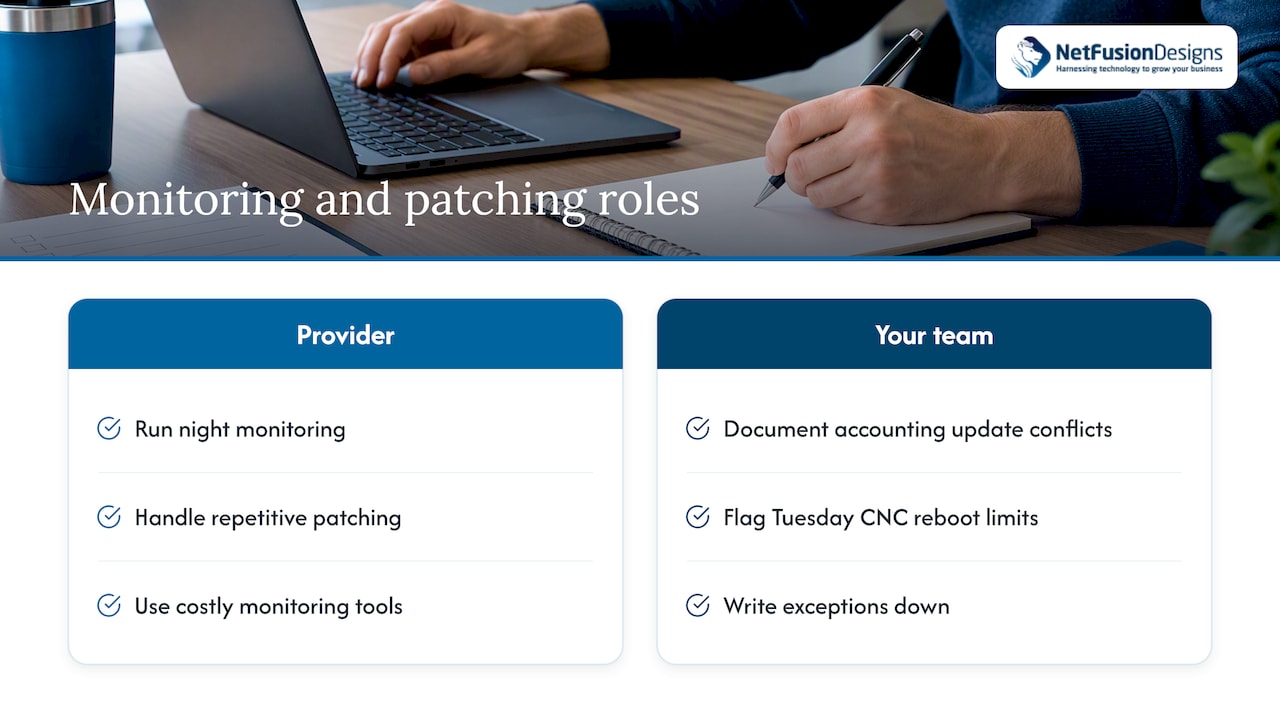
Provider tasks and client exceptions for patching

Security operations

Security is where an MSP most often adds what a small internal team lacks, such as endpoint detection and response (EDR, software that watches devices for attacks and can isolate them) and a security operations centre staffed around the clock. The Canadian Centre for Cyber Security recommends that organizations set up solutions to detect, monitor and respond to incidents. The question for your agreement is who has authority to act: can the provider isolate a laptop at 3 a.m. without calling you first? Decide that in advance, not during the incident.

Backup and recovery

The provider can run the backups. You still decide what counts as critical and how long you can be down. A backup that has never been restored is a hope, not a plan, so schedule restore tests and assign someone on your side to witness them.

What you cannot hand off

Handing tasks to a provider does not hand over responsibility. The Canadian Centre for Cyber Security states that your organization remains the data owner and is legally responsible for security even when it outsources, and its guidance on contracting with MSPs describes risk mitigation as shared between the organization and the provider, with the organization ultimately responsible for protecting its systems.

In practice, these stay with you:

  1. Risk decisions. The provider can tell you a system is exposed. Accepting, funding or fixing that risk is a business decision.
  2. Data ownership and location. Know where your data sits. The same guidance cautions that if a provider moves data to a jurisdiction you did not agree to, you should have contractual means to act, such as an exit or termination clause.
  3. Breach obligations. If personal information is involved, privacy law applies to you, not the provider. Under PIPEDA, organizations must keep records of all breaches of security safeguards for 24 months, whether or not they are reportable. Your agreement should oblige the provider to give you the facts and logs you need to meet that duty. If you are unsure whether an incident is reportable, speak to your privacy counsel or the Office of the Privacy Commissioner of Canada.
  4. Backups and logs you control. The same Cyber Centre guidance advises keeping offsite backups and network activity logs that you control, separate from the provider’s systems, so you can recover if the provider is compromised or the contract ends abruptly.
  5. Administrative access. The Cyber Centre’s guidance on secure cloud and outsourced IT advises that administrator accounts for cloud services use multi-factor authentication (MFA) and stay distinct from internal administrator credentials. Keep at least one break-glass admin account that only your organization holds.

Outsourcing doesn’t remove the risk

CISA, the US cyber agency, warns executives against assuming that outsourcing reduces operational risk. Ceding too much control can create visibility gaps, where weaknesses in the provider’s network compound unresolved issues in yours. It recommends a cost-benefit review with finance, legal and security leadership before you choose a co-managed or fully outsourced model. That is US guidance, but the logic applies to any Canadian business with a provider holding privileged access.

If an outage or breach would still hit your finances despite good contracts, look at insurance as well. A Dutch broker’s overview of cyber insurance for small and mid-sized businesses explains the kind of exposures a policy is meant to cover. The market and policy wording are Dutch, so use it for the concepts and ask a Canadian broker about coverage here.

Where co-managed arrangements go wrong

These are the failure patterns we see described most often, and they are all fixable with a clear agreement.

  • Both sides assume the other is patching. Each team believes the other has handled the vulnerable server. The fix is a named owner per system, not per category.
  • Alert fatigue on one side, silence on the other. The provider sends alerts your team ignores because nobody agreed on severity levels.
  • Undocumented changes. Your administrator changes a firewall rule and the provider’s monitoring starts failing. A shared change log prevents this.
  • Departure of the internal lead. Knowledge walks out the door. If documentation lives with the provider, the business keeps running.
  • Scope creep. Block hours or project work gets used up on helpdesk overflow. Define what is covered by the base arrangement and what is billed as project work.
  • No exit path. The relationship ends and nobody can find admin credentials or the backup location.

Questions to settle before you sign

Ask these of any provider, including us.

  1. Which tasks does each side own, listed system by system?
  2. What are the response and resolution times by severity, and do they apply outside business hours?
  3. Who can take containment action during a suspected breach, and what must they tell you first?
  4. Where is our data stored, and can the provider move it without our approval?
  5. Which independent audits or certifications does the provider hold, and can we see the reports? The Cyber Centre suggests verifying a provider’s compliance with standards such as SSAE 18 SOC 3 or the Canadian CSAE 3416.
  6. Who holds global admin rights, and what happens to them if we leave?
  7. How do we get our documentation, backups and logs on exit?
  8. How often do we review the split, and who attends?

The Cyber Centre also advises organizations to set security requirements and a formal service level agreement (SLA) before procurement, and to do their own due diligence on the provider’s financial and operational viability.

Our perspective: ownership first, tools second

We have a simple view at NFD: a co-managed arrangement succeeds or fails on clarity, not on tooling. Most of the businesses we talk to already have someone good in-house. They don’t need that person replaced. They need that person to stop being the single point of failure for everything from password resets to ransomware response.

So we start by mapping what your team owns and what it would rather not. We lean on our 24/7 network operations centre and our SOC 2 Type II certified processes for the repetitive, round-the-clock work, and leave the context-heavy work with the people who know your business. We run our own infrastructure in-house, which means we are not passing your tickets to a chain of third-party vendors, and where it is required we can support provincial data residency.
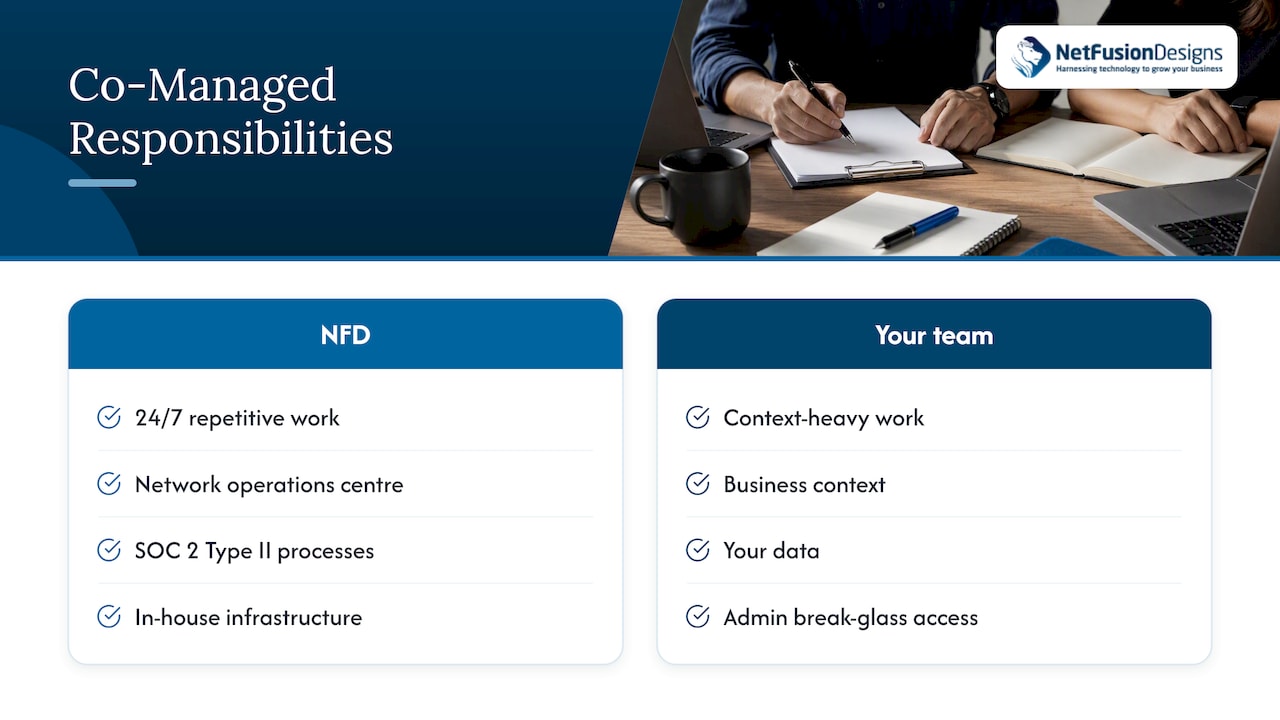
Our perspective: ownership first, tools second — overview diagram

We also say plainly that you should keep control of the things that are yours: your data, your admin break-glass access and your independent backups. A provider who resists that is telling you something.

One more habit worth copying whoever you choose: write the responsibility matrix in plain language, not in contract jargon, so the person on call can read it at 2 a.m. and know what to do.

— Geeshan

How NFD runs co-managed IT

Our co-managed IT support is built to sit beside your internal team. Depending on the gaps you have, that can include a 24/7 staffed helpdesk for overflow and after-hours, managed EDR and 24/7 SOC and MDR, cloud backup and disaster recovery and virtual CIO guidance. We also offer emergency IT support if something breaks outside any plan. See all of our IT support service options, or talk to us about a responsibility matrix for your own environment. We have teams in Kitchener-Waterloo, Toronto, Markham, Mississauga, Montréal and Winnipeg.

Reviewing the split over time

A matrix that is right today will be wrong in a year. Staff join and leave, you adopt a new cloud tool, an auditor asks for evidence, or you open a second location. Build in a review:

  • Quarterly: check ticket volumes, escalation times and any task that fell between two chairs.
  • Annually: revisit the whole matrix, the SLA, the exit plan and your recovery targets. Run a restore test and a tabletop exercise where you walk through a ransomware scenario.
  • After any incident: update the matrix with what the incident taught you about ownership.

As your internal team grows or shrinks, the split moves too. Some businesses move toward a fuller managed model, and others bring more in-house. Our guides on internal or outsourced IT and the benefits of working with an MSP can help with that decision.

FAQ

Who is responsible if there is a breach in a co-managed setup?

Your organization remains legally responsible for its data, as Canadian Cyber Centre guidance makes clear. The provider is responsible for performing the tasks it agreed to, such as monitoring and containment, and your contract should say what it must report to you and how fast. After an incident, speak to legal counsel about your reporting duties.

Does co-managed IT replace my internal IT staff?

No. The point of the model is to keep your team and give them tooling, depth and backup. Your staff keep ownership of the areas you assign them, and the provider covers the rest.

What should stay in-house?

Keep business priorities, risk decisions, vendor relationships tied to your operations, and the final say on access to your data. Also keep your own copy of backups, logs and break-glass admin credentials.

How is co-managed different from fully managed IT?

In fully managed IT, the provider runs the environment end to end and acts as your IT department. In co-managed IT, responsibility is split with your internal team by written agreement. Our page on where the line sits between the two goes through the differences.

How often should we review the responsibility split?

Review ticket and escalation data quarterly and the full matrix at least once a year. Also review it after any major incident, staffing change or new system.

Sources

  • Cyber security considerations for consumers of managed services (ITSM.50.030), Canadian Centre for Cyber Security
  • Secure cloud and outsourced IT services, Canadian Centre for Cyber Security
  • Cyber security best practices: Contracting with managed service providers, Canadian Centre for Cyber Security
  • Baseline cyber security controls for small and medium organizations, Canadian Centre for Cyber Security
  • CISA Insights: Risk Considerations for Managed Service Provider Customers
  • Complying with PIPEDA’s new breach reporting rules, LexisNexis Canada

Recommended

  • Co-Managed vs Fully Managed IT: Where’s the Line?
  • Co-managed IT support
  • Managed IT vs In-House IT: Which Should You Hire?
  • Internal or Outsourced IT?

Continue Reading

Construction Site Internet: How to Connect a Job Site Trailer
File Sharing for Multi-Location Teams: A Practical Guide
Switching IT Providers in Toronto: A Safe Handover Plan
Hybrid Cloud for SMBs: A Practical Guide for Canadian Firms
NetFusion Designs logo
NetFusion Designs is a globally recognized IT service provider and services clients across North America.

We hold a SOC 2 Type 2 report, and maintain internal processes and procedures that keep our clients’ data secure and confidential.
NetFusion Designs IT support team

IT Services Near Me

BurlingtonOakvilleHamiltonMississaugaMiltonBramptonEtobicokeBrantfordGuelphKitchenerWaterlooCambridgeSt CatharinesTorontoMarkhamCaledonNewmarketNorth YorkPickering & DurhamLondonMontreal

Services

Project PlanningHardwareTelephony & VoIPApplication DevelopmentCloud DesktopSecurity CamerasHelpdesk & SupportCyber Security & Anti-VirusData Backups & Disaster RecoveryMicrosoft 365 OptimizationVirtual CIO ServicesPenetration TestingPricingSchedule a MeetingRemote Support
Pricing

Pages

Free Security ScanAbout UsOur Migration ApproachWork CultureOur Core ValuesCode of ConductTestimonialsContactBlogSchedule a MeetingRemote Support

TORONTO

Bank capital office building law
401 Bay St, 16th Floor, Toronto Ontario
Email
info@nfd.ca
Phone
647-476-5259 (Canada)

MARKHAM

Bank capital office building law
141 Main Street N, Markham, ON L3P 1Y2
Email
info@nfd.ca
Phone
647-476-5259 (Canada)

TRI-CITY AREA
(Kitchener / Waterloo / Cambridge)

Bank capital office building law
22 Frederick St, Suite 700, Kitchener Ontario
Email
info@nfd.ca
Phone
647-476-5259 (Canada)

PEEL REGION

Bank capital office building law
6700 Century Ave, 3rd floor, Mississauga, ON L5N 1V8
Email
info@nfd.ca
Phone
647-476-5259 (Canada)

DURHAM REGION

Bank capital office building law
1315 Pickering Parkway, Pickering, ON L1V 7G5
Email
info@nfd.ca

MONTREAL

Bank capital office building law
8815 Av du Parc #402, Montréal, QC H2N 1Y7
Email
info@nfd.ca
Phone
647-476-5259 (Canada)

Special Offers

Radio station signal antena tower
Pricing: $100–185 per user
Icon chevron right
Terms and ConditionsPrivacy PolicyCookie Policy
© 2026 NetFusion Designs Inc.
LinkedInFacebookAlignable logo