Privileged access management (PAM) is the set of tools and rules that control who can use administrator-level accounts, when, for how long, and what they did with that access. For a small or mid-sized business, the practical goal is simple: nobody holds powerful access all the time, every elevation is approved and logged, and a stolen password alone cannot open the whole business. You do not need an enterprise budget to get there. You need a short list of accounts, a few firm rules and someone accountable for keeping them current. We handle that day to day for Ontario businesses through our Managed IT Services.
A privileged account is any account that can do more than ordinary work. The Government of Canada’s account management requirements describe them as accounts that can change key system settings, change or override security controls, view audit and security monitoring information, reach other users’ data including backups, or troubleshoot a system.
In a typical Ontario office, that means:
Microsoft lists the same account types in its PAM overview. Gartner adds that PAM now covers machines and software agents as well as people, and that its core features are credential vaulting and rotation, session monitoring and recording, and JIT privilege that replaces permanent access with time-limited credentials.
Why focus here? Microsoft’s privileged access guidance points out that a small number of identities hold power over most business assets, so attackers aim at them first. Protecting ten administrator accounts well does more for you than lightly protecting two hundred ordinary ones.
Three terms get mixed up, so here they are in plain words.
You need all three. MFA on an administrator account is necessary, but if that account is always on and shared, one successful phishing attack still hands over everything. PAM narrows what a single compromised sign-in can do.
The Cyber Centre defines least privilege as giving users only the privileges needed to perform authorized tasks. It advises restricting administrative functions to those who need them and giving those people separate administrative accounts.
A worked example: a bookkeeper at a 25-person accounting firm needs to open client files, run the accounting software and print. She does not need to install software, change firewall rules or read the whole firm’s mailboxes. If her laptop is compromised while she is a standard user, the attacker inherits standard access. If she was a local administrator “for convenience,” the attacker inherits control of the machine and often a path to the rest of the network.
The Treasury Board requirements add three useful habits you can copy at any scale: apply least privilege to every account type, tie each account to a single identity (no shared logins), and revoke access when it is no longer needed. They also set inactive user accounts to be disabled after 90 days and temporary accounts after 30 days.

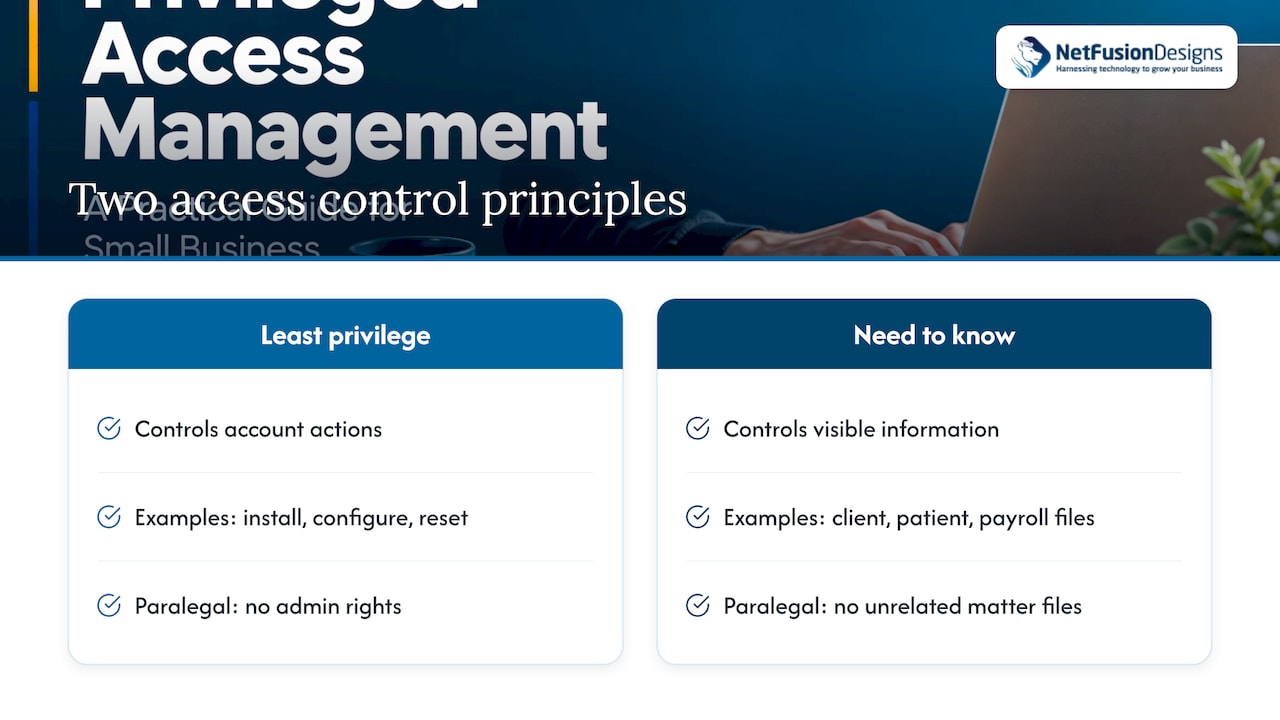
The two ideas overlap but answer different questions. Least privilege is about what actions an account may perform on systems: install, configure, reset, delete. Need to know is about which information a person may see: a client file, a patient chart, payroll. A paralegal may have no admin rights at all (least privilege) and still be kept out of files for matters they do not work on (need to know). Law firms, accounting practices and clinics usually have to do both, because privacy duties apply to the information and security controls apply to the accounts.
Just-in-time access means nobody keeps elevated rights “just in case.” The Treasury Board defines it as granting and revoking privileges only for the duration required for an authorized privileged function, with requests authorized when first made and periodically during use.
The Cyber Centre’s zero trust architecture guidance goes further on how it should work:
A related idea is just-enough access: not only when the access exists, but how much. A person fixing a printer server should not receive rights over the email system. Together, the two shrink both the time and the scope an attacker could exploit.
In a small business this can start without special software. A named administrator uses a standard account all day, elevates only for the task, and a second person (the owner, office manager or your IT provider) approves changes to sensitive systems. The same approach appears in many business tools as role-based user management with time-bound permissions and approval steps; role-based user management in operational software is a familiar example of keeping permissions tied to the job rather than the person.
The Cyber Centre’s baseline controls for small and medium organizations are written for organizations with fewer than 500 employees. They call for provisioning accounts with minimum functionality, restricting administrator privileges to an as-required basis, keeping admin accounts out of everyday activities such as email and web browsing, and removing accounts when they are no longer required. Here is how that becomes a plan.
Where this goes wrong: owners keep one all-powerful mailbox account “because it is easier.” That single habit undoes the rest. Our team handles the Microsoft 365 side through Microsoft 365 Optimization, and our write-up on Microsoft 365 tenant hardening covers the admin-role settings worth reviewing.
Where this goes wrong: removing local admin rights without a request path produces a flood of calls and a quiet return of the rights. Decide the approval route first, and make it fast.
A useful baseline for a smaller organization is: find privileged accounts, vault credentials, require approval with check-out, and rotate passwords automatically. Session recording, JIT elevation and fully zero standing privilege are the next stage as the business grows, according to the Cyber Centre-aligned guidance summarized in the research above and Gartner’s description of mature PAM.
Software helps once the rules exist. For an SMB, judge any PAM product on practical points:
For regulated professions such as law firms, accounting practices and dental or medical clinics, the ability to show who accessed what is often the difference between a clean answer and a long investigation. Our cybersecurity checklist for law firms lists related controls.
We approach privileged access as an operations problem, not a software purchase. Most small businesses in Ontario do not lack tools; they lack someone whose job is to ask every quarter, “who still has the keys, and why?”
That is why we bundle it into how we run IT. A single provider covering helpdesk, Microsoft 365, cybersecurity and a 24/7 SOC means the person who removes a departing employee’s admin rights is the same team that watches for the sign-in attempt that follows. There are no gaps between vendors where an account can slip through.
As a SOC 2 Type II–certified team, we are used to documenting who can access what and showing that the process is followed. For a law firm, accounting practice, clinic or manufacturer, that record is what turns “we think our admin access is controlled” into something you can show a client, insurer or auditor.
Start small and start now: separate admin accounts, MFA everywhere, no standing local admin rights, and a review on the calendar. Each step lowers your exposure before any new tool is purchased.
Geeshan
NetFusion Designs is a Managed IT and AI enablement provider serving small and mid-sized businesses across Ontario and Canada, with teams in Kitchener-Waterloo, Toronto, Markham, Mississauga, Montréal and Winnipeg. Our managed cybersecurity, Microsoft 365 and monitoring services come from one team, backed by a 24/7 NOC and a SOC 2 Type II–certified team, so access rules do not depend on coordinating several vendors.
If you want to see where your administrator access stands, start with our free cybersecurity assessment, or talk to us about Managed IT Services built around your accounts, your staff and your compliance obligations.
It is how you control the accounts that can change systems, override security or read other people’s data. PAM covers who gets that access, how they request it, how long it lasts and how it is recorded. The aim is that no single stolen password can open your whole business.
If you have administrator accounts, service accounts or staff with local admin rights, you already have privileged access to manage. The Cyber Centre’s baseline controls for small and medium organizations ask for admin privileges to be restricted to an as-required basis. You can begin with account separation, MFA, vaulting and reviews, then add tooling as you grow.
Least privilege limits how much access an account has. Just-in-time access limits how long elevated access exists, granting it for a task and removing it afterwards. Used together, they reduce both the scope and the time window an attacker could use.
List the applications that truly need elevation first, then set an approval route that responds quickly. Move users to standard accounts in stages, starting with the least technical roles. Keep a short log of exceptions and review it each quarter.