NetFusion Designs logo
Heart icon
Support
Email
info@nfd.ca
Phone
289 212-3930(Canada)
IT Services
Icon dropdown arrow

Infrastructure Implementation

Project PlanningHardware Voice over IP (VoIP)Application DevelopmentCloud DesktopSecurity Cameras

Managed IT Services

IT Support24/7 HelpDeskCyber Security & AntivirusData Backups & Disaster
Recovery
Co-Managed ITComplianceEmergency Ransomware
Recovery
Penetration & Vulnerability
Assessment

Optimization of Processes

Microsoft 365 OptimizationVirtual CIO ServicesPenetration TestingInventory Lifecycle
Management
Transforming SMEs with AI
Industries
Icon dropdown arrow
Dental Managed IT Services
Construction
Hotels & Hospitality
Franchises
Financial & Insurance Services
Government
Health Care & PharmaceuticalLegal & Professional Services
Local Small & Medium Businesses
Manufacturing
Non-profit
Real Estate
Retail
Transportation & Logistics
Enterprise & Consulting
Publicly Traded Companies
Our Story
Icon dropdown arrow
About UsTestimonials
Partners
Sponsorship
BlogContact Us
Open menuClose menu
Icon chevron up
Browse Blog:
Business
Insight
Advice
Insight

6 steps HR teams use to build an AI policy for employees

An effective AI policy for employees permits productive tool use where the risk is low, requires human review before any AI output touches hiring, pay, or client work, and puts firm guardrails on what data can be typed into a prompt box. Ownership sits jointly with HR, Legal, IT/Security, and Procurement, since no single department can enforce it alone. The first move isn’t drafting language. It’s running an AI inventory and pulling together a working group.


TL;DR:

  • Regularly update and audit the approved AI tool registry, including tool versions, permitted uses, data categories, approval owners, and expiry dates.
  • Limit sensitive data inputs to a small, approved subset of tools with strict logging and technical controls like DLP and enterprise logins.
  • Ensure vendor assessments include data residency, model training practices, certifications, ownership rights, and incident response procedures.
  • Require explicit human review for AI outputs affecting hiring, performance, or client decisions, with clear, plain-language guidelines and role-based training.
  • Conduct scheduled reviews, staff training, and manager-led modeling of responsible AI use to maintain policy enforcement and adapt to evolving workflows.

Table of Contents

  • Building an AI policy for employees: the essential components
  • How do you actually build the policy?
  • Approved tool registry and risk tiers: what to track
  • Data handling and confidentiality rules for AI use
  • Vendor diligence and procurement requirements
  • Making the policy stick: training, accountability, and cadence
  • A practical template you can adapt
  • What the legal and adoption evidence says
  • Why the simplest policies work best
  • How NetFusion Designs helps you implement the policy, not just write it
  • Sources
  • FAQ

Building an AI policy for employees: the essential components

Most policies fail because they skip a component, not because the writing is weak. A workable AI policy for employees needs these pieces, modelled on structures used in institutional policies like St. John’s University’s Policy 1038:

  • Purpose and scope statement: why the policy exists and what it governs, stated in one paragraph.
  • Definitions: what counts as “AI” for policy purposes, including embedded features (Copilot in Word, autocomplete in a CRM) that employees may not think of as AI at all.
  • Covered parties: employees, contractors, and vendors, across every jurisdiction the company operates in.
  • Permitted and prohibited uses: examples matter more than abstractions. “Drafting internal meeting summaries” is permitted; “feeding client contracts into a public chatbot” is not.
  • Human review thresholds: tied to risk. A blog draft needs a read-through. A performance review or hiring recommendation needs documented human sign-off before it affects anyone’s job.

Skip the legalese. HR professionals who write this section in plain, direct language get faster manager buy-in than those who paste in a compliance template wholesale.

How do you actually build the policy?

Drafting an AI policy for employees is a sequence, not a single document you write in an afternoon. Six steps get you from nothing to a published, enforceable policy:

  1. Audit first. Find out what employees are already using, sanctioned or not. Shadow AI use (personal ChatGPT accounts, browser extensions) is often more common than IT assumes.
  2. Map data sensitivity to risk tiers. Not every use case carries the same exposure. A low-risk tool drafting marketing copy needs lighter controls than one touching customer financial records.
  3. Assemble a cross-functional working group. HR, Legal, IT/Security, and a department head who actually uses the tools day to day.
  4. Draft using plain clause headings. Borrow structure from published templates rather than starting from a blank page.
  5. Pilot with a small team before rolling out company-wide, and fix what breaks.
  6. Publish a review cadence so the policy doesn’t quietly go stale six months after launch.

This sequencing avoids the common trap of publishing rules nobody tested against real workflows.

Approved tool registry and risk tiers: what to track

An approved-tools registry is the operational backbone of any AI policy for employees, and it needs specific fields to stay useful rather than becoming a forgotten spreadsheet:

  • Tool name and version
  • Approved uses (what it’s cleared for, specifically)
  • Data allowed (what categories of information may pass through it)
  • Approval owner (a named person, not a department)
  • Expiry date for the approval itself

Risk tiers typically break into three bands. Low risk covers internal drafting tools with no sensitive data exposure. Medium risk covers tools touching internal business data but not regulated information. High risk covers anything processing customer PII, health data, or financial records, and those need the tightest controls, including mandatory logging.

Pro Tip: Tie every tool’s approval expiry to your existing IT patch cycle. Approvals that never expire are how “approved lists” quietly rot into liabilities nobody remembers granting.

Automating this inventory through data loss prevention (DLP) tools or endpoint allowlisting removes the dependency on employees remembering the rules. NetFusion Designs Inc’s work on enterprise-grade security tooling covers how these controls integrate with existing IT environments.

Data handling and confidentiality rules for AI use

The riskiest moment in any employee’s AI workflow is the prompt itself, because that’s where confidential data leaks. Set explicit rules:

  • Prohibit uploading regulated personal information, protected health information, customer financial data, or trade secrets into any tool that isn’t explicitly approved for that data class.
  • Require vendor contracts to forbid training on your company’s data and to mandate prompt breach notification.
  • Enforce technical controls: DLP scanning, enterprise single sign-on logins (never personal accounts), and logging of prompts submitted to sanctioned tools.

These rules only work when they’re backed by technology, not just a signed acknowledgment form. A written prohibition without DLP enforcement behind it relies entirely on goodwill.

Vendor diligence and procurement requirements

Before any AI tool gets approved, Legal and Procurement need answers to a specific set of questions, not a general assurance from a sales rep:

  • Does the vendor train its models on your company’s input data, and can that be contractually disabled?
  • Where is data stored, and does that residency meet your regulatory obligations?
  • Does the vendor carry SOC 2 Type II or ISO/IEC 27001 certification?
  • Who owns the intellectual property produced by the tool?
  • What’s the vendor’s documented incident response process?

Require exit and transition clauses so you can leave a vendor without losing access to your own data. Fold every one of these checks into the third-party risk process you already run for software procurement. Don’t build a separate, parallel track for AI vendors.
Making the policy stick: training, accountability, and cadence

Making the policy stick: training, accountability, and cadence — overview diagram

A policy that lives in a PDF nobody reads isn’t a policy. It’s a liability shield with no teeth. Three training levels make the difference: an onboarding overview for every new hire, a role-based deep dive for teams using AI daily, and dedicated vendor and security training for IT staff managing the tools.

Managers carry disproportionate weight here. Research from Microsoft’s Work Trend Index shows organizations where managers actively model responsible AI use see higher-value, safer adoption than those relying on policy documents alone.

  • Quarterly tool inventory checks
  • Semi-annual vendor security reviews
  • Annual full policy revision

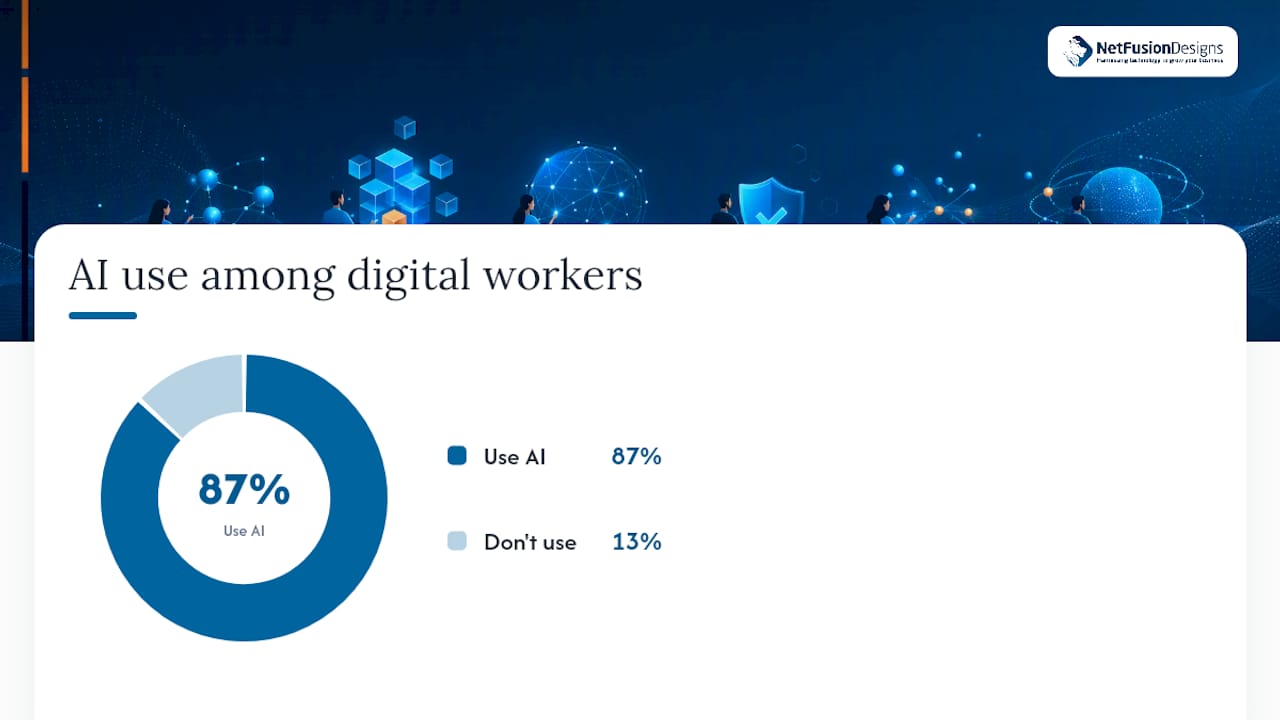
That cadence matters because 87% of digital workers now use AI at work, and workers report spending hours “botsitting”, cleaning up AI outputs that weren’t reviewed properly before they were sent along.

A practical template you can adapt

You don’t need to write this from scratch. A compact clause structure, adaptable from SHRM’s generative AI policy template, covers what you need:

  • Purpose: “This policy governs employee use of generative AI tools in connection with company business.”
  • Scope: “Applies to all employees, contractors, and vendors accessing company systems.”
  • Permitted uses: “Drafting internal communications, summarizing meeting notes, generating first-draft marketing copy.”
  • Prohibited inputs: “Customer PII, unreleased financials, or trade secrets may not be entered into any unapproved tool.”
  • Human review: “Any AI-generated content used in hiring, performance, or client-facing decisions requires documented human sign-off.”
  • Meeting transcription: “AI notetakers require explicit consent from all participants and are prohibited in HR, legal, or M&A discussions unless separately approved.”
Launch readiness checklist Status
Tool inventory completed Required before drafting
Working group assigned owners Required before drafting
Pilot group selected Required before rollout
Review cadence published Required before rollout

What the legal and adoption evidence says

Employment lawyers flag specific red flags worth building into your risk assessment directly:

  • Unmanaged AI use in hiring or performance decisions creates bias exposure and complicates litigation discovery, according to FordHarrison’s guidance for employers.
  • Canadian employers specifically face privilege and disclosure risks when AI-assisted work product enters a dispute, per BLG’s analysis for Canadian employers.
  • Frameworks like the NIST AI Risk Management Framework and ISO/IEC 42001 offer implementable structures rather than starting your governance model from zero.

Why the simplest policies work best

Most AI policies fail because they read like legal shields instead of operating manuals. Long prohibition lists get ignored; short, enforceable rules with named owners get followed. A policy that says “no confidential data in unapproved tools, full stop” beats three pages explaining every edge case. Pilot the rules with one team, watch what breaks, then scale. Managers who use the approved tools themselves, visibly, do more to shape behaviour than any handbook clause.

— Geeshan

How NetFusion Designs helps you implement the policy, not just write it

A policy document is only as good as the enforcement behind it, and that’s where most HR teams get stuck. NetFusion Designs Inc runs the AI tool inventories, vendor security assessments, and technical enforcement (DLP, endpoint allowlisting, SOC 2-aligned controls) that turn a policy PDF into something your IT environment actually applies day to day.

NetFusion Designs Inc

Beyond the technical build-out, NetFusion Designs Inc delivers hands-on AI workforce training so managers and staff know exactly where the lines sit, not just that lines exist. If your team needs help auditing current tool use, tiering risk, and rolling out enforceable controls without hiring a full internal compliance function, book a consultation with NetFusion Designs Inc to get your AI policy from draft to enforced.

Sources

  • Work AI Index 2026
  • Navigating AI in the workplace: legal considerations for Canadian employers | BLG
  • AI use in the workplace: what employers should do now to manage risk | FordHarrison
  • Generative AI usage policy template | SHRM

FAQ

What is an AI employee policy?

It’s a formal document setting rules for how staff, contractors, and vendors can use AI tools at work, covering permitted uses, prohibited data inputs, human review requirements, and vendor security standards.

What is the 30% rule for AI?

There’s no universally recognized “30% rule” for workplace AI governance; if you’ve seen the term elsewhere, it likely refers to a specific vendor’s or industry group’s internal guideline rather than a standard.

What is the current policy on AI in Canada?

Canada doesn’t yet have a single binding federal AI workplace law, but employers face existing obligations under privacy, employment, and human rights legislation, and legal advisories for Canadian employers recommend treating AI outputs used in employment decisions with the same scrutiny as any other decision-making tool.

What should be included in an AI policy?

At minimum: purpose and scope, definitions, covered parties, permitted and prohibited uses, human review thresholds, an approved tool registry, data handling rules, vendor diligence requirements, and a documented review cadence.

Recommended

  • AI Workforce Training for Real Business Impact
  • Transforming SMEs with AI: A Guide

Continue Reading

Phishing Simulation for Security Leaders: 30–90 Day Behavior Playbook
SIEM for small business: what it takes to adopt it well
SOC 2 Type II explained: what the audit actually proves
Why managed Wi-Fi matters for reliable manufacturing operations
NetFusion Designs logo
NetFusion Designs is a globally recognized IT service provider and services clients across North America.

We hold a SOC 2 Type 2 report, and maintain internal processes and procedures that keep our clients’ data secure and confidential.
NetFusion Designs IT support team
IT Services Near Me
BurlingtonOakvilleHamiltonMississaugaMiltonBramptonEtobicokeBrantfordGuelphKitchenerWaterlooCambridgeSt CatharinesTorontoMarkhamCaledonNewmarket
Services
Project PlanningHardwareTelephony & VoIPApplication DevelopmentCloud DesktopSecurity CamerasHelpdesk & SupportCyber Security & Anti-VirusData Backups & Disaster RecoveryMicrosoft 365 OptimizationVirtual CIO ServicesPenetration TestingPricingSchedule a MeetingRemote Support
Pricing
Pages
Free Security ScanAbout UsOur Migration ApproachWork CultureOur Core ValuesCode of ConductTestimonialsContactBlogSchedule a MeetingRemote Support
TORONTO
Bank capital office building law
401 Bay St, 16th Floor, Toronto Ontario
Email
info@nfd.ca
Phone
647-476-5259 (Canada)
MARKHAM
Bank capital office building law
141 Main Street N, Markham, ON L3P 1Y2
Email
info@nfd.ca
Phone
647-476-5259 (Canada)
TRI-CITY AREA
(Kitchener / Waterloo / Cambridge)
Bank capital office building law
22 Frederick St, Suite 700, Kitchener Ontario
Email
info@nfd.ca
Phone
647-476-5259 (Canada)
PEEL REGION
Bank capital office building law
6700 Century Ave, 3rd floor, Mississauga, ON L5N 1V8
Email
info@nfd.ca
Phone
647-476-5259 (Canada)
DURHAM REGION
Bank capital office building law
1315 Pickering Parkway, Pickering, ON L1V 7G5
Email
info@nfd.ca
MONTREAL
Bank capital office building law
8815 Av du Parc #402, Montréal, QC H2N 1Y7
Email
info@nfd.ca
Phone
647-476-5259 (Canada)
Special Offers
Pie chart piechart stats analytics
IT-Optimization Session
Icon chevron right
Money safe safebox
800% ROI Consultancy Offer (Video)
Icon chevron right
Radio station signal antena tower
Coming Soon!
Icon chevron right
Terms and ConditionsPrivacy PolicyCookie Policy
© 2026 NetFusion Designs Inc.
LinkedInFacebookAlignable logo