When someone leaves your business, their laptop is the easy part. The harder part is everything that can't be handed back across a desk: their Microsoft 365 account, the mailbox clients still write to, the files sitting in their OneDrive, the passwords they knew, and the phone that still syncs company email. An employee offboarding IT checklist turns that scattered cleanup into a short, repeatable routine, so nothing is missed and nobody has to remember it all on a stressful day.
The short version: agree on a departure time with HR, cut access at that moment, keep the person's data (don't delete it), redirect their email to whoever is taking over, recover company devices, and write down what was done. The rest of this guide walks through each step in the order we recommend for a small or mid-sized business running Microsoft 365.
It works for a planned retirement, a two-week notice period or a same-day termination. Only the timing changes.
Most offboarding problems aren't dramatic. They're quiet gaps that turn up months later: a former staff member who can still open a shared folder, a licence you keep paying for, a client email that bounced for six weeks, or a vendor portal nobody can log in to because the only password left with the person who set it up.
A written checklist fixes three things at once:
If your business relies on one person (internal or external) to "just know" how this is done, that's a risk in itself. We wrote about that in the hidden risk of relying on one IT person.
Good offboarding starts as soon as you know someone is leaving. A short conversation between the manager, HR and whoever handles your IT should settle four things:
Use the notice period for the handover itself: move important files out of personal folders into shared locations, record how recurring jobs are done, and transfer ownership of shared documents and Teams channels while the person is still around to answer questions.
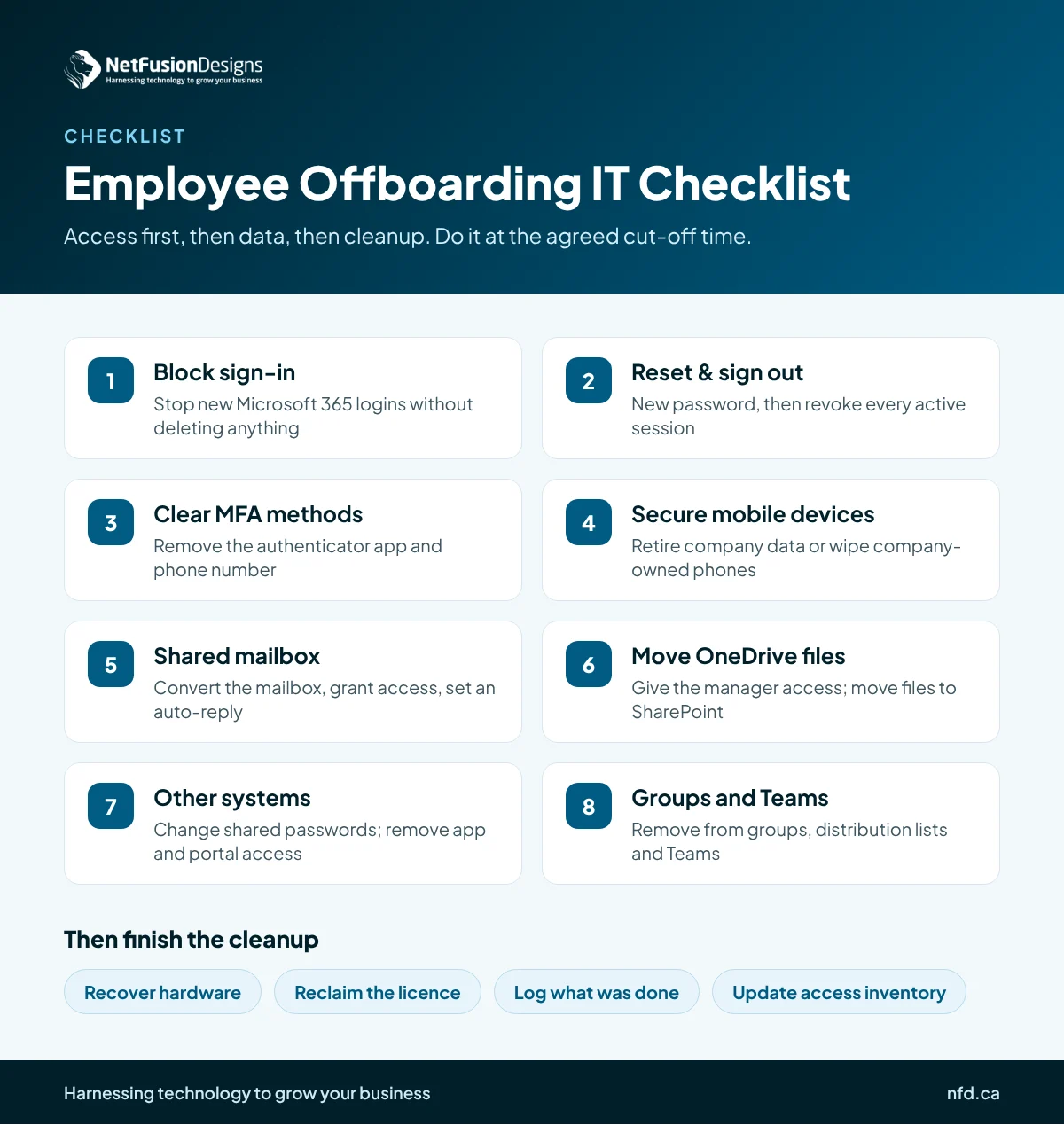
These are the steps to complete at, or right after, the agreed cut-off time. The order matters: access first, then data, then cleanup.
On a well-run Microsoft 365 tenant, the urgent access steps (1 to 3) take minutes. That's why it's worth assigning them to someone in advance instead of waiting for a free afternoon.
The most common mistake we see is deleting the user account on day one. In Microsoft 365, deleting a user starts a countdown on their mailbox and OneDrive, and once that window passes the data may not be recoverable without a separate backup. Block the account, move the data, and only then remove the licence.
Converting a departed employee's mailbox to a shared mailbox is usually the cleanest option. Colleagues keep access to past conversations and new mail still arrives, and according to Microsoft's shared mailbox documentation, a shared mailbox can store up to 50 GB without its own licence. Larger mailboxes, or ones that need an archive or a legal hold, still need a licence, so check the size first.
Two related settings are worth reviewing before anyone leaves:
If your tenant has grown messy over the years, with old accounts, unclear licences and mailboxes nobody owns, a Microsoft 365 optimization review is a good way to reset it so offboarding stays simple from then on.
Microsoft 365 is only part of the picture. Most small businesses have accounts that sit outside it and are easy to forget:
The fix is an access inventory: a simple list of every system, who has access and who owns it. Keep it updated as people join, and offboarding becomes a matter of working down that person's rows. Wherever possible, connect apps to Microsoft 365 single sign-on so blocking one account blocks them all.
In most businesses of 10 to 250 people, offboarding sits awkwardly between HR, the departing person's manager and IT. Each assumes another is handling it. A clear split works best:
If you don't have an in-house IT team, this is exactly the kind of routine, time-sensitive request that managed IT support for Canadian businesses should handle for you: a single ticket from HR starts the checklist, access is cut at the agreed time, and you get a confirmation of what was done.
Not right away. Block sign-in first, convert the mailbox to a shared mailbox, move OneDrive files, then remove the licence. Deleting the account early can put the mailbox and files on a countdown to permanent removal.
At the agreed cut-off time, ideally the moment employment ends. For terminations, access should be blocked during or just before the conversation. Planning the timing with HR in advance makes this simple.
Convert it to a shared mailbox, give their replacement or manager access, and set an automatic reply pointing senders to the new contact. Past emails stay searchable and new messages aren't lost.
The same steps apply, but contractors often use guest accounts or their own devices. Remove guest access, revoke shared links to files, and change any passwords they were given.
A departure is already a busy time for a small team. Writing the steps down once, agreeing who owns each one and keeping an access inventory means the next one takes minutes instead of days, with nothing left open. If you'd like help building an offboarding process around your Microsoft 365 setup, or would rather hand the whole routine to a team that does it every week, talk to NFD.
%20(1).avif)
%201.avif)