The backup 3-2-1 rule means keeping three copies of your data on two different media types, with one copy off-site. It’s still the baseline every business should meet, but it’s no longer sufficient on its own. Ransomware now targets backup repositories directly, which is why NetFusion Designs Inc and most security bodies now recommend the extended 3-2-1-1-0 model: add one immutable or air-gapped copy, and verify restores with zero errors on a regular schedule.
TL;DR:
- The extended 3-2-1-1-0 model adds an immutable or air-gapped backup copy to the traditional 3-2-1 strategy, crucial for ransomware resilience.
- Off-site copies must use versions with immutability or WORM settings, with compliance mode in cloud storage for stronger protection.
- Regular restore verification through automated tests and documented procedures is essential to ensure backups are truly reliable and meet recovery objectives.
- Many businesses mistakenly rely on cloud sync services as off-site backups, which lack proper versioning, retention, and immutability features needed for effective recovery.
- Managed backup services, including scheduled testing and secure documentation, help organizations implement the 3-2-1-1-0 standard effectively and respond swiftly in crises.
The 3-2-1 backup strategy breaks down into three simple numbers, and each one closes a different gap in your protection.
Three copies of your data. That’s your production data plus two backups. Losing the original file to a hard drive failure still leaves you with two ways back in. Most small businesses stop at one backup, which means a single mistake, one corrupted file, or one bad sync, wipes out their entire safety net.
Two different media types. Don’t put both backups on the same kind of storage. If you back up to an external hard drive and a network-attached storage (NAS) device that both live in the same office, a power surge, fire, or theft can take out both at once. Common pairings include:
One copy off-site. This is the copy that survives a fire, flood, ransomware attack on your local network, or a break-in. Off-site can mean a cloud backup provider, a drive stored at a second location, a safe deposit box, or a secondary office. The point is geographic separation from your primary systems, not just a different folder on the same network.
The Canadian Centre for Cyber Security frames this as a baseline control for a reason: it protects against hardware failure, theft, natural disaster, and human error all at once, without requiring specialized tools.
Knowing the rule and running it well are different things. The real work is matching media pairings and backup frequency to how much data your business can afford to lose.
Media pairings that hold up under pressure:
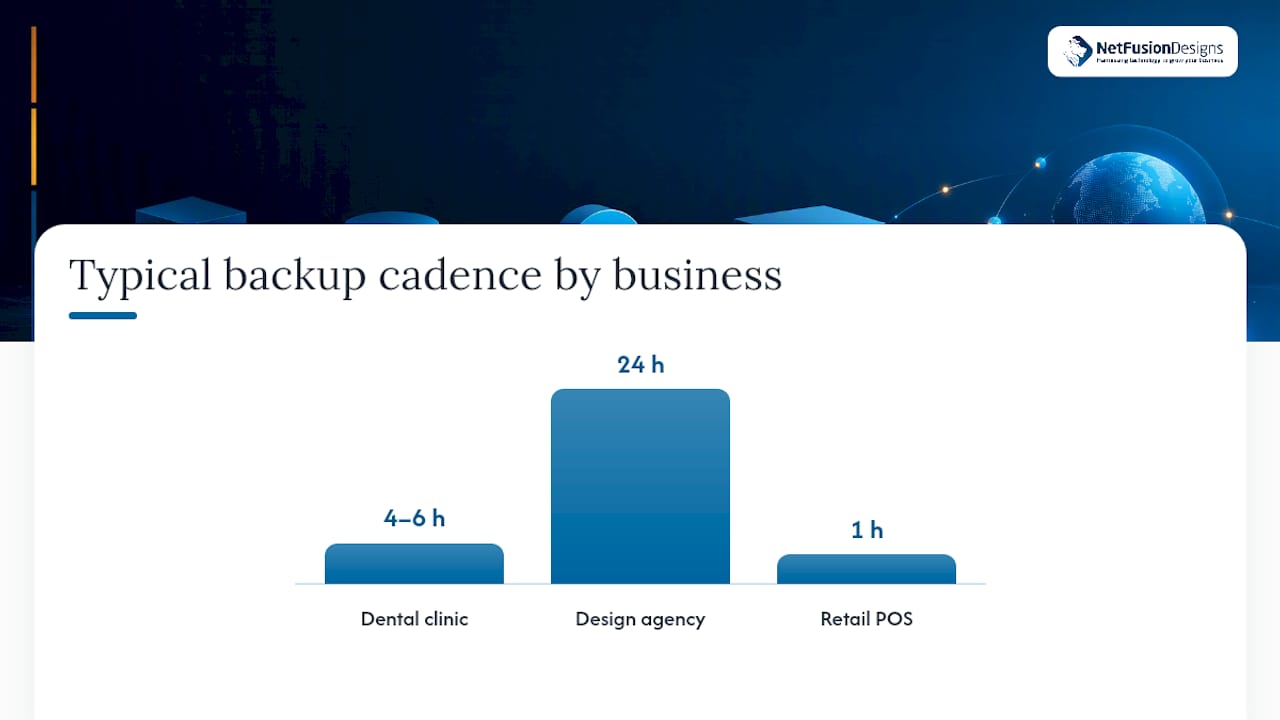
Backup frequency should map to your recovery point objective (RPO), the maximum data loss your business can tolerate. A dental clinic running patient scheduling software might need snapshots every four to six hours. A design agency working off shared drives might get away with nightly full backups and weekly archives kept for a year. Retail point-of-sale systems often sit somewhere in between, with hourly transaction backups and daily full copies.
Pro Tip: Don’t confuse replication with backup. Replication mirrors your files to a second location in near real time, which sounds protective until you remember it will happily copy ransomware-encrypted files too. The Canadian Centre for Cyber Security specifically recommends point-in-time snapshots alongside replication, because only a snapshot gives you a clean version to roll back to.
Cadence only matters if it’s paired with retention long enough to catch an intrusion before it’s overwritten. Some ransomware sits dormant for weeks before encrypting files, so a seven-day retention window can mean restoring straight back into the infection.
The 3-2-1 rule isn’t obsolete, but it has a blind spot: none of its three copies has to be immutable. If an attacker compromises your admin credentials, they can delete or encrypt all three copies, cloud included, in one pass. That’s why SentinelOne and TechTarget both point to 3-2-1-1-0 as the current best-practice floor for ransomware resilience.
The extra 1 is an immutable or air-gapped copy, one that can’t be altered or deleted for a set retention period, even by someone holding valid admin credentials. Common ways to implement it:
Cloud providers typically offer two immutability modes. Compliance mode blocks deletion for the entire retention period, full stop, even for the account owner. Governance mode allows privileged users to override the lock. For ransomware defence, compliance mode is the stronger choice, because it removes the one attack path, a stolen admin login, that governance mode still leaves open.
The 0 stands for zero errors on restore, meaning you’ve actually tested that the backup comes back clean, not just that the backup job reported “success.”
A cost-effective starting point: pair an immutable cloud bucket with a weekly offline drive rotation. That combination gives you logical protection against account compromise and physical protection against a full network breach, without the cost of enterprise tape infrastructure.
Building this out doesn’t require a big IT department. It requires sequencing the right decisions in the right order.
Pro Tip: Store your recovery documentation somewhere that survives the disaster you’re planning for. A recovery runbook saved only on the server you’re trying to recover is a document that stops existing exactly when you need it most.
This sequence matters because skipping step four is one of the most common gaps NetFusion Designs Inc finds during security reviews: businesses build a technically sound backup, then leave it reachable with the same credentials an attacker already has.
Plenty of small businesses think they’ve checked the “off-site” box because their files sync to Dropbox, Google Drive, or OneDrive. That’s a mistake worth catching before, not after, an incident.
Sync tools mirror changes almost instantly, including deletions and ransomware-encrypted files. There’s no separation between what’s on your desktop and what’s in the cloud, so an encrypted file syncs up just as fast as a healthy one did.
A true cloud backup is configured differently:
CISA’s backup guidance is direct about this: cloud backup only counts as resilient when it’s built with snapshots, separate retention, and separate credentials, not when it’s a rebranded sync folder. The trade-off is cost and setup time; a properly configured backup service costs more than a free sync tier, but it’s the difference between a real recovery option and a false sense of security.
The “0” in 3-2-1-1-0 means every restore comes back clean and complete. Getting there takes more than trusting a green checkmark in your backup software, because a job reporting “success” often only confirms bytes were written, not that the data will actually boot or open.
Build verification in layers:
CISA recommends restore tests cover enough operational history, at least seven days, to confirm you can roll back past a slow-developing incident, not just yesterday’s files.
| Test type | Frequency | What it confirms |
|---|---|---|
| Automated integrity check | Every backup job | Files are complete and readable |
| Single file restore | Monthly | Individual files recover correctly |
| Application/database restore | Quarterly | Business systems come back functional |
| Full failover drill | Annually | Actual RTO under real conditions |
Every drill should produce a number: how long did recovery actually take? Compare that figure against your target RTO. If a quarterly test takes six hours against a four-hour RTO target, that’s the gap to close before an actual incident forces the question.
A handful of errors show up again and again in businesses that thought they were covered.
NetFusion Designs Inc implements immutable, off-site backup copies alongside scheduled, automated restore testing, not just backup jobs that report success and get forgotten. Recovery drills are documented with actual RTO and RPO figures per client system, so businesses know their real recovery time before a crisis forces the question. That documentation also supports tabletop and recovery exercises that walk teams through a simulated incident before a real one hits.
Most businesses don’t need every advanced control on day one. Start with an accurate data inventory, a fast local recovery option, and one immutable off-site copy. Add monthly restore tests before you add anything fancier. A documented, scheduled testing programme beats an elaborate backup architecture nobody has ever actually restored from.
— Geeshan
Building a 3-2-1-1-0 backup plan on your own means juggling storage vendors, immutability settings, credential separation, and a testing calendar, on top of everything else running your business. NetFusion Designs Inc handles all of it as a managed service: immutable off-site copies, automated backup verification, and documented RTO and RPO for every critical system, so recovery time is a known number, not a guess made during an outage.

For businesses in the Kitchener-Waterloo region, our managed IT and backup services build the full 3-2-1-1-0 architecture and run the restore drills on a schedule, so you’re never relying on a backup that’s never actually been tested. If ransomware or hardware failure hits before your plan is in place, our emergency IT support team is available around the clock. Reach out to NetFusion Designs Inc to get a backup assessment started and see exactly where your current setup stands against the 3-2-1-1-0 standard.
No, but it’s incomplete on its own. It remains a solid baseline against hardware failure and disaster, though most security guidance now recommends the extended 3-2-1-1-0 model to defend against ransomware that specifically targets backup repositories.
It means keeping three copies of your data, on two different media types, with one copy stored off-site. This combination protects against device failure, local disaster, and theft simultaneously.
It’s a structure for reducing single points of failure: your production data plus two backups, spread across two storage types, with at least one copy physically or logically separated from your main location.
Keep your live data plus two backup copies, store those copies on different media (like cloud storage and a local NAS), and make sure one copy sits off-site, ideally with immutability enabled and restores tested monthly.
Yes. NetFusion Designs Inc configures immutable, off-site backup copies and runs scheduled restore tests with documented recovery times for clients across Ontario and Canada.
%20(1).avif)
%201.avif)