A new office IT checklist is a dated plan that covers internet circuits, cabling, network and Wi-Fi, phones, devices, security and data before move-in day. For a new office in Mississauga, start 90 days out: order internet first, confirm cabling with the landlord, then stage hardware so staff can work on day one.
Opening a second location or moving into a bigger space is exciting, and it is also one of the easiest ways to lose a week of productivity. Most of the problems we see are not technical. They are timing problems: a circuit ordered too late, a server room with no cooling, or phone numbers that were never scheduled to move.
This guide walks through the checklist we would hand to an operations manager planning a new office in Mississauga or anywhere in the GTA. It is written for owners and managers of businesses with 10 to 250 people, and it assumes you want the office to feel finished the morning your team walks in.
Start about 90 days before move-in, because the slowest items are outside your control. Business internet installs, building permissions and hardware shipments all have lead times you cannot rush.
Fibre to a new address often needs a site survey, landlord approval and sometimes construction, and that can take several weeks. Cabling contractors book up, and network gear or laptops can sit on back order. If you sign the lease before you call your IT partner, you lose the one advantage you have: time.
A simple rule: the moment the lease is signed, book a site walk with whoever will run your IT. Bring the floor plan, the move date and a headcount for opening day and for 12 months out.
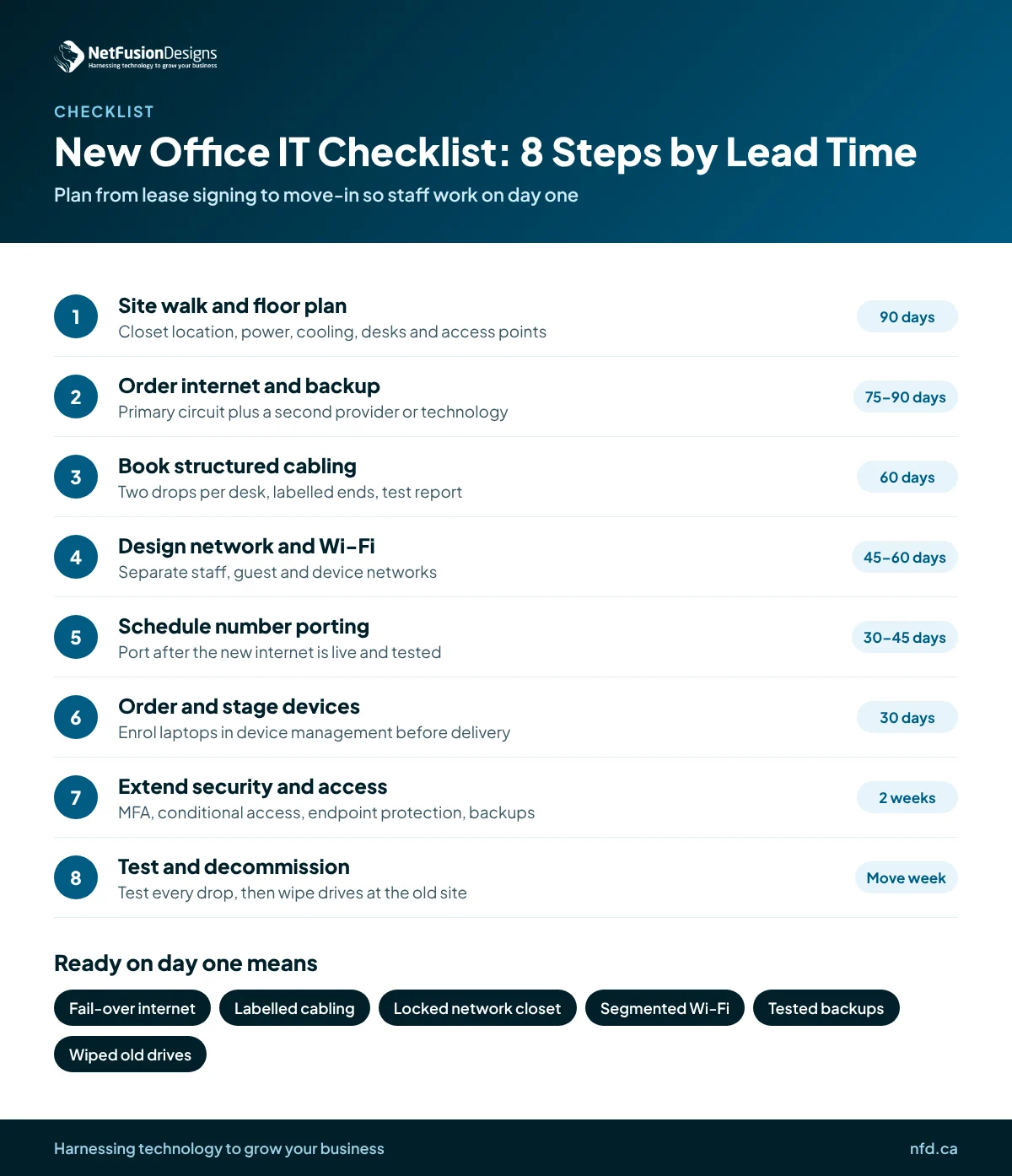
A good checklist runs in order of lead time, not in order of importance. Here is the sequence we use, from the longest lead time to the last-minute checks.
If you are working with a partner that offers managed IT services in Mississauga, this whole sequence should come back to you as one dated project plan with a single owner.
Choose the primary connection for speed and reliability, and the backup for independence. The backup only helps if it does not share the same failure point as the primary.
Before you sign, ask each provider three things: is service already lit in the building, what does installation involve, and what is the realistic install date in writing. Multi-tenant buildings often have preferred providers already in the riser, which can shorten the timeline. Older industrial units may need new conduit, which lengthens it.
If the new office needs to connect securely to an existing head office, read our guide to multi-site network design for SMBs before you finalise equipment.
Cabling is the one thing that is cheap to do right during fit-out and expensive to fix later. Once walls are closed and ceilings are finished, every missed drop costs more.
Plan at least two drops per workstation, one for each printer and meeting room display, and ceiling drops for each wireless access point and camera. Add spares in areas that might change. Ask your contractor to label both ends and provide test results for every run.
The closet needs dedicated power, a battery backup (UPS) and enough ventilation or cooling for the gear inside. A closet that doubles as storage tends to overheat and get unplugged by accident, so keep it locked and clear.
Place access points based on the floor plan and building materials, not guesswork. Create separate wireless networks for staff, guests and connected devices, so a visitor's phone or a smart TV never shares a network with your file server. This kind of segmentation is one of the basic controls the Canadian Centre for Cyber Security recommends in its baseline cyber security controls for small and medium organizations.
Keep your existing numbers, and schedule the port only after the new internet connection is live and tested. Cloud phone systems make this much easier, because the phones simply register again from the new location.
If you still use a traditional phone system, a move is a good time to consider a cloud system or Microsoft Teams Phone. Either way, give yourself a buffer: porting needs accurate account details from your current carrier, and a rejected request can push the date back. Our article on how phone number porting works in Canada covers the documents to gather and why ports fail.
On move day, test inbound calls, the auto attendant, voicemail and any fax or alarm lines. Alarm panels and elevator phones are easy to forget and are often tied to a specific line.
A move is a moment of change, and moments of change are when security settings slip. Treat the new office as an extension of your existing security, not a fresh start.
NetFusion Designs (NFD), a SOC 2 Type II certified managed IT provider headquartered in Kitchener-Waterloo, supports businesses across Ontario, Quebec and Manitoba from offices that include Mississauga, Toronto and Markham. For a new office, we run the project from the first site walk to the last cable test: circuits, cabling coordination, network and Wi-Fi design, phones, device staging and security. You get one plan, one owner and one team that also supports the office after it opens. If you want to see how we structure larger rollouts, our IT project planning page explains the approach.
Order business internet as soon as the lease is signed, ideally 75 to 90 days before move-in. New installs can need a site survey, landlord approval and sometimes construction, and each of those can add weeks. Ordering early also gives you time to install and test a backup connection from a second provider before staff arrive.
Plan at least two network drops per workstation, one for each printer and meeting room screen, and ceiling drops for every wireless access point and security camera. Add a few spares in areas likely to change. Ask the cabling contractor to label both ends of every run and provide a test report, so future troubleshooting is quick.
Yes. In most cases you can keep your existing business numbers by porting them to your new phone system or carrier. Gather your current account details early, because mismatched information is a common reason ports are rejected. Schedule the port date for after the new internet connection is installed and tested, so calls are never left without a working line.
Old computers, servers, printers and copiers can all store business and personal data on their drives. Before any device is sold, recycled or returned at the end of a lease, the drives should be securely wiped or physically destroyed, with a record of what was done. This protects client information and supports your privacy obligations.
Opening a new office should feel like progress, not a scramble. If you are planning a move or a new location in Mississauga or across the GTA, talk to the NFD team and we will help you build a dated plan that gets your people working on day one.
%20(1).avif)
%201.avif)