A custom web app in Canada usually costs from the low tens of thousands of dollars for a focused first version to several hundred thousand for a platform with many roles, integrations and compliance needs. The price is mostly hours multiplied by an hourly rate, so scope decides almost everything. This guide shows how to estimate that number yourself, what moves it, and what to budget after launch.
All figures below are in Canadian dollars. Where we give worked examples, they are our own illustrations built from published hourly rates, not quotes.
Every custom web app estimate comes down to three things: the number of hours of design, development, testing and project management; the rate of the people doing the work; and the running costs that start the day you launch.
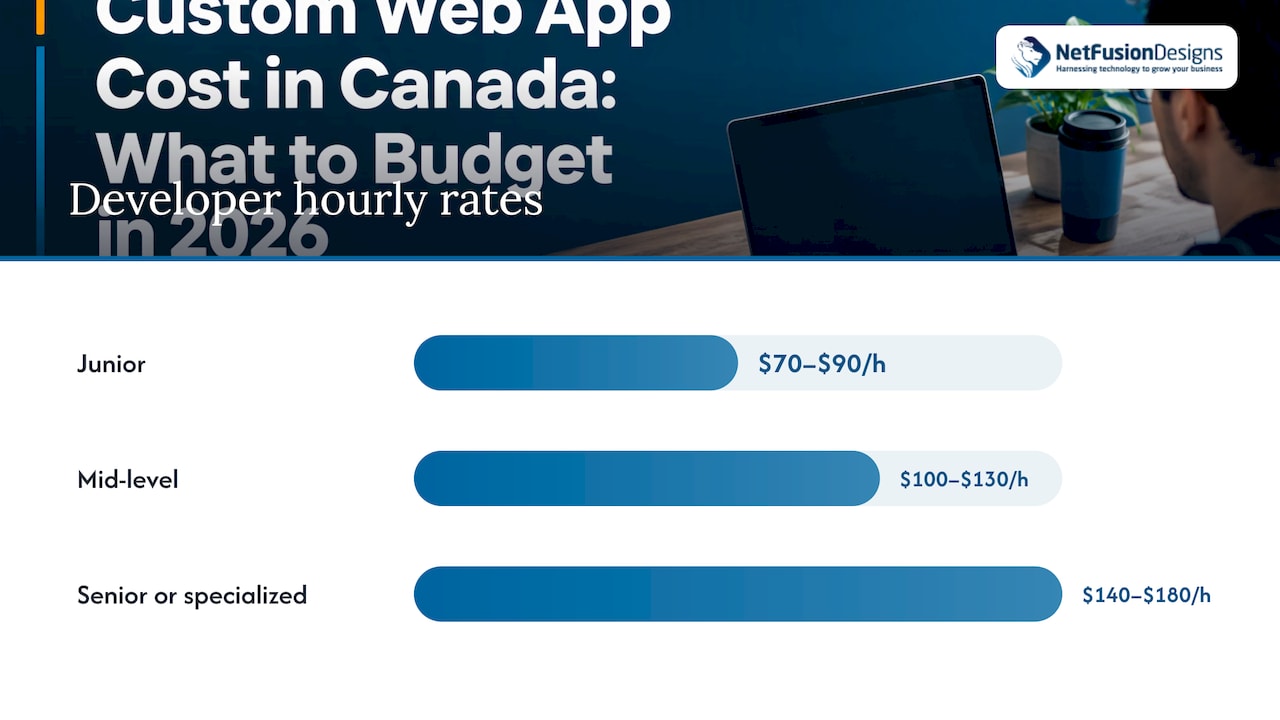
The rate is the easier part to pin down. A June 2026 Canadian staffing guide puts junior developers at roughly $70 to $90 an hour, mid-level at $100 to $130, and senior or specialized contractors at $140 to $180. It also reports that Toronto carries a premium of about 25 to 35% over the national average. Agencies and managed teams usually bill above individual contractor rates, because the price includes project management, quality assurance and accountability for the result.
The hours are the harder part, and they are where most of the variation between quotes comes from.
These examples multiply assumed hours by the mid-level range of $100 to $130 an hour. They show the shape of a budget, not a promise of price. Your own project could sit anywhere inside or outside them.
| Project type | Typical shape | Assumed hours | Illustrative range at $100–$130/hr |
|---|---|---|---|
| Focused first version (MVP) | One user type, a few core workflows, simple login, basic admin screen | 150–300 | $15,000–$39,000 |
| Business workflow app | Several user roles, reporting, integrations with accounting or CRM tools, audit trail | 600–1,200 | $60,000–$156,000 |
| Multi-role platform | Customer and staff portals, payments, many integrations, strict security and compliance | 2,000–4,000 | $200,000–$520,000 |
Two things stand out. First, the ranges are wide because the hours are wide. Second, the jump between rows comes from complexity (roles, integrations, rules), not from screen count.
Two apps that look similar in a sketch can differ by a factor of five in hours. These are the usual reasons.
One type of user is simple. Staff, managers, clients and external auditors each seeing different data is not. Every role multiplies the screens, the rules and the testing.
Connecting to your accounting package, Microsoft 365, a payment processor or a shipping system means building against someone else’s interface. Each integration is a mini project with its own testing and its own failure modes.
Approval chains, pricing logic, scheduling constraints and exceptions are where custom software earns its keep, and also where hours accumulate. A rule that takes one sentence to say can take days to build and test.
A clean, standard interface built from proven components is cheaper than fully bespoke visual design and animation. Many internal tools do very well with the first.
Apps that hold client financial files, health information or personal data need stronger access control, logging, encryption and sometimes Canadian data residency. These requirements add build and testing time. They are far cheaper to design in at the start than to add after launch.
Moving records out of spreadsheets or an old system is often underestimated. Messy source data means cleaning, mapping and checking before anything goes live.
Timeline and cost move together because a team’s time is the main expense. As a planning guide, a focused first version often takes a few months from kickoff to launch, and a multi-role platform can take most of a year or more. Those are our planning ranges, and your brief decides the real one.
A few timeline effects on the budget:
That last point is the most reliable way to control cost. Build the workflow people will use every day first, then add features based on what they ask for.
The build is not the whole cost. Plan a yearly budget for:
Ask any developer to put a yearly running estimate in writing alongside the build price. If the app will sit alongside your wider IT environment, it helps to have the same team look after hosting, backup and security. Our guide to managed IT services pricing explains how that side of the budget is usually structured.
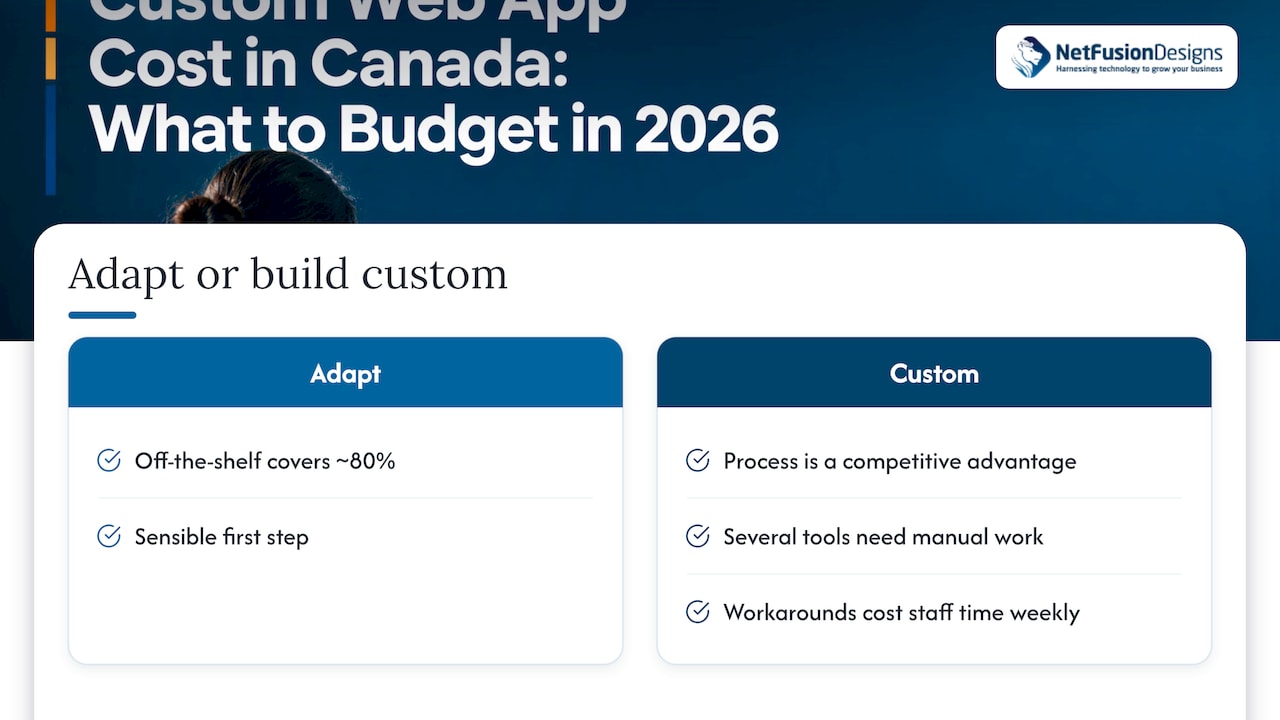
Custom is not always the right first step. If an off-the-shelf product covers about 80% of your process, adapting it can be the sensible choice. Custom software makes the most sense when your process is a competitive advantage, when you are stitching together several tools with manual work, or when existing software forces workarounds that cost staff time every week. We cover the decision in more detail in our piece on when to build custom software.
It also helps to separate a web app from a website. A brochure or small ecommerce site is priced very differently, and website pricing for businesses is a good way to see where a standard site ends and a custom application begins.
A vague request gets a vague number, and quotes you cannot compare. Before you contact developers, write down:
Good estimators then break the project into phases, show hours per phase, and flag assumptions. If two quotes differ widely, compare the assumptions before you compare the totals.
We build and support business software for small and mid-sized organizations in Ontario and across Canada, and the pattern is consistent: the projects that go well start with a clear workflow, not a feature list.
Our view is that a custom app should be treated as part of your IT environment, not a separate purchase. It needs to authenticate against your Microsoft 365 accounts, sit behind proper security monitoring, be backed up and be recoverable. Because we run managed IT, cybersecurity and backup as well as application development, we design for those things from the first week instead of bolting them on after launch.
We also work in plain language. You should be able to read an estimate and know what each phase delivers, what it assumes and what happens if the assumptions change. For regulated clients such as accounting and law firms, our SOC 2 Type II certification and ability to offer provincial data residency when required are part of how we approach security and compliance.
If AI or automation could remove manual steps from the workflow, we say so early, because it is often cheaper to design that in than to add it later.
Geeshan
If you are scoping a custom app, we can help you turn a rough idea into a phased plan, build it and then look after it. Our application development team in Kitchener, Waterloo and Cambridge works with businesses across Ontario and Canada, and our managed IT services cover the hosting, security and support that keep the app running. We do not publish fixed prices for custom work, because it depends on scope, so the first step is a conversation about what you need.

If you want the app, your Microsoft 365 setup and your security handled by one provider, start with our Managed IT Services page or contact us through nfd.ca and tell us about your project.
It depends on hours and rate. With mid-level Canadian rates of roughly $100 to $130 an hour, a focused first version of 150 to 300 hours lands at about $15,000 to $39,000 in our illustration. Complex platforms with many roles and integrations reach into the hundreds of thousands.
Usually, yes. One Canadian rate guide reports that Toronto carries a premium of about 25 to 35% over the national average. Teams in other Ontario cities or in remote-first firms often quote lower, so compare the scope and the team’s experience as well as the rate.
Yes, and it is usually the best way to control cost. Launch the core workflow first, collect feedback from real users, then fund the next phase. Ask your developer to design the first version so that later features can be added without rebuilding.
Plan for hosting, security updates, monitoring, support, third-party service fees and enhancements. The figure depends on app size and user count, so ask for a written yearly estimate alongside the build quote.