Start with baseline hygiene controls mapped against the NIST Cybersecurity Framework (CSF) 2.0, add CIS Controls Implementation Group 1 (IG1) for a practical safeguard list, and treat ISO/IEC 27001 as a later step if a customer or contract requires formal certification. The single next action is a quick asset inventory followed by turning on patching, endpoint detection and response (EDR), multi-factor authentication (MFA), and tested backups. Templates for each of these steps appear in the resources section below.
TL;DR:
- Canada’s baseline controls target organizations under 500 employees and apply an 80/20 approach, while NIST CSF 2.0 organizes work across six functions.
- Pursue ISO/IEC 27001 certification only when a customer, insurer, or regulator requires it; build its management system internally first because audits carry ongoing costs.
- During the first 30 days, inventory devices and accounts, enable missing MFA, and verify patching; by 90 days, add EDR and test backup restoration.
- Assign every gap an owner and target date, then review patch and MFA coverage monthly, the action plan quarterly, and profiles annually.
- Outsource continuous monitoring, patching, or incident response when staff cannot sustain them, and require clear response times, KPI reporting, and framework alignment in the contract.
A cybersecurity framework is a structured list of security outcomes and controls, organised so that decisions about what to fix first stop being guesswork. Instead of reacting to the latest headline or vendor pitch, you work from a list that tells you which gaps matter most and in what order to close them. For a small or medium business with a handful of IT staff, or none at all, that structure is the difference between spending a security budget wisely and spending it on whatever seems urgent that week.
Frameworks help SMEs in three concrete ways.
Not every framework asks the same thing of you, and the differences matter when you are choosing where to start. A voluntary framework like the NIST Cybersecurity Framework (CSF) 2.0 Small Business Quick-Start Guide gives you a structure for thinking about risk but does not require an audit or certificate. A control list such as CIS Controls IG1 is even more concrete: it names specific safeguards, such as inventorying devices or enabling MFA, without asking you to adopt a management system around them. A certifiable standard such as ISO/IEC 27001 sits at the other end: it defines a formal information security management system that an accredited body can audit and certify, which matters when a client or regulator specifically asks for the certificate rather than evidence of good practice.
None of these are mutually exclusive. Most SMEs end up using a control list for day-to-day hardening, a framework like CSF for prioritisation and reporting, and a certifiable standard only when the market demands it. The order you adopt them in should follow your actual exposure and customer pressure, not whichever framework your last vendor pitched.
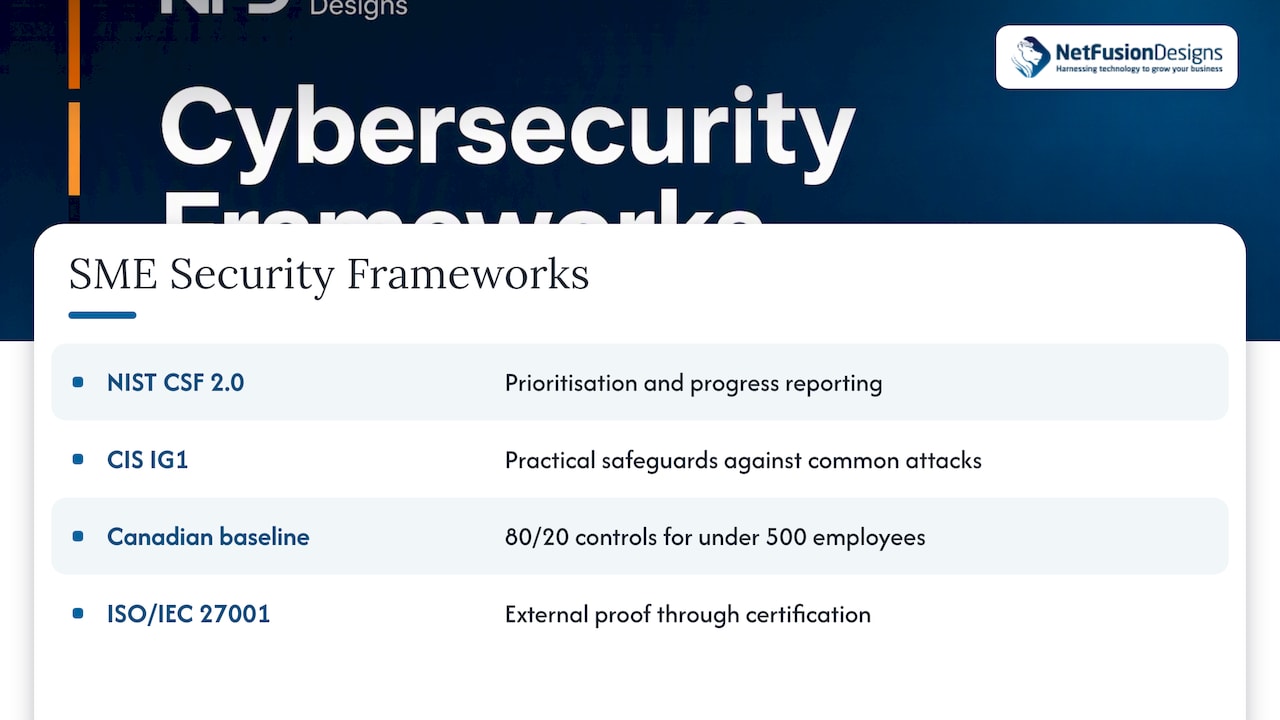
Four references come up again and again in SME security planning, each solving a slightly different problem.
NIST Cybersecurity Framework (CSF) 2.0 organises cybersecurity outcomes into six functions: Govern, Identify, Protect, Detect, Respond, and Recover. The 2024 Small Business Quick-Start Guide and its organisational profile templates were built specifically to let smaller organisations create a Current Profile, a Target Profile, and a gap analysis without hiring a compliance team. It is free, vendor-neutral, and works well as the prioritisation layer that sits above whatever control list you implement.
CIS Controls IG1 is a defined subset of the broader CIS Controls, built for organisations with limited in-house security expertise. The CIS Implementation Groups page describes IG1 as essential cyber hygiene made up of foundational safeguards aimed at stopping common, non-targeted attacks, the kind that hit SMEs far more often than sophisticated, targeted intrusions. CIS also publishes an SME-focused implementation guide that turns IG1 into a practical adoption sequence rather than a static checklist.
ISO/IEC 27001 is the certifiable option. It defines a full information security management system, and the ISO guidance for SMEs notes that it scales down to smaller organisations and can be run internally as a risk-management discipline well before anyone pursues formal certification. The certification itself carries ongoing audit costs, so it earns its place on the roadmap when a customer, insurer, or regulator specifically asks for it, not as a first move.
The Canadian baseline controls fill the gap between a control list and a formal standard. The Canadian Centre for Cyber Security’s baseline controls are written for organisations under 500 employees and explicitly apply an 80/20 principle: a short list of controls delivers most of the achievable risk reduction for the effort available. They map comfortably onto CIS IG1 and the Protect and Detect functions of CSF 2.0, so adopting the baseline rarely conflicts with either of the other two.
For an SME with no formal security program today, CIS IG1 and the Canadian baseline controls answer “what do we actually do on Monday,” while CSF 2.0 answers “how do we track and report progress.” ISO/IEC 27001 answers a different question entirely: “how do we prove it to someone outside the company.”
The right starting point depends less on what is trending in security news and more on four practical factors: what your customers and regulators actually require, what budget and staff you have, how sensitive your data is, and how exposed you are to common threats like phishing and ransomware. A law firm handling trust accounts and a five-person retail shop face very different risk profiles even though both qualify as SMEs.
Use this sequence to match your situation to a starting framework.
Pro Tip: If you are not sure which path applies, default to baseline and IG1 controls first. You can always add a certifiable standard later, but you cannot retroactively close the gaps a skipped first year leaves behind.
Certification earns its cost when a contract literally requires the certificate, when you compete regularly against vendors who already hold it, or when your cyber insurance premium drops meaningfully for certified applicants. Voluntary adoption of the same control set, without the audit, is enough for most SMEs that are not yet being asked for proof on paper. The practices matter more than the paperwork until a specific buyer tells you otherwise.
The baseline controls philosophy from the Canadian Centre for Cyber Security rests on a simple idea: a small set of controls stops most of the damage, and chasing the remaining edge cases can wait. For an SME with limited staff, that 80/20 split is the entire strategy, not a nice-to-have.
The controls worth doing first, in roughly the order they pay off:
A realistic timeline spreads these across three windows. In the first 0 to 30 days, inventory your devices and accounts, turn on MFA everywhere it is missing, and confirm patching is actually running rather than just configured. From 30 to 90 days, deploy or verify EDR coverage, run a real backup restoration test, and strip unnecessary admin rights from user accounts. From 90 to 180 days, formalise recurring staff training, document an incident response contact list, and review access logs for anything that should not be there.
MFA adoption and patch coverage are the two fastest indicators of progress, because both are binary, cheap to check, and close the two attack paths (stolen credentials and unpatched software) behind most SME breaches, a priority the CIS IG1 implementation guide treats as foundational rather than optional.
Turning a framework choice into daily practice follows the same five-step pattern regardless of which framework you picked, and NIST’s guide to organisational profiles lays out a version of it built for exactly this purpose.
The Current and Target Profile approach matters because it replaces subjective arguments about what “feels” urgent with a side-by-side list that any manager can read in five minutes. A spreadsheet with three columns, control, current state, target state, does the job for most SMEs; you do not need specialised software to start.
Pro Tip: Keep the first gap analysis short on purpose. Ten to fifteen line items that map to baseline and IG1 controls will surface more real risk than a sixty-item spreadsheet that never gets finished.
For reporting cadence, a monthly check-in on patch and MFA coverage, a quarterly review of the full action plan, and an annual refresh of the Current and Target Profiles keeps the work visible without turning it into a full-time job. Example KPIs to track from day one include percentage of devices fully patched, percentage of accounts with MFA enabled, time to restore from the most recent backup test, and mean time to detect an incident once monitoring is in place. A basic penetration or vulnerability assessment later in the cycle confirms whether the controls you have documented actually hold up under testing.
An organisational profile only earns its keep when it changes what gets funded. Once you have a Current and Target Profile, the gap analysis becomes the agenda for a short, recurring conversation about what to fix next, which short-circuits the usual debate about whether security spending is justified at all.
The practical next step after the gap analysis is a Plan of Action and Milestones, or POA&M: a living list of every open gap, who owns closing it, and by when. It does not need to be elaborate. A shared spreadsheet with status colours works for most SMEs, as long as someone reviews it on a fixed schedule rather than only when something goes wrong.
Useful KPIs to report to ownership or the board include:
Reporting these four numbers quarterly gives an owner or board enough signal to approve further budget without needing to understand the underlying technical detail. The Canadian baseline guidance suggests that general cybersecurity spending in the range of 4 to 7% of IT budget is a reasonable benchmark for smaller organisations, with larger organisations sometimes reaching 13%, which gives a starting figure for budget conversations rather than a fixed rule.
Outsourcing becomes the sensible move the moment the gap between what your framework requires and what your in-house team can sustain stops closing on its own as explained in this guide for SMBs. National guidance from the Canadian Centre for Cyber Security points to exactly this signal: when an SME lacks the in-house capacity for continuous monitoring, patching, and incident response, a managed security services provider (MSSP) or managed services provider (MSP) is an appropriate route, not a fallback.
The services that map most directly to the frameworks above are managed detection and response (MDR) or a security operations centre (SOC) for continuous monitoring, managed EDR for endpoint coverage, managed patching to keep the highest-impact control running without manual effort, and defined incident response support for when something does go wrong.
Signals that outsourcing is worth the cost include no dedicated security staff, repeated difficulty keeping patching current, a customer or insurer asking for evidence you cannot currently produce, or a near-miss incident that exposed how thin your coverage actually was.
Before signing with any provider, check for:
Pro Tip: Ask any prospective provider to show you a sample monthly report before you sign. If it is dense with jargon and no clear metrics, your team will stop reading it within a month.
Security operations often work this way: continuous monitoring, managed EDR, and patching run under the same baseline and IG1-aligned priorities described above, supported by a 24/7 Network Operations Center (NOC) rather than a single part-time hire trying to cover everything alone.
A framework only works if it attaches to the systems you already run, not a separate process nobody checks. Map each control to where it actually lives: MFA enforcement sits inside your identity provider or Microsoft 365 tenant settings, patch management ties into your existing device management tool, and backup verification belongs in whatever platform already runs your nightly jobs.
The practical risk is treating the framework as a document to file away rather than a set of settings to turn on inside tools you already use. Most SMEs run on a small stack: Microsoft 365 or Google Workspace, a handful of line-of-business applications, and a firewall or router at the edge. Each baseline or IG1 control usually has a direct equivalent inside that stack, which means implementation is mostly a configuration exercise rather than a purchasing exercise.
Microsoft 365 optimisation work often uncovers this directly: tenants that have run for years without MFA enforced, without conditional access policies, or without basic data loss prevention turned on, simply because no one connected the framework checklist to the admin console where the switch actually lives. Closing that gap rarely requires new spending, only someone with the time to go through the settings methodically and document what changed.
A framework adopted once and left untouched drifts out of relevance within a year, because the threats it was built against keep changing. Ransomware tactics, phishing techniques, and the software vulnerabilities attackers exploit all shift faster than most SMEs revisit their security documentation.
Continuous monitoring, through a SOC, MDR service, or even basic log review, catches the gap between what your policy says and what is actually happening on your network. Pair that with a fixed schedule, quarterly at minimum, to revisit your Current and Target Profiles against new threat patterns, especially after any major incident in your industry even if it did not touch you directly.
Our Cybersecurity Toronto service page outlines the kind of SOC-backed monitoring, EDR, and phishing simulation that keeps a framework answering current threats rather than last year’s. A framework that is reviewed only when a new regulation appears is already behind; the ones that hold up get revisited on a calendar, not a crisis.
Controls fail quietly when the people using the systems do not understand why a setting exists or how to spot the thing it is meant to stop. A new MFA prompt that staff find annoying gets worked around; a phishing email that nobody recognises gets clicked. Training closes that gap, and it does not need to be elaborate to work.
Short, recurring sessions, ten minutes a month rather than a two-hour annual lecture, build habits better than a single long session staff forget within weeks. Cover phishing recognition, password hygiene, and what to do in the first five minutes after noticing something suspicious. New hires should get this training in their first week, not whenever the next scheduled session happens to fall.
Awareness programs tied directly to your framework’s priority controls reinforce the same message your technical controls are enforcing: why MFA matters, why a surprising attachment deserves a second look before opening, and who to call when something seems off. Staff who understand the reasoning behind a control follow it far more reliably than staff who were simply told to click “approve.”
The SMEs that make the fastest progress are the ones that resist the urge to tackle everything at once. A baseline-first rollout, patching and MFA in the first month, EDR and tested backups by month three, tends to produce visible risk reduction well before any formal review happens. The pattern holds whether the business is a ten-person professional services firm or a fifty-person manufacturer.
Sustaining that progress is where most in-house efforts stall, not from lack of intent but from lack of ongoing capacity. That is the gap managed services teams often exist to close: continuous monitoring, managed EDR, and tested backup and disaster recovery running under the same baseline and IG1 priorities covered above, so the framework keeps working after the initial setup month ends.
— Geeshan
You do not need a dedicated security department to run a credible framework. You need the right first controls turned on, a way to track progress, and a provider who can sustain the parts your team cannot cover alone. That is the practical gap between reading a framework and actually benefiting from one.
We built our managed services around that gap. We run the baseline and IG1-aligned controls covered in this piece as ongoing work, not a one-time project: patching, managed EDR, MFA enforcement, tested backup and disaster recovery, and 24/7 monitoring through a Network Operations Center (NOC). A provider handling cybersecurity, Microsoft 365, cloud, and helpdesk services together can eliminate the need to manage separate vendors for each piece of the framework.
If your team has the baseline controls mapped out but not the hours to keep them running, our Managed IT Services page outlines how that work gets structured, and our Cyber Security & Anti-Virus and 24/7 SOC and MDR services cover the monitoring and EDR layer specifically. Reach out through either page to talk through where your current setup stands against the framework you have chosen.
SME refers to a small or medium-sized enterprise, generally an organisation with limited dedicated IT or security staff compared to a large enterprise. The Canadian Centre for Cyber Security defines small and medium organisations specifically as those with fewer than 500 employees for the purpose of its baseline control guidance.
NIST detailed catalogues of security and privacy controls are typically applied in government and larger regulated environments rather than by SMEs. Smaller organisations are better served by the NIST CSF 2.0 Small Business Quick-Start Guide, which is purpose-built for lighter adoption.
Patching, MFA, managed EDR, and tested backups deliver the largest risk reduction for the smallest effort, following the 80/20 principle behind the Canadian baseline controls. Staff training and basic access control round out the first wave of priorities before moving to more advanced monitoring.
General guidance from Canadian baseline cyber security recommendations suggests considering 4 to 7% of IT budget for cybersecurity as a starting benchmark, with larger organisations sometimes allocating up to 13%. The right figure still depends on your data sensitivity, customer requirements, and current gap analysis.
%20(1).avif)
%201.avif)