A single 1080p camera recording 24/7 typically needs about 40 to 60 GB of storage per day, while a four-camera small business system often lands between 2 and 4 TB for a 30-day retention window. Your actual number moves with resolution, frame rate, bitrate, and whether cameras record continuously or only on motion. The calculator and formulas below let you plug in your own setup.
TL;DR:
- A system with six cameras recording at 6 Mbps each needs about 11.1 TB for 30 days before adding the recommended 20% to 30% capacity buffer.
- Most surveillance footage needs no more than 15 fps, and reducing a 30 fps feed to 15 fps can roughly halve file size.
- Set retention by purpose: erase unused footage routinely, but keep investigation footage longer; some institutional guidance points to around a year.
- Choose surveillance grade hard drives for around the clock recording, since consumer drives can fail early or drop frames under sustained write loads.
Before running your own numbers, it helps to see what typical setups actually consume. Each example below assumes H.264 compression and continuous recording unless noted.
| Setup | GB/day | 7-day retention | 30-day retention | — |
|---|---|---|---|---|
| 1x 1080p, 24/7 | several tens of GB | several tenths of a TB | low single-digit TB range | a few TB |
| 4x 1080p, motion-only | less than 100 GB | several tenths of a TB | low single-digit TB range | a few TB |
| 8x 4K, 24/7 | hundreds of GB | multiple TB | tens of TB | tens of TB |
| 2x 720p, 24/7 | several tens of GB | several tenths of a TB | low single-digit TB range | a few TB |
Adjust these figures upward if you add audio tracks, analytics overlays, or higher bitrates for low-light scenes, since all three push file sizes above these baselines.
Every storage calculation rests on the same handful of inputs, and getting them right up front saves you from buying too little or too much capacity.
Pro Tip: Start with H.265 cameras wherever your recorder supports them. The processing cost is minor compared to the storage you save over a year of retention.
The formula is simple once you convert everything into the same units. Bitrate is measured in megabits per second (Mbps), but storage is sold in gigabytes and terabytes, so you need to convert carefully.
Worked example 1, home single camera: a 1080p camera at 4 Mbps, recording 24 hours a day. 4 Mbps ÷ 8 = 0.5 MB/s. 0.5 x 3,600 x 24 = 43,200 MB per day, or about 42.2 GB per day. Over a 30-day retention period, that’s roughly 1.27 TB.
Worked example 2, small business multi-camera: a 6-camera system, each at 6 Mbps, recording 24/7. Per camera: 6 ÷ 8 = 0.75 MB/s x 3,600 x 24 = 64,800 MB per day, about 63.3 GB per day. Across 6 cameras, that’s roughly 380 GB per day. Over a 30-day retention window, that’s close to 11.1 TB.
| Scenario | Per-camera GB/day | Total GB/day | 30-day total |
|---|---|---|---|
| 1 camera, 4 Mbps, 24/7 | 42.2 GB | 42.2 GB | 1.27 TB |
| 6 cameras, 6 Mbps, 24/7 | 63.3 GB | 380 GB | 11.1 TB |
Add a 20 to 30% capacity buffer on top of your calculated total to account for metadata, analytics overlays, and firmware updates that temporarily spike write volume.
The right storage architecture depends far more on scale and uptime requirements than on raw capacity. An NVR with direct-attached storage (DAS) suits a single location with a handful of cameras, but it has no built-in redundancy and becomes a single point of failure as camera counts grow.
Choose based on camera count, budget, and how critical uptime is to your operation, not on sticker price alone.
Surveillance recording is a write-intensive workload that runs around the clock, and that’s a very different job than general file storage. Standard consumer hard drives are rated for far lighter duty cycles, and using them for continuous surveillance writes often leads to premature failure or dropped frames under sustained load. Surveillance-grade drives are built and firmware-tuned for 24/7 streaming writes across many simultaneous channels.
SSDs make sense as a cache or hot tier for recent footage that needs fast access, while bulk long-term retention still belongs on surveillance-grade HDDs for cost efficiency. For redundancy, RAID arrays protect against single-drive failure, though erasure coding in HCI setups tends to recover faster from multi-drive issues. Specify sustained write throughput that exceeds your peak aggregate camera bitrate by 20 to 30% to leave headroom for bursts.
Pro Tip: Monitor drive temperature and rebuild times monthly. A drive running hot or a rebuild that takes days instead of hours is an early warning sign worth acting on before it fails.
How long you’re allowed, or required, to keep footage isn’t purely a technical decision. The Office of the Privacy Commissioner of Canada advises businesses to retain video recordings only as long as necessary for the stated purpose, and footage that has been accessed or disclosed, meaning it was “used,” often needs to be kept longer. Ontario’s Information and Privacy Commissioner guidance points to a similar principle: unused footage should follow a routine erasure schedule, while footage used in an investigation may need to be retained for around a year in many institutional contexts.
Build your retention policy around a few concrete practices:
If you’re storing footage with a third-party or cloud provider, confirm contractual safeguards and encryption standards before you sign, since you remain responsible for how that data is handled.
You can cut storage costs substantially without weakening your evidence trail. Motion-only recording with short pre- and post-event buffers (typically 5 to 15 seconds) captures the footage that matters while skipping empty hallways and parking lots.
Edge-to-cloud and intelligent tiering architectures are increasingly used to cut total on-site storage by keeping only tagged events at full resolution long-term and pruning the rest to a short local buffer. Our team at NetFusion Designs has built this kind of tiered approach into next-generation IP camera deployments, including AI-assisted site monitoring work supported on a hospital construction site safety project, backed by our SOC 2 Type II certified security operations.
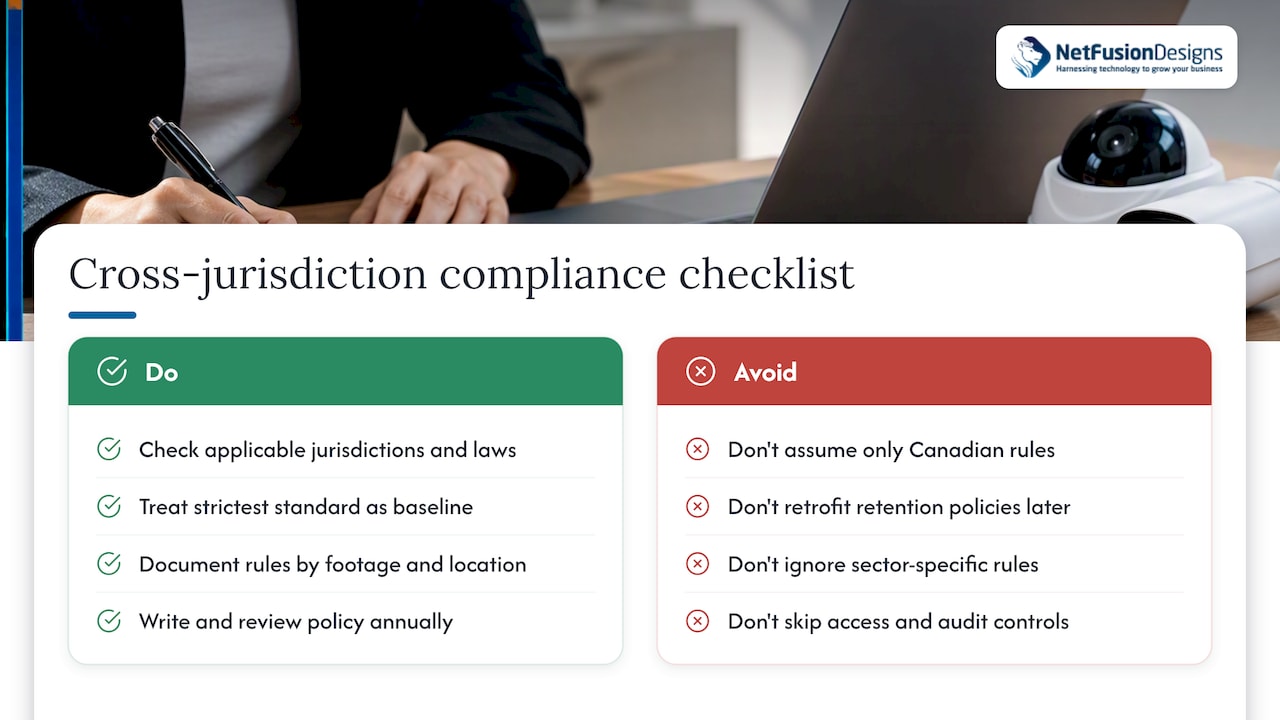
If your business operates across borders, stores footage involving visitors from other jurisdictions, or sits in a regulated sector like health care, additional frameworks may apply on top of Canadian privacy guidance. The European Union’s GDPR, for example, treats video footage of identifiable people as personal data and imposes its own retention minimization and data subject access rights, which can apply if you process footage involving EU residents or operate in the EU. In the United States, HIPAA governs footage captured in health care settings where patients might be identifiable, requiring specific safeguards around access control and audit logging.
For most small businesses operating solely in Canada, these frameworks won’t apply directly, but it’s worth checking if you operate multiple locations, serve clients under contractual data protection clauses, or handle footage involving protected health information. Sector-specific rules sometimes layer additional requirements on top of general privacy guidance, such as banking regulations around branch security footage or health care rules around patient-area cameras. When in doubt, treat the stricter standard as your baseline since retrofitting a compliant retention policy later is far more disruptive than building one in from the start.
Document which regulations apply to your specific footage types and locations, and revisit that assessment whenever you expand to a new jurisdiction or add cameras in a sensitive area. A short written policy, reviewed annually, covers most small organisations’ needs without requiring a dedicated compliance team.
Storage capacity means little if the footage itself isn’t protected. Encryption should apply both in transit, as footage moves from camera to recorder or cloud, and at rest, once it’s sitting on a drive or in cloud storage. Without encryption, footage sitting on a stolen or improperly disposed drive becomes readable to anyone who finds it.
Access control matters just as much as encryption. Limit who can view, export, or delete footage through role-based permissions, and keep an audit log of every access event so you can answer “who viewed this and when” if a dispute or investigation arises. Shared logins and unrestricted admin access are common weak points worth closing early.
Tamper detection protects against footage being altered or deleted without a trace. Look for systems that flag gaps in the recording timeline, detect when a camera is physically obstructed or redirected, and maintain checksums or hash values on stored files so any alteration is detectable after the fact. Combined with secure, logged backups, tamper detection gives you confidence that the footage you pull up six months from now is the footage that was actually recorded.
Not all footage needs to live on your primary storage tier. For cameras covering low-risk areas, routine footage can move to a cheaper archival tier after a short active window, typically 7 to 30 days, while flagged or “used” footage stays on faster, more accessible storage for its full retention period.
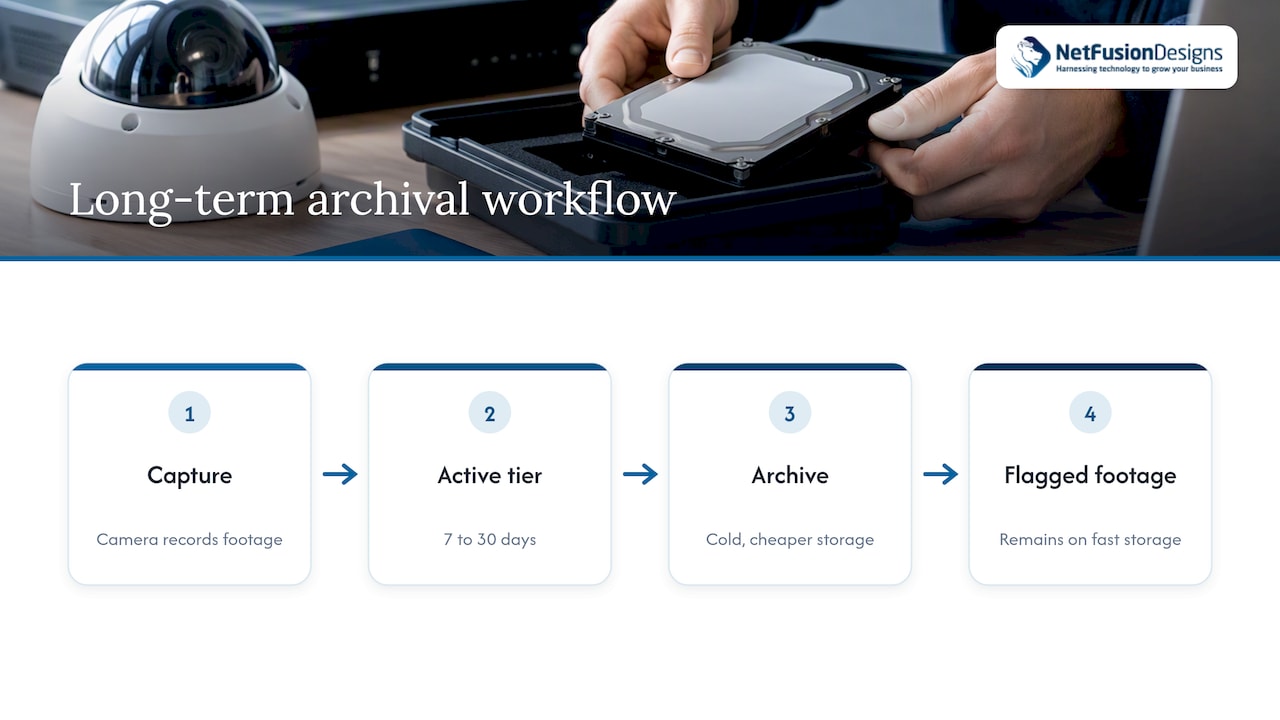
Cold storage options, whether on-site archival drives or a cloud archival tier, cost less per gigabyte than primary storage but take longer to retrieve from, which is an acceptable trade-off for footage you rarely expect to need. When planning archival storage, confirm the format will still be readable years from now: codecs and container formats do change, and migrating old archives periodically protects against format obsolescence.
Index your archive by date, camera, and any tagged events so a retrieval request doesn’t turn into a manual search through years of footage. A simple spreadsheet or your recorder’s built-in search function is often enough for small deployments, while larger systems benefit from AI tagging at the point of capture so archived footage stays searchable long after it’s moved off primary storage.
The most common mistake we see is buying storage by capacity alone, ignoring write performance until frame drops show up. A written retention policy, set before you buy hardware, prevents both undersizing and unnecessary compliance exposure.
— Geeshan
We help small and mid-sized businesses turn the calculations above into a working system rather than a spreadsheet exercise. Our team handles capacity planning, deploys surveillance-grade storage and next-generation IP cameras, and monitors write performance around the clock through our 24/7 NOC so frame drops and failing drives get caught before they become evidence gaps.

For footage that needs longer retention or off-site redundancy, our cloud backup and disaster recovery service gives you a compliant, encrypted path without managing a second data centre yourself. If you’re not sure whether your current setup can handle sustained recording loads or meet your retention obligations, our managed IT services team can assess your system and recommend a path forward. If you’re installing cameras yourself and want installation guidance, Stivo is a useful practical reference. Book a capacity assessment with us to see where your current system stands.
For a single 1080p camera recording 24/7 at around 42 GB per day, 2TB lasts for several weeks. Motion-only recording or lower resolution extends that considerably, while adding more cameras shortens it proportionally.
For one or two 1080p cameras with 30-day retention, 4TB offers comfortable headroom with room for growth. For a 6-camera system recording 24/7, 4TB covers less than two weeks, so retention needs should drive the decision rather than drive size alone.
A single 1080p camera at 4 Mbps recording continuously uses about 42 GB per day, so typical smaller drives last a few days before footage starts overwriting. Motion-only recording or a lower bitrate setting can stretch that period.
For a single camera with motion-only recording and a short retention window, smaller drives can work for basic needs. For multi-camera systems or longer retention requirements, higher capacity surveillance-grade drives are recommended.
H.265 (HEVC) typically cuts file size by close to half compared with H.264 at similar quality, which directly cuts storage costs and extends how long footage can be retained on the same hardware. The trade-off is higher processing demand on the recorder, so confirm your hardware supports H.265 encoding before switching.
%20(1).avif)
%201.avif)