NetFusion Designs logo
Heart icon
Support
Email
info@nfd.ca
Phone
647-476-5259(Canada)
IT Services
Icon dropdown arrow

Infrastructure Implementation

Project PlanningHardware Voice over IP (VoIP)Application DevelopmentCloud DesktopSecurity Cameras

Managed IT Services

IT Support24/7 HelpDeskCyber Security & AntivirusData Backups & Disaster
Recovery
Co-Managed ITComplianceEmergency Ransomware
Recovery
Penetration & Vulnerability
Assessment

Optimization of Processes

Microsoft 365 OptimizationVirtual CIO ServicesPenetration TestingInventory Lifecycle
Management
Transforming SMEs with AI
Industries
Icon dropdown arrow
Dental Managed IT Services
Construction
Hotels & Hospitality
Franchises
Financial & Insurance Services
Government
Health Care & PharmaceuticalLegal & Professional Services
Local Small & Medium Businesses
Manufacturing
Non-profit
Real Estate
Retail
Transportation & Logistics
Enterprise & Consulting
Publicly Traded Companies
Our Story
Icon dropdown arrow
About UsTestimonials
Partners
Sponsorship
BlogContact Us
Open menuClose menu
Icon chevron up
Browse Blog:
Business
Insight
Advice
Insight

SD-WAN for Small Business: A Practical Guide for Canadian Firms

SD-WAN for Small Business: A Practical Guide for Canadian Firms

SD-WAN (software-defined wide area network) lets a business with several locations run its network through software. Instead of paying for a private circuit between every office, you connect sites over ordinary broadband, fibre or LTE, and a central controller decides which link carries which traffic. For a small business, it makes sense when you have two or more sites, rely on cloud apps or VoIP, and want one place to manage the network. With a single site and one internet connection, you usually do not need it.

This guide explains how SD-WAN works, how it compares with a traditional WAN, what to assess before you buy, how a deployment runs, and where the security risks sit.

NetFusion Designs Inc
Keep Multi-Site IT Running Smoothly
NFD provides managed IT services, including security, monitoring, helpdesk, cloud, and Microsoft 365 for small and mid-sized businesses.
Explore managed IT services

TL;DR

  • SD-WAN is a software layer that joins your locations over any mix of connections and steers traffic based on link health and policy.
  • It tends to pay off with multiple sites, cloud and VoIP traffic, and a wish to move off costly private circuits. A single-site office rarely needs it.
  • Treat security as part of the design: patch SD-WAN devices quickly, harden the configuration and forward logs to a central location.
  • Deploy in stages: map sites and applications, pilot at one or two locations, then roll out and monitor.
  • A managed or co-managed model keeps the day-to-day work off your team.

Table of Contents

  • What SD-WAN is and how it works
  • SD-WAN vs traditional WAN
  • Benefits for a small business
  • Limitations to plan for
  • When SD-WAN fits, and when it does not
  • What to assess before you deploy
  • How an SD-WAN deployment runs
  • Security and reliability for Canadian businesses
  • Perspective: why we treat the WAN as part of managed IT
  • Plan your multi-site network with NFD
  • FAQ
  • Sources

What SD-WAN is and how it works

A wide area network (WAN) is what links your offices, warehouses, clinics or plants to each other and to your data. SD-WAN applies software-defined networking principles to that job. According to Palo Alto Networks, a central controller monitors latency, jitter and packet loss, and can reroute traffic when a link degrades. Policies you create once are pushed to every site.

In plain terms, each location has a small appliance (or a virtual one) that sees all the connections available there: a cable line, a fibre line, a 5G or LTE backup. The controller learns which one is healthy and sends each application down the best path. Video calls and VoIP can take the cleanest link, while a large file backup uses the cheaper one.

SD-WAN routes applications across available links

The three layers

SD-WAN designs are commonly described in three logical parts, as Mushroom Networks lays out:

  • Data plane: the forwarding layer at the network edge, where traffic actually moves.
  • Control plane: the centralized intelligence that watches path health and makes routing decisions.
  • Management plane: the administrative interface where you configure the system, set policies and watch performance.

For a business owner, the management plane is the part that matters most. It is the single screen from which changes apply across all sites, rather than logging into each router one by one.

SD-WAN vs traditional WAN

A traditional WAN usually means MPLS, a private network you rent from a carrier, often with traffic backhauled through a head office before it reaches the internet. Fortinet’s comparison describes MPLS as a dedicated, contract-based service that takes a long time to set up and is expensive, while SD-WAN is a virtual overlay that combines different connection types and builds encrypted tunnels over the internet.

Factor Traditional WAN (MPLS) SD-WAN
Transport Dedicated carrier circuits Any mix: broadband, fibre, LTE/5G, and MPLS if kept
Setup Carrier provisioning, often slow Appliance at each site, configured centrally
Cost model Premium per circuit Lower-cost internet links possible
Traffic steering Mostly fixed paths, often via head office Application-aware, based on live link quality
Changes Site by site, often through the carrier Central policy pushed to all sites
Security Private, but not a full security stack Encrypted tunnels; security depends on how it is built

What SD-WAN does not change

SD-WAN does not change the physical medium underneath. A Canadian consulting firm, BBA, points out that dedicated fibre has latency characteristics shared services cannot match, and that without an MPLS link there is no quality-of-service guarantee across the carrier backbone. It also notes that in Canada, swapping dedicated-fibre MPLS for dedicated-fibre internet may still yield worthwhile savings. That article dates from 2019, so confirm current carrier pricing before building a business case.

The practical conclusion: SD-WAN is a better way to manage connections, not a way to make a poor connection good. A hybrid design, keeping one private link for sensitive or latency-critical traffic and adding internet links around it, is often the right fit.

Benefits for a small business

  • Lower connectivity cost. SD-WAN can connect sites over low-cost options such as broadband or LTE rather than MPLS circuits, and has no native bandwidth limits like MPLS, as Cloudflare explains.
  • One management view. Centralized management means network-wide changes go through a single interface, which matters when you do not have a full-time network engineer.
  • Better cloud and VoIP performance. Traffic for Microsoft 365, hosted desktops and phone calls can go straight to the internet over the best link instead of detouring through head office.
  • Fewer configuration mistakes. As one Network World perspective argues, a large share of outages and compromises come from configuration errors, and consistent, automated configuration across sites improves resilience. The same piece suggests that more than a handful of sites can justify SD-WAN where secure private connectivity is needed.
  • Resilience. Automatic failover to a second link means a cut cable at one site no longer stops the day.

Limitations to plan for

Good planning includes knowing the trade-offs. The BBA paper lists more equipment and licences to manage, more devices exposed to the internet, possible effects on real-time applications, and no native level 2 service. Cloudflare adds that SD-WAN is often paired with separate security tools, which can create overhead and inconsistent security rules, and that organizations can end up paying twice for bandwidth and security licences.

All of these are design questions rather than reasons to avoid the technology. They are why many small firms choose a provider who handles the WAN, the firewall and the monitoring as one service.
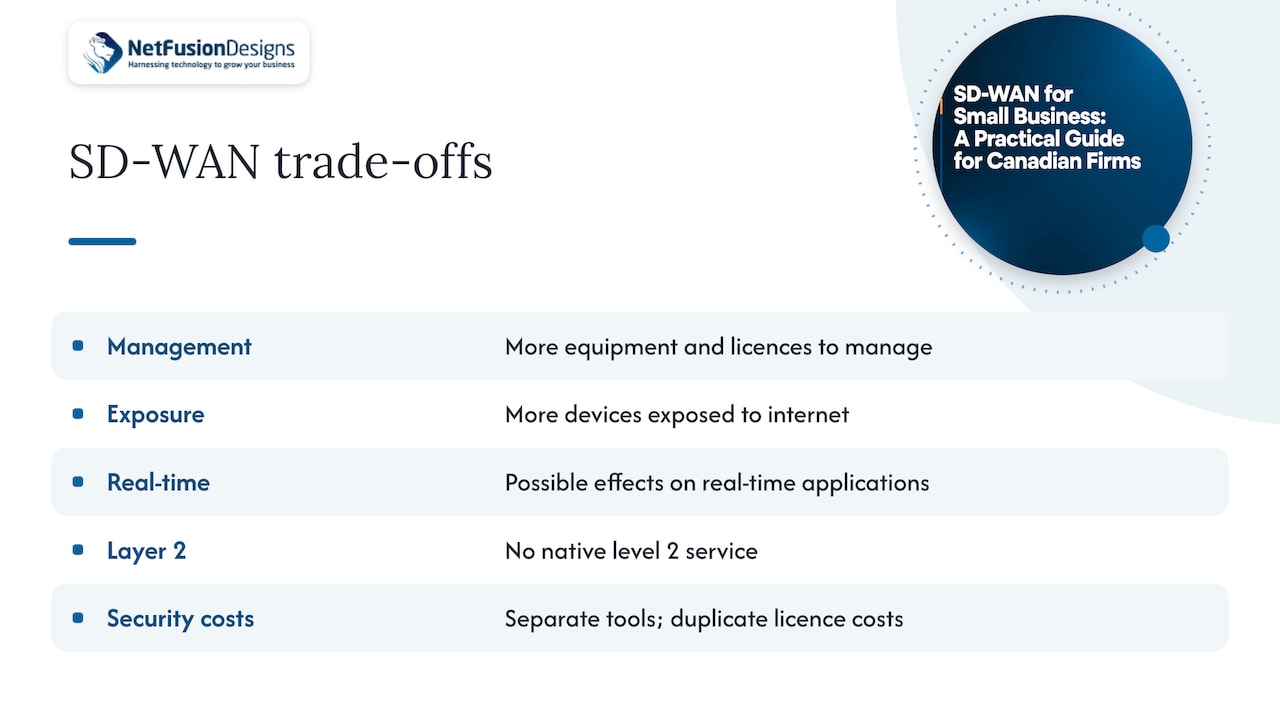
Limitations to plan for

When SD-WAN fits, and when it does not

Good fits

  • Two or more locations that share files, applications or a phone system.
  • A manufacturer with a plant and an office that both depend on cloud ERP or hosted desktops.
  • Dental or medical clinics with several sites needing reliable, segmented connections to a central practice system.
  • Law and accounting firms with branch offices and staff working from home who need consistent access to the same applications.
  • Businesses paying for private circuits that have become expensive or slow to change.

Cases where it may be more than you need

A single office with one internet line and a handful of cloud apps typically needs a good business-grade firewall and a second connection for failover, not a full SD-WAN. Many firewalls already include SD-WAN features such as link bonding and failover, so you may be able to get the benefit without new hardware. If your sites are few and your traffic is simple, start with that and revisit as you grow. Our own multi-site network design guide covers the step up from one office to several.

What to assess before you deploy

Work through these questions before you request quotes.

  1. Sites and users. List every location, headcount, and who works remotely. Include sites you may open in the next two years.
  2. Applications and traffic. Which apps are business-critical: Microsoft 365, a cloud accounting platform, a hosted desktop, VoIP, a manufacturing system? Note which are sensitive to delay.
  3. Current connections. For each site, record the provider, speed, contract end date and whether a second link is available. In rural parts of Ontario, your options may be limited, so check early.
  4. Bandwidth use. Note peak hours and heavy consumers such as backups, video calls or camera feeds. If you run IP cameras across sites, the choice between wired and wireless cameras changes how much traffic the network has to carry.
  5. Security and compliance. Which data must stay in Canada or inside a particular province? Do you need segmentation between, for example, guest Wi-Fi, office systems and production equipment? Your cyber insurer may also ask about controls, which our cyber insurance renewal checklist explains.
  6. Who will run it. Decide whether your team manages it, a provider manages it fully, or the work is shared.

Managed, unmanaged or co-managed

Unmanaged (do-it-yourself) SD-WAN costs less in fees but needs in-house skills for configuration, patching and troubleshooting. Fully managed shifts that to a provider. Co-managed sits in between: your IT lead keeps control of day-to-day decisions while a provider supplies monitoring, engineering and after-hours coverage. Choose based on the skills you already have, not on the licence price alone.

How an SD-WAN deployment runs

A deployment for a small business typically follows these stages.

  1. Discovery and design. Document sites, circuits, applications and security requirements. Decide the topology and whether any MPLS stays in a hybrid design.
  2. Circuit and hardware readiness. Order or confirm secondary links, then choose appliances sized to the real throughput each site needs, with headroom for encryption and security features.
  3. Policy definition. Write traffic rules: which applications get priority, which links they prefer, what happens on failure, and which segments can talk to each other.
  4. Pilot. Deploy at one or two sites, ideally a head office and a smaller branch. Test failover by deliberately disconnecting a link. Measure call quality and application response before and after.
  5. Phased rollout. Move the remaining sites in groups, outside business hours where possible. Keep the old connections live until each site has passed testing.
  6. Hardening and handover. Apply the security baseline, set up alerting, record the configuration and train whoever will use the dashboard.
  7. Ongoing management. Patch devices, review link performance, adjust policies when applications change, and review the design each year.

A pilot costs little and catches most surprises, such as an application that behaves badly on a particular link, or a site whose second connection is not as independent as it appeared.

Security and reliability for Canadian businesses

SD-WAN devices sit at the edge of your network, so they need the same attention as a firewall. The Canadian Centre for Cyber Security and international partners have issued joint guidance on threats to SD-WAN networks. It urges defenders to fully patch SD-WAN devices and to apply the vendor’s hardening guidance. That guidance includes perimeter controls, replacing self-signed certificates, using pairwise keying, limiting session timeouts and forwarding logs to a remote syslog server.

For a small business, this translates into a short routine:

  • Apply vendor security updates promptly and keep an inventory of every SD-WAN device and its software version.
  • Restrict management access to trusted networks and use multi-factor authentication (MFA) on the controller.
  • Send logs to a central system so unusual activity is visible. Our SIEM guide for small business explains what that involves.
  • Segment the network so a problem at one site or device does not reach everything else.

The risk is not abstract. Statistics Canada data reported by Insurance Business found that 16% of small businesses with 10 to 49 employees were affected by cyber security incidents in 2021. For wider context, see our overview of the biggest cybersecurity threats in Canada.

Reliability deserves the same planning. Pair SD-WAN with tested backups so a site failure does not become a data loss. Our cloud backup and disaster recovery service is built for that.

Perspective: why we treat the WAN as part of managed IT

We see SD-WAN projects succeed or stall for the same reason: whether somebody owns the network after the install day.

The appliances are the easy part. The harder work is deciding which applications matter most, keeping devices patched, watching link quality, and changing policy when the business changes. When that is split between a carrier, a firewall vendor and a phone provider, small firms end up chasing three parties during an outage.

That is why we offer one provider for IT, cybersecurity and communications, with no third-party vendor management for you. Our 24/7 NOC and SOC 2 Type II-certified team monitor the network, and we explain what we find in plain language. Where a firm has its own IT lead, co-managed IT lets them keep control while we supply monitoring, engineering and after-hours cover.

Our advice: design the WAN, security and backup together, pilot at one site, and write down who responds when a link fails at 2 a.m.

Geeshan

Plan your multi-site network with NFD

NetFusion Designs is a managed IT provider serving small and mid-sized businesses across Ontario and Canada, with teams in Kitchener-Waterloo, Toronto, Markham, Mississauga, Montréal and Winnipeg. We help firms design multi-site networks, connect them securely, and keep them monitored around the clock, with transparent, predictable monthly pricing.

NetFusion Designs Inc

If you are weighing SD-WAN, start with a conversation about your sites and applications. See our managed IT services, or look at co-managed and ad-hoc support options if you already have an IT person. For the security side, our 24/7 SOC and managed detection and response covers monitoring of the devices at your network edge.

FAQ

Is SD-WAN worth it for a small business with only two locations?

Often yes, if both sites depend on cloud apps, VoIP or shared systems, and you want automatic failover between connections. If traffic is light and each site only needs internet access, a business firewall with a second connection may be enough. Map your applications first, then decide.

Does SD-WAN replace a firewall?

Not by itself. SD-WAN handles how traffic is routed between sites and links, while security needs its own controls, such as a next-generation firewall, endpoint protection and monitoring. Many products combine both, so ask how the pieces fit together and who maintains them.

Can SD-WAN work without MPLS?

Yes. SD-WAN can run entirely over broadband, fibre or LTE. Some businesses keep one MPLS or dedicated link for latency-sensitive traffic and add internet links around it, which is called a hybrid design.

How long does an SD-WAN deployment take?

It depends on the number of sites and how quickly circuits are delivered. The appliance setup is usually quick, while ordering new internet connections often sets the schedule. A pilot at one or two sites first gives you a realistic timeline for the rest.

How do we keep SD-WAN secure?

Keep devices patched, restrict and protect management access with MFA, replace default certificates, segment the network and send logs to a central system. The Canadian Centre for Cyber Security’s guidance is a good reference for these steps.

Sources

  • What Is SD-WAN? Palo Alto Networks
  • SD-WAN for Small Business: A Technical Implementation Guide, Mushroom Networks
  • SD-WAN vs MPLS: Key Differences, Fortinet
  • Is SD-WAN for everyone? Almost!, BBA
  • Pros and cons of SD-WAN, Cloudflare
  • When does SD-WAN make sense?, Network World
  • Joint guidance on malicious cyber threats to SD-WAN networks, Canadian Centre for Cyber Security
  • Revealed: how much Canadian businesses spend on their cyber defences, Insurance Business

Recommended

  • Network for Multi-Site Business
  • Small Business IT Support Options Compared 2026 Guide
  • Role of Remote IT Support Services for SMBs
  • Small Business IT Support Ontario

Continue Reading

AI in Customer Service: A Practical Guide for Canadian Businesses
VoIP Phone System Cost in Toronto: 2026 Budget Guide
Penetration Testing Cost in Canada: 2026 Price Guide
Custom Web App Cost in Canada: What to Budget in 2026
NetFusion Designs logo
NetFusion Designs is a globally recognized IT service provider and services clients across North America.

We hold a SOC 2 Type 2 report, and maintain internal processes and procedures that keep our clients’ data secure and confidential.
NetFusion Designs IT support team

IT Services Near Me

BurlingtonOakvilleHamiltonMississaugaMiltonBramptonEtobicokeBrantfordGuelphKitchenerWaterlooCambridgeSt CatharinesTorontoMarkhamCaledonNewmarketNorth YorkPickering & DurhamLondonMontreal

Services

Project PlanningHardwareTelephony & VoIPApplication DevelopmentCloud DesktopSecurity CamerasHelpdesk & SupportCyber Security & Anti-VirusData Backups & Disaster RecoveryMicrosoft 365 OptimizationVirtual CIO ServicesPenetration TestingPricingSchedule a MeetingRemote Support
Pricing

Pages

Free Security ScanAbout UsOur Migration ApproachWork CultureOur Core ValuesCode of ConductTestimonialsContactBlogSchedule a MeetingRemote Support

TORONTO

Bank capital office building law
401 Bay St, 16th Floor, Toronto Ontario
Email
info@nfd.ca
Phone
647-476-5259 (Canada)

MARKHAM

Bank capital office building law
141 Main Street N, Markham, ON L3P 1Y2
Email
info@nfd.ca
Phone
647-476-5259 (Canada)

TRI-CITY AREA
(Kitchener / Waterloo / Cambridge)

Bank capital office building law
22 Frederick St, Suite 700, Kitchener Ontario
Email
info@nfd.ca
Phone
647-476-5259 (Canada)

PEEL REGION

Bank capital office building law
6700 Century Ave, 3rd floor, Mississauga, ON L5N 1V8
Email
info@nfd.ca
Phone
647-476-5259 (Canada)

DURHAM REGION

Bank capital office building law
1315 Pickering Parkway, Pickering, ON L1V 7G5
Email
info@nfd.ca

MONTREAL

Bank capital office building law
8815 Av du Parc #402, Montréal, QC H2N 1Y7
Email
info@nfd.ca
Phone
647-476-5259 (Canada)

Special Offers

Radio station signal antena tower
Pricing: $100–185 per user
Icon chevron right
Terms and ConditionsPrivacy PolicyCookie Policy
© 2026 NetFusion Designs Inc.
LinkedInFacebookAlignable logo