Searching for IT services near you means looking for local providers who can handle your technology needs quickly, whether that is a broken device, a network outage, or ongoing managed support. The best local IT providers offer a clear scope of services, certified technicians, and defined response times. Qualifications like SOC 2 Type 2 attestation and enterprise-grade security tooling signal a provider that takes your data seriously. Here is what you can typically expect from local IT support options:
NetFusion Designs Inc is a strong example of what a full-service local provider looks like, offering all of the above with SOC 2 Type 2 attestation and a 24/7 Network Operations Centre (NOC) for Canadian businesses.
Local IT service providers typically cover a broad range of needs, from one-time repairs to fully managed monthly support. Understanding the full menu helps you match the right model to your situation.
Common services offered locally:
Onsite vs. remote support at a glance:
| Feature | Onsite support | Remote support |
|---|---|---|
| Best for | Hardware failures, physical setup, network wiring | Software issues, user support, monitoring |
| Response time | Typically same day to next day | Often within minutes to hours |
| Cost structure | Hourly or project-based | Included in managed plan or flat rate |
| Availability | Business hours, sometimes after-hours | Can be 24/7 with managed providers |
| Disruption to staff | Technician on premises | Minimal, resolved in background |
Pricing structures vary widely. Break-fix providers charge per incident, typically by the hour. Managed IT services use a predictable monthly fee that covers monitoring, patching, help desk, cybersecurity, and backup monitoring. That monthly model removes budget surprises and keeps your systems consistently maintained, rather than waiting for something to fail.
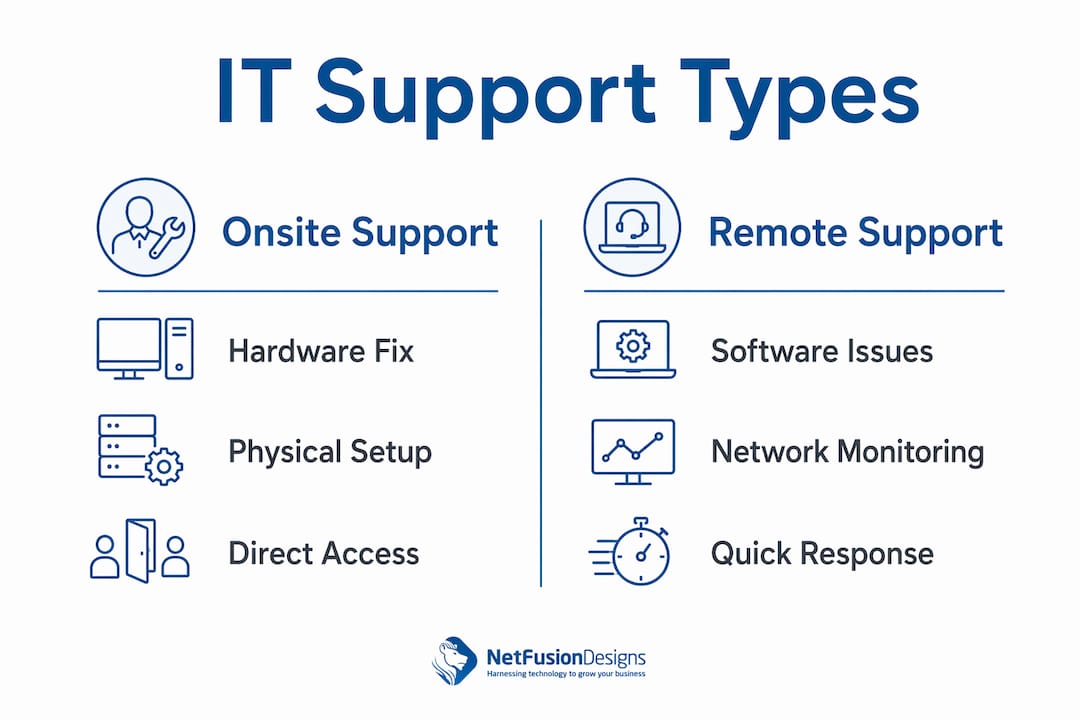
The right delivery model depends on the nature of the problem, not just personal preference.
Onsite support makes sense when a technician needs to physically touch equipment: replacing a failed hard drive, running network cabling, setting up a new workstation, or diagnosing a hardware fault that cannot be replicated remotely. Onsite IT support also matters when staff are not comfortable granting remote access or when security policies restrict it.

Remote support handles the majority of day-to-day issues faster and at lower cost. Software errors, user account problems, virus removal, Microsoft 365 configuration, and most help desk requests resolve cleanly over a secure remote session. Managed providers monitor your systems continuously in the background, catching problems before your team even notices them.
Advantages and limitations side by side:
Pro Tip: Before calling for an onsite visit, describe the problem clearly to your provider. Most software and connectivity issues resolve remotely in under an hour, saving you time and money. Reserve onsite visits for confirmed hardware failures or new equipment installations.
Security is a real consideration in both models. A reputable provider uses encrypted remote access tools and requires multi-factor authentication before connecting to your systems. Ask any candidate provider to explain their remote access security controls before you grant them access.
Choosing a local IT provider is a business decision, not just a technical one. The wrong fit can lead to significant challenges and risks such as delays, extra costs, and security issues.

Evaluating IT providers means verifying certifications, understanding support scope, response times, pricing, and exit processes. Contract clarity reduces the risk of surprise billing and misaligned expectations. Here is what to confirm before signing anything:
Criteria to evaluate:
Questions to ask potential providers:
Assessing reviews takes more than counting stars. Look for patterns in feedback: consistent praise for response times and communication is more telling than a handful of five-star ratings. Check Google reviews, industry directories, and ask for references from businesses in your sector. A provider with strong cybersecurity monitoring capabilities and transparent pricing is worth paying a modest premium for.
NetFusion Designs Inc demonstrates what a well-structured local IT provider looks like in practice. SOC 2 Type 2 attested, NetFusion Designs Inc serves small and mid-sized businesses across Ontario and Canada, with teams operating in Kitchener-Waterloo, Toronto, Markham, Mississauga, Montréal, and Winnipeg.
What NetFusion Designs Inc delivers:
That last point sets NetFusion Designs Inc apart from a standard managed service provider. Beyond keeping systems running, NFD helps clients identify where AI and automation can reduce manual work and cut operating costs. For a manufacturing client in Toronto or a professional services firm in Mississauga, that means technology becomes a competitive tool rather than a recurring overhead.
Trust signals that matter:
Small businesses in Toronto and across the province benefit from having a provider who understands local infrastructure, regional compliance considerations, and the pace at which Canadian SMBs need to move.
Running a business without reliable IT support is a liability, not a cost saving. NetFusion Designs Inc gives Canadian SMBs access to enterprise-grade managed IT without the enterprise price tag or the complexity of managing multiple vendors.

Whether you need IT services in Mississauga, managed IT in Kitchener-Waterloo, or emergency IT support anywhere across Ontario, NetFusion Designs Inc brings certified technicians, a 24/7 NOC, and a clear, written service scope to every engagement. There are no vague contracts and no surprise charges for services you assumed were included. You get proactive monitoring, cybersecurity, help desk, cloud management, and strategic planning under one accountable provider. Contact NetFusion Designs Inc today to get a clear picture of what managed IT would cost and cover for your business.
Choosing the right local IT provider comes down to verified certifications, a written service scope, transparent pricing, and a provider accountable for your full technology environment.
| Point | Details |
|---|---|
| Managed IT vs. break-fix | Managed IT delivers predictable monthly costs, proactive monitoring, and stronger security than reactive break-fix support. |
| Written scope is non-negotiable | Always get a written breakdown of included services and exclusions before signing to avoid unexpected charges. |
| Onsite vs. remote | Remote support resolves most software and help desk issues faster; reserve onsite visits for confirmed hardware failures. |
| Provider certifications | SOC 2 Type 2 attestation and vendor credentials are reliable indicators of a provider’s security and technical competence. |
| NetFusion Designs Inc | A SOC 2 Type 2 attested managed IT provider serving Canadian SMBs with 24/7 NOC, cybersecurity, cloud, and AI enablement. |
Break-fix IT support is billed by the hour or per incident, while managed IT services use a predictable monthly fee covering monitoring, help desk, patching, and cybersecurity. Costs vary by provider, scope, and number of users or devices covered.
It depends on the repair cost relative to replacement value. If the repair exceeds roughly half the cost of a comparable new device, replacement usually makes more financial sense, especially given the security risks of running outdated hardware and unsupported operating systems.
A local managed IT provider or a certified managed service provider like NetFusion Designs Inc typically delivers better value for businesses than retail repair chains, offering proactive monitoring, defined response times, and ongoing support rather than one-off fixes.
Ask about their certifications, what is included in the monthly fee versus billed separately, how backups are tested, how security incidents are handled, and what the exit process looks like if you switch providers.
SOC 2 Type 2 means an independent auditor has verified that the provider’s security controls operate effectively over time, not just on paper. It is a meaningful signal that your data and systems are handled with documented, tested security practices.
%20(1).avif)
%201.avif)