You keep your phone number when you switch providers in Canada. That’s the short answer, and it’s backed by federal rules, not carrier policy that can change on a whim. The single move that starts everything is simple: contact your new provider and ask them to port your existing number. You do not call your old carrier first, nor do you need to give 30 days’ notice before switching.
The CRTC guarantees your right to keep your number when you move within the same local calling area, whether you’re going from Rogers to Bell, from a regional wireline provider to a wireless carrier, or anywhere in between. The new provider manages the transfer request on your behalf. Your old provider’s only job is to release the number once the port goes through.
Here’s what actually happens once you make that call or walk into a store:
Timeline snapshot: wireless-to-wireless ports often complete in about 2.5 business hours when your details match exactly. Anything touching a landline, wireless-to-wireline or wireline-to-wireless, needs at least a couple of business days. Businesses moving several numbers or working through a reseller should expect more.
Porting a Canadian phone number works because the new provider manages the entire transfer while your old service stays active until the switch completes.
| Point | Details |
|---|---|
| Start with your new provider | Never contact your old carrier first; the new provider initiates the port request. |
| Don’t cancel early | Only active numbers can be ported, so cancelling your old service first can strand the number. |
| Timelines vary by scenario | Wireless-to-wireless takes about 2.5 business hours; landline-involved ports need at least two business days. |
| Have your account details ready | Account number, name, billing address, and PIN prevent the most common rejection causes. |
| Complex business ports need coordination | NetFusion Designs Inc manages bulk, reseller, and VoIP-linked ports for businesses across Ontario and Canada. |
The mechanics of number porting canada follow a repeatable pattern, no matter which carrier you’re leaving or joining. Understanding each stage before you start prevents the two most common headaches: dropped service and a rejected transfer request.
Call, chat, or walk into your new provider and give them the number you want to bring over. They’ll check whether it’s active and portable in seconds. Do not cancel your existing service at this point, even if a store rep seems eager to close the sale. An inactive number often can’t be ported, which means cancelling early can strand you without the number you’re trying to keep.
Your new provider will ask for specific information tied to your old account. Have it ready before you start so the request doesn’t bounce back for a correction.
Most carriers require some form of confirmation, usually a text message or email sent to the number being ported. Bell’s support documentation walks through this authorization step in detail, and other national carriers follow a similar pattern. Respond promptly. A missed authorization prompt is one of the most common reasons a port stalls.
Once approved, your new SIM or line activates and the old one deactivates, often within the timelines above. Make a test call and send a test text as soon as service switches over to confirm everything landed correctly.
Pro Tip: Keep your old SIM powered on in a spare phone until the port finishes. If you use iPhone-to-iPhone messaging or RCS on Android, deregister those services only after the number lands on your new carrier, not before. Deregistering early can cause texts to vanish into the old ecosystem for days.
Most Canadian phone numbers qualify. Standard mobile numbers, most landlines, and local numbers tied to a physical address generally transfer without issue, provided the number is active at the moment you request the port.
Some categories don’t qualify, and it’s worth knowing them before you assume your number will move:
According to the Canadian Telecommunications Association’s consumer resource, the active-number requirement is the rule that trips people up most often. Someone cancels service with their old carrier thinking it simplifies the switch, and by the time the new provider processes the request, the number has already been released back into the general pool.
VoIP-to-landline and landline-to-VoIP transfers add another wrinkle. Not every VoIP provider serves every address, and rural or older exchange areas sometimes have coverage limits that block a clean port. Confirm coverage and number-type compatibility with your prospective provider before assuming the switch will go smoothly. It usually does, but a five-minute call avoids an unpleasant surprise.
Timing depends entirely on what kind of service you’re leaving and what you’re moving to. A straightforward wireless-to-wireless swap is the fastest path; anything involving a landline takes longer because it touches a different technical system entirely.
| Scenario | Typical timeline | Notes |
|---|---|---|
| Wireless to wireless | About 2.5 business hours | Fastest path when account details match exactly |
| Wireline to wireless | Minimum 2 business days | Some cases run 3 to 7 business days |
| Wireless to wireline | Minimum 2 business days | Complex cases may take longer |
| Bulk or business ports | Several business days or more | Depends on carrier coordination and number volume |
Telecom Decision CRTC 2005-72 set these targets when wireless number portability launched, and they remain the framework carriers operate under. Freedom Mobile’s support documentation confirms mobile-to-mobile transfers commonly land within one to three hours when a SIM is already in hand, while landline transfers can run two to five business days and may briefly disrupt features like 911 location data during the switch.
A few things stretch these windows further. Involvement from an MVNO or reseller adds a coordination layer, since the underlying network carrier still has to process the request. Leased or bulk number blocks, common with business phone systems, require negotiated handling. And a single typo in your account name or billing address can bounce the request back to square one, adding days you didn’t budget for.
If your port is urgent (moving offices, losing a lease, closing a deal that hinges on a working line) tell your new provider up front. Some carriers can prioritize wireless ports, but wireline and complex business moves rarely compress below their standard window.
Your new provider needs enough detail to prove you’re the account holder and to locate the number in the national portability database. Missing or mismatched information is the single biggest cause of delay.
Have these ready before you call or visit a store:
| Field | Where to find it | Why it matters |
|---|---|---|
| Account number | Top section of your latest bill | Confirms which account the number belongs to |
| Account holder name | Bill or online account profile | Must match exactly to avoid rejection |
| Billing address | Bill or account settings | Cross-checked against the old carrier’s records |
| PIN/authorization code | Set in online account or by request | Some carriers require it to prevent fraud |
Most carriers print your account number in the top corner of a paper or PDF bill, right next to the billing period. If you’ve gone paperless and can’t find a recent statement, your online account dashboard will list it too. Dig it up before your appointment. Standing at a counter waiting on hold with your old provider defeats the purpose of a same-day port.
The port itself doesn’t usually carry a direct charge from the provider processing it, but your old account can still generate costs depending on your contract terms. Understanding the difference matters, because “porting is free” and “switching is free” aren’t always the same statement.
Here’s what to check before you commit:
Your old provider typically issues a final bill covering charges up to the disconnection date, plus any early termination or device balance owed. That bill arrives on its usual cycle rather than immediately, so don’t assume silence means you’re clear.
Pro Tip: Before you initiate the port, pull up your current contract and check three things: your term end date, any remaining device financing balance, and the cancellation fee schedule. A five-minute review can save you a $200 to $400 surprise on your final invoice.
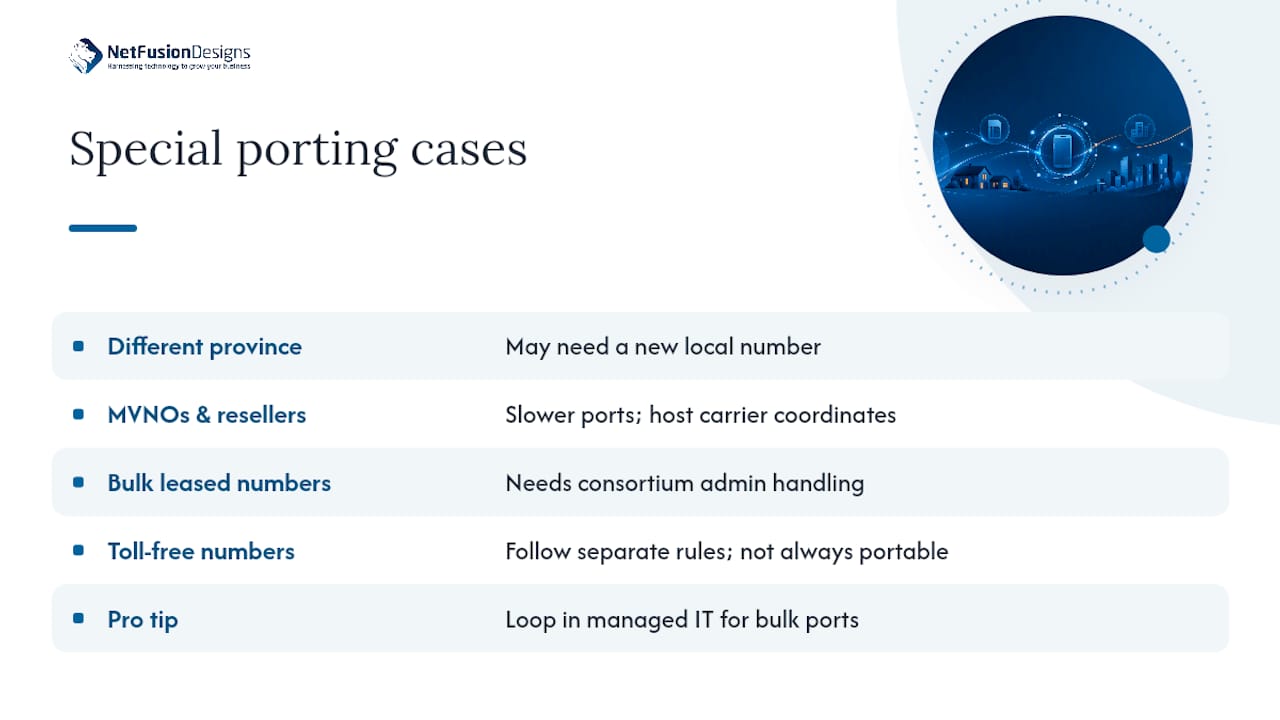
Not every port follows the standard path. A handful of scenarios need extra planning, and businesses in particular should flag these before assuming a switch will be routine.
Moving to a different province. Local calling area rules mean a number tied to one region’s exchange may not carry cleanly into a different province’s network, especially for landlines. In many cases you’ll keep your existing number for calls and texts, but you may need a new local number if you require true local-rate calling in the new area.
MVNOs and resellers. Discount carriers that operate on a larger network’s infrastructure (a common reseller arrangement in Canada) add a coordination step, because the underlying network operator still processes the technical transfer. Expect slightly longer timelines than a direct carrier-to-carrier port.
Bulk and leased business numbers. A business migrating ten, fifty, or five hundred numbers at once faces a fundamentally different process than an individual consumer. Leased number blocks often require negotiated handling through the Canadian Local Number Portability Consortium’s administrative processes, and bulk ports need advance coordination with both the losing and gaining carriers.
Toll-free numbers. Toll-free arrangements follow separate rules and exceptions, and not every toll-free number is portable in the same way a standard local number is. If your business relies on a toll-free line, confirm directly with your prospective provider what’s possible before assuming a standard port applies.
Pro Tip: If your business is porting more than a handful of numbers, or migrating a phone system alongside the port, loop in a managed IT provider before you start. Bulk ports that go sideways can knock out inbound calls for days, and that’s a cost most businesses can’t absorb.
A rejected or stuck port is almost always traceable to one of a few specific causes, and most of them are fixable within minutes once you know what to look for.
The usual culprits:
To check status, your fastest path is contacting your new provider directly. Most major carriers, including Rogers and Bell, offer status-tracking tools through their support portals or customer service lines specifically for pending ports. If the port has stalled beyond the expected window for your scenario, ask for an escalation, most front-line reps can flag a stuck request to a specialized porting team.
Pro Tip: Keep a screenshot or saved copy of your port confirmation, the authorization text you responded to, and the time you submitted your request. If a dispute comes up over a delayed or failed port, having a clear timeline in hand speeds up resolution considerably.
A clean port isn’t just about the technical transfer. It’s about making sure everything tied to that number, your two-factor codes, your voicemail, your business call flows, keeps working once the switch happens.
Before you start:
While the port is in progress:
After the port completes:
Individual consumers can usually manage a port on their own with the steps above. Businesses juggling multiple lines, a VoIP cutover, or a bulk migration face a different level of complexity, and that’s where a managed approach pays for itself.
NetFusion Designs Inc handles the full scope of a business port: scoping which numbers move and when, managing the port requests with your carriers, testing compatibility across your phone system before cutover, and staying on the line through the actual transition so calls never drop unexpectedly.
A business phone migration is really an IT project wearing a telecom disguise. The number transfer is the easy part; the hard part is making sure your call routing, your CRM integrations, and your two-factor logins survive the move without anyone noticing a gap.
What a managed engagement typically covers:
NetFusion Designs Inc is SOC 2 Type II certified and runs a 24/7 network operations centre, with teams serving businesses across Kitchener-Waterloo, Toronto, Markham, Mississauga, Montréal, and Winnipeg. That regional footprint matters when a phone system goes down mid-business-day and you need someone who understands both the technical and the regulatory side of a Canadian port.
Pro Tip: If you’re bundling a number port with a broader Microsoft 365 or infrastructure migration, sequence the phone cutover last. Get your data and identity systems stable first, then move voice services once everything else is confirmed working.
The biggest mistake I see business owners make isn’t a technical one. It’s timing: they treat the phone number port as an afterthought bolted onto a bigger IT project, instead of the thing that actually determines whether customers can reach them on day one of the switch.
Keep every service active until the new provider confirms the port is complete. That single discipline prevents more failed transfers than any technical fix. For a solo consumer switching one mobile line, that’s easy to manage alone. For a business moving ten lines tied to a call centre, or migrating to VoIP while porting numbers simultaneously, the coordination burden multiplies fast, and that’s exactly the scenario where a managed approach earns its keep. Check the section above on how NetFusion Designs supports business ports and VoIP migrations for the specifics on what that looks like in practice.
Coordinating a multi-line port or a VoIP cutover on top of your regular workload isn’t a great use of your time, especially with a reseller or bulk number block in the mix. NetFusion Designs Inc gives you a single point of contact who handles the carrier requests, tests your call routing before anything switches, and stays on through cutover so your business doesn’t lose a single inbound call during the transition.

That means less downtime than juggling multiple carrier support lines yourself, and no gap between your old system going dark and your new one coming online. If your business is planning a port alongside a phone system upgrade, explore VoIP services in Kitchener, Waterloo, Markham, and London or get in touch about managed IT support in Kitchener and Waterloo to scope your migration with a team that handles this daily. Businesses outside that region can reach the broader NetFusion Designs Inc team through the Mississauga IT services page to start the conversation.
Yes. You contact your new provider directly, provide your account details, and they handle the technical transfer. You never need to contact your old carrier first.
The main risks are timing delays if your account details don’t match, temporary loss of features like voicemail settings that don’t carry over automatically, and potential cancellation fees on your old account if you’re still under contract.
Pager numbers, many toll-free arrangements, and special service numbers using an asterisk or pound sign generally aren’t portable. A number that’s already been cancelled or reassigned also can’t be recovered through a port.
Often yes, but local calling area rules can limit this, particularly for landlines. Check with your new provider, since you may need a new local number if you require true local-rate service in a different region.
Bulk or business ports typically take longer than single consumer ports because of carrier coordination requirements. NetFusion Designs Inc manages this process directly with carriers to keep multi-line migrations on schedule.
%20(1).avif)
%201.avif)