The right CAD workstation for engineering firms balances four things: a fast processor for modelling, a professional graphics card certified for your CAD software, enough memory for your largest models, and fast local storage. Size each machine to the work its user actually does, buy from your software vendor's certified list, and plan the refresh before performance slips.
Getting this wrong is expensive in two directions. Under-spec a workstation and your engineers lose time to slow regenerations, laggy viewports and crashes in the middle of a deadline. Over-spec every seat and you spend thousands on capacity that a 2D detailer will never touch. Because workstations are typically kept for several years, a sizing decision made today shapes how productive your design team is for a long time.
This guide walks through what makes a CAD workstation different from an office PC, how to size specs by role, a practical buying checklist, when cloud workstations make sense, and how to keep machines fast and secure once they are on desks.
A CAD workstation is built for sustained, heavy graphics and compute work, with hardware and drivers that CAD software vendors have tested and certified.
An office PC is designed for email, documents and browsers. A workstation adds features that matter when someone spends eight hours a day in Revit, Civil 3D, MicroStation or SolidWorks:
Start with the work each person does, not with a single standard build, because CAD workloads use hardware very differently.
Much of day-to-day modelling in common CAD and BIM tools leans heavily on single-core processor speed, while rendering, point clouds and simulation spread across many cores and the graphics card. That means a few distinct profiles usually cover most engineering firms:
Write these profiles down. A short, documented standard makes purchasing faster, keeps spare parts and drivers consistent, and makes it obvious when someone's role has outgrown their machine.
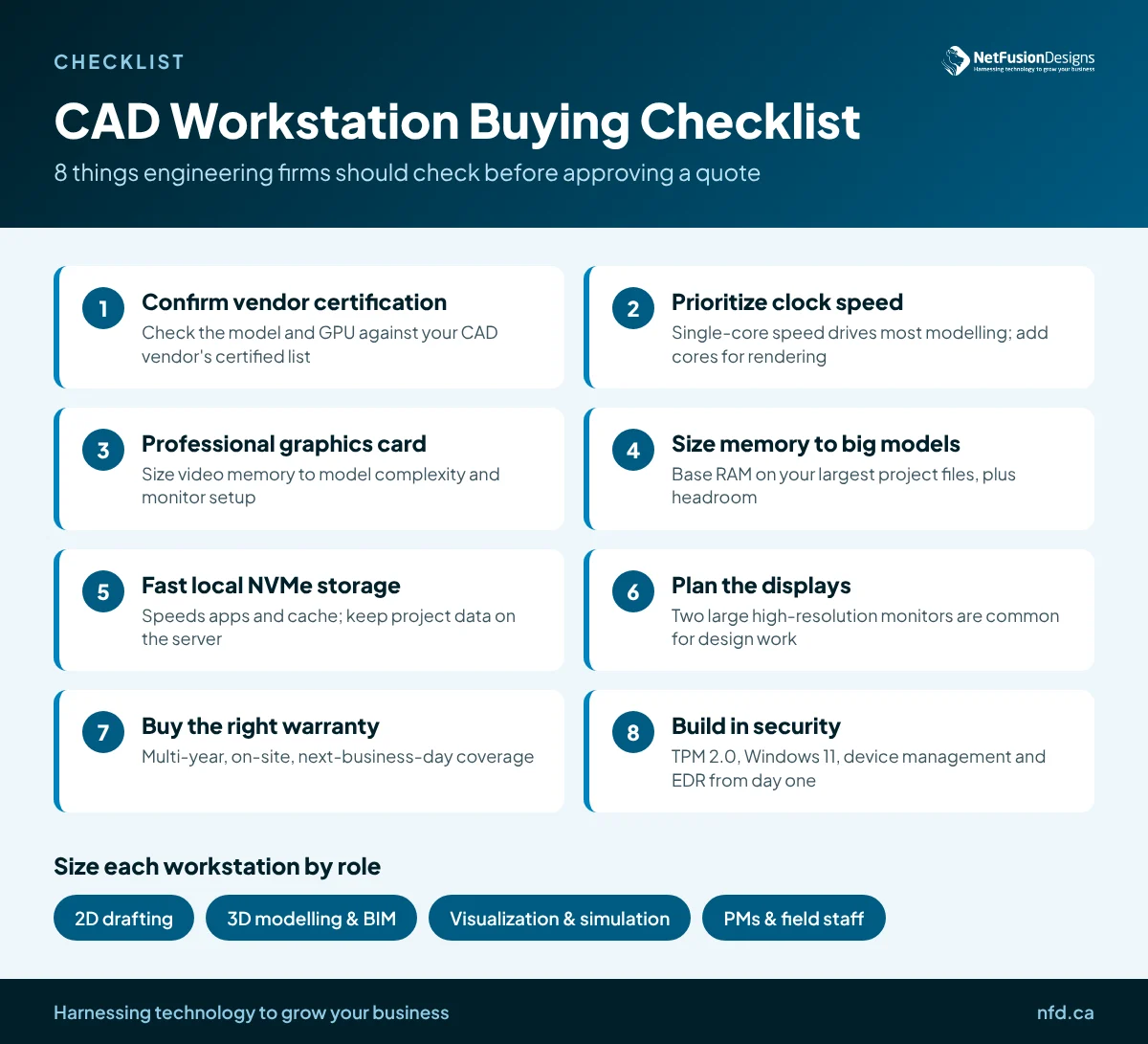
Before you approve a quote, check every workstation against the same short list.
For most firms the answer is a mix: physical workstations for heavy daily modelling in the office, and cloud workstations where flexibility matters more than raw local performance.
GPU-backed cloud workstations run in a data centre and stream the desktop to any device. They suit a few situations well:
The trade-offs are real. Cloud workstations depend on a stable, low-latency internet connection, the monthly cost adds up for full-time power users, and graphics-heavy work can feel less responsive than a local machine. Run a pilot with your actual models and your slowest office or site connection before committing.
Plan replacements on a schedule tied to warranty, software requirements and user experience rather than waiting for machines to fail.
Demanding CAD seats usually feel their age sooner than office PCs, because each new software release and each larger project asks more of the hardware. Many firms set a cycle of roughly three to five years for workstations and cascade older machines to lighter roles, such as moving a former BIM workstation to a 2D drafter. Our guide on how often a business should replace computers covers the budgeting side in more detail.
Operating system support matters too. Windows 10 reached end of support in October 2025, so any CAD machine that still can't run Windows 11 should be at the front of the replacement queue.
A well-chosen workstation only stays productive if drivers, updates, backups and security are managed deliberately.
NetFusion Designs (NFD), a SOC 2 Type II certified managed IT provider headquartered in Kitchener-Waterloo, supports engineering and design teams across Ontario, Quebec and Manitoba. We help firms define workstation standards by role, source and deploy hardware, manage drivers and updates, and protect every endpoint. Learn more about our managed IT for engineering and architecture firms, or see our business hardware sales and leasing options.
For serious 3D and BIM work, yes. Professional graphics cards use driver branches that CAD vendors test and certify, which reduces display errors, crashes and support headaches. Consumer cards can run some CAD software, but if something goes wrong on uncertified hardware, the vendor may not help. For light 2D drafting, an entry-level certified card is usually enough.
It depends on the size and complexity of the models your team opens, not on a single number. Look at your largest project files, check your software vendor's published system requirements, and add headroom so the machine still performs as projects grow over its lifespan. BIM, point cloud and simulation users need noticeably more memory than 2D drafters.
A certified mobile workstation handles many modelling tasks well, and it suits engineers who split time between the office, client meetings and sites. It will usually trail a desktop with similar specs on sustained rendering or analysis because of cooling and power limits. Pairing a mobile workstation with a dock and large monitors works well for hybrid roles.
They can be, when they are configured properly. Because models stay in the data centre rather than on laptops, a lost device exposes far less. Security still depends on the basics: multi-factor authentication, conditional access, encryption, monitoring and backups. Confirm where the data is hosted if your clients require it to stay in Canada.
Choosing the right CAD workstation is one of the simplest ways to give your engineers back time on every project. If you would like help building a workstation standard, planning a refresh or testing cloud workstations with your own models, talk to the NFD team.