Manufacturers run on nine core system types: ERP, MES, SCADA, PLC/DCS, IIoT/edge platforms, PLM/PDM, QMS, CMMS, and BI/analytics, with CRM tying customer orders back into the mix. The ISA-95 standard explains how these layers stack together, from boardroom planning down to the sensor on a conveyor belt. The rest of this article breaks down what each one does, where it fits, and how to pick the right combination for your plant.
TL;DR:
- Most manufacturers should layer their systems according to ISA-95 levels, maintaining clear boundaries between planning, execution, and control to prevent decision-making failures.
- Selecting systems aligned with the specific production type and regulatory requirements ensures efficiency, especially for regulated sectors that need built-in compliance features.
- Proper integration relies on ongoing maintenance and realistic change management practices, including phased rollouts, operator training, and clear ownership of data boundaries.
- Cloud solutions generally offer faster implementation and easier scaling, but on-premise setups remain critical for plants with strict data residency or unreliable connectivity.
- Security measures should focus on network segmentation and deliberate update policies rather than relying solely on traditional endpoint detection tools, to protect OT environments.
Every manufacturing IT stack answers three questions: what should we make, what are we making right now, and did the machine do what we told it to. Different system types answer different questions, and confusing them is where most technology budgets get wasted.
Here’s how the core categories break down by function:
A few of these deserve extra attention because they’re widely misunderstood:
ISA-95 gives manufacturers a shared vocabulary for who owns what, and it does that by time horizon rather than department. The tighter the loop, the lower the level.
Production software works best treated as a layered stack aligned to these five levels, and the layering exists for a reason: each system is built for its own decision speed. Ask an ERP to do something Level 1 should own, like adjusting a cycle-level setpoint in real time, and you get the most common failure mode in manufacturing IT: a system built for monthly planning trying to make a decision that needs to happen in milliseconds. It can’t, latency and batch processing make sure of that, and the workaround teams build to compensate usually becomes a bigger maintenance headache than the original problem.
The fix isn’t picking a “better” system. It’s keeping each layer in its lane and building clean integration points between them.
Start with your production type, not a vendor’s feature list. Discrete manufacturing (assembling distinct units), process manufacturing (continuous or batch chemical/food production), job shop work (custom, low-volume runs), and regulated environments (pharma, aerospace, medical devices) each pull toward different MES and QMS configurations. A job shop needs flexible routing and quick reconfiguration; a regulated process plant needs rigorous batch records and electronic signatures baked in from day one.
Pro Tip: Ask every MES or SCADA vendor to show you a live data exchange with your actual ERP instance during the sales process, not a slide. If they can’t do it on the spot, budget extra time and money for the integration phase.
The security playbook that works for office laptops can knock a production line offline if you apply it to a PLC. Industrial networks need a different approach, one built around segmentation rather than blanket enterprise policy.
Segment IT and OT traffic with an Industrial DMZ. Guidance from Rockwell Automation recommends explicit segmentation between enterprise and industrial networks so office traffic never touches deterministic control communications directly.
Govern updates deliberately. A routine Windows patch pushed enterprise-wide can crash an HMI running on an outdated OS if nobody excludes production assets from the rollout.
Back up production systems separately from office data, with recovery procedures tested against actual downtime scenarios, not just file restores.
Rethink monitoring for OT. Standard endpoint detection and response (EDR) tools often can’t run on a PLC. Segmentation itself acts as an operational safeguard, not just a security control, because it stops enterprise-side disruptions from ever reaching time-sensitive OT traffic in the first place.
Manufacturers that treat network segmentation as an afterthought tend to discover the gap during an incident, which is the most expensive time to learn it.
NetFusion Designs Inc is SOC 2 Type II certified and runs a 24/7 NOC, which matters more in manufacturing than most industries because a missed alert at 2 a.m. can mean a stopped line by 6 a.m.
Support work for manufacturers usually spans a few consistent areas:
The pattern that shows up across manufacturing engagements is straightforward: connect the shop floor’s data to the systems that need it, and keep OT traffic isolated from anything that could disrupt it. Author: Geeshan.
The vendor landscape splits cleanly by system type, and understanding that split saves you from evaluating an ERP vendor’s MES module against a dedicated MES specialist’s core product, which is rarely a fair comparison.
ERP coverage generally comes from large enterprise-suite providers offering integrated finance, procurement, and planning modules, often extended with manufacturing-specific add-ons. MES and MOM platforms range from standalone specialists focused entirely on shop-floor execution to modules bundled inside broader product lifecycle or operations platforms, with Autodesk’s Fusion Operations representing one example built specifically for monitoring, tracking, and controlling production from raw material through shipping. SCADA and HMI software tends to come from industrial automation vendors that also supply PLCs and field hardware, since tight integration between control layers matters more than best-of-breed shopping at Levels 0 through 2.
IIoT and edge platforms are the newest and most fragmented category, spanning protocol-translation specialists, cloud-hyperscaler edge offerings, and industrial automation vendors adding edge analytics to existing hardware. QMS and CMMS solutions often arrive as standalone best-of-breed tools rather than suite modules, because quality and maintenance teams frequently have different priorities than the ERP buyer.
The practical takeaway: evaluate each layer against specialists in that layer first, then check integration compatibility with what you already run, rather than assuming one vendor’s “full suite” claim covers every level equally well.
A discrete parts manufacturer, a food and beverage processor, and a pharmaceutical plant all need the same five ISA-95 levels, but the systems that fill them look nothing alike.
In discrete manufacturing (think metal fabrication or electronics assembly), MES typically centres on work-order tracking, genealogy, and defect capture at each station, feeding OEE dashboards that plant managers check daily. Process manufacturers, such as chemical or food producers, lean harder on batch control at the SCADA layer and need MES that can handle recipe management and ingredient traceability, often because regulatory audits demand it.

Regulated sectors like pharmaceuticals and medical devices push QMS and MES closer together than almost any other industry, since electronic batch records and validated audit trails aren’t optional; they’re the difference between a passable inspection and a shutdown order. Case-study research on manufacturing IT infrastructures confirms this pattern directly: considerable variation exists between plants, and tailoring the stack to actual process requirements, rather than copying a competitor’s architecture, is standard practice among plants that get implementation right the first time.
The common thread across every sector: successful digital transformation is rarely about replacing every system at once. It’s about making sure each layer in the stack communicates reliably with the ones next to it.
The most common deployment failure isn’t a bad system choice; it’s underestimating change management on the shop floor. Operators who’ve run a process manually for a decade won’t trust a new MES screen just because IT says it’s more accurate.
A few patterns show up repeatedly in stalled or failed rollouts:
Best practice looks almost boring by comparison: pilot on one line, measure before and after, get operator buy-in before the second rollout, and build integration maintenance into someone’s actual job description rather than hoping it happens organically. Manufacturers looking for a practical factory-focused guide to sequencing these rollouts tend to find the phased approach far less disruptive than a single big-bang cutover.
Regulatory pressure doesn’t just influence which systems manufacturers choose; it determines which features inside those systems are mandatory rather than optional.
Pharmaceutical and medical device manufacturers need electronic records and signatures that meet FDA 21 CFR Part 11 requirements, which pushes MES and QMS vendors to build validated audit trails directly into their core product rather than as an add-on. Food and beverage producers need traceability systems capable of supporting recall processes under regulations like FSMA in the US or CFIA requirements in Canada, meaning batch and lot tracking in MES isn’t a nice extra; it’s the mechanism that limits liability during a recall event.
Automotive and aerospace suppliers typically need to demonstrate quality management aligned with standards like IATF 16949 or AS9100, which shapes how QMS and MES exchange non-conformance data. Meanwhile, ISA-95 itself isn’t a regulatory requirement anywhere, but it’s become the de facto reference architecture auditors and integrators use to assess whether a manufacturer’s system responsibilities are cleanly separated, which matters during compliance reviews even when no regulation names the standard directly.
The practical implication: pick systems with compliance-relevant features already built in for your sector, rather than assuming you can bolt on audit trails and traceability later. Retrofitting compliance into a system that wasn’t designed for it is almost always more expensive than buying it correctly the first time.
Most vendor pitches start with features and work backward to justify the sale. That’s the wrong order for manufacturing IT, and it’s why so many plants end up with three overlapping tools that each do 60% of what’s needed.
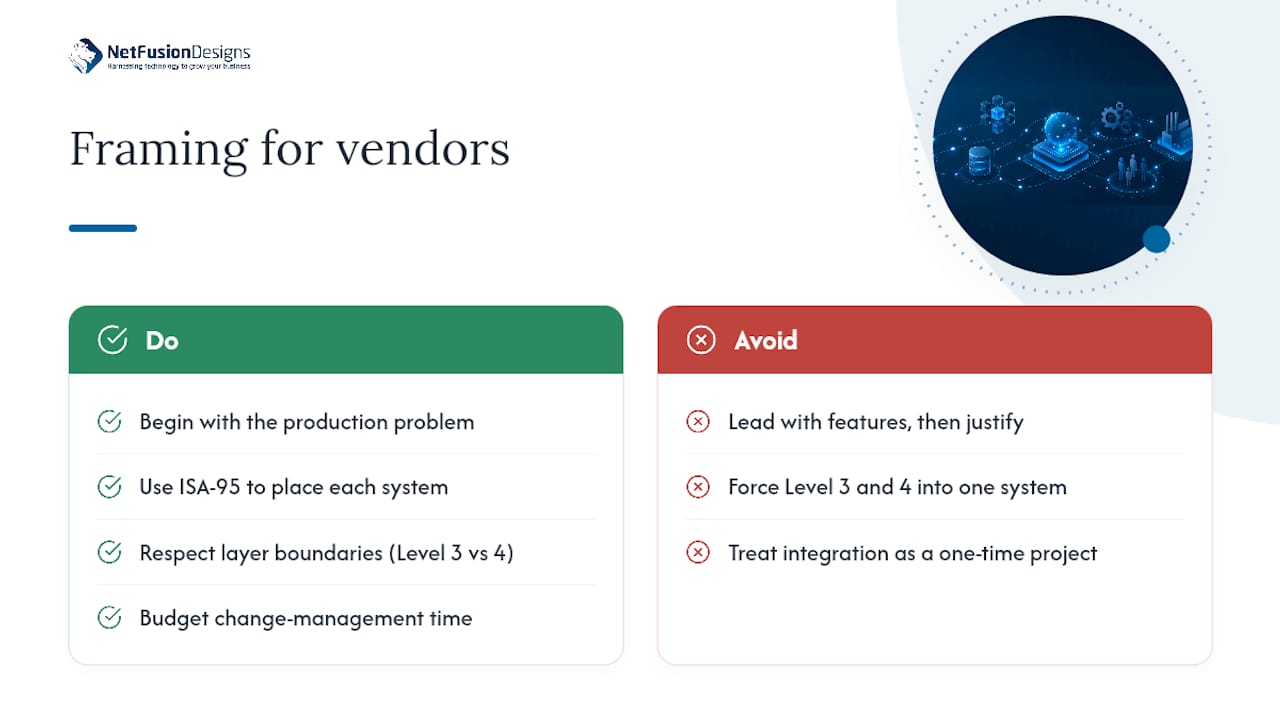
The ISA-95 model isn’t academic decoration. It’s a diagnostic tool. If you can’t say which level a proposed system lives in and what time horizon it owns, you don’t yet understand what problem it solves, regardless of how good the demo looked. The conventional advice, “get everyone on one integrated platform,” sounds efficient but ignores that Level 3 and Level 4 problems move at fundamentally different speeds. Forcing them into one system usually means one layer gets compromised to fit the other.
What actually works is boring: know your production type, respect the layer boundaries, segment your OT network before you need to, and budget change management time as seriously as you budget the software licence. Manufacturers who get this right treat integration as ongoing maintenance work, not a one-time project milestone. That mindset shift matters more than any single vendor choice.
— Geeshan
Manufacturers rely on ERP, MES, SCADA, PLC/DCS, IIoT/edge platforms, PLM/PDM, QMS, CMMS, BI/analytics, and often CRM, each mapped to a different level of the ISA-95 model based on how fast that layer needs to make decisions.
MES sits between ERP and SCADA, handling shift-level scheduling, quality tracking, and traceability, while ERP plans days to months ahead and SCADA supervises equipment in minutes or seconds.
ISA-95 is a five-level framework (Levels 4 through 0) that assigns manufacturing responsibilities by time horizon, from enterprise planning down to sensor-level control, and it helps teams avoid asking one system to do another’s job.
Cloud-native MES generally cuts implementation time and scales more easily for most manufacturers, but sites with strict data residency rules, unreliable connectivity, or heavy regulatory oversight often still choose on-premise deployments.
Standard enterprise security tools like broad EDR agents often can’t run on PLCs, so manufacturers instead rely on network segmentation, commonly through an Industrial DMZ, to keep enterprise traffic from disrupting real-time production communications.
%20(1).avif)
%201.avif)