For most SMBs managing multiple locations, a centralised SD-WAN hub with clear network zoning and cloud-hosted services gives the best trade-off of simplicity, security, and cost. This setup scales as you add sites, limits the blast radius of a breach, and cuts the daily operational load on a small IT team. Before choosing hardware or carriers, run a site inventory and connectivity audit so every later decision rests on real numbers, not guesswork.
TL;DR:
- Most SMBs should implement a centralised SD-WAN hub with proper network zoning and cloud services to balance simplicity, security, and cost.
- Network design must account for diverse site connectivity, including failover plans for satellite, cable, or wireless links, especially with limited IT staff.
- Cloud-managed firewalls, switches, and controllers simplify management and support standardized hardware across locations, reducing spares and training needs.
- Hub-and-spoke topologies suit up to ten sites, while SD-WAN enables dynamic traffic steering over mixed links once growth exceeds that scale.
- Network zoning and segmentation, such as guest and finance zones, are crucial for limiting breach impact and are recommended even in small-business environments.
Every multi-site network design for SMBs runs into the same wall eventually: there is no large IT department behind it. A single administrator, or a two-person team, is often responsible for every site, every vendor, and every incident. That reality should drive the design, not a feature list from a hardware vendor.
Internet links vary site to site. One office might sit on a fibre connection with symmetrical speeds; another, in an industrial park or a smaller town, might depend on cable or even fixed wireless. A design that assumes uniform link quality will fail at the weakest site; failover planning has to be part of the architecture from day one, not an afterthought.
Legacy on-premises systems, old file servers, local domain controllers, unpatched network-attached storage, add attack surface at every site that runs them. Each additional on-prem system is another thing to patch, monitor, and secure, multiplied by the number of locations.
Budgets are also tight enough that Wi-Fi performance, voice quality, and cloud application speed all compete for the same dollars. A few constraints recur across almost every SMB rollout:
Recognizing these constraints early keeps the design grounded in what a small team can actually run day to day.
A multi-site rollout does not need enterprise data centre gear at every branch. It needs the right few components, sized correctly, and bought with support in mind.
At the access layer, PoE gigabit switches should match the number of access points, phones, and cameras at that site, with enough ports left over for growth. Oversizing by a port or two at purchase time is cheaper than a second truck roll later. Access points should be sized to the floor plan and user density rather than the cheapest unit available: a small office with twenty desks has very different coverage needs than a warehouse with the same headcount spread over open space.
At the edge, you are choosing between a traditional next-generation firewall (NGFW) at each site and a cloud-managed firewall-as-a-service (FWaaS) model that centralizes policy and logging. The cloud-managed route tends to suit SMBs better because policy changes propagate to every site at once instead of requiring a technician to touch each box.
Controllers follow the same logic. Cloud-managed Wi-Fi and switch controllers let one person oversee ten sites from a single dashboard, where local controllers require someone on-site, or remote hands, for every firmware update.
Pro Tip: Standardize on one switch and access point vendor family across all sites; it cuts spare-parts costs and means your team only needs to master one management console.
Three connectivity patterns dominate multi-site network design, and each fits a different stage of growth.
Beyond SD-WAN, Secure Access Service Edge (SASE) and its security-focused subset, Security Service Edge (SSE), extend the model by combining networking and security into one cloud-delivered service. A joint CISA guide on modern network access security describes SASE and SD-WAN as valid replacements or complements to traditional VPNs, provided the migration protects the control plane with multi-factor authentication, telemetry, and version control rather than rushing the cutover.
Sequencing matters more than the label on the technology. A sensible path runs: hub-and-spoke for core connectivity first, SD-WAN overlay once you have more than three or four sites with mixed link quality, then SASE/SSE as your security needs around remote and hybrid staff grow. Our overview of cloud-delivered security tools covers how SASE and SSE options fit into that later stage.
Network security zoning is not an enterprise-only discipline. The Government of Canada’s baseline requirements define four zones, the Public Access Zone (PAZ), the Operations Zone (OZ), the Restricted Zone (RZ), and the Management Zone (MZ), connected through defined Zone Interface Points (ZIPs) that control what traffic can cross between them. This model, documented in ITSP.80.022, gives SMBs a template rather than a blank page when deciding how to segment a site.
In practice, that means guest Wi-Fi lives in its own zone with no path to internal file shares. Printers and IoT devices sit in an operations zone separate from finance systems. VoIP traffic gets its own VLAN so a compromised laptop cannot eavesdrop on calls. Finance and HR systems sit in a restricted zone with the tightest access controls and logging.
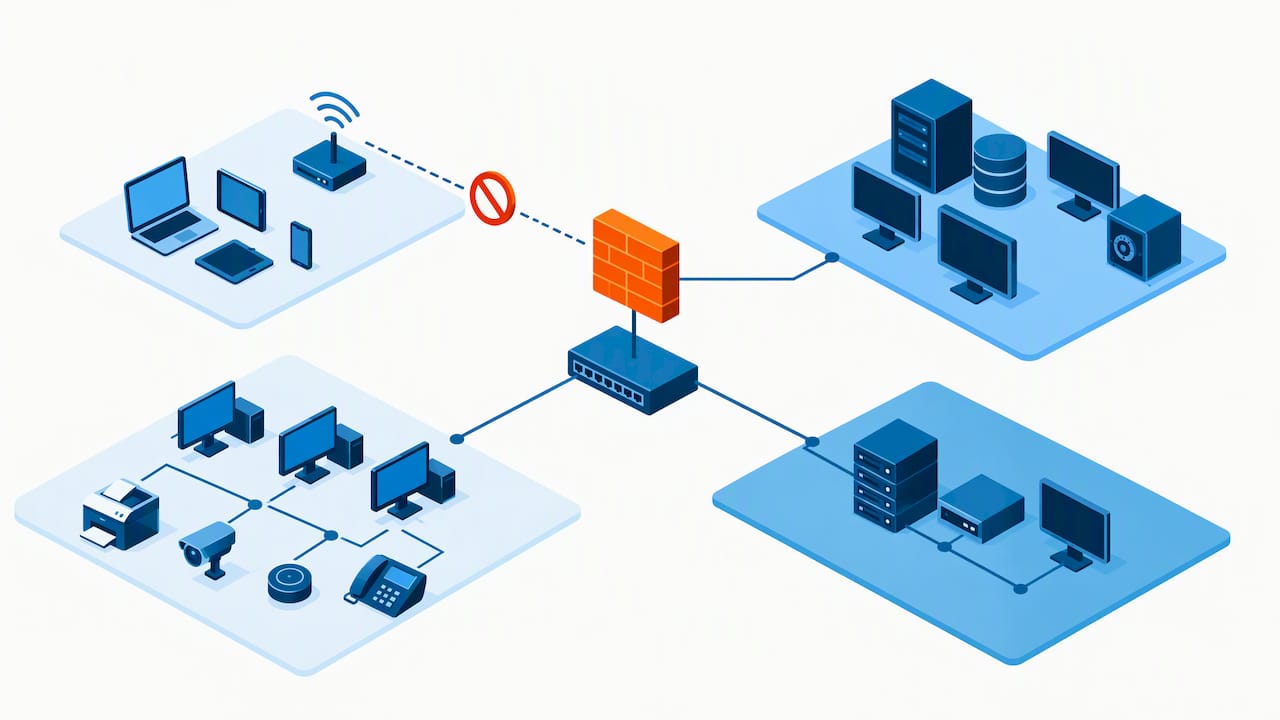
Network zoning like PAZ, OZ, RZ, and MZ is foundational to defence-in-depth architecture, and it works at the scale of a ten-person office just as it does at a large enterprise, because the principle, limiting what can talk to what, scales down cleanly.
At each zone edge, a few controls do most of the work:
That same zoning discipline is what limits third-party and vendor risk: a contractor who needs access to one printer fleet should never land on the same segment as payroll, a point our piece on VPN access for remote teams also covers from the access-control side.
Site-to-site connectivity options are not mutually exclusive, and most multi-site networks end up running more than one.
Standards-based IPsec VPN remains viable for smaller deployments or as a backup path, but it needs to be configured to published hardening guidance, not left on vendor defaults. Joint CISA and NSA guidance on VPN hardening flags remote-access VPNs as a frequent entry point for ransomware when left unpatched or weakly configured, which is reason enough to review cipher suites, disable legacy protocols, and enforce multi-factor authentication on every tunnel. Our comparison of Citrix, RDS, and ZTNA access models walks through how these options differ for staff who need remote access rather than just site-to-site links.
SD-WAN earns its place in a mixed-link environment: when one site has fibre and another has cable or LTE, SD-WAN actively steers SaaS and voice traffic to whichever path performs best at that moment, instead of relying on static routing.
Dedicated circuits and cellular failover round out the resilience picture. A dedicated MPLS or fibre circuit guarantees bandwidth for a site that cannot tolerate downtime, while an LTE or 5G failover link keeps card payments and basic connectivity alive during an outage.
That last point matters regardless of which connectivity mix you choose: visibility into link health and configuration history is what turns an outage into a quick fix instead of a guessing game.
A staged rollout beats a big-bang migration almost every time. Pick one representative site, ideally one with average link quality and a normal mix of users, and validate the design there before touching anything else.
A small pilot with clear KPIs for latency, app performance, and failover is one of the strongest predictors of a smooth rollout across the remaining sites, because it surfaces vendor and carrier issues before they are multiplied across a dozen locations.
Pro Tip: Build your rollback plan before your rollout plan. Knowing exactly how to revert a site to its last known-good configuration removes most of the pressure from a pilot gone wrong.
Reducing what you run on-premises is one of the most effective levers available to a small IT team, because it shifts patching, monitoring, and resilience onto a provider built for that job. CISA’s cyber guidance for small businesses recommends migrating services such as email and file storage to managed cloud platforms specifically because it reduces the attack surface a small team has to defend directly.
A sensible migration order starts with email and identity, since most other services depend on them, followed by file storage, then line-of-business applications once the identity foundation is stable. Before migrating anything, confirm backup coverage for the data being moved and map which local systems depend on the on-prem directory you are retiring.
Our guide to Microsoft 365 optimization covers the practical side of this migration path for email and file services specifically, including the configuration choices that matter most for a distributed, multi-site workforce.
Where IPsec VPN remains part of the design, usually as a backup path or for a site not yet on SD-WAN, a few configuration habits matter more than the brand of hardware running it.
Use current, standards-based cipher suites and disable legacy protocols that a tunnel might default to out of the box. Enforce multi-factor authentication on any VPN endpoint that allows remote administrative access, not just user logins. Rotate pre-shared keys and certificates on a defined schedule rather than leaving them static for years.
Document every tunnel’s configuration in a central repository, with version history, so a change at one site does not silently diverge from your standard. Monitor tunnel uptime and throughput centrally rather than relying on a complaint from the branch office to flag a problem.
Segment what the VPN tunnel can actually reach once it lands. A site-to-site tunnel that dumps a remote office directly onto the flat core network undoes much of the value of zoning elsewhere in the design. Instead, terminate the tunnel into a defined zone with its own firewall policy, so a compromised device at one site cannot reach finance systems at another.
Finally, treat VPN configuration as a living document, not a set-and-forget task. Review hardening settings against current guidance at least annually, since cipher recommendations and known vulnerabilities change faster than most SMB IT teams revisit their VPN settings on their own.
Multi-site networks carry very different traffic types on the same limited circuits: voice calls, video meetings, SaaS applications, and bulk file transfers all compete for the same bandwidth, often on a connection that was sized for email and web browsing a few years ago.
Quality of Service (QoS) policies are the first lever. Tagging voice and video traffic for priority treatment keeps a call from breaking up when someone in the next office starts a large backup job. Most managed switches and SD-WAN platforms support this natively, but it has to be configured deliberately rather than left at defaults.
Application-aware traffic steering, a core SD-WAN feature, goes further by routing specific applications over whichever link performs best at that moment rather than treating all traffic equally. A SaaS application like a cloud accounting platform can be steered over the fibre link while bulk backup traffic takes the secondary circuit.
Bandwidth monitoring at each site, visible centrally, flags which locations are approaching capacity before users start complaining. That visibility also supports planning: a site whose traffic has grown steadily over several quarters is a candidate for a circuit upgrade before it becomes a bottleneck.
Caching and local breakout for high-volume cloud services can also reduce strain on backhaul links, particularly for sites where most traffic is destined for the same handful of SaaS platforms rather than the central hub.
A multi-site network creates both a risk and an advantage for disaster recovery: more locations means more points of failure, but it also means sites can potentially back each other up if the design accounts for it.
Start with what actually needs to stay running: identify which applications and services are critical at each site, and work backward to the recovery time and recovery point objectives that matter for each one. A retail location’s point-of-sale system has very different continuity requirements than a back-office file share.
Backups need to live somewhere the local failure cannot reach, which usually means cloud backup rather than a second on-site device at the same location. Our overview of cloud backup and disaster recovery services covers how that separation works in practice for distributed, multi-site organizations.
Failover planning at the network layer matters as much as data backup. A site with cellular failover and a documented process for rerouting traffic through the central hub during an outage recovers in minutes rather than hours. Document the failover process itself, who gets notified, what gets rerouted, and how staff are told to proceed, because a plan that exists only in one person’s head fails the same moment that person is unavailable.
Test the plan periodically rather than assuming it works. A documented recovery process that has never been rehearsed tends to reveal gaps at the worst possible time.
We have certification and run a network operations center around the clock, which supports the centralized monitoring, zoning, and staged rollout recommended above. Our managed IT services and local teams, including our Kitchener-Waterloo presence, apply this same architecture across the SMB clients we support.
Multi-site networking punishes guesswork. Every extra site multiplies the cost of a weak decision made early, while a documented pilot with real telemetry catches problems before they spread. The businesses that do this well are not the ones with the biggest budget. They are the ones that resisted the urge to roll out everywhere at once and treated the first site as a test, not a formality.
— Geeshan
We built our managed IT services around the problem of distributed sites, thin internal IT teams, and the need for predictable monthly costs instead of surprise invoices. 
A first engagement typically starts with a network and connectivity audit, moves into a pilot site to validate the design, and then expands into a fully managed plan with 24/7 NOC monitoring and SOC 2 Type II backed security once the pattern is proven. If you are ready to move past spreadsheets and start with a real audit of your sites, visit our Managed IT Services page to get started.
Timelines depend heavily on site count and existing infrastructure, but a staged approach, pilot site first, then phased expansion, generally moves faster than a single big-bang cutover. Expect the pilot and validation phase to take longer than any individual site rollout that follows it.
Site-to-site VPN remains viable for smaller deployments or as a backup path, especially when hardened to published guidance. SD-WAN tends to suit businesses with more than a few sites and mixed-quality links, since it steers traffic dynamically rather than routing it statically.
Network zoning separates systems into zones such as the Public Access Zone, Operations Zone, Restricted Zone, and Management Zone, connected through controlled interface points, as defined in Government of Canada guidance. The principle scales down to small businesses just as it scales up for larger organizations, since isolating guest Wi-Fi, finance systems, and operations traffic limits how far a breach can spread.
Yes, our managed IT services cover networks and telephony, security operations, and 24/7 monitoring across multiple sites, backed by SOC 2 Type II certification. Pricing depends on the scope of each engagement and is available on request.
Email and identity typically come first, since most other systems depend on them, followed by file storage once multi-factor authentication is enforced. CISA guidance recommends this migration path specifically to reduce the on-premises attack surface a small IT team has to manage directly.
%20(1).avif)
%201.avif)