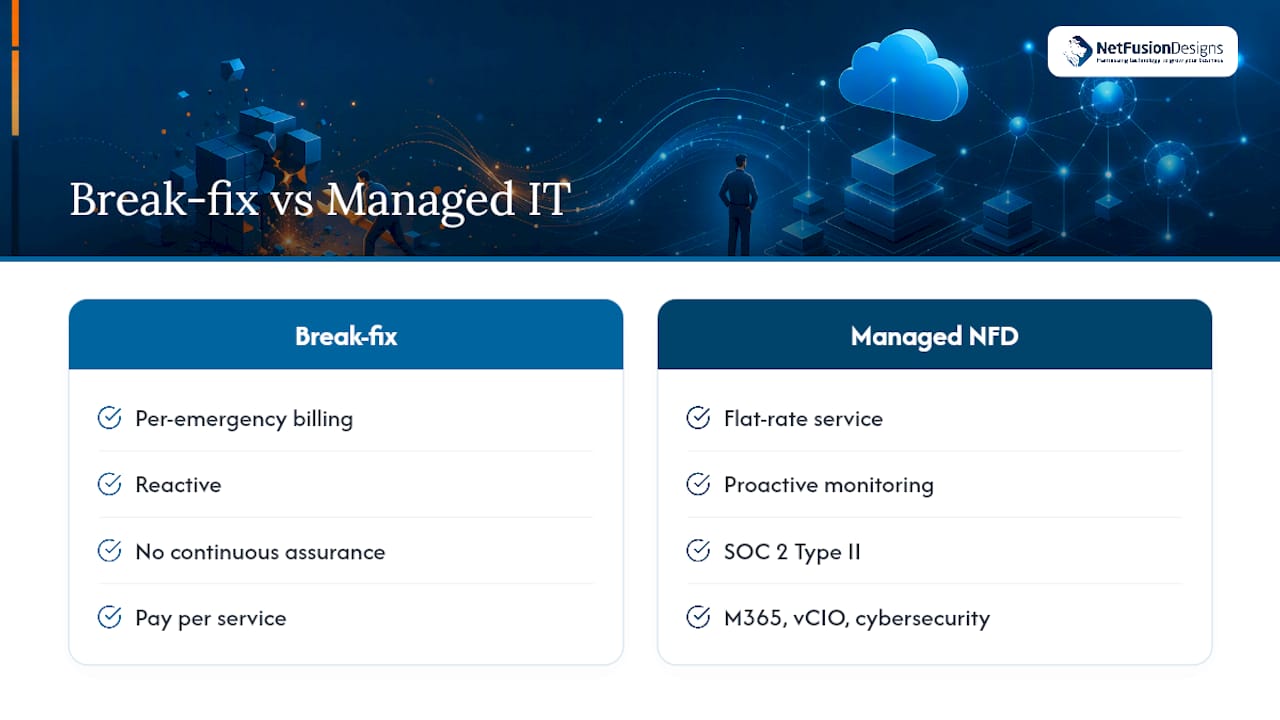
Break-fix IT means paying a technician only when something breaks. Managed IT means paying a fixed monthly fee to a provider whose job is making sure nothing breaks in the first place. That single difference in incentive changes almost everything about cost, risk, and how your business runs day to day.
The decision rule is simpler than most IT proposals make it sound: if downtime, security, or growth actually matter to your business, managed IT almost always wins on cost and risk over a full year. Break-fix still makes sense for a genuinely small, low-dependency setup.
Managed IT costs more per month than break-fix but usually costs less per year, because prevention is cheaper than the emergencies it avoids.
| Point | Details |
|---|---|
| Break-fix fits narrowly | Works for very small teams with minimal technology dependency and low downtime cost. |
| Managed IT changes incentives | Providers profit from uptime instead of incidents, which is why monitoring and patching come bundled in. |
| TCO beats monthly price | Compare annual total cost, including surcharges and downtime, not just the base subscription or hourly rate. |
| Expect a stabilization phase | Incident counts often rise in the first 30 to 90 days as a new provider audits and remediates legacy issues. |
| NetFusion Designs delivers the model | SOC 2 Type II certification, a 24/7 NOC, and managed security/vCIO services back a phased, low-disruption transition. |
Break-fix is the oldest model in the industry, and it is exactly what it sounds like. Something fails, you call a technician, they fix it, and you get billed for the visit. There is no ongoing relationship between incidents. Here is what that workflow typically looks like in practice:
The cost mechanics matter more than most business owners realize going in. Hourly rates vary widely, minimums apply regardless of how small the job is, and after-hours or weekend work usually carries a surcharge on top of the base rate. Parts and replacement hardware get billed separately, with markup.
What break-fix typically does not include is the longer list: no continuous monitoring, no proactive patching, no managed backup verification, and no security posture review from proactive website security monitoring. You are paying for the fix, not for prevention. That gap is fine for a business with minimal technology dependency and a handful of users, where an occasional outage is an inconvenience rather than a crisis. It becomes expensive fast once your team, your data, or your customers depend on systems staying up.
Managed IT flips the financial logic of IT support. Instead of billing for time spent fixing problems, a managed service provider (MSP) charges a flat subscription, usually priced per user or per device, sometimes structured into tiers based on service depth. That single change means the provider now profits from your systems staying healthy, not from them breaking.
A typical managed IT package for a small or mid-sized business bundles several layers of protection that break-fix simply does not touch:
Typical managed inclusions in 2026 also extend to monthly patching cadences and encrypted backups with tested restore procedures as a baseline, not an upsell. Service level agreements (SLAs) usually spell out response time targets by severity, escalation paths when a technician cannot resolve an issue on the first pass, and sometimes uptime commitments for hosted infrastructure.
The incentive shift is the part most business owners underestimate. A break-fix shop makes more money when your server crashes. An MSP makes more money when it doesn’t, because emergencies cost the provider labour they aren’t billing for separately. That single change in who profits from stability versus incidents is the real distinction between the two models, not just the pricing structure on the invoice.

Pro Tip: Ask any prospective provider what percentage of their revenue comes from break-fix work versus flat-rate contracts. A provider still doing a lot of hourly billing on the side has less reason to keep your systems from breaking.
Cost is the first thing owners compare, and it is also the easiest one to get wrong by looking at a single month instead of a full year. Break-fix looks cheaper when nothing breaks. Then one bad month, a server failure, a phishing incident, a compliance audit, wipes out a year of savings in emergency labour, after-hours surcharges, and lost productivity. Reactive support creates hidden costs beyond the invoice: lost productivity, emergency surcharges, and repeated fixes for the same root cause that was never actually diagnosed. Managed IT trades that volatility for a flat, predictable line item, which tends to lower total cost of ownership for many SMBs by reducing the frequency and severity of incidents rather than just spreading the cost evenly.
Downtime risk tells a similar story from a different angle. Break-fix has no one watching your systems between calls, so failures get caught after they’ve already stopped work. Managed IT catches most problems before an employee notices, because monitoring and patching are baked into the service rather than billed separately after something already broke. The real cost of an outage on a busy floor tends to dwarf a subscription fee once you count idle wages and missed deliverables.
Security and insurability diverge sharply too. Many cyber insurance applications now ask about patch cadence, EDR deployment, and backup testing, none of which a break-fix arrangement documents by default. Managed providers generate that paperwork as a byproduct of doing the work.
Scalability and accountability are the two dimensions that quietly decide whether a growing business regrets its choice. A managed contract scales by adjusting the per-user count. A break-fix relationship has to be re-negotiated, re-explained, and re-diagnosed with every new hire or added system, because no one at the vendor owns your environment as a whole.
Some traits point toward managed IT clearly enough that the decision barely requires debate. Businesses with more than about 10 users, or with regulatory and compliance obligations, generally see better total cost of ownership and lower risk under a managed model., while very small teams with minimal technology dependency can still get by on break-fix. Run through this checklist before signing anything:
If you’re evaluating a managed provider, ask specifically about SLA response times by severity level, which tools they use for monitoring and endpoint protection, how often they test backup restores (not just run backups), and for two or three examples of incidents they’ve handled for similarly sized clients. Practitioners in the field also recommend asking how a provider measures success internally, whether that’s mean-time-to-resolve targets, uptime percentages, or broader business-value metrics, rather than accepting a vague answer about “keeping things running.”
If you’re still comparing against a break-fix supplier, ask about guaranteed response windows, on-site visit minimums, after-hours rates, and what happens if the same problem recurs three times in a month. A supplier who cannot answer the recurrence question clearly is one who bills for symptoms, not causes.
Pro Tip: Watch for proposals that quote a low monthly number but exclude backup, security tooling, or after-hours support as “add-ons.” Ask for the fully loaded price before comparing it to anything else.
Red flags worth walking away from include vague SLA language with no numeric response targets, no documented backup testing schedule, and reluctance to name specific tools they use for monitoring or endpoint detection.
Switching models is not a light-switch change, and expecting it to feel that way is where most transition frustration comes from. Moving from break-fix to managed services typically starts with an audit and remediation phase, because the new provider needs to know exactly what they’re inheriting before they can commit to an SLA.
That audit covers more ground than most owners expect:
Expect incident counts to rise, not fall, during the first few weeks. That is not the new provider creating problems, it’s them finding problems that were already there and previously invisible without monitoring. A sensible transition follows a rough 30/60/90-day rhythm: the first month focuses on stabilization and closing the most urgent security gaps, the second month on standardizing documentation and access, and by the third month the environment should be running under normal monitoring with incident volume settling toward baseline. Track success with concrete metrics rather than gut feel: ticket volume trend, patch compliance percentage, and backup test pass rate.
NetFusion Designs (NFD) operates as a SOC 2 Type II–certified managed IT and AI enablement provider, which means an independent auditor has verified our security controls hold up over time, not just on paper during a single review. That certification backs the monitoring, helpdesk, and security work described throughout this article, rather than sitting as a marketing claim disconnected from delivery.
Day-to-day, that looks like:
For a business coming off break-fix, the practical next step is usually a technology audit followed by a phased onboarding rather than a full cutover on day one, which keeps risk contained while the transition happens.
The conventional advice on this topic treats break-fix versus managed IT as a pricing question, and that framing is the mistake. Business owners compare the monthly number on a proposal and assume the cheaper one wins. It rarely does, because the number on the page never includes what happens the month something actually goes wrong.
The research supports a sharper judgement: this is a risk allocation decision disguised as a procurement decision. Break-fix doesn’t eliminate the cost of downtime, security gaps, or repeated failures. It just hides that cost until it lands, usually at the worst possible time, and usually larger than it would have been under a provider whose contract depends on preventing it.
Where I’d push back on typical guidance is the idea that managed IT is only for larger companies. The threshold isn’t headcount alone, it’s dependency. A ten-person firm running client data through cloud accounting has more at stake than a fifty-person operation doing light word processing. Count what you’d lose in a bad week, not how many people are on payroll, before deciding which model fits.
— Geeshan
If your business has outgrown the “call someone when it breaks” model, NetFusion Designs Inc offers a clearer path than piecing together break-fix relationships and hoping nothing coincides badly. Where break-fix bills you for every emergency, NFD’s managed IT model puts monitoring, patching, and backup verification into a single flat-rate service, backed by a SOC 2 Type II certification and a 24/7 NOC watching for problems before your team notices them.

This fits a business at the exact point this article describes: more than a handful of users, real dependency on cloud systems or customer data, and no appetite for a surprise five-figure downtime bill. NFD serves clients across Kitchener-Waterloo, Toronto, Markham, Mississauga, Montréal, and Winnipeg, with managed cybersecurity, Microsoft 365 optimization, and vCIO strategic planning included as standard rather than sold separately.
The practical next step is a technology audit, the same first move described in the transition section above, scoped to your current environment before anything changes. If you’re in the Mississauga area, you can start with NFD’s IT services for Mississauga businesses to see what a managed engagement would look like for your specific setup, or explore emergency IT support if you need an immediate fix while planning a longer-term move.
This article draws on published comparisons from managed services vendors and IT industry practitioners covering cost structure, transition planning, and hidden break-fix costs. Sources include analysis from NinjaOne, MSP Directory, Kaseya, and Charter Technology Solutions, each addressing a distinct piece of the cost and transition picture.
Break-fix means paying an IT technician only when something fails, billed per incident, usually by the hour with a minimum charge and no ongoing monitoring between calls.
It depends on scale: managed IT often costs less than a full in-house team for small and mid-sized businesses while providing 24/7 coverage, though larger organizations sometimes blend both models with an internal lead supported by a managed provider like NetFusion Designs.
Managed IT services means a provider delivers ongoing monitoring, patching, backup management, helpdesk support, and security under a flat subscription, with incentives aligned to keeping systems running rather than billing for failures.
A fixed-price break-fix quote covers a single job at an agreed rate, while managed services is an ongoing subscription covering monitoring, security, and support continuously, not a one-time project fee.
Incident counts often rise briefly during the first 30 to 90 days as a new provider audits your environment and finds long-standing issues, which typically settle once the stabilization phase is complete.
%20(1).avif)
%201.avif)