AI in the workplace is no longer a question of if — it's a question of how. Your employees are already using AI tools to draft emails, summarise meetings, analyse spreadsheets, and write proposals. The real question for small business owners is whether that's happening securely, with your knowledge, or in the shadows where you can't see the risks.
This guide walks through how small businesses can adopt AI practically and safely: what can go wrong, the policies and guardrails that prevent it, and how AI fits alongside the managed IT and cybersecurity you (hopefully) already have in place.
For hands-on help putting this into practice, see our AI solutions for small and mid-sized businesses.
Here's the uncomfortable starting point: in most small businesses, AI adoption has already happened — it just wasn't planned. Someone on your team has pasted a client list into a public chatbot to "clean it up." Someone else has uploaded a confidential proposal to get a quick summary. None of it was malicious. All of it was risky.
This is what's called shadow AI: the use of AI tools without IT oversight or company policy. It mirrors what happened with cloud storage and personal devices a decade ago. The tools are genuinely useful, so people reach for them. Without guidance, they reach for them in ways that can expose your business.
The answer isn't banning AI — bans don't work and they put you at a competitive disadvantage. The answer is adopting it deliberately, with the same care you'd apply to any system that touches your data.
Most AI incidents in small businesses aren't sophisticated attacks. They're ordinary mistakes with extraordinary consequences:
Pasting sensitive data into public AI tools. Free chatbots typically use your inputs to train their models. Client information, financials, HR matters, and proprietary documents pasted into a public tool may be retained, reviewed by humans, and potentially surfaced to other users. Once it's in, you can't take it back.
No policy, so no boundaries. Without a written AI acceptable-use policy, every employee improvises their own rules. One person's "harmless shortcut" is another person's data breach. Policies aren't bureaucracy — they're the difference between a consistent standard and thirty different interpretations.
Choosing tools on convenience alone. Not all AI tools handle data the same way. Business and enterprise tiers of major AI platforms offer data retention controls, no-training guarantees, and compliance certifications that free versions don't. Picking whatever's easiest usually means picking whatever's least protective.
Ignoring where AI meets existing security. AI tools connect to your email, your files, your CRM. Each integration is a new door into your systems. If your underlying IT security is weak — no multi-factor authentication, unpatched devices, no endpoint protection — AI just gives attackers a faster way in.
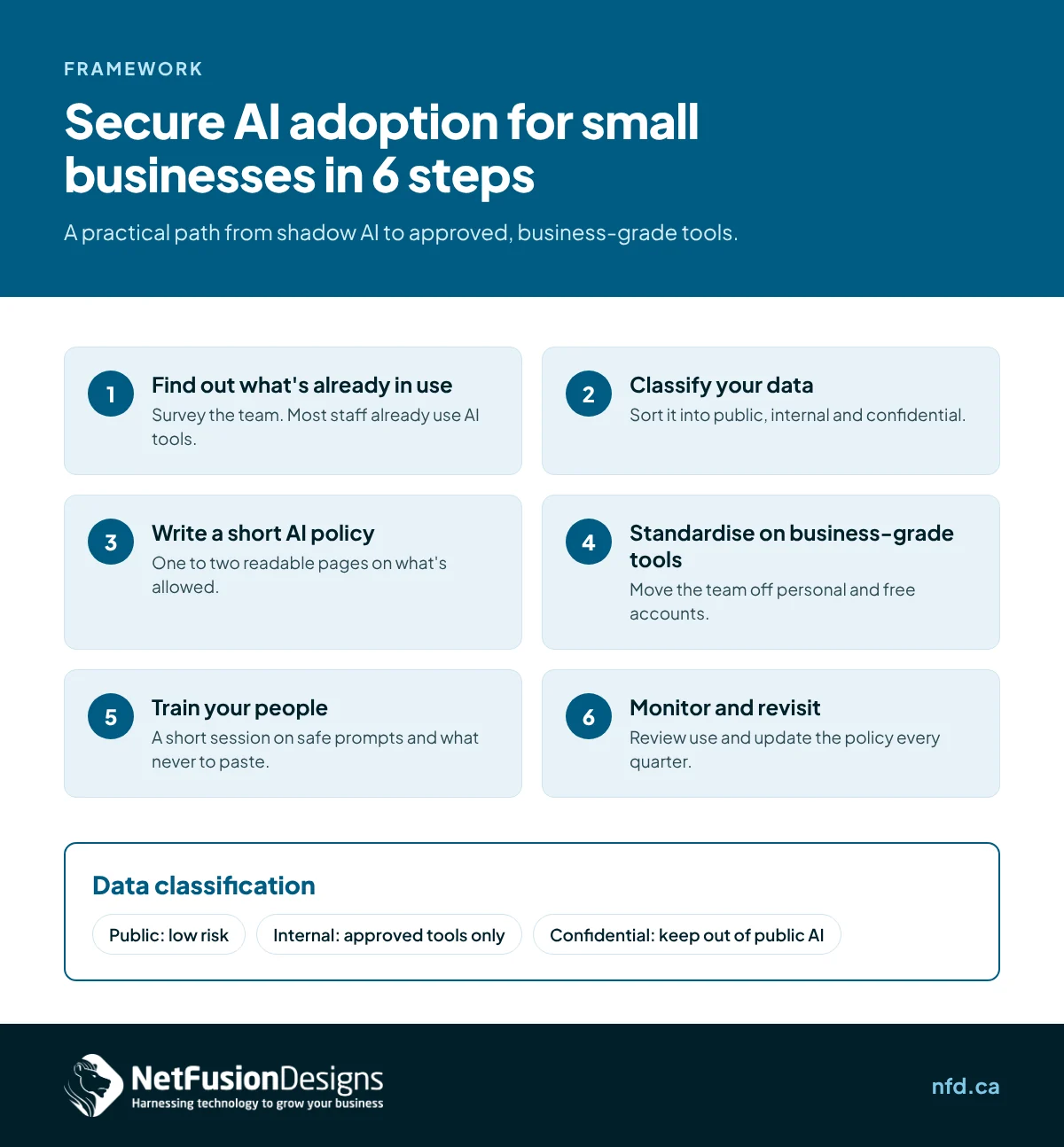
You don't need an enterprise AI governance program. You need a sensible sequence that a small business can actually execute:
Before writing a single policy, survey your team. Ask directly which AI tools people use for work and what they use them for. Frame it as curiosity, not an inquisition — you want honesty, not confessions. Your IT provider can also check for AI tool traffic on your network. You'll likely find more usage than you expected, which is exactly why this step comes first.
Not all information carries the same risk. Sort your business data into three buckets:
This classification becomes the backbone of your AI policy. Most employees handle AI safely once they understand which bucket their data falls into.
Keep it to one or two pages. Cover: which tools are approved for business use, what data can and can't go into AI tools, who approves new tools, and what happens with AI-generated content (review before sending to clients, for starters). Write it in plain language your team will actually read. A ten-page policy nobody opens protects no one.
Move your team off free consumer AI accounts and onto business tiers of established platforms. The business versions offer the controls that matter: guarantees your data won't train models, admin controls over who's using what, data residency options, and audit logs. The per-user cost is modest compared to the risk of a data incident — and centralised billing means you can see exactly what's in use.
A 30-minute session beats a 30-page document. Walk through real examples: what's fine to paste into the approved tool, what should never go near any AI, and how to spot AI-generated phishing (attackers use the same tools you do). Make it practical, make it specific to their roles, and repeat it when you onboard new staff.
AI tools evolve monthly. Schedule a quarterly review: what's in use, whether the policy still fits, whether new tools need evaluation. Your IT provider should fold this into their regular strategic reviews rather than treating it as a one-time project.
Here's the structural point most businesses miss: AI adoption isn't a separate initiative from IT and security — it's an extension of both. The same foundation that keeps your business safe generally is what makes AI safe specifically:
A provider that only does traditional IT support will struggle to advise on AI. A provider that only sells AI tools won't secure the foundation underneath them. You need all three working together, which is why the IT partner conversation and the AI conversation should be the same conversation.
If you're evaluating whether your current IT provider can support AI adoption — or choosing a new one — ask:
Vague answers to these questions are themselves an answer.
If you want to move from reading to doing, here's a realistic first month:
None of this requires a large budget or a dedicated AI team. It requires intention — and an IT partner who treats AI as part of the job, not someone else's problem.
Yes, with the right guardrails. Business-tier AI platforms with no-training guarantees and proper configuration are designed for commercial use. The risk comes from employees using free consumer tools with sensitive data and no policy — which is a governance problem, not a technology problem.
The opposite — AI raises the stakes for cybersecurity. AI tools connect to your systems and data, so weak access controls or unpatched devices become bigger liabilities, not smaller ones. Adopt AI only on top of solid security fundamentals: multi-factor authentication, endpoint protection, patched systems, and monitored networks.
Business tiers typically guarantee your data won't be used to train models, provide admin controls and audit logs, offer data residency options, and include contractual privacy commitments. Free consumer versions generally offer none of these. For any business use involving non-public data, the business tier isn't optional.
The tools themselves are modest — business AI subscriptions typically run a small per-user monthly fee. The larger investment is the governance: policy writing, training, and ongoing oversight. Most small businesses handle this through their existing managed IT provider rather than hiring dedicated staff.
Thinking about AI for your business? NetFusion Designs helps Ontario small businesses put practical AI to work alongside managed IT and cybersecurity — securely, and without the guesswork. We respond within 15 minutes during business hours (Mon–Fri, 8am–6pm ET). Call 647-476-5259 or reach out through nfd.ca.
%20(1).avif)
%201.avif)