Switching IT providers feels like a hassle, so most businesses put it off far longer than they should. The devil you know, the fear of downtime mid-transition, the sunk cost of the current relationship — it all adds up to inertia.
But staying with the wrong provider has its own cost, paid daily: slow responses, recurring problems, security gaps, and technology decisions made without you. If several of the signs below sound familiar, you've probably outgrown your IT provider already. The good news: switching is far less disruptive than most businesses expect, when it's done properly.
When you're ready to make the move, here's how we handle the switch to a new IT provider, including the handover from your current one.
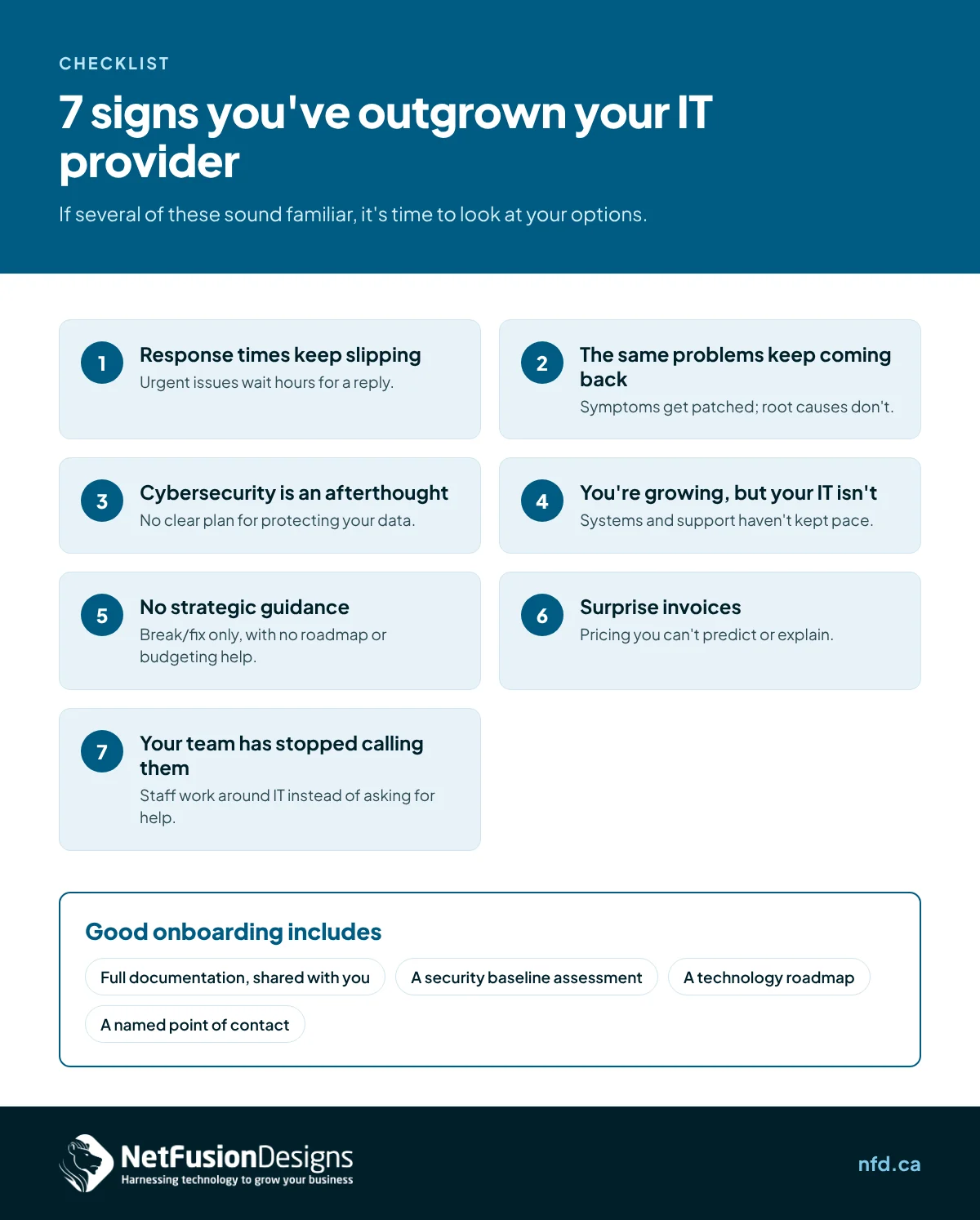
Remember when they used to answer quickly? If "we'll get back to you" has become the default and urgent issues sit for hours, something has changed — usually that you've become a smaller fish in their pond, or their team is stretched past capacity.
Occasional delays happen everywhere. A pattern of delays is a structural problem. Check your agreement: are they still meeting the response times they promised? If there were never any written response times, that's a separate red flag — and a reason the slippage has no consequences for them.
A printer that breaks monthly. Internet that drops every few weeks. The same malware alert on the same workstation. Recurring issues are the clearest signal your provider is fixing symptoms instead of causes.
Good IT support is boring: problems get resolved once, root causes get eliminated, and your ticket volume trends downward over time. If you're reporting the same categories of issues quarter after quarter, your provider is either not investigating properly or not resourced to fix things permanently. Either way, you're paying for activity instead of outcomes.
Ask yourself: when did your provider last talk to you about security without you bringing it up? If the answer is "never" or "during the sales pitch," you have a problem.
In the current threat landscape, cybersecurity can't be reactive. Your provider should be running phishing simulations, reviewing your defences regularly, enforcing multi-factor authentication, and briefing you on new risks — unprompted. If security only comes up as an upsell, or after an incident, your business is exposed and your provider is behind.
The systems that served you at 15 people start creaking at 40: the server that can't keep up, the ad-hoc file sharing that's become a liability, the phone system nobody can administer. Growth exposes every shortcut your IT was built on.
A good provider anticipates this. They plan capacity ahead of your hiring, standardise systems before they sprawl, and bring you a technology roadmap — not just a repair bill. If every growth milestone arrives as an emergency, your provider is reacting to your business instead of supporting it.
There's a simple test: when was the last time your IT provider came to you with a recommendation you didn't ask for? A better backup approach, a cost-saving consolidation, a security improvement, a plan for adopting AI tools safely?
If your provider only appears when something breaks, you don't have an IT partner — you have an expensive help desk. Technology should be discussed quarterly at minimum: what's working, what's aging out, what's coming next, and what it all costs. Silence between incidents isn't stability; it's neglect.
The monthly bill arrives and it's 40% higher than expected — again. Emergency rates, after-hours surcharges, project fees that were never quoted, hardware marked up without disclosure. If you can't predict what IT costs you in a given month, your provider's pricing model is working against you.
Managed IT exists precisely to solve this: a flat per-user monthly fee that covers support, monitoring, and maintenance. It aligns incentives — the provider profits by preventing problems, not billing hours to fix them. If your provider still bills primarily by the hour, ask yourself whose interests that serves.
This is the quietest sign and often the most telling. When employees would rather struggle with a problem, ask a colleague, or Google a workaround than contact IT support, the relationship is broken. Maybe past tickets went nowhere. Maybe the help desk was condescending. Maybe it's just too slow to be useful.
Whatever the cause, an IT provider your team avoids is an IT provider that's failing at its most basic job. Shadow workarounds also create security risks — unapproved tools, personal devices handling company data — that compound the original problem.
The fear that keeps most businesses stuck is downtime during the transition. In practice, a professional handover is methodical and low-risk. Here's what it should look like:
1. Discovery and documentation. Your new provider audits your environment: network diagrams, hardware inventory, software licences, backup status, security posture. Everything gets documented — often better than it ever was before.
2. Credential and access transfer. Admin passwords, vendor accounts, domain registrations, cloud consoles. Your new provider should drive this process and coordinate directly with the outgoing provider. You shouldn't have to play messenger.
3. Parallel monitoring. The new provider deploys their monitoring tools while the old provider is still engaged. There's an overlap period where both can see the environment — no blind handoff.
4. Cutover. Support responsibility transfers on an agreed date, usually with the new provider shadowing for the first week. Your team gets new contact details and a clear escalation path.
5. First-month review. Thirty days in, the new provider should present findings: what they discovered, what they've already fixed, and what they recommend next. This is when you find out what the old provider wasn't telling you.
A well-run transition takes two to four weeks and your staff should barely notice it happening.
Use the onboarding period as the ultimate test of your new provider. In the first 90 days, you should see:
If a new provider can't deliver these basics during onboarding — when they're trying hardest to impress — they won't deliver them later either.
It shouldn't. Professional transitions run the old and new providers in parallel during a handover period, so there's no gap in coverage. The main risk is poor coordination, which is why your new provider — not you — should manage the cutover process.
You do — or you should. Before engaging a new provider, confirm in writing that all documentation, credentials, configurations, and licences transfer to you. A reputable outgoing provider hands everything over cleanly. One that drags its feet is confirming you made the right call.
Evaluate the new provider against the seven signs above, in reverse: written SLAs, proactive security, strategic reviews, transparent pricing, and references from businesses your size. And favour providers that don't require long lock-in contracts — a company confident in its service doesn't need to trap you.
Usually, yes — check your current agreement's termination clause and notice period. Many businesses time the switch for contract renewal, but if the relationship is genuinely broken, the cost of staying often exceeds any early-termination fee. Your new provider can advise on timing.
Recognise any of these signs? NetFusion Designs has helped Kitchener-Waterloo businesses switch IT providers smoothly since 2006 — with 24/7 support, no lock-in contracts, and managed IT, cybersecurity, and practical AI guidance under one roof. We respond within 15 minutes during business hours (Mon–Fri, 8am–6pm ET). Call 647-476-5259 or reach out through nfd.ca.
%20(1).avif)
%201.avif)