An AI roadmap for a small business is a short, time-bound plan that ties AI to a business goal. It names one problem to solve first, the data and tools that problem needs, the safeguards around it, and the result that decides whether you continue. You don’t need a large budget or a data team to build one. You need an honest look at where work is slow, a focused pilot, and clear rules for how staff use AI.
Below is the plan we walk Ontario and Canadian small and mid-sized businesses through: assess, choose, prepare, pilot, measure, then expand.
A roadmap is not a list of tools you want to try. It is a sequence: which problem you tackle first, what has to be true before you start (clean data, a policy, a trained team), how long the test runs, and what happens next.
For a small business this matters because the risks are practical. Staff paste client details into a public chatbot. Someone buys three overlapping subscriptions. A pilot runs for months with nobody able to say whether it saved anything. A roadmap prevents these by forcing three decisions early: the goal, the guardrails and the measure of success.
Keep it to a page or two. If your owner, your office manager and your IT lead can’t each explain it in two minutes, it is too complicated.
Before choosing a use case, look at five areas: strategy, data, technology, skills and governance. BDC publishes a free AI readiness assessment for entrepreneurs that covers these and returns your strengths, gaps, maturity level and suggested next steps.
In plain terms, ask yourself:
Most small businesses come out of this with a mixed picture, and that is fine. The point is to know which gaps to close before the pilot and which can wait.
Two gaps come up again and again. The first is access control: AI assistants that search your files will surface whatever a user is technically allowed to see, so overly broad permissions become a data exposure problem. The second is backup and recovery, because automation that edits records at speed needs a way back if something goes wrong. Tidying permissions and confirming tested restores are cheap steps that make every later step safer. Our guide to Microsoft 365 optimization covers the first, and our backup and disaster recovery service covers the second.
Walk through a normal week and note where time disappears. Good candidates share three traits: the task repeats, the inputs are fairly consistent, and a person can quickly check the result. Typical examples in Ontario SMBs:
The Government of Canada’s AI Readiness Scorecard is a useful lens here. It scores each problem on AI fit, pain-point impact, process quality and data quality, and the result supports a decision to proceed, pivot or pause. A messy process with poor data is a “pause”, not a failure: fix the process first.
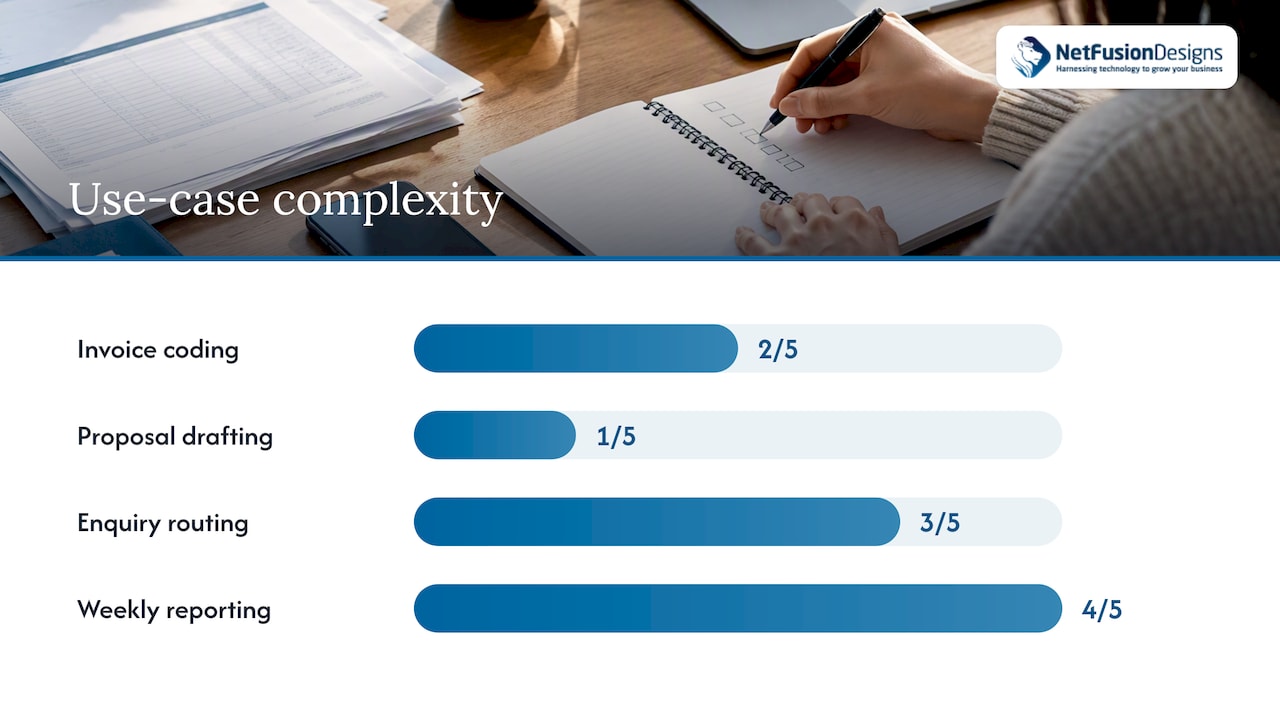
BDC suggests ranking your five to 10 most promising solutions by business impact, strategic alignment and complexity, then usually choosing one to start with. A simple table makes this fast:
| Use case | Impact (1–5) | Fit with goals (1–5) | Complexity (1–5, lower is easier) | Data ready? |
|---|---|---|---|---|
| Invoice coding | 4 | 4 | 2 | Yes |
| Proposal drafting | 3 | 3 | 1 | Mostly |
| Enquiry routing | 3 | 4 | 3 | Partly |
| Weekly reporting | 4 | 5 | 4 | No |
The numbers above are an illustration, not a benchmark. Your scores will differ. What matters is that the first project is high on impact, low on complexity and has data you can already trust. In this example, invoice coding wins.
When you weigh candidates, think about return as well as effort. Published figures on productivity gains from AI in other sectors can help you frame what to expect, but treat them as a prompt to set your own baseline rather than a promise.
This is where small businesses get surprised, so plan four things explicitly.
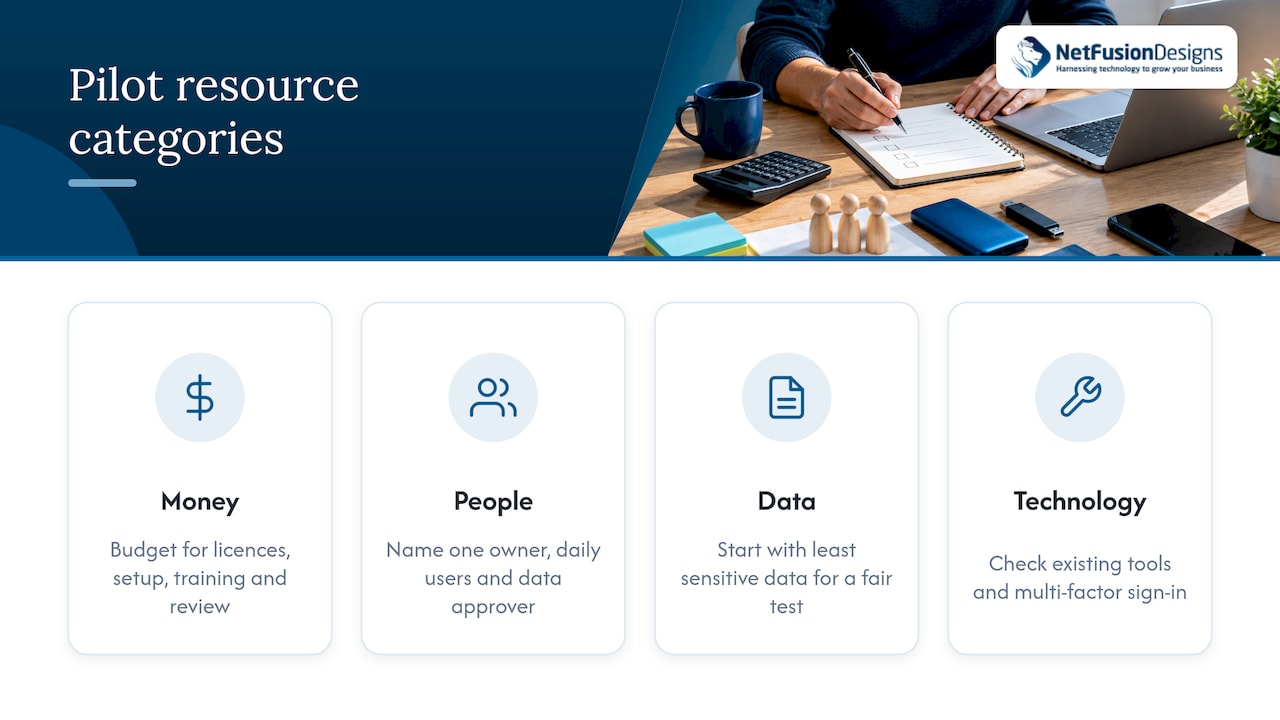
Money. Budget for licences or subscriptions, any setup or integration work, staff time for training and testing, and ongoing review. Compare solutions on total cost, not the headline subscription. Ask what happens to the price as headcount grows and whether you can exit without losing your data.
People. Name one owner for the pilot, one or two daily users, and someone who approves what data may be used. In a small firm these are often three people, not three departments.
Data. Decide which data the tool may see. Start with the least sensitive data that still allows a fair test. Clean up duplicates and outdated records in that slice only.
Technology. Confirm the tool works with what you already run, such as Microsoft 365, your accounting package or your CRM, and that sign-in uses multi-factor authentication (MFA), which means a second proof of identity beyond the password.
If you don’t have an internal IT lead, this is the point where a managed provider or a virtual CIO earns their keep: someone who can check the environment, vet the vendor and keep the pilot from becoming a side project nobody maintains.
Guardrails are what separate a roadmap from enthusiasm. The Canadian Centre for Cyber Security’s top 10 AI security actions point to a set of habits that suit a small business well:
Innovation, Science and Economic Development Canada’s toolkit for SMEs deploying AI adds that risks should be identified, evaluated and mitigated across the whole AI lifecycle, before and during deployment, not only at launch. It also points to securing the engineering and supply chain behind AI tools, including change control and dependency scanning, which in practice means asking your vendor how they handle updates and third-party components.
For a team of 10 to 100 people, the minimum written set is short:
We’ve published a plain-language template in our guide to an AI policy for employees, and a longer treatment of generative AI data governance for owners who handle client or patient records. If your firm is regulated, such as law, accounting or healthcare, check your professional body’s current guidance as well.
The AI and SME Charter from MTL connecte lays out a pilot sequence that fits small teams well. Adapted:
Two habits make the difference. Include the awkward cases (the odd invoice, the unclear request) in the test, because a pilot that only sees easy examples proves nothing. And keep a short log of every correction a person had to make, since correction effort is a real cost.
Set a baseline before the pilot starts. Time a sample of the same work done the current way, and record error rates. Then compare equivalent work with and without AI on four measures, following the MTL connecte guidance: time, quality, total cost and correction effort. Add one more: the outcome tied to your original goal, such as invoices paid on time or enquiries answered within the hour.
Then apply a simple rule:
Stopping is a legitimate result. A pilot that ends in a clear “no” after four weeks has cost far less than a year-long subscription nobody uses.
Once one use case works, resist the urge to build complex automations straight away. AWS’s AI readiness checklist for SMBs recommends spreading adoption across teams first and deepening technically later, so that consistent use and trust are in place before you automate multi-step workflows.
A sensible sequence for the following quarters:
For a wider look at how this fits into daily operations, see our overview of AI automation for small business and our secure adoption guide for SMBs.
Most small businesses we meet don’t have an AI problem. They have an IT foundation problem that AI makes visible. Permissions that grew over ten years, backups nobody has tested, staff using whatever free tool they found: these decide whether an AI project is safe and useful or a liability.
That is why we treat AI as part of managed IT, not a separate experiment. Our team already runs security, monitoring, Microsoft 365 and backup for clients, and we hold SOC 2 Type II certification, so a pilot starts inside an environment we know and can protect. We call this model Managed Intelligence: the same provider keeps your systems secure and helps you decide where AI and automation actually cut cost.
Our advice is consistent. Start small, write the rules down, measure honestly, and have one accountable partner so nothing falls between vendors. A roadmap that fits on two pages and gets reviewed every quarter beats a thick strategy document nobody opens.
Geeshan
If you’d like a second pair of eyes on your readiness, your shortlist of use cases or your AI policy, our Managed Intelligence Provider service combines managed IT, security and AI enablement under one team. Businesses that want to see the scope of our work can start with our AI solutions for SMEs page.
We serve small and mid-sized businesses across Ontario and Canada, with teams in Kitchener-Waterloo, Toronto, Markham, Mississauga, Montréal and Winnipeg. To talk it through, start at nfd.ca.
The planning itself can be done in a few days: a readiness check, a list of use cases and a ranked shortlist. The first pilot then runs two to four weeks, according to the MTL connecte charter. Plan on roughly a quarter from first conversation to a continue, adjust or stop decision.
Usually one. BDC recommends ranking five to 10 candidates and then typically choosing a single solution to begin with, so you learn what works in your environment before you spread effort across several projects.
You need clean enough data for the specific task you are testing, not for the whole company. Pick a use case where the information is already reasonably accurate, and tidy only that slice. If the data is the obstacle, the readiness scorecard will tell you to pause and fix it first.
Approved tools, what data staff may enter, who reviews output, and who to tell if something goes wrong. The Cyber Centre also points to minimizing PII in prompts and using encryption. Our AI policy guide has a starting template.