Azure OpenAI and the OpenAI API give you access to the same family of models. The difference is the platform around them. Azure OpenAI runs inside your Microsoft Azure tenant, with Azure identity, networking and compliance tooling. The OpenAI API is a direct, consumption-priced service that is quicker to start with. For most Canadian small and mid-sized businesses, the deciding factors are where data is processed, how you manage access, and who is accountable for the controls.
This guide walks through the practical differences, what they mean for Canadian privacy expectations, how pricing compares, and how to choose.
The OpenAI API is OpenAI’s own platform. You create an account, generate an API key and send requests to OpenAI’s endpoint. The 2025 draft findings of the British Columbia privacy commissioners describe it as a consumption-priced platform that customers use to build applications powered by OpenAI models.
Azure OpenAI is Microsoft’s hosted version of those models. Microsoft says it gives customers OpenAI models with Azure’s security and enterprise capabilities, and that the two companies co-develop compatible APIs. In practice you create a resource in your Azure subscription, deploy a model, and call it with Azure credentials.
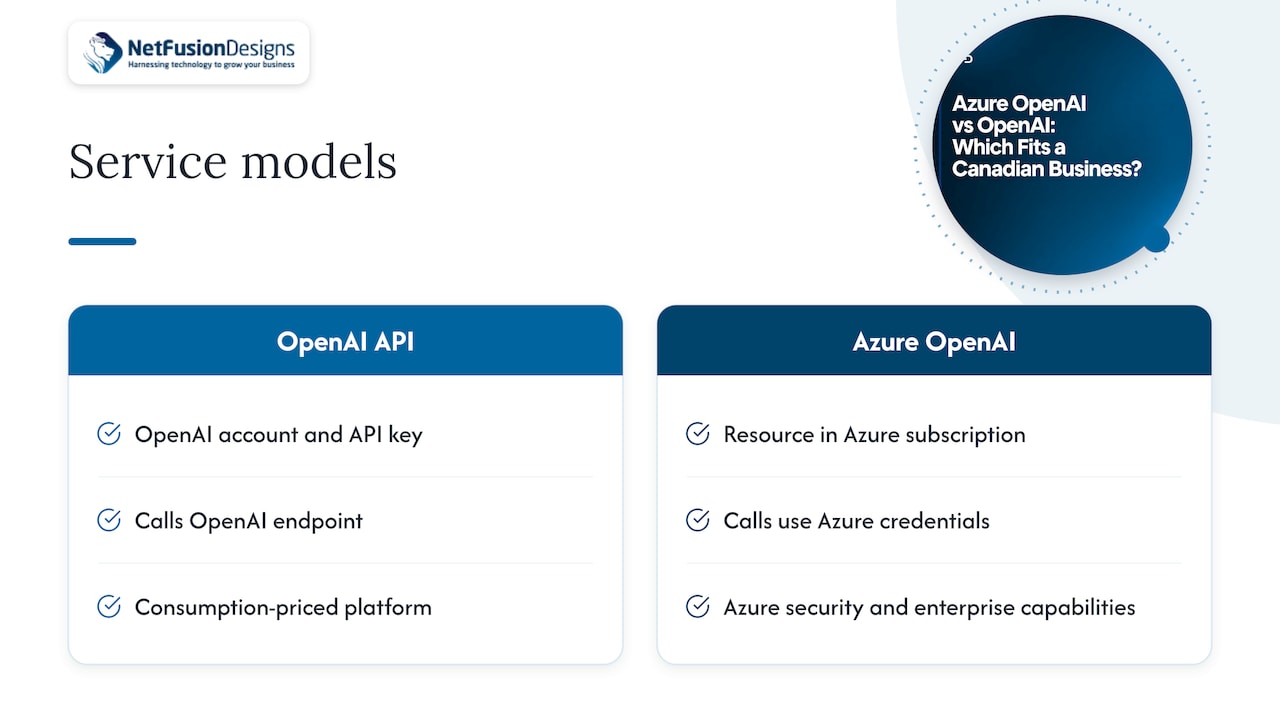
That is why developers often say the models are the same but the operating model is different. You are not choosing between two intelligences. You are choosing between two ways of running, securing and paying for one.
| Area | OpenAI API | Azure OpenAI |
|---|---|---|
| Where it runs | OpenAI’s platform | Your Azure subscription |
| Sign-in and access | API keys tied to an OpenAI account | Azure identity and role-based access, plus keys |
| Networking | Public endpoint | Virtual networks and private endpoints supported |
| Model call format | Model name | Deployment name you choose |
| Billing | Consumption, generally in USD | Pay-as-you-go tokens or reserved capacity, on your Azure invoice |
| Regional control | Limited choices | Region and deployment type selectable |
| Fit | Prototypes, small teams, quick starts | Organizations already on Microsoft cloud |
Model access is the first question most buyers ask. Microsoft’s own page says Azure OpenAI offers foundational, multimodal and reasoning models, along with integrated AI agents, fine-tuning, and built-in security and responsible-AI tooling. Its transparency note lists access to GPT-image, GPT-4 Turbo with Vision, GPT-4o, o-series and realtime speech models.
Two practical points matter more than the model list:
Whichever platform you pick, confirm the specific model you need is offered in the region you need before you design around it.
Because the APIs are compatible, a prototype built on one platform can usually move to the other. Microsoft Learn notes that the unified v1 endpoint and the common OpenAI client library make switching between the services easier. Some details still change: endpoint, authentication and deployment configuration are different.
One difference catches developers early. OpenAI calls identify a model by its model name. Azure OpenAI calls use the deployment name you chose when you deployed the model. Keep that in a configuration setting, not hard-coded, and a later move is a small job.
If your business lives in Microsoft 365, Azure also gives you a single identity system for people and applications. Our Microsoft 365 Optimization work often starts there, because tidy identity and licensing make any AI rollout safer.
This is where the comparison matters most for a Canadian firm. Law firms, accounting practices, clinics and manufacturers handle client data that carries obligations under federal and provincial privacy law.
Azure lets you choose how a model is deployed, and the choice changes where your data goes. Microsoft’s regional documentation explains that Global types may be processed in any Azure region where the model is deployed. Data Zone types are processed within a Microsoft-specified zone (US, EU or Asia Pacific), and Standard or Regional types are processed in the region of your deployment. Canada is not one of those named data zones, so for Canadian processing the regional option is the one to look at.
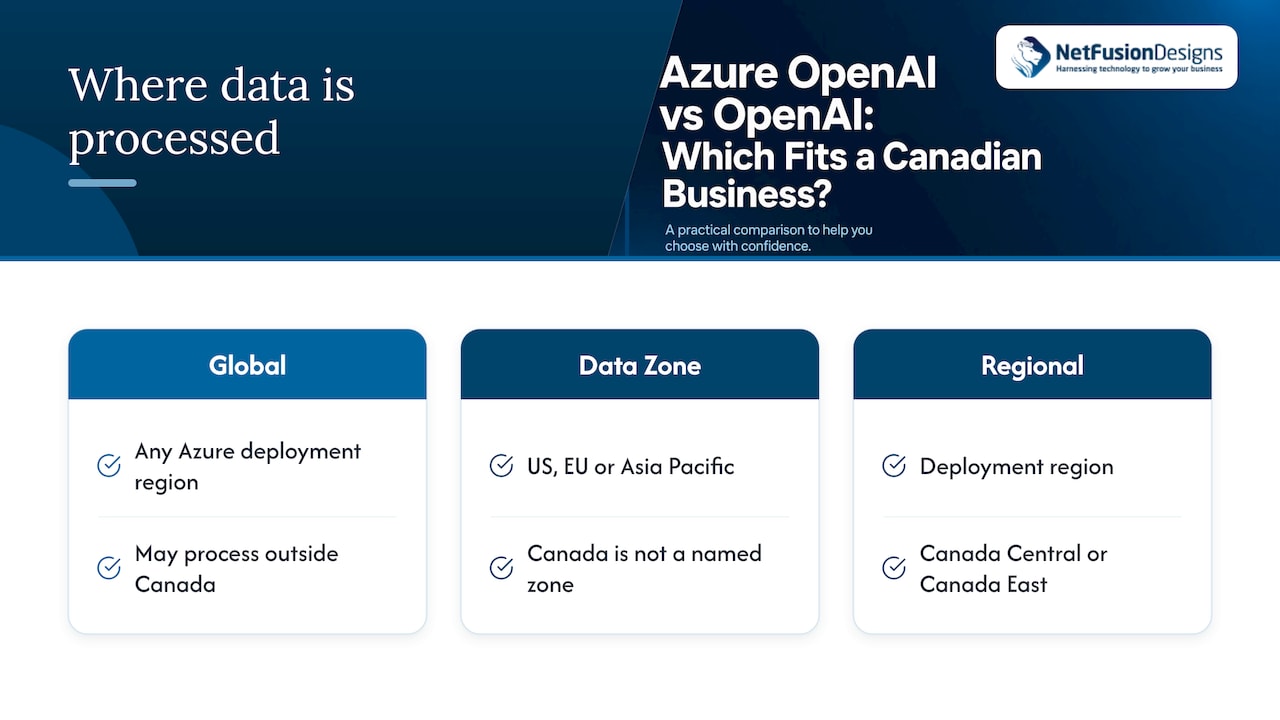
The Government of Canada’s cloud guidance for Azure OpenAI says Global deployments may process outside Canada. For Protected B data, it says storage must be in Canada, while processing may occur outside Canada if the data stays encrypted in transit. It also lists, as of October 2025, GPT-4o version 2024-11-20 and GPT-3.5 Turbo versions 1106 or 0125 for Canada-region Standard processing. Model lists move quickly, so check the current list before you commit.
A Microsoft Q&A answer gives the practical rule: a business wanting entirely Canadian processing should select Canada Central or Canada East with a standard regional quota and avoid global or non-Canadian deployments. It also warns that model availability differs by region.
The BC privacy commissioners’ 2025 draft findings concluded that OpenAI’s initial collection and use of personal information from public websites and third-party sources to train GPT-3.5 and GPT-4 was overbroad and inappropriate under the Canadian privacy laws examined. The findings concern training data, not how your prompts are handled today, and they are still a draft. They do show that Canadian regulators ask about collection, consent, transparency and safeguards. Whichever platform you use, you should be able to answer those questions about your own use.
For your business, that means documenting:
Azure makes items 2 and 3 easier to control, because deployment region and access roles sit in the same tenant as the rest of your systems. For Ontario health information, our PHIPA compliance guide covers the wider obligations, and our IT compliance support page explains how we approach PHIPA, PCI and SOC 2 work. If data location is a board-level question for you, see why Canadian data sovereignty matters.
The model price per token is only part of the picture. Currency, deployment type and idle capacity all change the bill.
Microsoft’s Canadian pricing page describes the Standard option as pay-as-you-go billing for input and output tokens. For steady, high-volume workloads, Microsoft offers provisioned throughput units (PTUs), described as allocated throughput with predictable costs, with monthly and annual reservations available. A Microsoft Q&A answer notes that PTUs can incur hourly charges for reserved capacity even when idle. So PTUs suit a predictable, constant workload, while pay-per-token suits a pilot or variable use.
OpenAI’s API is also billed by tokens. A Canadian pricing guide reports that prices are generally published in USD, so Canadian customers must account for conversion to CAD. Its table lists GPT-5.1 at US$1.25 per million input tokens and US$10 per million output tokens, and GPT-5 mini at US$0.25 and US$2. Those figures show how much model choice and the input-to-output mix matter. Prices change often, so treat them as a snapshot and confirm on the provider’s page.
Same model, same tokens: the list price per token is usually the starting point on both platforms, so do not pick on price alone. The costs that differ are around the edges:
If you also want to see how reserved inference capacity is priced in the wider market, reserved AI inference pricing is a useful reference point for budgeting token-heavy workloads.
Azure OpenAI availability is covered mainly by a 99.9% service-availability SLA, and a Microsoft Q&A answer states there is no specific latency SLA in that discussion. If response time is critical to your application, test it under realistic load and consider a different region or deployment type.
Quota is the other surprise. Microsoft’s Q&A explains that a 0/0 TPM display means no quota has been allocated to that subscription. It does not by itself prove the model is unavailable in Canada. Quota approval and regional capacity can limit what you deploy, so request quota early in a project timeline.
Azure OpenAI tends to fit when:
The OpenAI API tends to fit when:
Most businesses that start direct and then grow end up wanting the governance of the second option. Building with the compatible API and keeping model and deployment names in configuration keeps that move cheap.
Most owners who ask us about this are really asking a different question: how do we use AI without creating a new security and compliance problem?
Our view is that the platform choice follows from your data. If prompts will touch client files, patient records or financial information, we want identity, network controls, logging and data location handled inside the same environment we already manage for you. That is a strong reason to look hard at Azure, with a Canadian region selected on purpose and not left to defaults.
As a SOC 2 Type II-certified provider with a 24/7 NOC, we approach AI the way we approach any other system: define who can use it, what data it can see, how it is monitored and how it is backed up. Our goal is a defensible position, not a rushed one, and a single accountable provider so you are not coordinating several vendors yourself.
Start small, pick one workflow, measure the time saved, and put the governance in place before you scale. Our AI adoption guide for small businesses sets out that approach in plain language.
Geeshan
NetFusion Designs is a Managed Intelligence Provider: managed IT, cybersecurity and AI enablement from one team, supporting small and mid-sized businesses across Ontario and Canada. We can help you decide which platform fits, set up the environment securely, and keep it monitored once it is live. See how our Managed Intelligence Provider service works, or talk to us about AI planning and rollout.
If you want the roadmap first, our AI roadmap for small business is a good place to start, and our managed cybersecurity services cover the protection that should sit around any AI project.
They use related models and compatible APIs, but they are different services. Azure OpenAI is run by Microsoft inside Azure, with Azure security and enterprise features. The OpenAI API is run by OpenAI directly. Your data handling, access controls and billing differ between the two.
Not necessarily. Both bill by tokens, and the per-token cost depends on the model and deployment type. The differences usually come from currency conversion, reserved capacity such as PTUs that can bill while idle, and any extra Azure networking or monitoring you add. Check the current Azure pricing page for Canada and OpenAI’s own page before budgeting.
Yes, if you configure it that way. Choose a Canadian region such as Canada Central or Canada East with a regional Standard deployment, and avoid Global deployments, which may process outside Canada. Model availability differs by region, so confirm your model is offered there. For regulated data, ask your IT provider or privacy officer to review the setup.
Usually, yes. The compatible APIs and the common client library make switching easier, though endpoint, authentication and deployment settings still change. Keep those values in configuration and the move is mostly a matter of updating them and retesting.