NetFusion Designs logo
Heart icon
Support
Email
info@nfd.ca
Phone
647-476-5259(Canada)
IT Services
Icon dropdown arrow

Infrastructure Implementation

Project PlanningHardware Voice over IP (VoIP)Application DevelopmentCloud DesktopSecurity Cameras

Managed IT Services

IT Support24/7 HelpDeskCyber Security & AntivirusData Backups & Disaster
Recovery
Co-Managed ITComplianceEmergency Ransomware
Recovery
Penetration & Vulnerability
Assessment

Optimization of Processes

Microsoft 365 OptimizationVirtual CIO ServicesPenetration TestingInventory Lifecycle
Management
Transforming SMEs with AI
Industries
Icon dropdown arrow
Dental Managed IT Services
Construction
Hotels & Hospitality
Franchises
Financial & Insurance Services
Government
Health Care & PharmaceuticalLegal & Professional Services
Local Small & Medium Businesses
Manufacturing
Non-profit
Real Estate
Retail
Transportation & Logistics
Enterprise & Consulting
Publicly Traded Companies
Our Story
Icon dropdown arrow
About UsTestimonials
Partners
Sponsorship
BlogContact Us
Open menuClose menu
Icon chevron up
Browse Blog:
Business
Insight
Advice
Insight

Co-Managed IT Pricing in Canada: What You Pay and Why

Co-Managed IT Pricing in Canada: What You Pay and Why

Co-managed IT in Canada is almost always quoted as a monthly fee, either per user, per device or as a flat amount for a defined scope. The final number depends less on a published rate than on how much work your internal team keeps and how much the provider takes. Because the split is different for every business, any single “average price” tells you very little. What matters is knowing which fee model you are being offered, what sits inside it and what sits outside.

This guide explains the pricing models, the factors that move a quote, the extras that surprise buyers and a practical way to compare proposals. NetFusion Designs does not publish co-managed rates, so you will not find a made-up price here. You will find the questions that produce a number you can trust.

NetFusion Designs Inc
Build a Co-Managed IT Plan
NetFusion Designs provides managed IT services for businesses across Ontario, helping define support around your team's needs.
Explore managed IT services

TL;DR

  • Co-managed IT means an outside provider shares the work with your in-house IT staff. You pay for the gap, not for a full IT department.
  • Fees are usually per user, per device, per service tier or a blended flat fee. Ask which one is in the quote and what happens when headcount changes.
  • The biggest price drivers are user count, how many tasks your team keeps, security requirements, after-hours coverage and the age of your environment.
  • Compare quotes by scope, response times and exclusions, not by the headline rate alone.
  • Onboarding, projects, licences and hardware are often billed separately. Get them in writing.

Table of Contents

  • What co-managed IT is, and how it differs from fully managed IT
  • How co-managed IT fees are calculated
  • What is usually included, and what may cost extra
  • What influences the price
  • Co-managed, in-house and fully managed: how the costs compare
  • A worked example: how to think about your own number
  • Questions to ask before you accept a co-managed quote
  • Our perspective
  • Get a co-managed quote built around your team
  • FAQ
  • Sources

What co-managed IT is, and how it differs from fully managed IT

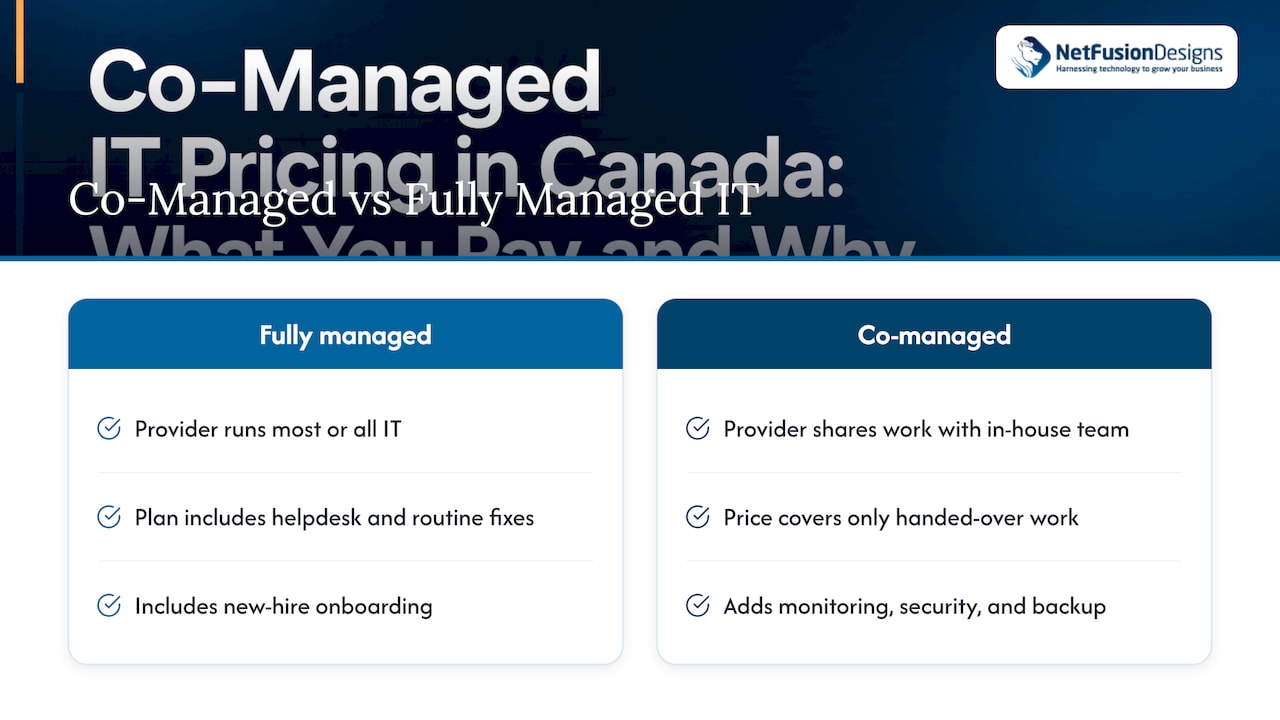
Co-managed IT is an arrangement in which an outside provider shares IT work with an in-house team, while in a fully managed model the provider runs most or all of IT. In practice, your IT lead or small team keeps the work they are good at: knowing your people, your line-of-business software and your priorities. The provider adds what is hard to staff: round-the-clock monitoring, security operations, tooling, backup management, escalation engineers and cover for holidays and sick days.

That difference is the heart of the pricing question. A fully managed plan has to price in the helpdesk, the onboarding of every new hire and the routine fixes. A co-managed plan can leave those with you and charge only for the pieces you hand over. For a detailed look at where the line falls, see our page on co-managed versus fully managed IT and our explainer of co-managed IT for Canadian SMBs.
What co-managed IT is, and how it differs from fully managed IT

How co-managed IT fees are calculated

There are four common ways to structure the fee. Most proposals use one of them or a blend.

Fee model How it works Best fit Watch for
Per user, per month One rate multiplied by the number of people you employ Offices where headcount drives the workload Whether part-time staff, contractors and shared mailboxes count as users
Per device, per month A rate for each workstation, server or network device Environments with many shared or kiosk machines, such as plants and clinics How servers, printers, firewalls and phones are counted
Tiered bundle Fixed packages (for example, monitoring only, monitoring plus security, full stack) Teams that want a clear menu What each tier excludes, and the cost of moving up
Flat fee for a defined scope A set monthly amount for named services such as 24/7 monitoring and security operations Teams whose in-house staff cover everything else What happens when scope grows mid-term

Co-managed deals also often combine a recurring fee with a block of project hours or an hourly rate for work outside the agreement. That is normal. What you need is for the boundary between “covered” and “billable” to be written down in plain language.

Per user or per device: which is fairer?

If your headcount is stable and each person uses one or two devices, per-user pricing is simple to budget. If you run a manufacturing floor with shared terminals, or a clinic with many workstations per employee, per-device pricing usually reflects the real workload better. Ask for the quote both ways if the provider allows it, then see which one matches how your business actually uses technology.
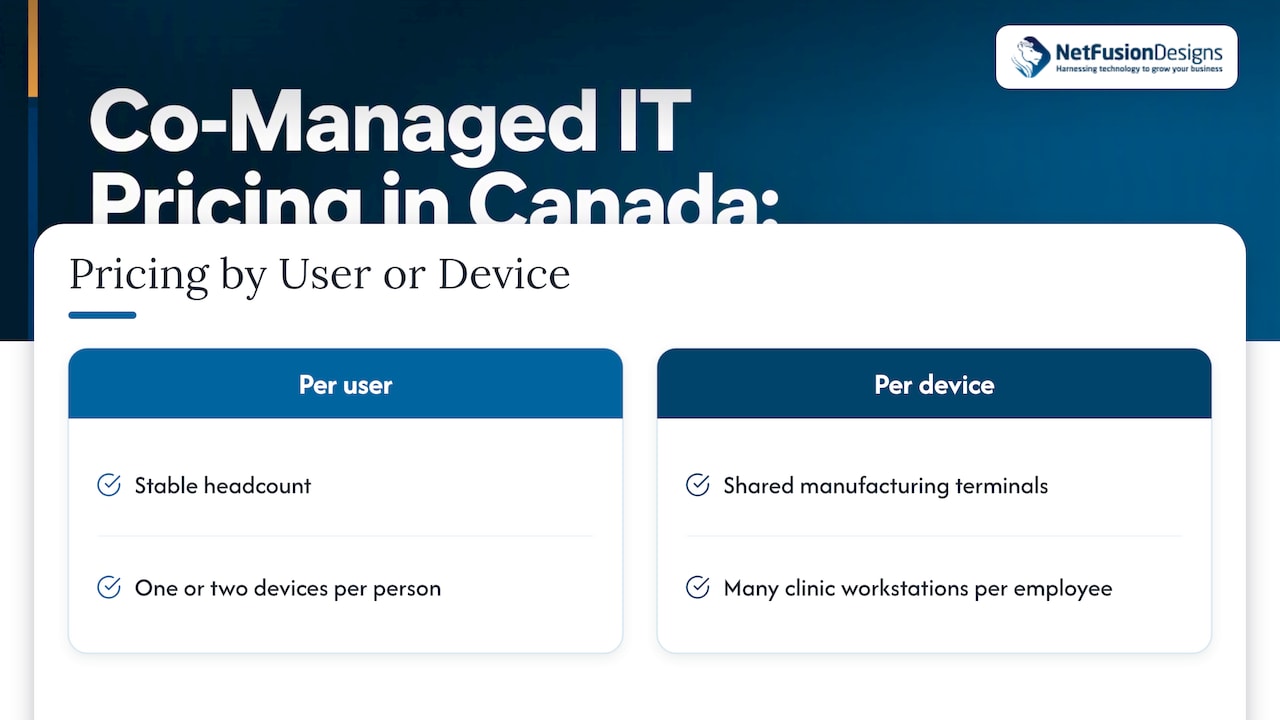
Per-user and per-device pricing comparison

What is usually included, and what may cost extra

The services below are the building blocks of most co-managed agreements. Your quote may include some and exclude others, which is exactly why two proposals with the same headline price can differ widely in value.

Often included in the recurring fee

  • Remote monitoring and management of servers, workstations and network equipment
  • Patch management and software updates
  • Endpoint protection, often with detection and response
  • Escalation support for your internal team, meaning a senior engineer you can call when a problem is beyond your staff
  • Backup monitoring and restore support
  • Reporting and regular reviews

Frequently billed separately

  • Onboarding and environment documentation
  • Software licences, such as Microsoft 365 seats, and hardware purchases
  • Projects such as office moves, server migrations and Microsoft 365 tenant changes
  • After-hours and on-site visits beyond what the agreement lists
  • Penetration testing and security assessments
  • Virtual CIO time for planning and budgeting
  • Telephony and VoIP

At NetFusion Designs, co-managed IT sits alongside ad-hoc support, emergency support and outsourced IT, so a business can start with the portion it needs and adjust later. Our own security offering covers managed anti-virus with EDR, 24/7 SOC and MDR, and penetration testing, which are the services co-managed clients most often hand over first.

What influences the price

Six factors move a co-managed quote more than anything else.

  1. Number of users and devices. The more endpoints and accounts, the more monitoring, patching and licensing.
  2. How much your team keeps. If your internal staff handle the helpdesk, the provider’s fee shrinks. If you want the provider to cover nights, weekends and vacations, it grows.
  3. Security expectations. Cyber insurance requirements, compliance frameworks and client questionnaires push you toward EDR, managed detection and response, multi-factor authentication and logging. Each adds cost, and each reduces risk. Clients in law, accounting, healthcare and manufacturing usually fall into this group.
  4. Hours of coverage. A 24/7 network operations centre and security operations centre cost more to staff than business-hours support, and the quote reflects it.
  5. Age and complexity of the environment. Older servers, mixed vendors, several offices and undocumented systems take more effort to take on and to maintain.
  6. Cloud and licensing choices. Microsoft 365 plans, backup add-ons and new AI tools change your monthly bill even when the provider’s fee does not. Licence tiers matter: our Microsoft 365 licensing guide walks through the differences, and Copilot licensing cost surprises show why AI add-ons deserve a line in the budget from day one.

Multi-location businesses should also ask whether each site is priced separately. Network equipment, local circuits and on-site visits can differ by office.

Co-managed, in-house and fully managed: how the costs compare

The honest comparison is not price against price. It is what each model leaves you responsible for.

Internal team only Co-managed Fully managed
Who handles daily requests Your staff Your staff, with provider escalation Provider
24/7 monitoring and security operations You build it or go without Provider Provider
Cover for absences and turnover Gap in service Provider fills it Provider
Tooling and licences You buy and maintain Provider’s stack, usually included Provider’s stack
Main cost Salaries, benefits, training, tools Your team plus a provider fee Provider fee
Main risk Single points of failure Unclear division of tasks Less in-house knowledge

A useful starting figure for the in-house side is wages. Job Bank reports a median wage of $35.71 per hour for computer network technicians in Ontario. Over a standard 2,080-hour year, that is roughly $74,300 in wages before benefits, payroll costs, training, tools and vacation cover. One person also cannot watch your network overnight. That is the gap co-managed IT fills. For a local worked example, see our outsourced versus in-house IT cost breakdown for Toronto.

A worked example: how to think about your own number

The example below uses invented round numbers to show the method. It is not a price list and not a quote.

Imagine a 40-person professional services firm with one IT administrator. The administrator handles onboarding, the helpdesk and vendor calls, but cannot cover nights, has no security tooling and takes holidays. The firm wants three things from a provider: 24/7 monitoring, managed endpoint security and escalation support.

  1. Count the users and devices the provider will cover.
  2. List the three services above as the covered scope.
  3. Ask for a monthly fee for that scope, with a stated number of project hours or a stated hourly rate beyond it.
  4. Ask for the one-time onboarding fee and what it includes.
  5. Add licences and hardware the firm buys anyway.

The total is the real annual cost: twelve months of the recurring fee, plus onboarding, plus project time you expect, plus licences. Comparing that total to the cost of hiring a second technician and buying the same tools shows where co-managed pays off. It will not pay off for every business, and a fair provider will tell you when your needs fit another model.

Questions to ask before you accept a co-managed quote

Use these to turn a proposal into something you can compare.

  • What exactly is the covered scope? Ask for a service list, not a brochure.
  • How are users and devices counted, and how does the bill change when they change? Ask for the rule on adding and removing people mid-term.
  • What are the response and resolution targets? Check whether they apply to your internal team’s escalations the same way they would to an end user.
  • What is billed outside the agreement? Request hourly rates and a list of typical billable projects.
  • What are the onboarding costs and timeline? A structured 30-60-90 day plan is a good sign.
  • What are the contract term, renewal and exit terms? You should be able to retrieve your documentation and credentials if you leave.
  • Where is data stored and what certifications back the provider’s processes? For regulated sectors, ask about audited controls and Canadian or provincial data residency.
  • Who is accountable when something breaks? In a co-managed model, the handoff between your team and theirs needs a named owner.

If a provider answers a pricing question with “it depends” and stops there, ask what it depends on. A good answer names the variables. A good proposal puts them in the contract.

Our perspective

We see the same pattern in Ontario SMBs. A capable internal IT person, sometimes two, is stretched across helpdesk tickets, security alerts and projects, and nobody is watching at 2 a.m. Co-managed IT works when we treat that person as the owner of the relationship with the business and take on the work that is hard to staff: monitoring, security operations, backup verification and escalation.

We prefer pricing that is predictable and in plain language. Before we quote, we want to know what your team does well, what keeps them up at night and which compliance obligations you answer to. That conversation decides the scope, and the scope decides the price. A number given before that conversation is a guess.

Our team is SOC 2 Type II certified, we run a 24/7 NOC and we manage our infrastructure in-house, so you are not left coordinating a chain of third-party vendors. If you later want us to take over more, the same relationship scales from co-managed to fully managed without starting over.

Geeshan

Get a co-managed quote built around your team

We scope co-managed IT around what your internal team already does well, then add the 24/7 monitoring, security and escalation support you are missing. You get a plain-language proposal with the covered services, the billable extras and the onboarding plan listed.
NetFusion Designs Inc

See how co-managed IT and our other support options work, or contact NetFusion Designs to discuss your environment. If you are comparing models, our managed IT services pricing guide and the 2026 Canadian managed IT guide go deeper on fully managed plans.

FAQ

How much does co-managed IT cost in Canada?

There is no single rate, because the fee follows the scope you hand over, your user and device count and your security needs. Online ranges for managed IT are wide and mostly describe fully managed plans, which cost more than co-managed ones for the same headcount. The reliable way to get a figure is to ask for a written quote based on a defined service list.

Is co-managed IT cheaper than fully managed IT?

Often the recurring fee is lower, because your internal team keeps tasks such as the helpdesk and onboarding. That saving only holds if your staff have the time to do that work. If they are overloaded, the cost shows up as slow response and missed alerts rather than on the invoice.

What is usually not covered by a co-managed fee?

Onboarding, projects, hardware, software licences, on-site visits and penetration testing are commonly billed separately. Ask for these to be listed in the proposal with their rates so that nothing is a surprise in the first year.

Can a business move from co-managed to fully managed later?

Yes. Many businesses start co-managed and hand over more as they grow or when their IT lead leaves. A provider that documents your environment during onboarding makes that change much easier.

Sources

  • What Is Co-Managed IT? (ITBroker)
  • Computer Network Technician in Ontario (Job Bank, Government of Canada)
  • Prevent Copilot Cost Shock: Dynamics 365 Contact Center for IT Leaders (VOICERAcx)

Recommended

  • Managed IT Services in Canada: Complete 2026 SMB Guide
  • Outsourced IT vs In-House IT: Toronto Cost Breakdown
  • Managed IT Support Cost in Kitchener-Waterloo (2026 Guide)
  • What Managed IT Support Costs and What Drives It

Continue Reading

Backup Retention Policy: How Long Should You Keep Backups?
Co-Managed IT Pricing in Canada: What You Pay For
AI Roadmap for Small Business: A Practical 90-Day Plan
Shop Floor Wi-Fi Design: A Practical Guide for Manufacturers
NetFusion Designs logo
NetFusion Designs is a globally recognized IT service provider and services clients across North America.

We hold a SOC 2 Type 2 report, and maintain internal processes and procedures that keep our clients’ data secure and confidential.
NetFusion Designs IT support team

IT Services Near Me

BurlingtonOakvilleHamiltonMississaugaMiltonBramptonEtobicokeBrantfordGuelphKitchenerWaterlooCambridgeSt CatharinesTorontoMarkhamCaledonNewmarketNorth YorkPickering & DurhamLondonMontreal

Services

Project PlanningHardwareTelephony & VoIPApplication DevelopmentCloud DesktopSecurity CamerasHelpdesk & SupportCyber Security & Anti-VirusData Backups & Disaster RecoveryMicrosoft 365 OptimizationVirtual CIO ServicesPenetration TestingPricingSchedule a MeetingRemote Support
Pricing

Pages

Free Security ScanAbout UsOur Migration ApproachWork CultureOur Core ValuesCode of ConductTestimonialsContactBlogSchedule a MeetingRemote Support

TORONTO

Bank capital office building law
401 Bay St, 16th Floor, Toronto Ontario
Email
info@nfd.ca
Phone
647-476-5259 (Canada)

MARKHAM

Bank capital office building law
141 Main Street N, Markham, ON L3P 1Y2
Email
info@nfd.ca
Phone
647-476-5259 (Canada)

TRI-CITY AREA
(Kitchener / Waterloo / Cambridge)

Bank capital office building law
22 Frederick St, Suite 700, Kitchener Ontario
Email
info@nfd.ca
Phone
647-476-5259 (Canada)

PEEL REGION

Bank capital office building law
6700 Century Ave, 3rd floor, Mississauga, ON L5N 1V8
Email
info@nfd.ca
Phone
647-476-5259 (Canada)

DURHAM REGION

Bank capital office building law
1315 Pickering Parkway, Pickering, ON L1V 7G5
Email
info@nfd.ca

MONTREAL

Bank capital office building law
8815 Av du Parc #402, Montréal, QC H2N 1Y7
Email
info@nfd.ca
Phone
647-476-5259 (Canada)

Special Offers

Radio station signal antena tower
Pricing: $100–185 per user
Icon chevron right
Terms and ConditionsPrivacy PolicyCookie Policy
© 2026 NetFusion Designs Inc.
LinkedInFacebookAlignable logo